Contents
- Introduction
- Objectives.
- Prerequisites.
- Package.
- To Run The Sample.
- Configuration Files.
- Assembly References from client assembly.
- Code blocks in client source file CRemoteObjClient.cs
- Code blocks in client source file CRemoteObjServer.cs
- Walkthrough.
- References.
Introduction

.NET Remoting is a framework for developing distributed applications. It is the successor to DEC/RPC/DCOM. Simply put, Remoting allows an application (Remoting Client) to instantiate a type (Remotable class) on a remote server (Remoting server) across network. Communication between client and server object (Instance of Remotable class) hosted by a Remoting Server is channeled through a "proxy" � representation of server object on client side.
Remoting Server can be a simple console application, a Windows Service or hosted on IIS. It's responsible for hosting server objects and publishes them to the outside world. A Remoting client is any application that consumes the published server object.
There're many tutorials on this broad subject. Unfortunately, most are lacking, in one way or another, in coverage of basic maneuvers a developer needs to know. The purpose of this article is to supplement MSDN and to provide a complete coverage of basic remoting tasks in one short article.
Objectives of the tutorial
The tutorial will cover the following topics.
- Basic Remoting , Programmatic Configuration (channel/type), Config files, LeaseTime,
new, Activator.GetObject (server-activated object, or SAO) and Activator.CreateInstance (client activated object, or CAO)
- How to implement interface for remote class, and interact with remote object through interface.
- Passing custom/user-defined objects between remote object and client.
- Asynchronous method calls on remote object.
- Events and remoting: How client can subscribe to events generated by remote object.
This tutorial does not cover the following topics.
- Hosting server from IIS [Ref - 2,7]
- Delayed loading of channels
- Tracking services
ClientSponsor and sponsoring mechanism [Ref 5]
- Custom formatter, sinks, channels � that's where things actually get complicated. [Ref 1]
- SoapSuds
Prerequisites
- .NET Delegates and events.
- Asynchronous programming.
IAsyncResult, BeginInvoke, EndInvoke, WaitHandle... etc.
Package
Overall Architecture
- ReadMe: dnetremoting.doc (That's this document.)
- Project folders, classes and overall structure:
[Editor Note - hyphens/spaces have been used in the table contents to prevent scrolling]
|
Module |
Folder/Directory |
Primary class |
namespace |
Remarks |
|
Interface
Dll |
/CRemote-ObjInterface
source: IRemoteObj.cs |
CRemote-ObjInterface
|
nsCRemote-ObjInterface
|
Interface (IRemoteObj) for CRemoteObj. Three interface methods:
Authenticate-Loser
SetupUser
UpdateProfile CProfile
To illustrates how to pass custom object between remote object (CRemoteObj) and client. It's marked Serializable and is input/return parameter of CremoteObj. UpdateProfile. CStatusEventSink
This is the event sink class to be instantiated in client's process. It's derived from MarshalByRefObject. The class has a public method StatusHandler. This method handles the events raised by CRemoteObj. AuthenticateLoser StatusEventArgs
Serializable event argument. Refer to CremoteObj. evStatus. Delegate to evStatus event can be found in CRemoteObj class. Signature as follows:
public delegate void StatusEvent( object sender, StatusEventArgs e);
|
|
Remote Object dll |
/CRemoteObj
source: CRemoteObj.cs |
CRemoteObj
|
nsCRemoteObj
|
That's your remote object. This class implement IRemoteObj interface and exposes:
Methods
Authenticate-Loser � Demonstrates how to client can response to events generated by remote object.
SetupUser � Demonstrates how to execute asynchronous calls and method parameters IO.
UpdateProfile � Demonstrates how to pass instances of user-defined class in and out of remote object.
Properties
objID - Remote object's lifetime depends on the object's activation mode:
- Server activated -
SingleCall
- Server activated -
Singleton
- Client activated
With Server- activated-SingleCall objects, a new instance of remote object is created every time client invoke a method through the proxy. For "Server-activated-Singleton" and "Client-activated" objects, lifetime of the remote object depends on server configurations (config file <lifetime> element or programmatically via LifeTimeServices), as well as when client invoke a method on the remote object. Default LeaseTime is 300 sec.
The object ID is to demonstrate remote object lifetime by marking each object with a randomly generated ID. Pay attention to server console when invoking methods on remote object. |
|
Server
exe |
/CRemote-ObjServer
source: CRemote-ObjServer.cs
Executable:
\web_vdir\bin\ CRemoteObj-Server.exe
(C# console app) |
CRemote-ObjServer
|
nsCRemote-ObjServer
|
CRemoteObjServer hosts/publishes the remote object CRemoteObj.
Config files
cremoteobjserv (client). config � for client activation.
cremoteobjserv (wellknown) .config � for server activation; WellKnown ObjectMode = SingleCall. You need to modify the config file if you wish to publish the remote object using Singleton mode.
OPTION 2 loads config file as follows:
Remoting Configuration. Configure( "cremoteobjserv. config");
Please be reminded that security setting in config files will be ignored unless file name comply to the following convention:
AssemblyName. exe.config
In this case:
CRemoteObjServer. exe.config
For this tutorial, rename config file name to: cremoteobjserv.config and place it in the same folder (\web_vdir\bin) as the exe. |
|
Client
exe |
/CRemote-ObjClient
source:
CRemoteObj-Client.cs
Executable:
\ bin\Debug \CRemoteObj-Client.exe
(C# console app) |
CRemote-ObjClient
|
nsCRemote-ObjClient
|
NOTE:
If it wasn't due to the fact that we used "new" keyword to instantiate remote object in <BLOCK 2-A>:
CRemoteObj obj = new CRemoteObj();
We could have eliminated reference to CRemoteObj assembly � reference to interface CRemoteObjInterface would suffice.
Config files (folder: /config file):
- cremoteobjclient (client).config � for client activation.
- cremoteobjclient (wellknown). config � for server activation;
In <BLOCK 2-A>, we called Configure to load configuration file:
RemotingConfiguration. Configure( "cremoteobjclient. config");
Please be reminded that security setting in config files will be ignored unless file name comply to the following convention:
AssemblyName .exe.config
In this case:
CRemoteObjClient .exe.config
For this tutorial, rename config file name to: cremoteobjclient.config and place it in the same folder (\web_vdir\bin) as the exe. |
To run the sample
- Run server executable.
- Run client executable.
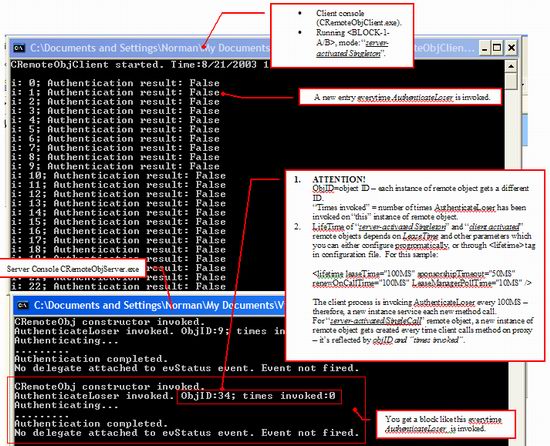
Server and client are both C# console apps. Pay attention to console output.
Configuration files
Before Remoting client and Remoting Server can begin to communicate, two pieces of information must first be properly configured, whether you're on server side or client side:
Communication channel
- Communication channel: port number, protocol, uri/url. <channel> tags in configuration files. (Both server and client side)
NOTE: You don't need to specify port number for client side.
Type (Remotable class) to be published or consumed:
- Resource to be published and activation mode (config file for remoting server) <service> tag in configuration files (Remoting server side).
- Resource to be consumed (config file for remoting client) <client> tag in configurations files (Remoting client side).
Two configuration options:
- Using XML configuration files:
RemotingConfiguration.Configure("cremoteobjserv.config");
- Configure setting programmatically:
ChannelServices.RegisterChannel(httpchannel);
RemotingConfiguration.RegisterWellKnownServiceType(
typeof(nsCRemoteObj.CRemoteObj),
"CRemoteObjURI",
WellKnownObjectMode.SingleCall
);
RemotingConfiguration.RegisterActivatedType(
Typeof(nsCRemoteObj.CRemoteObj) );
Note: There're two types of server object: SAO (server activated object) and CAO (client activated object). SAO can be further divided into two types: singlecall and singleton. Here's a brief description.
- Server-Activated Object (SAO) = Well-known Object.
- Client Activated Object (CAO).
SAO
SingleCall - A new instance of the remotable class is created every time a client invokes a method through proxy.
Lifetime: Instance remains in memory for duration of method call.
This is stateless.
Singleton - The Singleton Instance is created on first method call.
Lifetime: This instance stays in memory until "Lease" expires.
This is Stateful. Only one instance of Singleton-SAO is instantiated on remoting server. Multiple Remoting Clients are serviced by same Singleton-SAO. Multiple remoting clients can communicate through one instance of Singleton SAO.
CAO
- Instantiated on remote server as soon as the remoting client requests that an instance be created through
Activator.CreateInstance or new keyword. This is in contrast to SAO where server objects are created upon first method call.
- Lifetime: Just as Singleton-SAO, object stays in memory until "Lease" expires.
- Stateful. Each CAO instance services only the remoting client responsible for its creation. Therefore, if you have multiple Remoting Client, each gets their own instance of CAO.
Single-call SAO is the most scalable option among the three and is most suitable in a load-balanced environment. Singleton-SAO and CAO offers more flexibility that:
- Remoting clients have complete control over a server object's lifetime.
- Server objects are stateful. CAO maintains states across multiple requests/method call. Singleton-SAO maintains states across multiple Remoting Client.
Sample configuration files
Server side
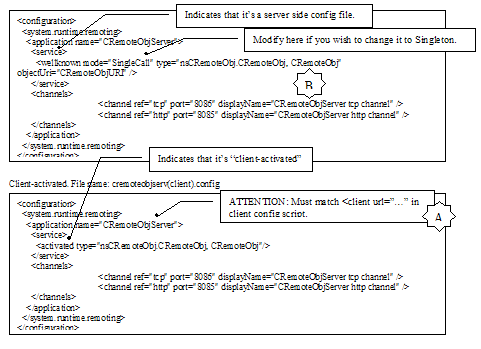
Server activated. File name: cremoteobjserv(wellknown).config
Client side
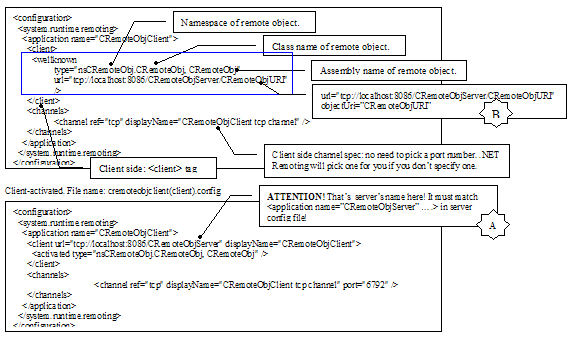
Server-activated. File name: cremoteobjclient(wellknown).config
In addition to type and channel information, configuration file may contain setting such as object lifetime, security... Example: lifetime of Singleton SAO and CAO remote object can be configured in <lifetime> tag in a config file:

Remote object lives as long as CurrentLeaseTime>0. When the object first got instantiated, CurrentLeaseTime = leaseTime. From this point on, CurrentLeaseTime starts decrementing until the next method call, or that a "sponsor" extend the "lease". On next method call (if lease has not yet expired), CurrentLeaseTime is reset to renewOnCallTime. On the other hand, if CurrentLeaseTime decrement to zero before next method call arrives, the object is marked for garbage collection. If this happens, the next method call will be serviced by a new instance of the remote class. In short, "server-activated Singleton" and "client activated" remote object lives for as long as CurrentLeaseTime>0. Lifetime setting can also be configured programmatically:
using System.Runtime.Remoting.LifetimeServices;
LifetimeServices.LeaseTime = TimeSpan.FromMinutes(3);
LifetimeServices.RenewOnCallTime = TimeSpan.FromMinutes(3);
For more information about leasing mechanism and sponsoring mechanism, refer to MSDN under the topic "Lifetime Leases" [Ref 5] and "Remoting Example: Lifetimes" [Ref 8].
Assembly References from "client" assembly
- Reference to interface assembly (i.e.. "Project" menu>"Add Reference">select interface CRemoteObjInterface.dll)
Now, since we use "
new" keyword in BLOCK 2-A, we added reference to remote object assembly (
CRemoteObj.dll) in addition to reference to interface assembly (
CRemoteObjInterface.dll). In general however, we can retrieve proxy via
Activator.GetObject or
Activator.CreateInstance, thereby eliminating need to reference remote object assembly (i.e.. Client references ONLY interface assembly).
Code blocks in client source file CRemoteObjClient.cs
Basically, client source is separated into two mutually exclusive blocks � marked by the following tags in client's source code CRemoteObjClient.cs:
<BLOCK X-Y>
... code block ...
<BLOCK X-Y END>
You should comment out BLOCK 1 when you want to run code in BLOCK 2, and vice versa.
- BLOCK 1: remote object is published as server-activated object.
- BLOCK 2: remote object is published as client-activated object.
So, depending on setting in CRemoteObjServer, you may wish to comment out one of the blocks before you compile and execute. In addition, <BLOCK 2-A> and <BLOCK 2-B> are mutually exclusive.
- BLOCK 2-A configures channel/type information by loading the config file, then instantiate remote object with "new" keyword.
- BLOCK 2-B configures channel/type information programmatically. Proxy is retrieved with call to
Activator.CreateInstance(..)
So, again, comment out one of the two before compile and execute.
namespace nsCRemoteObjClient
{
class CRemoteObjClient
{
- Delegate to
CRemoteObj.SetupUser()
- Signature:
public string SetupUser(string sname, string spasswd, out string sTime)
- Refer to <BLOCK 1-C>
public delegate string SetupUserDelegate(...);
[STAThread]
static void Main(string[] args)
{
<BLOCK 1>
try
{
<BLOCK 1-A>
Retrieve interface/proxy:
- Illustrates how to retrieve proxy via:
Activator.GetObject(...)
- Cast proxy into
IRemoteObj: further separation between provider and supplier.
<BLOCK 1-A END>
<BLOCK 1-B>
- LeaseTime
- Invoke method on remote object through interface.
<BLOCK 1-B END>
<BLOCK 1-C> Asynchronous programming/remoting
- Illustrates asynchronous calls on remote objects and how to pass parameters into/out of methods exposed by remote object using
BeginInvoke, EndInvoke.
- Illustrates how to pass user defined object to/from remote object.
<BLOCK 1-C END>
}
catch(Exception err)
{
}
<BLOCK 1 END>
- Scenario 2: "client-activated" remote object.
<BLOCK 2>
try
{
<BLOCK 2-A>
- Illustrates how to configure channel information using config file.
- Illustrates how to instantiate remote object with "
new" keyword.
<BLOCK 2-A END>
<BLOCK 2-B>
Illustrates how to retrieve proxy to remote object via
Activator.CreateInstance(...)
<BLOCK 2-B END>
<BLOCK 2-C>
- Illustrate how to invoke method through proxy.
- Illustrates how to subscribe to events generated by remote object.
<BLOCK 2-C END>
}
catch(Exception err)
{
}
<BLOCK 2 END>
}
}
}
Code blocks in server source file
- Block 1: Option 1: programmatic registration of channel and type information thru:
ChannelServices.RegisterChannel
RemotingConfiguration.RegisterWellKnownServiceType
- Block 2: Option 2: Configure by loading xml config file:
RemotingConfiguration.Configure("cremoteobjserv.config");
Again, you comment out OPTION 1 if you're using OPTION 2, and vice versa.
Walkthrough
- Remoting Basic, configuration (channel/type): programmatic, config files. LeaseTime, "
new", Activator.GetObject (for server-activated) and Activator.CreateInstance (for client activated)
- Config files: See previous section.
LeaseTime
- Change config file, and run application in different activation mode: server-activated SingleCall, server-activated Singleton, client-activated.
- Run the client. Comment out <BLOCK 2> and <BLOCK 1-C>. Pay attention that
obj.AuthenticateLoser is invoked in <BLOCK 1-B>
- Monitor server console and
objID. Default LeaseTime is 300-sec for Singleton, if time elapsed between method calls is greater than 300sec, a new instance of remote object gets created each call when remote object runs under the following mode:
- server-activated Singleton.
- Client-activated
Lease configuration can be found in server config file:
<lifetime leaseTime="100MS" sponsorshipTimeout="50MS"
    renewOnCallTime="100MS" leaseManagerPollTime="10MS" />
In <BLOCK 1-B>, time between consecutive method calls is 101 ms. That's a little over 100 sec. So, every method call should be serviced by a new instance � therefore a different objID. Adjust lease configuration and observe. For server-activated SingleCall, a new instance service every method call.
NOTE: objID is a randomly generated object ID assigned to an instance of remote object CRemoteObj � take a look at constructor.
"new" keyword: Instead of Activator.GetObject or Activator.CreateInstance, we can use "new" to instantiate the remote object. However, if you choose to configure channel and type information via config file, you may instantiate remote object using "new" keyword. However, "new" implies that you'll be instantiating CRemoteObj � as opposed to interface IRemoteObj. This further implies that your client assembly must reference CRemoteObj assembly.
Activator.GetObject: Take a look at CRemoteObjClient.cs <BLOCK 1-A>
IRemoteObj obj = (IRemoteObj) Activator.GetObject(
typeof(IRemoteObj),
"http://localhost:8085/CRemoteObjURI"
);
Activator.CreateInstance: Take a look at CRemoteObjClient.cs <BLOCK 2-B>
object[] attrs = { new UrlAttribute(
"tcp://localhost:8086/CRemoteObjServer") };
ObjectHandle handle = (ObjectHandle) Activator.CreateInstance(
"CRemoteObj",
"nsCRemoteObj.CRemoteObj",
attrs);
CRemoteObj obj = (CRemoteObj) handle.Unwrap();
How to implement interface for remote class, and interact with remote object through interface.
Interface: IRemoteObj (CRemoteObjInterface.cs)
If we instantiate remote object via Activator's static methods, it'd be unnecessary for client assembly to reference remote object's assembly. This provides further separation between the remote object and the client. If client side settings are loaded from config file instead, remote object has to be instantiated using "new" keyword. This implies client has to reference remote object's assembly.
Take a look at the source code. Pay attention to the architecture and assembly references.
Passing custom/user-defined objects between remote object and client.
User defined class: CProfile (defined in CRemoteObjInterface.cs)
[Serializable]
public class CProfile
{
public string fname;
public string lname;
public string user;
public string passwd;
};
Method: CRemoteObj.UpdateProfile (defined in CRemoteObj.cs)
The method takes a CProfile object as argument, and return a CProfile object.
public CProfile UpdateProfile(CProfile p)
{
return pout;
}
The method is also exposed by interface IRemoteObj, although it's not necessary. Call to method is trivial. Now, let's take a look at <BLOCK 1-C> in client's source file CRemoteObjClient.cs.
CProfile p = new CProfile("John", "Kennedy", "JFK", "ace");
CProfile p2 = obj.UpdateProfile(p);
Console.WriteLine("UpdateProfile completed. return p2 passwd: {0}",
    p2.passwd);
Asynchronous method calls on remote object.
Take a look at <BLOCK 1-C> in client's source file CRemoteObjClient.cs.
public delegate string SetupUserDelegate(
string string1, string string2, out string string3);
Main(...)
{
<BLOCK 1-C>
Wrap SetupUser in a delegate before calling BeginInvoke:
SetupUserDelegate d = new SetupUserDelegate(obj.SetupUser);
Invoke CRemoteObj.SetupUser asynchronously:
string sTime;
IAsyncResult ar = d.BeginInvoke(
"Dexter",
"AceInOpen",
out sTime,
null,
null
);
ar.AsyncWaitHandle.WaitOne();
if(ar.IsCompleted)
{
string ret = d.EndInvoke(out sTime, ar);
Console.WriteLine("obj.SetupUser return. sTime:{0}{1}" +
"return value: {2}", sTime, Environment.NewLine, ret);
}
<BLOCK 1-C END>
}
Events and remoting: How client can subscribe to events generated by remote object.
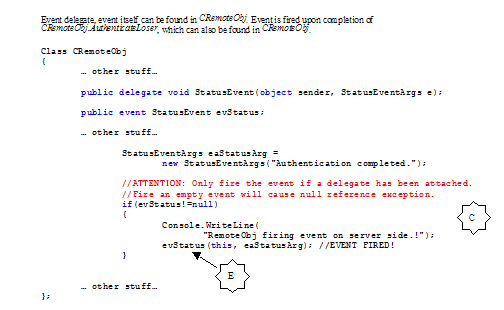
The event handler is declared in the interface module CRemoteObjInterface.

Routing mechanism: Here's the sequence of things that takes place when client invoke the AuthenticateLoser:

That's it. I hope this article provide a good coverage of most basic maneuvers that would be expected of a component developer. Go through the source code and play around with different configurations. You should be well on your way to building distributed applications and harness power offered by .NET Remoting.
References
- REF-1 .NET Remoting Customization Made Easy by Motti Shaked
- REF-2 MSDN online: Remoting Example: Hosting in Internet Information Services (IIS)
- REF-3 MSDN online: Remote Object Configuration
- REF-4 MSDN online: Asynchronous Programming Overview
- REF-5 Other MSDN references:
- "Asynchronous Delegates Programming Sample"
- "Asynchronous Remoting"
- "Asynchronous Programming Overview"
- "Lifetime Leases"
- REF-6 SoapSuds vs. Interfaces in .NET Remoting by Ingo Rammer
- REF-7 Hosting Remote object in IIS � A Remoting sample by Sandeep Alur
- REF-8 MSDN online: Remoting Example: Lifetimes


