Introduction
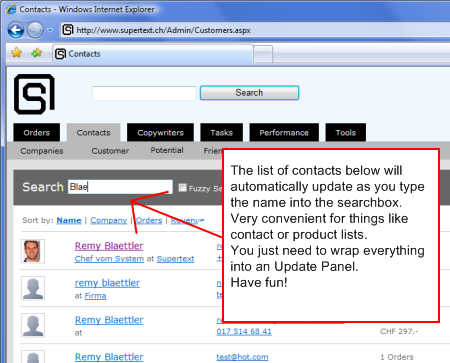
Highrise and other new AJAX enabled tools have this feature that when you type in a search query, it automatically updates the search results below. It's almost like an auto-complete box, but with the full results on the page instead of a dropdown list below the control. Unfortunately, I didn't find anything like this in the Microsoft ASP.NET AJAX Toolkit. So, I decided that this was a good way to finally dive into the AJAX Control Toolkit.
Here is the result: Live Demo.
It's my first AJAX control, so I'm sure there is room for improvements. I've tested it in Internet Explorer 7, Firefox and Safari. Seems to work fine in all of them.
Background
I used the Membership Editor Example from Peter Keller and TextChangedBehavior.js from Garbin as my inspiration and resource, but started with a VS ASP.NET AJAX Control Project to get the framework up and running.
The Use Case
The user starts typing his search query into the textbox. After he types in the first few characters of the keyword he is looking for, he pauses. Magically, all search results that fit his query so far appear below. If he types in more of the keyword, the results are updated accordingly.
Example: A user is searching for a contact. He types Bl and stops. The names that now show up could include:
BlaettlerBlattBlackmoreBloomfieldBlodgettBlum
Now, he types another letter, let's say, o, and the list reduces itself to:
The Control
There is really only JavaScript code that has functionality. The only thing the code does is start a time on the keyup event, stop the time on keydown, and after the timer fires, it executes the onchange method of the associated TextBox. This way, we get a delayed postback after the user stops typing and not lots of postbacks when he's still writing something.
_onkeyup : function(ev) {
    var k = ev.keyCode ? ev.keyCode :
                ev.rawEvent.keyCode;
    if (k != Sys.UI.Key.Tab) {
        this._timer.set_enabled(true);
    }
},

_onkeydown : function(ev) {
    this._timer.set_enabled(false);
},

_onTimerTick : function(sender, eventArgs) {
    this._timer.set_enabled(false);

    if(this._text != this.get_element().value) {
        this._text = this.get_element().value;

        this.get_element().onchange();
    }
},
Everything else is just setup and teardown code. There is one property in the C# file called Timeout. This determines how long of a pause the user needs to make until the search results get updated.
Using the Code
Just add this control like any other Extender to your ASPX page, set the TargetControlID, and add a TextChanged handler to the search textbox.
<cc1:DelayedSubmitExtender
    ID="DisableButtonExtender1"
    runat="server"
    Timeout="1000"
    TargetControlID="TextBox1"/>
<asp:TextBox
    ID="TextBox1"
    runat="server"
    AutoPostBack="True"
    OnTextChanged="TextBox1_TextChanged"
    Columns="50"></asp:TextBox>
<br />
List of matching words:<br />

<asp:UpdatePanel ID="UpdatePanel1" runat="server">
    <Triggers>
        <asp:AsyncPostBackTrigger ControlID="TextBox1" />
    </Triggers>
    <ContentTemplate>
        <asp:Repeater ID="Repeater1" runat="server">
            <HeaderTemplate><ul></HeaderTemplate>
            <ItemTemplate>
                <li><%#DataBinder.Eval(Container, "DataItem[0]")%></li>
            </ItemTemplate>
            <FooterTemplate></ul></FooterTemplate>
        </asp:Repeater>
    </ContentTemplate>
</asp:UpdatePanel>
I would then wrap the search results area in an UpdatePanel. If the TextBox is outside, just add an AsyncPostBackTrigger to the UpdatePanel. Inside the UpdatePanel, you can present your search results. For my example, I just have a list of words.
Code-behind
protected void TextBox1_TextChanged(object sender, EventArgs e)
{
    List<string[] /> items = new List<string[] />();

    for (int i = 0; i < wordlist.Length; i++ )
    {
        if (wordlist[i].StartsWith(
                TextBox1.Text,
                StringComparison.OrdinalIgnoreCase))
        {
            string[] item = new string[1];
            item[0] = wordlist[i];

            items.Add(item);
        }
    }

    Repeater1.DataSource = items;
    Repeater1.DataBind();
}
In the TextChanged handler on the server side, you need to add your specific search code. As mentioned above, I just display a list of words with a Repeater control. The list is contained in a string array called wordlist.
I would recommend to just have a look at the example. It's very simple, and should show you how this works.
Please let me know how it works and if it is of any use. Good luck!


