Introduction
This project shows an easy way to create a guestbook built using ASP.NET. Access database is used to store the data. ADO.NET is used to access the data on the server. To format the data, I use the Repeater control that comes with Visual Studio .NET.
Background
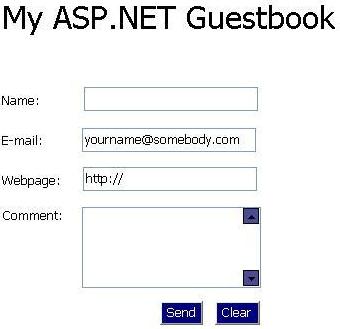
The guestbook is split into two pages, one where the user can write in the guestbook and the other shows a log of all the guestbook entries.
Using the code
In order to be able to access data through a website, you'll have to include these two lines of code on every page you want to use data access methods:
<%@ Import Namespace="System.Data" %>
<%@ Import Namespace="System.Data.OleDB" %>
I'm first going to describe the one where the user writes to the guestbook. The code needed to create the connection to the database looks like this:
sub OnBtnSendClicked (s As Object, e As EventArgs)
    Dim strConn as string = "Provider=Microsoft.Jet.OLEDB.4.0;Data Source=" _
                                    & server.mappath("guestbook.mdb") & ";"
    Dim MySQL as string = "INSERT INTO Guestbook " & _
       "(Name, EMail, URL, Comment) VALUES " & _
       "('" & txtName.Text & "','" & txtEMail.Text & "','" _
       & txtURL.Text & "','" & txtComment.Text & "')"
    Dim MyConn as New OleDBConnection (strConn)
    Dim cmd as New OleDBCommand (MySQL, MyConn)
    MyConn.Open ()
    cmd.ExecuteNonQuery ()
    MyConn.Close ()
    Response.Redirect ("guestlog.aspx")
end sub
This function executes when the user selects the "Send" button. It creates a connection with the server and then adds what the user typed in the form to the database, using the INSERT INTO statement. The txtName.Text retrieves the context of the Name field and adds it to the command. The other fields are retrieved exactly the same. You can see the code for the form in the source file, that comes with this article.
After the function has added the new record, the user is redirected to the log page, where he can see all the other entries in the guestbook. Now we are going to look at the page, that displays the entries of the guestbook (database).
This function executes whenever the page is loaded (or refreshed). It creates a connection with the database, and binds the data to the Repeater control. The Repeater control is formatted elsewhere in the file, a great way to separate data and logic.
Sub Page_Load (Source As Object, E as EventArgs)
    Dim strConn as string = "Provider=Microsoft.Jet.OLEDB.4.0;Data Source=" _
                                & server.mappath("guestbook.mdb") & ";"
    Dim MySQL as string = "SELECT Name, EMail, URL, Comment FROM Guestbook"
    Dim MyConn as New OleDBConnection (strConn)
    Dim Cmd as New OleDBCommand (MySQL, MyConn)
    MyConn.Open ()
    rptGuestbook.DataSource = _
      Cmd.ExecuteReader(System.Data.CommandBehavior.CloseConnection)
    rptGuestbook.DataBind()
End Sub
You can see the code for the Repeater in the source file, but one interesting thing that I used is to automatically create a link to the website the user provided in the form. That is done using the Hyperlink control that comes with Visual Studio .NET.
Points of Interest
I hope this article has shown you how easy it is to create a simple guestbook in a very short time. Of course, you may like to format the output differently. I didn't spend much time on the design of the interface, but instead concentrated on the logic. I haven't included any error checking, in order to make the code as simple as possible.
If you understand the theory behind this guestbook, you can move on to some more complex things using ASP.NET. I hope you enjoyed this as much as I have! - Good luck!
Update 16.03.2004
This article talks about the "Operation must use an updateable query" problem, that many people are having.


