Introduction
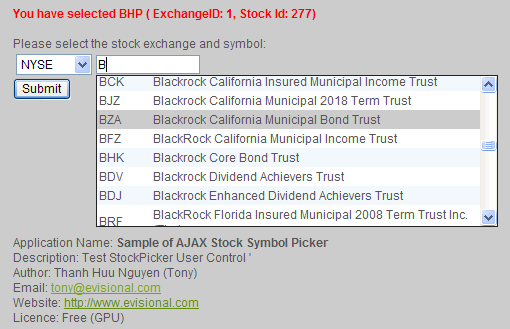
This ASP.NET user control can be used to assist users in selecting/picking a valid stock code from a drop-down list without effecting the webpage performance.
Users just enter the first letters of stock symbol, then the list of stock symbols with the fisrt letters will show in drop-down list. Accordingly, users can select the limited list of symbols from drop-down list.
Background
Recently, there are more than 10,000 stock symbols and it will effect the MS SQL and ASP page performance if all stock symbols are loaded and displayed in drop-down list. Users also find it diffcult to locate a stock symbol from a huge drop-down list. So, a limited list of symbols should be showed in accordance to the symbols' first letters typed by users.
Using the code
Run sample:
After downloading, unzip the StockPicker.zip to a folder"
1) Create a Database i.e BlueVision in in SQL Server Management Studio
2) Run script \App_Data\populatedata.sql in SQL Server Management Studio
3) Change the web.config
<add name="LocalSqlServer" connectionString="Data Source=(local);Integrated Security=True; database=BlueVision"/>
4) Create a Virtual Directory: StockPicker pointing to the StockPicker Folder
5) Open browser type: http://localhost/StockPicker/default.aspx
Reuse UserControls:
1. Create the database and load data as mentioned above.
2. Copy the UserControls folder to your website
2. Add the line below to the aspx page which you want to show the stockpicker control
<%@ REGISTER SRC="~/UserControls/StockPicker.ascx" TAGNAME="StockPicker" TAGPREFIX="Evisional" %>
3. Add the line below to the place you want to display the control
<Evisional:STOCKPICKER ID="StockPicker1" RUNAT="server" />
4. To get the selected value/symbol in the the submit event, you can use:
StockPicker1.ExchangeID : ExchangeID
StockPicker1.StockCode : Stock Code/Symbol
StockPicker1.StockID : Stock ID in the database
Points of Interest
You can notify that the stock symbols are filtered based on the user-typed symbols' first letters. Insteads of using ASP.NET AJAX technique, I use iframe (named stockList) to refresh the stock symbols.
When the onKeyUp events of _StockCode textbox and _ExchangeId dropdown list is triggered, the src property of stockList iframe will be change as follows:
1) Iframe control in StockPicker.ascx:
<ASP:HIDDENFIELD ID=_StockId RUNAT="server" />
<table>
<tr>
<td>
<ASP:DROPDOWNLIST id=_ExchangeId RUNAT="server" DATASOURCEID="SQLExchangeSource"
DATATEXTFIELD="ExchangeName" DATAVALUEFIELD="ExchangeID">
</ASP:DROPDOWNLIST>
<td>
<ASP:TEXTBOX id=_StockCode width=100px RUNAT="server" /><br>
<span style="position:absolute">
<iframe id="_StockList" frameborder="0" scrolling=auto src="<%=request.ApplicationPath%>/UserControls/StockPicker.aspx"
style="position:relative;top:0; left:0; width:400px; height:150px; background: #ffffff; display:none; border: 1px solid #222222"></iframe>
</span>
</td>
</tr>
</table>
2) StockPicker.ascx's JavaScript:
function onKeyUp() {

    var exchangeID = document.getElementById('<%=_ExchangeId.ClientID %>').value;
    var stockCode = document.getElementById('<%=_StockCode.ClientID %>').value;
    var stockList = document.getElementById('_StockList');

  if (stockCode.value!='NaN') {
     stockList.src='http://www.yourdomain.com/UserControls/StockPicker.aspx?t=1&ExchangeId='+
     exchangeID+'&StockCode='+stockCode; stockList.style.display='block';
  }
   else stockList.style.display='none';

}
3) In StockPicker.ascx.vb onload event, assign onKeyUp event for _StockCode and _ExchangeId
Protected Sub Page_Load(ByVal sender As Object, ByVal e As System.EventArgs) Handles Me.Load

    SQLExchangeSource.SelectCommand = "SELECT * FROM StockExchange"
    _ExchangeId.DataBind()
    _ExchangeId.SelectedValue = 1

    _StockCode.Attributes("onkeyup") = "onKeyUp();"
    _ExchangeId.Attributes("onchange") = "onKeyUp();"


End Sub
Listed Companies/Stock Code List
For people who want to know where I get the stock code list: I searched on Google with keywords: "listed companies" and found :
US stock list: http://www.nasdaq.com/reference/comlookup.stm#viewdownload
Australian Stock List: http://www.afrsmartinvestor.com.au/tables.aspx
or http://www.asx.com.au/asx/downloadCsv/ASXListedCompanies.csv
UK: http://www.londonstockexchange.com/en-gb/pricesnews/statistics/listcompanies/
SWISS: http://www.swx.com/admission/listing/equity_market/download/issuers_equity_market_en.csv
If anyone knows other lists, please put a comment. I will update this list.


