Table of Contents
Please read Fredrik Norm�n's fabulous introduction on client-call back before reading this. This brief tutorial is simply a more realistic example of using the technology which he explains.
Introduction
One of the new features in ASP.Net 2.0 is the ability to call server-side code from client-side code. While this isn't something new, a new simpler and cleaner mechanism is now available: client callback. The general idea is to have some type of hook, client-side functions (JavaScript) can use to utilize powerful server-side functions. A key benefit to this closing the gap on desktop applications with respect to cleaner, richer and more responsive applications. Fredrik Norm�n has
a great blog entry explaining how it works and how to use it. This brief tutorial is simply written to showcase a more realistic example.
Compatibility
Its important to note that Client Callback uses
XmlHttp, which, as far as I know, only works in IE. Hopefully workarounds and third party solutions aren't far away, which'll make this a truly powerful weapon to have in our arsenal.
Linked Drop Downs
The example I'll be doing will be a simple example of having values in a dropdownlist linked to values in another dropdownlist. A couple such examples would be a list of states/provinces for a selected country, or a list of departments in an organization. Our example will use the organization/departments example. Without using a method like client callback, we'd either have to dump large amounts of [hard to maintain] Javascript arrays and do a lot of client-side processing, or postback each time the value in the dropdownlist changed. Each solution, while workable, had some serious drawbacks. Using
JavaScript could quickly become unwieldy, posting-back can cause even the best surfers to be confused for a couple seconds.
Requirements
Our requirements are simple:
- Two dropdownlists are displayed to users
- The first dropdownlist contains all of the Canadian Governments Departments
- The 2nd dropdownlist contains all of the primary sections within the selected department
- A department may not have any sections
- We cannot use postback, must only support IE, and have to keep the Javascript to a minimum
No problem!
Database Structure
Keeping with our entire "simple" theme, our database structure is very simple:
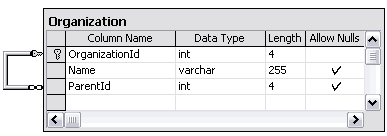
The SQL script to create our table:
      CREATE TABLE dbo.Organization (
          OrganizationId int IDENTITY (1, 1) NOT NULL CONSTRAINT
             [PK_Organization] PRIMARY KEY CLUSTERED,
          [Name] varchar (255),
          ParentId int NULL CONSTRAINT [FK_Parent_Organization]
             FOREIGN KEY REFERENCES Organization(OrganizationId)
      ) ON [PRIMARY]
      GO
Basically, all our top-level departments will have a ParentId of NULL, while our sections will have a ParentId that is the same as their Departments OrganizationId. In your case you might have a many-many relationship, or your entities might not reside in the same table, in that case simply change the data-access code we'll be using, but the client callback code stays the same.
And to make this a complete example, some sample data:
insert into Organization
   VALUES ('Agriculture and Agri-Food Canada', NULL)

insert into Organization
   VALUES ('Bank of Canada', NULL)

insert into Organization
   VALUES ('Cadets Canada', NULL)

insert into Organization
   VALUES ('Canada Lands Company Limited', NULL)


insert into Organization
   VALUES ('Canadian Rural Partnership ', 1)

insert into Organization
   VALUES ('Co-operatives Secretariat', 1)

insert into Organization
   VALUES ('Fish and Seafood On-line', 1)

insert into Organization
   VALUES ('Bank Notes', 2)

insert into Organization
   VALUES ('Currency Museum', 2)

insert into Organization
   VALUES ('Old Port of Montr�al Corporation Inc.', 3)

insert into Organization
   VALUES ('Parc Downsview Park Inc.', 3)
Code
Basics
Our HTML will consist of two dropdownlist webcontrols:
1: <asp:DropDownList ID="ParentOrganizations" Runat="server" />
2: <asp:DropDownList ID="ChildOrganizations" Runat="Server" />
For now, our
Page_Load will be pretty basic:
   1:   private void Page_Load(object source, EventArgs e) {
   2:     if (!Page.IsPostBack) {
   3:        DataTable dt = GetOrganizations();
   4:        DataView dv = dt.DefaultView;
   5:        dv.RowFilter = "ParentId IS NULL";
   6:        ParentOrganizations.DataSource = dv;
   7:        ParentOrganizations.DataTextField = "Name";
   8:        ParentOrganizations.DataValueField = "OrganizationId";
   9:        ParentOrganizations.DataBind();
  10:        ParentOrganizations.Items.Insert(0, new ListItem("Select", "0"));
  11:     }
  12:  }
We get a datatable (we'll look at the
GetOrganization() function next)
[line: 3], get its default view
[line: 4] and filter it so we only get our top-level Departments
[line: 5]. We then do normal databinding stuff
[line: 6-9] and add an option at the top for improved user-friendliness
[line: 10].
The
GetOrganizations() function is your typical DAL method:
   1:     private DataTable GetOrganizations() {
   2:        DataTable dt = (DataTable)Cache["Organizations"];
   3:        if (dt == null) {
   4:           SqlConnection connection = new SqlConnection(connectionString);
   5:           SqlCommand command = new SqlCommand(
                    "SELECT * FROM Organization ORDER BY Name", connection);
   6:           command.CommandType = CommandType.Text;
   7:
   8:           SqlDataAdapter da = new SqlDataAdapter(command);
   9:           dt = new DataTable();
  10:           try {
  11:              connection.Open();
  12:              da.Fill(dt);
  13:              Cache.Insert("Organizations", dt, null,
                        DateTime.Now.AddHours(6), TimeSpan.Zero);
  14:           } finally {
  15:              connection.Dispose();
  16:              command.Dispose();
  17:              da.Dispose();
  18:           }
  19:        }
  20:        return dt;
  21:     }
There's really nothing fancy here. Notice though that we get all Departments/Sections, that's why we have to filter for ParentId IS NULL in the
Page_Load. If your entities were in two separate table, you could get your top level entities here, and simply create a 2nd function for your child-entities, which we'll be using shortly.
Client Callback
Now we'll make all the changes necessary to make this magical callback work. Again, you really have to read Fredrik's blog before going on as I'm not going to go into any details.
The first thing we do is add to our Page_Load in order to hookup and register all our Client Callback code:
   1:   private void Page_Load(object source, EventArgs e) {
   2:     if (!Page.IsPostBack) {
   3:        DataTable dt = GetOrganizations();
   4:        DataView dv = dt.DefaultView;
   5:        dv.RowFilter = "ParentId IS NULL";
   6:        ParentOrganizations.DataSource = dv;
   7:        ParentOrganizations.DataTextField = "Name";
   8:        ParentOrganizations.DataValueField = "OrganizationId";
   9:        ParentOrganizations.DataBind();
  10:        ParentOrganizations.Items.Insert(0, new ListItem("Select", "0"));
  11:
  12:        ParentOrganizations.Attributes.Add("onchange",
           "GetChildren(this.options[this.selectedIndex].value, 'ddl');");
  13:        string callBack = Page.GetCallbackEventReference(this, "arg",
             "ClientCallback", "context", "ClientCallbackError");
  14:        string clientFunction = "function GetChildren(arg, context){ "
                    + callBack + "; }";
  15:        Page.ClientScript.RegisterClientScriptBlock(this.GetType(),
                 "GetChildren", clientFunction, true);
  16:     }
  17:  }
On
[line: 12] we add an onChange JavaScript event to our dropdownlist so that it calls the
GetChildren() Javascript function. This is the proxy-function to our server-side callback function. Notice that the first
JavaScript parameter will be the value of the selectedOption (in other words, the OrganizationId).d Next we use the Page to create the
JavaScript string that'll actually do the callback
[line: 13]. We wrap the string in our proxy GetChildren Javascript function
[line: 14]. Finally we register the script on the page
[line: 15].
Next, make sure that your page implements
ICallbackEventHandler:
   1:  public partial class index_aspx : ICallbackEventHandler {
   2:  ...
   3:  }
The last thing to do in our codebehind is implement
ICallbackEventHandler.RaiseCallbackEvent, which is the server-side function which handles the client-side call.
   1:     public string RaiseCallbackEvent(string eventArgument) {
   2:        int parentId;
   3:        if (Int32.TryParse(eventArgument, out parentId)) {
   4:           DataTable dt = GetOrganizations();
   5:           DataView dv = dt.DefaultView;
   6:           dv.RowFilter = "ParentId = " + parentId.ToString();
   7:           StringBuilder sb = new StringBuilder();
   8:           for (int i = 0; i < dv.Count; ++i) {
   9:              sb.Append(dv[i]["OrganizationId"]);
  10:              sb.Append("^");
  11:              sb.Append(dv[i]["Name"]);
  12:              sb.Append("|");
  13:           }
  14:           return sb.ToString();
  15:        }
  16:        return "";
  17:     }
Again, there's really nothing fancy here. All we are doing is using the organizationId which is passed as eventArgument to get all sections who have a matching ParentId
[line: 6]. We loop through the matching sections
[line: 8] and create a string in the format of Id^Name|Id^Name|Id^Name
[line: 9-12]. Finally we return our string
[line: 14]. If anything went wrong or no records were found, an empty string will be returned.
The
last step is to create our Javascript function that'll handle the return of our server-side function. Back in our modified
Page_Load,we said this function would be named
ClientCallBack:
   1:     <script language="Javascript">
   2:     function ClientCallback(result, context){
   3:        var childOrganizations = document.forms[0].elements[
                  '<%=ChildOrganizations.UniqueID%>'];
   4:        if (!childOrganizations){
   5:           return;
   6:        }
   7:        childOrganizations.length = 0;
   8:        if (!result){
   9:           return;
  10:        }
  11:
  12:        var rows = result.split('|');
  13:        for (var i = 0; i < rows.length; ++i){
  14:           var values = rows[i].split('^');
  15:           var option = document.createElement("OPTION");
  16:           option.value = values[0];
  17:           option.innerHTML = values[1];
  18:           childOrganizations.appendChild(option);
  19:        }
  20:     }
  21:     </script>
We get a reference to our child dropdownlist
[line: 3], clear out any existing values it might have had
[line: 7] and split our string into id^name chunks
[line: 12]. We then loop through each pair, and add a new option
[line: 15], with the right text and value
[line: 16, 17], to our child dropdownlist.
Observations
I just had a couple observations I wanted to pass along. These are possibly wrong and hopefully someone will correct me, but:
- Note that you are limited to a single string argument into and out of your your server-side function. If you need to pass more, like we did coming out, you'll need to serialize the data somehow (using | is obviously a highly efficient serializing algorithm ;) ).
- It would be really wonderful if in our codebehind
RaiseCallbackEvent
we could simply bind our ChildOrganization dropdownlist to our
DataView and not need any JavaScript, but that obviously can't work. The idea behind Client callback is to allow you to do server-side processing without postback, not rerender parts/all of the page.
- As far as I can tell,
RaiseCallbackEvent doesn't happen inside the same instance of the the actual request. If you set a private field during
Page_Load, you won't have access to it in RaiseCallbackEvent unless its static.
Complete Code
Copy and paste, change the connection string and create
Organization table with data
The complete HTLM source is:
<%@ Page Language="C#" CompileWith="index.aspx.cs" ClassName="index_aspx" %>
<html>
<head>
   <title>Client CallBack</title>
</head>
<body>
<form runat="server">
   <asp:DropDownList ID="ParentOrganizations" Runat="server"  />
   <asp:DropDownList ID="ChildOrganizations" Runat="Server" />

   <script language="javascript">
   function ClientCallback(result, context){
      var childOrganizations = document.forms[0].elements[
            '<%=ChildOrganizations.UniqueID%>'];
      if (!childOrganizations){
         return;
      }
      childOrganizations.length = 0;
      if (!result){
         return;
      }

      var rows = result.split('|');
      for (var i = 0; i < rows.length; ++i){
         var values = rows[i].split('^');
         var option = document.createElement("OPTION");
         option.value = values[0];
         option.innerHTML = values[1];
         childOrganizations.appendChild(option);
      }
   }
   </script>
   function ClientCallbackError(result, context){
      alert(result);
   }
</form>
</body>

</html>
The complete code file is:
using System;
using System.Data.SqlClient;
using System.Web.UI;
using System.Web.UI.WebControls;
using System.Data;
using System.Text;

public partial class index_aspx : ICallbackEventHandler {
   private const string connectionString = @"YOUR CONNECTION STRINGS";

    private void Page_Load(object source, EventArgs e) {
      if (!Page.IsPostBack) {
         DataTable dt = GetOrganizations();
         DataView dv = dt.DefaultView;
         dv.RowFilter = "ParentId IS NULL";
         ParentOrganizations.DataSource = dv;
         ParentOrganizations.DataTextField = "Name";
         ParentOrganizations.DataValueField = "OrganizationId";
         ParentOrganizations.DataBind();
         ParentOrganizations.Items.Insert(0, new ListItem("Select", "0"));

         ParentOrganizations.Attributes.Add("onchange",
"GetChildren(this.options[this.selectedIndex].value, 'ddl');");
         string callBack = Page.GetCallbackEventReference(this, "arg",
"ClientCallback", "context", "ClientCallbackError");
         string clientFunction = "function GetChildren(arg, context){ "
+ callBack + "; }";
         Page.ClientScript.RegisterClientScriptBlock(this.GetType(),
"GetChildren", clientFunction, true);
      }
   }

   public string RaiseCallbackEvent(string eventArgument) {
      int parentId;
      if (Int32.TryParse(eventArgument, out parentId)) {
         DataTable dt = GetOrganizations();
         DataView dv = dt.DefaultView;
         dv.RowFilter = "ParentId = " + parentId.ToString();
         StringBuilder sb = new StringBuilder();
         for (int i = 0; i < dv.Count; ++i) {
            sb.Append(dv[i]["OrganizationId"]);
            sb.Append("^");
            sb.Append(dv[i]["Name"]);
            sb.Append("|");
         }
         return sb.ToString();
      }
      return "";
   }

   private DataTable GetOrganizations() {
      DataTable dt = (DataTable)Cache["Organizations"];
      if (dt == null) {
         SqlConnection connection = new SqlConnection(connectionString);
         SqlCommand command = new SqlCommand(
"SELECT * FROM Organization ORDER BY Name", connection);
         command.CommandType = CommandType.Text;

         SqlDataAdapter da = new SqlDataAdapter(command);
         dt = new DataTable();
         try {
            connection.Open();
            da.Fill(dt);
            Cache.Insert("Organizations", dt, null,
DateTime.Now.AddHours(6), TimeSpan.Zero);
         } finally {
            connection.Dispose();
            command.Dispose();
            da.Dispose();
         }
      }
      return dt;
   }
}


