Introduction
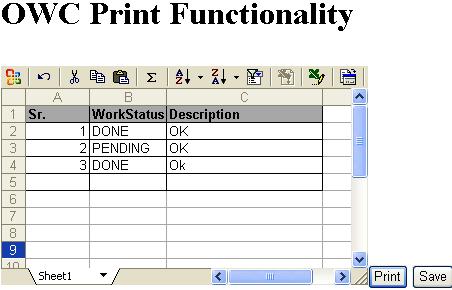

During development of an application we came across the situation where we need to print the content of OWC spreadsheet.So after doing some search and research we were successful in getting the solution for above problem. The code given below is self explanatory.The only disadvantage of this solution is that it render and save the content into html file. One can get rid of this mechanism by deleting this file after the print operation is completed.
Important Namespace
    using Microsoft.Office.Interop.Owc11;
    using System.IO;
Using the code
There are two event :
1.Call 'Save' event to store the XMLData of spreadsheet into hidden variable using javascript
2.Call print event from code behind to print the OWC Spreadsheet content.
Step1:Javascript-Save Event Function
    function btnSave_Click()
     {
        var spreadsheet = document.getElementById("sp");
        document.getElementById('<%= hdnXML.ClientID %>').value=spreadsheet.XMLData;
        return false;
     }
Step2 :ASPX
Note include validateRequest=false in the page directive of aspx page.
<body>
    <form id="form1" runat="server">
    <div>
    <h1>OWC Print Functionality </h1>
    <hr width=1px />
    <object classid="clsid:0002E559-0000-0000-C000-000000000046" id="sp" width="100%"
                    height="80%"><param name="XMLData" value="<?xml version='1.0'?>
        <?mso-application progid='Excel.Sheet'?>
        <Workbook xmlns='urn:schemas-microsoft-com:office:spreadsheet'
         xmlns:o='urn:schemas-microsoft-com:office:office'
         xmlns:x='urn:schemas-microsoft-com:office:excel'
         xmlns:ss='urn:schemas-microsoft-com:office:spreadsheet'
         xmlns:html='http://www.w3.org/TR/REC-html40'>
         <DocumentProperties xmlns='urn:schemas-microsoft-com:office:office'>
          <Author></Author>
          <LastAuthor></LastAuthor>
          <Created></Created>
          <Company></Company>
          <Version></Version>
         </DocumentProperties>
         <ExcelWorkbook xmlns='urn:schemas-microsoft-com:office:excel'>
          <WindowHeight>8955</WindowHeight>
          <WindowWidth>15195</WindowWidth>
          <WindowTopX>120</WindowTopX>
          <WindowTopY>60</WindowTopY>
          <ProtectStructure>False</ProtectStructure>
          <ProtectWindows>False</ProtectWindows>
         </ExcelWorkbook>
         <Styles>
          <Style ss:ID='Default'
          ss:Name='Normal'>
           <Alignment ss:Vertical='Bottom'/>
           <Borders/>
           <Font/>
           <Interior/>
           <NumberFormat/>
           <Protection/>
          </Style>
         </Styles>
         <Worksheet ss:Name='Sheet1'>
          <WorksheetOptions xmlns='urn:schemas-microsoft-com:office:excel'>
           <Selected/>
           <ProtectObjects>False</ProtectObjects>
           <ProtectScenarios>False</ProtectScenarios>
          </WorksheetOptions>
         </Worksheet>

        </Workbook>"/></object>
          <asp:Button ID="btnPrint" OnClick="btnPrint_Click" runat="server" Text="Print" />

          <asp:Button ID="btnsave" OnClientClick="javascript: return btnSave_Click();" runat="server" Text="Save" />
    </div>
    <input type=hidden runat="server" id="hdnXML" />
    </form>

</body>
Step3:Codebehind-Print Event Function
protected void btnPrint_Click(object sender, EventArgs e)
{
try
{
SpreadsheetClass spreadSheetClass = new SpreadsheetClass();
spreadSheetClass.XMLData = hdnXML.Value;
spreadSheetClass.Export(Server.MapPath("OWCXML.htm"),
Microsoft.Office.Interop.Owc11.SheetExportActionEnum.ssExportActionNone,
SheetExportFormat.ssExportHTML);
StreamWriter streamWriter;
streamWriter = System.IO.File.AppendText(Server.MapPath("OWCXML.htm"));
streamWriter.WriteLine
("<html><body onload='window.print()'><table><tr><td></td></tr></table></body></html>");
streamWriter.Flush();
streamWriter.Close();
ClientScript.RegisterClientScriptBlock
(this.GetType(), "Key1", "<script>window.showModalDialog('OWCXML.htm','popup'); </script>");
}
catch (Exception ex)
{
throw ex;
}
}
Reference
For more detail on OWC refer article by Gautam Sharma: Office Web Component v11.0 Spreadsheet and AJAX Interoperatibility Part1


