5,699,997 members and growing! (22,101 online)
Email Password   helpLost your password?
Web Development » ASP.NET » General     Intermediate

RichTextBox user control for ASP.NET 1.1

By s.kushal

RichTextBox user control for ASP.NET 1.1
Javascript, HTMLWindows, .NET, .NET 1.0, .NET 1.1, .NET 2.0, Win2K, WinXP, Win2003, ASP.NET, WebForms, VS.NET2002, VS.NET2003, IE 6.0, IE 5.5, IE 7, Visual Studio, IE, Dev

Posted: 20 Sep 2007
Updated: 20 Sep 2007
Views: 12,167
Bookmarked: 15 times
Announcements
Loading...


Search    
Advanced Search
Sitemap
5 votes for this Article.
Popularity: 2.73 Rating: 3.91 out of 5
0 votes, 0.0%
1
1 vote, 20.0%
2
0 votes, 0.0%
3
0 votes, 0.0%
4
4 votes, 80.0%
5
Note: This is an unedited contribution. If this article is inappropriate, needs attention or copies someone else's work without reference then please Report This Article

Introduction

I just finished creating a RichTextbox control for my website.

So I thought it will be a great idea to put it on CodeProject so that it can be used for other developers who want such control and also I can get some good feedback to create better controls and improving the current one.

This is a simple control that lets you put in text and you can make the entered text Bold, Underline , Italics, Align the text, put a horizontal rule, give it desired font and size.

Also I have made the code such that you can get the text easily from the control using the getText() and getHTML() methods. The getText() method will give the inner text of the textbox and the getHTML() method will give the text with the HTML code embedded in the resulting text.

Checkout the code of the control where I have given a working example of using it.

Also the control is such designed that it will work perfectly on a Datagrid. Where in you can use it as a template item.

Any comments and/or suggestion are very much appreciated.

Using the code

Using the code is pretty simple and easy. Any web developer who has littele knowledge of working with user controls will be able to use it.

Although i have given a fully functional working example with it. You can view the example and learn how to use the control.

Screen Shots
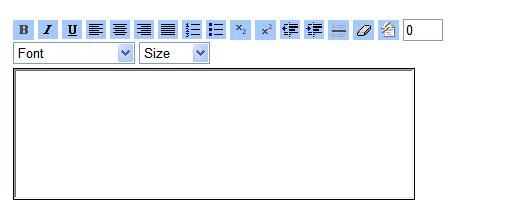
Screenshot - ScreenShot1.jpg

working example in a stand alone page.
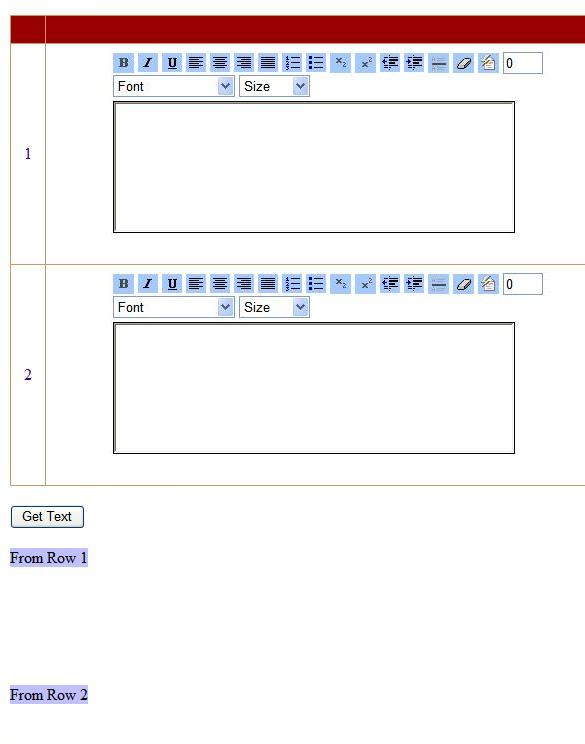
Screenshot - ScreenShot2.jpg

working example in a grid.

Conclusion

In case anyone wants to add some more functionalities to the code he / she is more than welcome to do so. Please give some feedback and observations as this is my first project that i have uplaoded. if you find certain ways that i can improve on, please let me know so.


License

This article has no explicit license attached to it but may contain usage terms in the article text or the download files themselves. If in doubt please contact the author via the discussion board below.

A list of licenses authors might use can be found here

About the Author

s.kushal


Occupation: Web Developer
Location: India India

Other popular ASP.NET articles:

Article Top
Sign Up to vote for this article
You must Sign In to use this message board.
FAQ FAQ Noise ToleranceSearch Search Messages 
 Layout  Per page   
 Msgs 1 to 10 of 10 (Total in Forum: 10) (Refresh)FirstPrevNext
QuestionRTB with IE7memberToCentre23:58 25 Sep '08  
GeneralNO GOmemberMember 36369409:16 22 May '08  
GeneralThanks. I find it usefullmemberAbdul Bakour11:45 15 Apr '08  
Generalnot working in mozillamemberna_k1:42 2 Apr '08  
GeneralRe: not working in mozillamemberna_k4:49 3 Apr '08  
GeneralSetting Default Messagemembersujanakar2:28 6 Oct '07  
GeneralRe: Setting Default Messagememberjimmy.jiang23:44 26 Jun '08  
Generalnice workmembermultimedia96:36 21 Sep '07  
GeneralRe: nice workmemberSteve Maier8:24 21 Sep '07  
GeneralRe: nice workmembers.kushal2:42 22 Sep '07  

General General    News News    Question Question    Answer Answer    Joke Joke    Rant Rant    Admin Admin   

PermaLink | Privacy | Terms of Use
Last Updated: 20 Sep 2007
Editor:
Copyright 2007 by s.kushal
Everything else Copyright © CodeProject, 1999-2008
Web12 | Advertise on the Code Project