Introduction
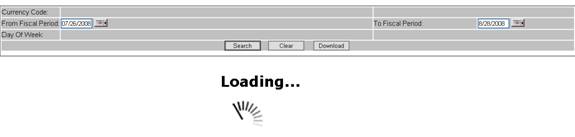
This document will explain how to convert your normal ASP.NET, which is executing long running queries — to AJAX enabled code, which will display a loading image instead of a traditional progress bar.
Background
I struggled a lot to display the loading image into my application.
Using the Code
- I have used AJAXControls.dll from the extract which I got from another article on Code Project: Atlas: ModalUpdateProgress - An UpdateProgress Control in Modal Popup Style
- Now add references of
AjaxControls, System.Web.Extensions and System.Web.Extensions.Design to your application.
- Add the following code between <system.web> </system.web> tags:
<pages>
    <controls>
        <add tagPrefix="asp" namespace="System.Web.UI"
        assembly="System.Web.Extensions, Version=1.0.61025.0, Culture=neutral,
        PublicKeyToken=31bf3856ad364e35"/>
    </controls>
</pages>

<httpHandlers>
    <remove verb="*" path="*.asmx"/>
    <add verb="*" path="*.asmx" validate="false"
        type="System.Web.Script.Services.ScriptHandlerFactory,
        System.Web.Extensions, Version=1.0.61025.0, Culture=neutral,
        PublicKeyToken=31bf3856ad364e35"/>
    <add verb="*" path="*_AppService.axd" validate="false"
        type="System.Web.Script.Services.ScriptHandlerFactory,
        System.Web.Extensions, Version=1.0.61025.0, Culture=neutral,
        PublicKeyToken=31bf3856ad364e35"/>
    <add verb="GET,HEAD" path="ScriptResource.axd"
        type="System.Web.Handlers.ScriptResourceHandler,
        System.Web.Extensions, Version=1.0.61025.0, Culture=neutral,
        PublicKeyToken=31bf3856ad364e35" validate="false"/>
</httpHandlers>
- If the pages are Master-Detail pages then add “Register …. Like:”
<%@ Register Assembly="AjaxControls" Namespace="AjaxControls" TagPrefix="asp" %>
<asp:Content ID="Content1" ContentPlaceHolderID="DetailContentHolder"
      runat="server">
Here @Register line should be before <asp:Content . . . > line.
- Now in the first line of code add below line:
<asp:ScriptManager ID="ScriptManager1" runat="server" />
In my case, I have used <Script> …. </Script>. So, the above line will be immediately after the end of the </Script> tag.
- Add
ModalUpdateProgress tag:
<asp:ModalUpdateProgress ID="ModalUpdateProgress1" runat="server"
    DisplayAfter="0" BackgroundCssClass="modalProgressGreyBackground">
    <ProgressTemplate>
        <div class="modalPopup">
        Loading
        <img height="50px" width="50px" src="Images/ajax-loader.gif"
            align="middle" />
        </div>
    </ProgressTemplate>
</asp:ModalUpdateProgress>
Here, with this loading gif you can generate at your own leisure and download it from the site: ajaxload.info.
- Now, all controls which are currently defining your GUI, put them under
<asp:UpdatePanel ID="UpdatePanel1" runat="server" UpdateMode="Conditional">
    <ContentTemplate>
table cellpadding="0" width="100%" class="TableDataEntry">
Here on my Search Button, I am loading the data in grid. So, in the triggers, I have added that button’s ID.
- In my case, I am using one more button called “Download,” which will download data into an Excel sheet.
Now, here if I keep the code like above and try to Download the data, it will try to popup the save as dialog:
And before that it will throw the error like:

- To avoid this error, I tried following:
Remove the Onclick event of the Download button. Instead of it, add OnClientClick = "javascript:DownLoadClick()"
For that, after enough R&D, I have added one hidden button outside the <asp:UpdatePanel> tag…
Generally, this button will be in the beginning of the code like:
<asp:ScriptManager ID="ScriptManager1" runat="server" />
    <asp:Button ID="btnDownload" runat="server" Height="0" Width="0" Text="Download"
        CausesValidation="false" OnClick="Download_Click"
    ></asp:Button>
This button will now call the Download_Click event, which is a code-behind event.
And also, don’t forget to add the following JavaScript function under the <script> tag:
function DownLoadClick()
{
    var myHiddenButton = document.getElementById("<%=btnDownload.ClientID %>");
    myHiddenButton.click();
}
Points of Interest
In point 9 above, to avoid the error, either you can keep the control outside of UpdatePanel or if not, then create one dummy control, which is outside of UpdatePanel. Then, from the original control, and using JavaScript, call the code behind; otherwise your page will not get the visual effect of the control event which is inside the Updatepanel.


