Introduction
This article walks through the motions of creating a custom name using the %SourceFileName% macro for sending handlers within BizTalk 2004.
Scenario
When working on a particular project, I had to adhere to a naming convention for one of our customers for one of the data files we were sending. The convention was:
AAA_AA_NNNNNNNNN.xml
(A=alpha/N=numeric)
The number part always needed to be 9 numbers and in sequence. So for ease, a database table is used to record each time a sequence number is created.
(The SQL scripts are available with the downloadable source code.)
C# Assembly
I then created a C# class which connects to the database to return the sequence number value.
(See downloadable source code).
I created three methods:
GetSequenceNumber: This method (as the name suggests) uses the database methods to retrieve a new sequence number.PadSequenceNumber: This method returns the number of 0s to be placed in front of the sequence number returned from the database.GetFileName: This method is the one called in the BizTalk Orchestration to get the file name.
public static string GetFileName(string id) {
string num = GetSequenceNumber(id);
int i = num.Length; string name = PadSequenceNumber(i);
string res = name + num; return res;
}
BizTalk 2004 Project
For the purpose of this article, I have created a simple BizTalk project which takes an address from an XML file and outputs as an XML file.
Within this project, there is the address schema, the mapping between the schemas for the XML output and an orchestration for specifying the file name.
Orchestration
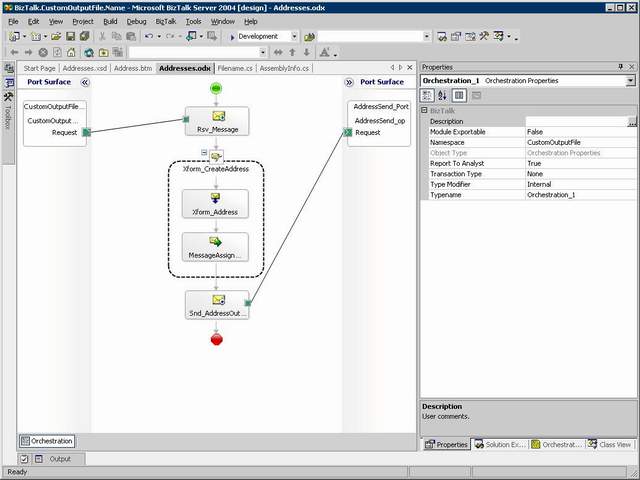
The flow of the orchestration is as follows:
- A message is received from the specified receive location.
- It is then transformed using the Address map (Please note this is a dummy map which is not needed. In this example, I have tried to keep to the original project that I created).
- The receive file name is changed.
- The constructed message with new file name is sent to send location.
Within the Message Assignment shape (after the Transform Shape) is the code that sets the file name.
filename = BizTalk.CustomOutputFile.CSharp.Filename.GetFileName("Address");
Address_Output(FILE.ReceivedFileName) = "VIS_HA_" + filename + ".xml";
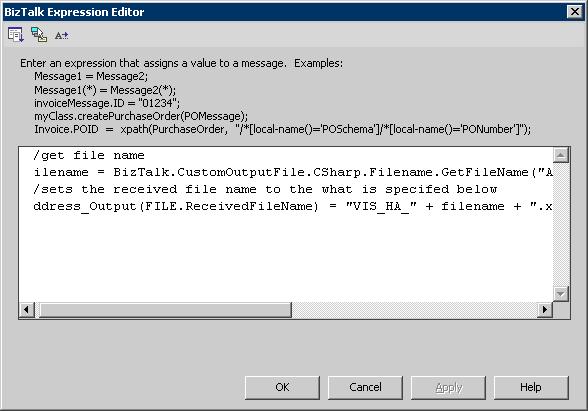
As you can see, the message receive name is changed. This is done using the %SourceFileName% macro available for send handlers within BizTalk 2004.
See below for other macros available:
|
Macro name
|
Substitute value
|
|
%datetime%
|
Coordinated Universal Time (UTC) date time in the format YYYY-MM-DDThhmmss (for example, 1997-07-12T103508).
|
|
%datetime_bts2000%
|
UTC date time in the format YYYYMMDDhhmmsss, where sss means seconds and milliseconds (for example, 199707121035234 means 1997/07/12, 10:35:23 and 400 milliseconds).
|
%datetime.tz%
|
Local date time plus time zone from GMT in the format YYYY-MM-DDThhmmssTZD, (for example, 1997-07-12T103508+800).
|
|
%DestinationParty%
|
Name of the destination party. The value comes from message the context property BTS.DestinationParty.
|
|
%DestinationPartyID%
|
Identifier of the destination party (GUID). The value comes from the message context property BTS.DestinationPartyID.
|
|
%DestinationPartyQualifier%
|
Qualifier of the destination party. The value comes from the message context property BTS.DestinationPartyQualifier.
|
|
%MessageID%
|
Globally unique identifier (GUID) of the message in BizTalk Server. The value comes directly from the message context property BTS.MessageID.
|
|
%SourceFileName%
|
Name of the file from where the File adapter reads the message. The file name includes extension and excludes the file path, for example, foo.xml. When substituting this property, the File adapter extracts the file name from the absolute file path stored in the FILE.ReceivedFileName context property. If the context property does not have a value, for example, if message was received on an adapter other than File adapter, then the macro will not be substituted and will remain in the file name as is (for example, C:\Drop\%SourceFileName%).
|
|
%SourceParty%
|
Name of the source party from which the File adapter received the message.
|
|
%SourcePartyID%
|
Identifier of the source party (GUID). The value comes from the message context property BTS.SourcePartyID.
|
|
%SourcePartyQualifier%
|
Qualifier of the source party from which the File adapter received the message.
|
|
%time%
|
UTC time in the format hhmmss.
|
|
%time.tz%
|
Local time plus time zone from GMT in the format hhmmssTZD (for example, 124525+530).
|
Port Configuration
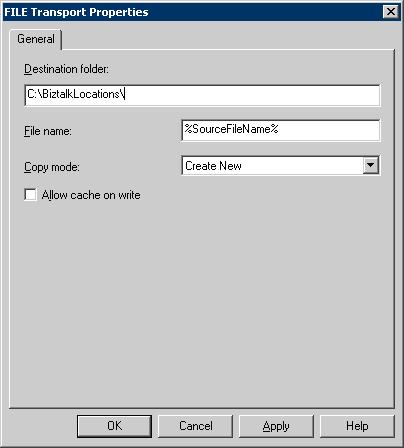
I created a receive and sent port, specifying locations where I wanted the files to be dropped.
On the send port, I set the File name property to:
%SourceFileName%
Finally
Once I had done this, I deployed the project. I started the orchestration and dropped a test file in the location and watch it create a file name using a sequence number.
End Note
- This macro is case sensitive.
- There is no need for the file extension on the end of this macro unlike other marcos.
- Other send handler macros can be combined.
i.e. %MessageID%+ %time%.xml


