Introduction
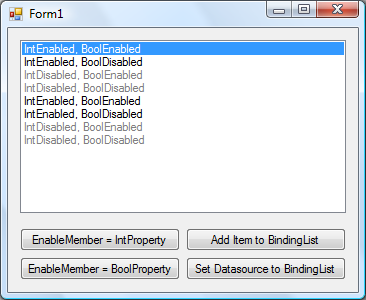
Recently I needed to create an application where certain features were turned on or off depending on the customer. A group of these features were contained in a pair of ListBoxes, but I couldn't find any way to disable certain items in the lists. I decided to make my own class which derives from ListBox and here's what I ended up with.
Now with databinding! It actually wasn't as complicated as I thought it would be. More information below.
Using the Code
The DisableListBox contains a list of booleans, ListEnables, which defines which items (in Items) are enabled and disabled. ListEnables[i] being true meaning Items[i] is enabled. I've provided functions to add/insert/remove/removeAt and clear items, so you don't have to worry about keeping the two lists synchronized.
public void AddItem(object item, bool enabled);

public void InsertItem(int index, object item, bool enabled);

public void RemoveItem(object item);

public void RemoveItemAt(int index);

public void ClearItems();
Now if you want to enable or disable items after adding them, I created a few simple methods for that:
public void EnableItem(object item);

public void EnableItemAt(int index);

public void DisableItem(object item);

public void DisableItemAt(int index);
I've also left ItemEnables exposed in case you want to mess around with the Items and ItemEnables lists yourself.
Now for the fun part. Version 1.1 allows databinding. The control exposes a property EnableMember which works just like DisplayMember and ValueMember. EnableMember will take the value in the property and use it to determine whether the item is enabled. It uses Convert.ToBoolean so it can handle numeric types and strings. If you don't set EnableMember when databinding, all of the items will default to enabled. Here's the code which runs when EnableMember or DataSource change:
private void RefreshItemEnables()
{
GetEnableProperty();
ItemEnables.Clear();
for (int i = 0; i < Items.Count; i++)
ItemEnables.Add(ProduceEnable(i));
for (int i = SelectedItems.Count - 1; i >= 0; i--)
if (!ItemEnables[SelectedIndices[i]])
SelectedItems.Remove(SelectedItems[i]);
}
private void GetEnableProperty()
{
if (DataSource != null && EnableMember != string.Empty)
{
enableProperty = null;
foreach (PropertyDescriptor property in DataManager.GetItemProperties())
if (property.Name == enableMember)
enableProperty = property;
}
}
private bool ProduceEnable(int i)
{
if (DataSource != null && enableProperty != null)
try
{
return Convert.ToBoolean(enableProperty.GetValue(Items[i]));
}
catch (InvalidCastException)
{
return false;
}
else
return true;
}
I also had to handle when items in the data source changed, which is done by registering some of the ListBox's DataManager (which is actually a CurrencyManager) events.
void DataManager_ListChanged(object sender, ListChangedEventArgs e)
{
switch (e.ListChangedType)
{
case ListChangedType.ItemAdded:
ItemEnables.Insert(e.NewIndex, ProduceEnable(e.NewIndex));
break;
case ListChangedType.ItemDeleted:
ItemEnables.RemoveAt(e.NewIndex);
break;
}
}
void DataManager_ItemChanged(object sender, ItemChangedEventArgs e)
{
if (e.Index > -1)
SetEnabledAt(e.Index, ProduceEnable(e.Index));
}
A lot of the work went into making sure the disabled items couldn't be selected. For this I had to override WndProc and catch the following messages:
private const int VK_PRIOR = 0x21;
private const int VK_NEXT = 0x22;
private const int VK_END = 0x23;
private const int VK_HOME = 0x24;
private const int VK_LEFT = 0x25;
private const int VK_UP = 0x26;
private const int VK_RIGHT = 0x27;
private const int VK_DOWN = 0x28;
private const int WM_KEYDOWN = 0x100;
private const int WM_MOUSEMOVE = 0x200;
private const int WM_LBUTTONDOWN = 0x201;
First I handled mouse selection:
if (m.Msg == WM_MOUSEMOVE || m.Msg == WM_LBUTTONDOWN)
{
Point clickedPt = new Point();
clickedPt.X = lParam & 0x0000FFFF;
clickedPt.Y = lParam >> 16;
for (int i = 0; i < Items.Count; i++)
if (!ItemEnables[i] && GetItemRectangle(i).Contains(clickedPt))
return;
}
Then keyboard selection (for brevity I've only shown half the code):
if (m.Msg == WM_KEYDOWN)
if (wParam == VK_DOWN || wParam == VK_RIGHT)
{
for (int i = SelectedIndex + 1; i < Items.Count; i++)
if (ItemEnables[i])
{
SelectedIndex = i;
break;
}
return;
}
else if (wParam == VK_UP || wParam == VK_LEFT)
{
...
}
else if (wParam == VK_PRIOR)
{
if (ItemEnables.Count == 0)
return;
int currentIndex = Math.Max(0, SelectedIndex);
int toJump = NumVisibleItems() - 1;
if (currentIndex >= toJump)
{
for (int i = currentIndex - toJump; i >= 0; i--)
if (ItemEnables[i])
{
SelectedIndex = i;
return;
}
}
else
toJump = currentIndex;
for (int i = currentIndex - toJump; i <= currentIndex; i++)
if (ItemEnables[i])
{
SelectedIndex = i;
break;
}
return;
}
else if (wParam == VK_NEXT)
{
...
}
else if (wParam == VK_END)
{
for (int i = ItemEnables.Count - 1; i >= 0; i--)
if (ItemEnables[i])
{
SelectedIndex = i;
break;
}
return;
}
else if (wParam == VK_HOME)
{
...
}
The final task was to handle the drawing of the disabled items. This was done by overriding OnDrawItem after first setting DrawMode = DrawMode.OwnerDrawFixed; in the constructor. I decided to expose two properties, EnabledItemColor and DisabledItemColor to set the text color of the items. These are defaulted to Black and Gray respectively in the constructor. I also added code to handle RightToLeft being set and making sure it displays exactly like a ListBox.
protected override void OnDrawItem(DrawItemEventArgs e)
{
if (e.Index > -1 && !suspendDraw && !IsDesignMode())
{
e.DrawBackground();
Color color;
if (Enabled && ItemEnables[e.Index])
if ((e.State & DrawItemState.Selected) == DrawItemState.Selected)
color = Color.White;
else
color = EnabledItemColor;
else
color = DisabledItemColor;
Rectangle shiftedBounds;
TextFormatFlags alignment;
if (base.RightToLeft == RightToLeft.No)
{
shiftedBounds = new Rectangle(e.Bounds.X - 1, e.Bounds.Y, e.Bounds.Width,
e.Bounds.Height);
alignment = TextFormatFlags.Left;
}
else
{
shiftedBounds = new Rectangle(e.Bounds.X + 2, e.Bounds.Y, e.Bounds.Width,
e.Bounds.Height);
alignment = TextFormatFlags.Right;
}
string displayString = GetItemText(Items[e.Index]);
TextRenderer.DrawText(e.Graphics, displayString, e.Font, shiftedBounds, color,
alignment);
e.DrawFocusRectangle();
}
base.OnDrawItem(e);
}
Points of Interest
I had a fun time trying to get the name of the DisableListBox to show up in design mode, just like ListBox does it. Basically what this entailed was having the DrawMode set to Normal in the designer but OwnerDrawFixed otherwise. Here's all the code that handles this:
private DrawMode drawMode = DrawMode.Normal;
[Browsable(false), EditorBrowsable(EditorBrowsableState.Never)]
public override DrawMode DrawMode
{
get { return drawMode; }
set
{
drawMode = value;
if (!IsDesignMode()) base.DrawMode = value;
}
}
public DisableListBox()
{
DrawMode = DrawMode.OwnerDrawFixed;
}
private bool IsDesignMode()
{
return DesignMode || LicenseManager.UsageMode == LicenseUsageMode.Designtime;
}
The IsDesignMode() method is there because DesignMode doesn't like to work all the time. You can read more about that here.
Special thanks go to Hans Passant (nobugz) and Nishant Sivakumar on the MSDN forums for helping me out with this.
Known Bug(s)
Changing the EnableMember while data is bound causes enabled items to become disabled. If a previously enabled item was the selected item, it is unselected. Unfortunately, CurrencyManager (which handles data binding) has no "unselected" position. If the data source changes before you select something else, the list will refresh and the disabled item will now be selected.
I don't know how to solve this because there's always the case where all the items are disabled so I can't just set it to another item instead of removing the selection. Also, in this case the OnSelectedIndexChanged event doesn't even fire when the item is reselected. I'm clueless how to fix this so any suggestions are welcome.
The other "bugs" are that the DrawMode, SelectionMode and Sorted properties have been hidden. DrawMode has been hidden because changing it to Normal doesn't show the disabled items, and if you're going to change it to OwnerDrawVariable you'll have to change the OnDrawItem code anyways, so at that point you can unhide it if you want to be able to switch between OwnerDrawFixed and OwnerDrawVariable.
Sorted isn't implemented because to keep the two lists (Items and ItemEnables) synchronized I'll have to write a custom sort in the class, which just seems kind of wasteful. Plus I doubt anyone would use it all that much. If anyone would like to see it added just comment and we'll see.
SelectionMode is hidden because the multi-select options really screw things up. I don't know how to handle shift-clicking when there are disabled items in the middle, so like Sorted I won't be implementing this unless I get a request for it.
History
- July 29, 2009
- Updated to v1.2
- Added
EnableMemberError event which fires if an EnableMember value can't be converted to boolean, giving the exception and the index of the item - Bug Fix: Adding empty data source after the constructor threw an exception
- Bug Fix: Updating bound data source threw an exception
- Bug Fix: Page Up/Down and Home/End would let you select disabled items
- Bug Prevention: Disallows changing
SelectionMode and Sorted until those features are implemented
- July 17, 2009
- Updated to v1.1
- Added data binding and better drawing
- July 10, 2009


