Click here to Skip to main content
6,595,444 members and growing! (20,157 online)
Email Password   helpLost your password?
Languages » C / C++ Language » General     Intermediate License: The Code Project Open License (CPOL)

A progress disk similar to that in SQL Server 2005

By Amr Elsehemy ®

The use of built-in methods of GDI+ to draw a progress disk similar to the one in SQL Server 2005
C#, Windows, .NET, Visual Studio, GDI+, Dev
Posted:16 Jul 2006
Updated:31 May 2007
Views:49,457
Bookmarked:93 times
Announcements
Loading...
 
Search    
Advanced Search
Add to IE Search
printPrint   add Share
      Discuss Discuss   Broken Article?Report  
42 votes for this article.
Popularity: 6.00 Rating: 3.70 out of 5
4 votes, 9.5%
1
1 vote, 2.4%
2
3 votes, 7.1%
3
8 votes, 19.0%
4
26 votes, 61.9%
5

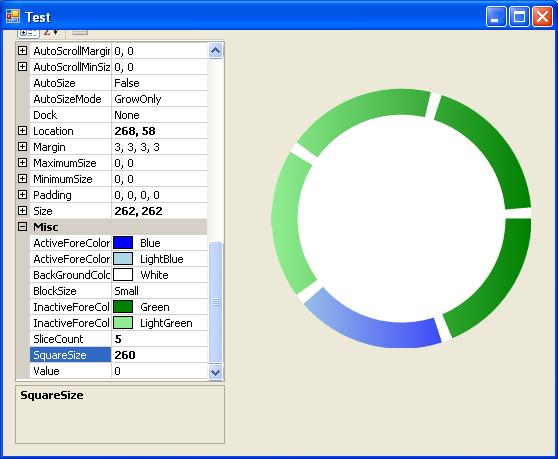
Sample screenshot

Introduction

Progress disk is a simple control that I wrote after I saw the one in SQL Server 2005. It can be used to replace the old progress bar with a nice and colorful mix of gradient colors.

Idea

The .NET 2.0 class library has the Graphics object, which is responsible for drawing 2D shapes. It has primitive shapes such as point, line, rectangle, ellipse, pie, etc. I used the DrawPie method to draw my control, which is formed by drawing 3 pie layers over top of each other:

  • The first layer in the bottom: a pie having a start angle of zero and a sweep angle of 360 degrees to draw a full circle that serves as the background of the control
  • The second layer in the middle: a pie that represent the blocks of the disk; 12 blocks (pie pieces) have been drawn, each having a sweep angle of 25 degrees and a separating angle of 5
  • The third layer in the top: similar to the first layer, but its function is to control the size of the blocks; the smaller the circle drawn, the bigger the blocks appear (i.e. having an inner circle with radius zero would give blocks having the shape of slices of a pizza)

Colors

I used a linear gradient brush to fill in the blocks: 2 colors for the inactive blocks and 2 for the active block. Properties added to keep the control flexible include:

  • Value: The current value of the progress disk
  • BackGroundColor: The color of the background
  • ActiveForeColor1 & ActiveForeColor2: These 2 for the block of current value
  • InactiveForeColor1 & ActiveForeColor2: These 2 for the rest of the blocks
  • SquareSize: The side length of the square containing the control
  • BlockSize: An enum for 6 different sizes
  • SliceNumber: The number of slices in the control (added by Coyotelapa)

Code

4 GraphicsPath objects were used to draw the control, one for each layer and an extra one to color the block with the current value.

    protected override void OnPaint(PaintEventArgs e)
        {
            e.Graphics.SmoothingMode = SmoothingMode.AntiAlias;
            region = new Region(ClientRectangle);
            if (backGrndColor == Color.Transparent)
            {
                region.Exclude(bkGroundPath2);
                Region = region;
            }

            e.Graphics.FillPath(new SolidBrush(backGrndColor), bkGroundPath1);
            e.Graphics.FillPath(
            new LinearGradientBrush(new Rectangle(0, 0, size, size), 
                inactiveforeColor1, inactiveforeColor2,
            value * 360 / 12, true), valuePath);
            e.Graphics.FillPath(
            new LinearGradientBrush(new Rectangle(0, 0, size, size), 
                activeforeColor1, activeforeColor2,
            value * 360 / 12, true), freGroundPath);
            e.Graphics.FillPath(new SolidBrush(backGrndColor), bkGroundPath2);

            base.OnPaint(e);
        }

    //The Render method called on any change to control(size,colors,..)

    private void Render()
        {
            
            bkGroundPath1.Reset();
            bkGroundPath2.Reset();
            valuePath.Reset();
            freGroundPath.Reset();
            bkGroundPath1.AddPie(new Rectangle(0, 0, size, size), 0, 360);

            //just in case...

            if (sliceCount == 0)
            {
                sliceCount = 12;
            }

            float sliceAngle = 360 / sliceCount;
            float sweepAngle = sliceAngle - 5;
            for (int i = 0; i < sliceCount; i++)
            {
                if (value != i)
                {
                    valuePath.AddPie(0, 0, size, size, i * sliceAngle, 
                        sweepAngle);
                }
            }
            bkGroundPath2.AddPie(
            (size / 2 - size * blockRatio), (size / 2 - size * blockRatio),
            (blockRatio * 2 * size), (blockRatio * 2 * size), 0, 360);
            freGroundPath.AddPie(new Rectangle(0, 0, size, size), 
                value * sliceAngle, sweepAngle);
            Invalidate();
        }

History

  • 16 July, 2006 - Original version posted
  • 29 July, 2006 - Updated after adding improvements made by Coyotelapa and fixing some bugs
  • 31 May, 2007 - Article edited and moved to the main CodeProject.com article base

License

This article, along with any associated source code and files, is licensed under The Code Project Open License (CPOL)

About the Author

Amr Elsehemy ®


Member

Amr is a .Net developer living in Cairo/Egypt.

Works now as software developer and tranier at SCS.

Main interests : Windows,GDI+,SqlServer, ASP.Net,Custom controls and others.

Academics:
BSc Computer and Information Sciences June 2006.

Certifications:
MCSD C#.Net
MCTS:SQL Server 2005

Blog: here

Occupation: Web Developer
Location: Egypt Egypt

Other popular C / C++ Language articles:

Article Top
You must Sign In to use this message board.
FAQ FAQ 
 
Noise Tolerance  Layout  Per page   
 Msgs 1 to 25 of 29 (Total in Forum: 29) (Refresh)FirstPrevNext
AnswerProgressDisk whit IsIndeterminate PinmemberCarlos Gutierrez6:07 29 Jan '09  
QuestionSlight clipping? Pinmembermentatmatt5:07 25 Jun '08  
GeneralVery Nice PinmemberPaul Conrad16:50 1 Jun '07  
GeneralRe: Very Nice PinmemberAmr Elsehemy®11:33 3 Jun '07  
GeneralRe: Very Nice PinmemberPaul Conrad16:06 3 Jun '07  
GeneralRe: Very Nice PinmemberAmr Elsehemy®1:57 1 Aug '07  
GeneralWOW..... I really needed it Pinmemberahmedsayed_ig12:06 18 Sep '06  
GeneralCopyright Problem PinmemberPixelated20:15 1 Aug '06  
GeneralRe: Copyright Problem PinmemberAmr Aly Elsehemy8:04 2 Aug '06  
GeneralThis rocks! PinmemberPixelated19:58 1 Aug '06  
GeneralRe: This rocks! PinmemberAmr Aly Elsehemy8:09 2 Aug '06  
GeneralRe: This rocks! PinmemberPixelated11:32 2 Aug '06  
GeneralBuilt-in timer PinmemberMerryWanderer14:50 28 Jul '06  
GeneralSliceCount Pinmembertim_mcgwyn0:39 28 Jul '06  
GeneralRe: SliceCount PinmemberCoyotelapa1:56 14 Aug '06  
GeneralBug Fixes / Improvements PinmemberCoyotelapa5:21 17 Jul '06  
GeneralRe: Bug Fixes / Improvements PinmemberAmr Aly Elsehemy14:56 18 Jul '06  
GeneralRe: Bug Fixes / Improvements PinmemberCoyotelapa23:01 18 Jul '06  
GeneralResize problem Pinmembertzvi9:38 16 Jul '06  
GeneralRe: Resize problem PinmemberAmr Aly Elsehemy14:10 16 Jul '06  
GeneralTip Pinmemberleppie8:00 16 Jul '06  
GeneralRe: Tip PinmemberAmr Aly Elsehemy8:10 16 Jul '06  
GeneralA bug... PinmemberVlad Stanciu7:35 16 Jul '06  
GeneralRe: A bug... PinmemberAmr Aly Elsehemy7:49 16 Jul '06  
GeneralRe: A bug... PinmemberAmr Aly Elsehemy8:02 16 Jul '06  

General General    News News    Question Question    Answer Answer    Joke Joke    Rant Rant    Admin Admin   

PermaLink | Privacy | Terms of Use
Last Updated: 31 May 2007
Editor: Genevieve Sovereign
Copyright 2006 by Amr Elsehemy ®
Everything else Copyright © CodeProject, 1999-2009
Web16 | Advertise on the Code Project
