Introduction
Small C/C++ applications with a couple of modules are easy to manage. Developers can recompile them easily by calling the compiler directly, passing source files as arguments. That is a simple approach. However, when a project gets too complex with many source files it becomes necessary to have a tool that allows the developer to manage the project.
The tool I'm talking about is the make command. The make command is used not only to help a developer compile applications, it can be used whenever you want to produce output files from several input files.
This article is not a full tutorial, it focuses on C applications and how to use the make command and makefile to build them. There is a zip file with many samples in a directory structure. The most important files in the samples are the makefiles not the C source code. You should download the samples file and unzip it with the unzip command or any other preferred tool. So, for a better understanding of this article:
- Download make_samples.zip.
- Open a terminal session.
- Create a directory in your home directory.
- Move make_samples.zip to directory created.
- Unzip it: unzip make_samples.zip.
Contents
. Make Tool: Syntax Overview
make command syntax is:
make [options] [target]
You can type make --help to see all options make command supports. In this article an explanation of all those options are not in the scope. The main point is makefile structure and how it works. target is a tag (or name defined) present in makefile. It will be described later in this article.
make requires a makefile that tells it how your application should be built. The makefile often resides in the same directory as other source files and it can have any name you want. For instance, if your makefile is called run.mk then to execute make command type:
make -f run.mk
-f option tells make command the makefile name that should be processed.
There are also two special names that makes -f option not necessary: makefile and Makefile. If you run make not passing a file name it will look first for a file called makefile. If that does not exist it will look for a file called Makefile. If you have two files in your directory one called makefile and other called Makefile and type:
make <enter>
make command will process the file called makefile. In that case, you should use -f option if you want make command processes Makefile.
2. Basic Syntax of Makefiles
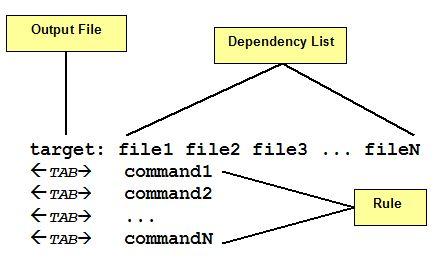
Figure 1: Makefile general syntax
A make file consists of a set of targets, dependencies and rules. A target most of time is a file to be created/updated. target depends upon a set of source files or even others targets described in Dependency List. Rules are the necessary commands to create the target file by using Dependency List.
As you see in figure 1 each command in the Rules part must be on lines that start with a TAB character. Space issue errors. Also, a space at end of the rule line may cause make issues an error message.
The makefile is read by make command which determines target files to be built by comparing the dates and times (timestamp) of source files in Dependency List. If any dependency has a changed timestamp since the last build make command will execute the rule associated with the target.
2.1 Testing sample1
It is time to make a simple test. Source code contains a directory called sample1. There are four files:
- app.c and inc_a.h: a simple C application.
- mkfile.r: A right makefile (.r extension means right).
- mkfile.w: An incomplete or bad written makefile (.w extension means wrong). It does not mean there are errors of syntax.
so, we have:
mkfile.r
# This is a very simple makefile

app: app.c inc_a.h
	cc -o app app.c
and
mkfile.w
# This is a very simple makefile

app: app.c
	cc -o app app.c
Apparently the difference between them seems irrelevant but in certain cases it is relevant. First, let us check the makefile's part:
- Character # is used to insert comments in makefiles. All text from the comment character to the end of the line is ignored.
- app is the target, the executable that must be build.
- app.c and inc_a.h are the dependencies of target app (inc_a.h is present only in mkfile.r).
- cc -o app app.c is the rule used to build target take into consideration any changes on files in dependency list.
To demonstrate how they work let us try the following sequence of commands (Figure 2):

Figure 2: sample1 sequence of commands.
- make command is invoked to process mkfile.r and you can see the rule being executed to create app executable.
- app is removed in order to force make command to build app again.
- Now the make command is invoked to process mkfile.w and we got the same result such as item 1.
- make command is invoked again by using mkfile.r but nothing is executed because target is up to date.
- Same result such as item 4, this time processing mkfile.w.
- The touch command is used to change the timestamp for inc_a.h, simulating a change made on file.
- mkfile.w did not recognize the change in inc_a.h module.
- mkfile.r is processed as expected.
- The touch command is invoked to change access time for app.c, simulating a change made on file.
- mkfile.w processed as expected.
- touch command is invoked to change access time for app.c, simulating a change made on file.
- mkfile.r processed as expected.
Now you see why mkfile.w is considered a bad or incomplete makefile. It does not take into consideration inc_a.h module because it is not described in the dependency list of app target.
2.2 Testing sample2
sample2 is another example of simple makefile but this time there is more than one single target. Again, there are 2 makefiles: mkfile.r and mkfile.w to demonstrate the right and the wrong way to write a makefile.
As you notice, the final executable (app target) is formed by 3 object files: main.o, mod_a.o and mod_b.o. Each one is a target with its source files that represent its dependency list.
app target is the main target or the target that will result the main executable file. Notice app dependency list. They are names of others targets.
Both makefiles are complete. The main difference is the order the targets are placed in the makefile.
So, we have:
mkfile.r
app: main.o mod_a.o mod_b.o
	cc -o app main.o mod_a.o mod_b.o

main.o: main.c inc_a.h inc_b.h
	cc -c main.c

mod_a.o: mod_a.c inc_a.h
	cc -c mod_a.c

mod_b.o: mod_b.c inc_b.h
	cc -c mod_b.c
and
mkfile.w
main.o: main.c inc_a.h inc_b.h
	cc -c main.c

mod_a.o: mod_a.c inc_a.h
	cc -c mod_a.c

mod_b.o: mod_b.c inc_b.h
	cc -c mod_b.c

app: main.o mod_a.o mod_b.o
	cc -o app main.o mod_a.o mod_b.o
Let us try the following sequence of commands (
Figure 3
):
Figure 3: sample2 sequence of commands.
- make command is invoked to process mkfile.w and you can see only the first rule is executed.
- All object files resulted from previous builds were removed to force make command to perform a full build.
- make command is invoked to process mkfile.r and all modules are correctly created.
- app is executed.
- All objects and executables were removed to force the make command to perform a full build.
- make command is invoked to process mkfile.w again. But this time app target is passed as an argument and all modules are correctly created.
So, what is wrong with mkfile.w ? Well, technically nothing when you inform the main target (figure 3 - item 6). However, when you do not inform a target the make command reads makefile from the beginning to find the first target to process. In the mkfile.w case, that target is main.o. main.o target only says to make to build main.o from main.c, inc_a.h and inc_b.h - there is nothing more related to do. Make will not read the next target.
Note: the first target read determines how make must interpret all other targets and which order it must follow during the building process. So, the first target should be the main target and it might relate to one or more secondary targets to perform the build.
Let us see app target. It is placed in different lines in both makefiles but they have identical syntax in both. So, item 3 and item 6 of figure 3 will produce the same result:
- app target says to make command it has 3 dependency to process first: main.o, mod_a.o and mob_b.o before building the final executable (app).
- Then, make starts finding for a main.o target and process it.
- After, it finds and processes mod_a.o.
- And finally, mod_b.o is processed.
- When all those 3 targets are built, app target rule is processed and app executable is created.
3. Phony Targets, Macros and Special Characters
Sometimes a target does not mean a file but it might represent an action to be performed. When a target is not related to a file it is called phony target.
For instance:
getobj:
mv obj
getobj target move all files with .o extension from obj directory to current directory -- not a big deal. However, you should be asking yourself: "What if there is no file in obj ?" That is a good question. In that case, the mv command would return an error that would be passed to the make command.
Note: make command default behavior is to abort the processing when an error is detected while executing commands in rules.
Of course, there will be situations that the obj directory will be empty. How will you avoid the make command from aborting when an error happens?
You can use a special character - (minus) preceding the mv command. Thus:
getobj:
	-mv obj/*.o .  2>/dev/null
- Tells the make to ignore errors. There is another special character: @ - Tells make not to print the command to standard output before executing. You can combine both always preceding the command:
getobj:
	-@mv obj/*.o .  2>/dev/null
There is a special phony target called all where you can group several main targets and phony targets. all phony target is often used to lead make command while reading makefile.
For instance:
all: getobj app install putobj
The make command will execute the targets in sequence: getobj, app, install and putobj.
Another interesting feature, make command supports is the concept of MACRO in makefiles. We can define a MACRO by writing:
MACRONAME=value
and access the value of MACRONAME by writing either $(MACRONAME) or ${MACRONAME}.
For instance:
EXECPATH=./bin

INCPATH=./include

OBJPATH=./obj

CC=cc

CFLAGS=-g -Wall -I$(INCPATH)
While executing, make replaces $(MACRONAME) with the appropriated definition. Now we know what phony targets and macros are we can move to the next sample.
3.1 Testing sample3
sample3 has a bit more complicated makefile that uses macros, phony targets and special characters. Also, when you list the sample3 directory you can see 3 sub-directories:
- include - where all .h files are.
- obj - directory where all object files are moved after build and from where they are moved before starting a new build.
- bin - where final executables are copied.
The .c sources are kept along with makefile in the sample3 root. When the makefile file name is makefile then, there is no need to use -f option in the make command.
Files are separated in directories to make this sample more realistic. makefile listing follows:
Figure 4: sample3 makefile listing.
Of course, line numbers do not exist in makefile. I use them here only to make it easier to read the source.
So, we have:
- Lines 7 - 13: definition of some MACROS:
- INSTPATH, INCPATH and OBJPATH refers to sub-directories.
- CC and CFLAGS are the compiler and most common compiler options respectively. Notice you can change CC to point to gcc compiler if you want.
- COND1 and COND2 are commands to be executed then macros are referred.
- Line 17: all phony target as very first target in the makefile. all target defines the order which targets will be executed, from left to right:
- getobj is the first followed by app (main.o, mod_a.o and mod_b.o are dependencies of app and will be called if necessary), next make calls install target and finally putobj is executed.
- Lines 19-29: list targets responsible for building application itself. Notice the use of CC and CFLAGS macros. Remember macros are replaced by values. Thus $(CC) is read as cc and CFLAGS is read as -g -Wall -I./include. Then, line 20 is interpreted as:
- -g -Wall -I./include -o app main.o mod_a.o mod_b.o
- Line 31-34: list getobj and putobj targets. Those are phony targets that helps or organizes build process:
- getobj is referred in all target to be executed first. It is responsible for bringing object files from obj directory ($(OBJPATH)) before build starts. Thus, make command can compare timestamps from objects against timestamps from source code files and rebuild or not the object file according changes in source files.
- putobj does the opposite. After a successfully build it move all object files back to obj directory.
- Line 38: install target is another phony target that shows the use of if shell statement. Shell programming is not in the scope of this article. So, if you want more information google it. What install target does will be explained later in the article.
- Line 47: cleanall target deletes all files to force make command rebuild all again. It is not called during build process. You can call it by passing it as argument to make command:
make cleanall
You should also notice the use of special characters (- and @) preceding the commands in getobj, putobj, install and cleanall. As explained before, - tells make to continue processing even an error occurs and @ tells make not to print command before executing it.
Note: On install target every line finishes with a "\" and "\" character must be the last character in the line (no spaces after it) otherwise make might issue the following error:
line xxx: syntax error: unexpected end of file
Where xxx is the line considering the beginning of the block.
In fact, every time you want to group commands with \ it must be the last character in the line.
Let us try the following sequence of commands (Figure 5):
Figure 5: sample3 sequence of commands.
- make command is invoked with no arguments since makefile name is makefile.
- If there are no files in the obj directory getobj will issue an error. However, the - (minus) character preceding mv command (line 32) prevents make from aborting processing.
- That message is printed only if condition is TRUE (line 39). The first thing to notice is the @ character preceding the if statement. That makes the entire block not to be printed. The condition compares two strings that are the result of two commands defined by COND1 and COND2 macros (lines 12-13). The condition uses a combination of shell commands to verify if app and ./bin/myapp timestamps are different. If true, app is copied to ./bin with myapp name and has its file permissions changed to allow only file owner has access over it. If no condition was imposed then install target would be executed every time make was invoked.
- make command is invoked again but only getobj and putobj are executed. No build happens and consequently no install.
- touch command changed timestamp for inc_a.h
- make command is invoked and only targets that has inc_a.h as dependency are rebuilt.
- Just listing ./bin contents. Notice myapp permissions.
- An example of how to use cleanall target.
4. Suffix Rules: Simplifying Makefiles Syntax
When your project gets complex with many source files it is not practical to create targets representing each one of those source files. For instance, if your project got 20 .c files to build a single executable and each source uses the same set of compiler flags in building then, there should be such a way you can instruct make command to perform the same command to all source files.
The way I'm talking about is called Suffix Rules or rules based upon file extension. For instance, the following suffix rule:
.c.o:
    cc -c $<
tells the make command: given a target file with .o extension there should be a dependency file with .c extension (same name -- only extension changes) that can be build. Thus, a file main.c will produce a file main.o. Notice .c.o is not a target but two extensions (.c and .o).
The syntax of a suffix rule is:
Figure 6: Suffix Rule syntax
The special character $< will be explained later in this article.
4.1 Testing sample4 - mkfile1
Let us try sample4. There are some makefiles to test. The first one, mkfile1:
.c.o:
    cc -c $<
You see it only contains a suffix rule definition, nothing more.
Let us try the following sequence of commands (Figure 7):
Figure 7: sample4 sequence of commands - mkfile1.
- make command is invoked to process mkfile1 makefile. Nothing happens because there is no target defined.
- make command is invoked again but this time passing main.o target. This time the make command compiles main.c following .c.o suffix rule.
There is a point to be understood here. mkfile1 only defines a suffix rule, no targets. So, why main.c is compiled ?
The make command processed main.o as if the following target was defined in mkfile1:
main.o: main.c
    cc -c main.c
So, the suffix rule .c.o tells the make command: "for each xxxxx.o target there must be a xxxxx.c dependency to build."
If the command was:
make -f mkfile1 mod_x.o
make would return an error because there is no mod_x.c in the directory.
- make command is invoked passing two targets.
- make command is invoked passing three targets. As those target has already been built then it did not do them again.
4.2 More Special Characters
What is that $< defined in suffix rule? That means name of current dependency. In the case of .c.o suffix rule, $< is replaced by xxxxx.c file when rule is executed. There are others:
| $? | list of dependencies changed more recently than current target. |
| $@ | name of current target. |
| $< | name of current dependency. |
| $* | name of current dependency without extension. |
These next samples are going to show the use of those characters.
4.3 Testing sample4 - mkfile2
mkfile2 shows other way to use suffix rules. Now it only renames file.txt to file.log:
.SUFFIXES: .txt .log

.txt.log:
	@echo "Converting " $< " to " $*.log
	mv $< $*.log
The keyword .SUFFIXES: tells the make command what are the file extensions that are going to be used in the makefile. In case of mkfile2, they are .txt and .log. Some extensions like .c and .o are default and do not need to be defined with .SUFFIXES: keyword.
Let us try the following sequence of commands (Figure 8):
Figure 8: sample4 sequence of commands - mkfile2.
- First, file.txt is created.
- make command is invoked passing file.log target and rule is executed.
The suffix rule .txt.log tells make command: "for each xxxxx.log target there must be a xxxxx.txt dependency to be build (in this case, renamed).". It works as if file.log target was defined in mkfile2:
file.log: file.txt
    mv file.txt file.log
- Show that file.txt was renamed to file.log.
4.4 Testing sample4 - mkfile3 and mkfile4
So far we saw how to define suffix rules but we did not use them in a real situation. So, let us move to a more realistic scenario by using the C source code in the sample4 directory.
First let us try mkfile3:
.c.o:
	@echo "Compiling" $< "..."
	cc -c $<

app: main.o mod_a.o mod_b.o
	@echo "Building target" $@ "..."

	cc -o app main.o mod_a.o mod_b.o
You see a suffix rule at beginning and the app target.
Let us try the following sequence of commands (Figure 9):
Figure 9: sample4 sequence of commands - mkfile3.
- make command is invoked to process mkfile3 makefile. make command reads app target and processed the dependencies: main.o, mod_a.o and mod_b.o - following the suffix rule .c.o make command knows that: "for each xxxxx.o there is a dependency xxxxx.c to be build"
- make command is invoked again but nothing is processed because app target is up to date.
- main.c access time is updated to force make command recompiled it.
- make command recompiled only main.c as expected.
- make command is invoked but nothing is processed because app target is up to date.
- inc_a.h (that is included by main.c and mod_a.c) is updated to force make command to recompile those modules.
- make command is invoked but nothing happens(?)
What went wrong at item 7? Well, there is nothing saying to make command that inc_a.h is a dependency of main.c or mod_a.c.
A solution is to write the dependencies for each object target:
.c.o:
	@echo "Compiling" $< "..."
	cc -c $<

app: main.o mod_a.o mod_b.o
	@echo "Building target" $@ "..."

	cc -o app main.o mod_a.o mod_b.o

main.o: inc_a.h inc_b.h
mod_a.o: inc_a.h
mod_b.o: inc_b.h
You can edit and add the last three lines and try the sequence of commands of figure 9 again. Do not forget to remove objects before testing it again:
rm -f *.o app
Well, add the dependencies for each module indicating the exact include file each one includes is good but not practical. Imagine your project with 50 .c and 30 .h. That is a lot of typing!
A more practical solution can be seen in mkfile4:
OBJS=main.o mod_a.o mod_b.o

.c.o:
	@echo "Compiling" $< "..."
	cc -c $<

app: main.o mod_a.o mod_b.o
	@echo "Building target" $@ "..."

	cc -o app main.o mod_a.o mod_b.o

$(OBJS): inc_a.h inc_b.h
Let us try the following sequence of commands and see what happens (Figure 10):
Figure 10: sample4 sequence of commands - mkfile4.
- make command is invoked to process mkfile4 makefile.
- > mod_a.c timestamp is updated to force make command recompiled it.
- make command recompiled only mod_a.c as expected.
- inc_a.h (that is included by main.c and mod_a.c) is updated to force the make command to recompile those modules.
- make command recompiled all modules (?)
Why was mod_b.c recompiled at item 5
mkfile4 defines inc_a.h as a dependency of mod_b.c and it is not. I mean, inc_a.h is not included by mod_b.c. In fact, makefile tells the make command that inc_a.h and inc_b.h are dependencies of all modules. I did mkfile4 that way because it is more practical and that does not mean there is any error. You can separate headers by module if you want.
Tip: When working on big projects I used to put only master header files as dependency. That means, those headers that are included by all (or most) modules.
5. A Makefile Calling Others Makefiles
When you are working in a large project with many different parts such as libraries, DLLs, executables, it is a good idea to split them in a directory structure by keeping the source of each module in its own directory. Thus, each source directory might have its own makefile and it can be called by a master makefile.
The master makefile is kept into root directory and it changes into each sub-directory to invoke the module's makefile. It sounds simple and it really is.
But there is a trick you should know when you force the make command to change into other directory. For instance, let us test the simple makefile:
target1:
	@pwd
	cd dir_test
	@pwd
By invoking make command the result is:
Figure 11: changing current directory -wrong way.
The pwd command prints the current directory. In that case is the /root directory. Notice the second pwd command print the same directory even after cd dir_test has been executed. What that means?
You should know that most shell commands like (cp, mv and so on) force make command:
- open a new instance of the shell;
- execute the command;
- close instance of the shell;
In fact, make creates three different instances of shell to process each of those commands.
cd dir_test was executed successfully only in second instance of the shell created by make.
The solution is the following:
target1:
	(pwd;cd dir_test;pwd)
See the result:
Figure 12: changing current directory -right way.
The brackets ensure that all commands are processed by a single shell - make command starts only one shell to execute all three commands.
So, you can imagine what would happen when you do not use brackets and your makefile was:
target1:
    cd dir_test
    make
See the result:
Figure 13: Recursive make calling.
You see what happens when you try it without brackets? It is calling the same makefile recursively. For instance, make[37] means the 37th instance of make command.
5.1 Testing sample5
sample5 demonstrates how to call others makefiles via a master makefile. When you list sample5 directory you find:
- tstlib directory: contains a the source code of a simple library (tlib.a).
- application directory: contains the application's source code that links to tlib.a.
- makefile: master makefile.
- runmk: a shell that calls master makefile. You don't really need this shell but when make command processes a makefile that changes into other directory make uses to show an annoying message that informs it is entering or leaving a directory. You should use --no-print-directory to avoid those messages.
master makefile listing:
COND1=`stat app 2>/dev/null | grep Modify`
COND2=`stat ./application/app 2>/dev/null | grep Modify`

all: buildall getexec

buildall:
	@echo "****** Invoking tstlib/makefile"
	(cd tstlib; $(MAKE))
	@echo "****** Invoking application/makefile"

	(cd application; $(MAKE))

getexec:
	@if [ "$(COND1)" != "$(COND2)" ];\
	then\
		echo "Getting new app!";\
		cp -p ./application/app . 2>/dev/null;\
		chmod 700 app;\
	else\
		echo "Nothing done!";\
	fi

cleanall:
	-rm -f app
	@echo "****** Invoking tstlib/makefile"
	@(cd tstlib; $(MAKE) cleanall)

	@echo "****** Invoking appl/makefile"
	@(cd application; $(MAKE) cleanall)
It is not a big deal. 4 phony targets. all target starts calling buildall target and you see make command is commanded to enter and try to build two different projects. Notice the $(MAKE) macro that is replaced by make word. $(MAKE) macro is default and do not need to be defined.
cleanall target is used indirectly to remove all objects and executables. Notice @ character preceding open brackets to force make not to print the commands.
Let us try the following sequence of commands (Figure 14):
Figure 14: sample5 sequence of commands
- make command is invoked via runmk shell to process master makefile.
- all target calls buildall target and since it is a phony target it will be executed always. First, makefile in the tstlib directory is called and tlib.a is built. See the makefile listing:
TLIB=tlib.a
OBJS=tstlib_a.o tstlib_b.o
CC=cc
INCPATH=.
CFLAGS=-Wall -I$(INCPATH)

.c.o:
	$(CC) $(CFLAGS) -c $<

$(TLIB): $(OBJS)
	ar cr $(TLIB) $(OBJS)

$(OBJS): $(INCPATH)/tstlib.h

cleanall:
	-rm -f *.o *.a
- Next, the makefile in the application directory is called and app is built. See the makefile listing:
OBJS=main.o mod_a.o mod_b.o
CC=cc
INCLIB=../tstlib
LIBS=$(INCLIB)/tlib.a
CFLAGS=-Wall -I. -I$(INCLIB)

.c.o:
	$(CC) $(CFLAGS) -c $<

app: $(OBJS) $(LIBS)
	$(CC) $(CFLAGS) -o app $(OBJS) $(LIBS)

$(OBJS): inc_a.h inc_b.h $(INCLIB)/tstlib.h

cleanall:
	-rm -f *.o app
Notice tlib.a is a dependency in app target. Thus, whenever tlib.a is rebuilt, app must be linked to it again.
- getexec target was called in master makefile. Since app executable is not present in the sample5 directory it is copied from the application directory.
- touch command is used to change timestamp of tstlib/tstlib_b.c, simulating a change made on file.
- make command is invoked via runmk shell to process master makefile.
- tlib.a is rebuilt.
- app is linked again to tlib.a since it was changed.
- getexec target was called in master makefile. Since application/app is different from app it is updated in the sample5 directory.
- touch command is used to change timestamp of application/inc_a.h, simulating a change made on file.
- make command is invoked via runmk shell to process master makefile.
- tlib.a is not processed since there was no change on it.
- app rebuilt (all modules) because inc_a.h is dependency of all .c source.
- getexec target was called in master makefile. Since application/app is different from app it is updated in sample5 directory.
- cleanall target is executed in master makefile.
6. Conclusion
As you saw through this article, make command is a powerful tool that can help you a lot in your projects. As I said, this article does not intend to be a tutorial just a reference of basic aspects of how to write makefiles. There are lots of information on internet about make command and makefiles. Also, there are books that covers others features not present in this article.
Hope this helps.
History
First version.


