1. Introduction
This is a follow-up to the "An attribute based approach to business object validation" article in which I introduced the use attributes and reflection to validate business objects. I also promised to write another article on data converters and method based validators, and here it is.
2. Background
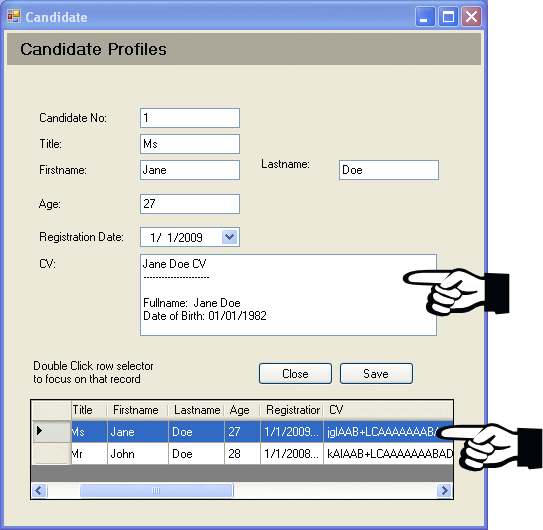
In this article, I will use an example to show how you can validate your business object using a method based attribute and how you can convert data assigned to properties when it is saved and re-convert it when the business object is read. All this will be based on attributes.
Sometimes a need arises, to store data differently from the way it is viewed. For example, if you have a field which would have comments you may want to compress them on storage. This will certainly be good for your bandwidth - especially for us here in Africa.
3. The Business Object
In this example, let's use a Candidate object. I'm assuming a company considering interviewees.
I would like you to look closely at the attributes that we have used to decorate the object below. The attributes will enable validation of the business object much easier than having to write some instructions on the presentation layer. Some attributes below will help in converting the data so that it is stored differently from the way it is viewed.
public class Candidate : EntityObject
{
#region Constructors
public Candidate(DataContext dataContext)
{
}
public Candidate()
{
}
#endregion
#region Properties
[Required]
[MethodRule("Unique")]
public int CandidateNo { get; set; }
[DefaultValue("Mr")]
public string Title { get; set; }
[Required]
public string Firstname { get; set; }
[Required]
public string Lastname { get; set; }
[InRange(18, 95)]
[DefaultValue(30)]
public int? Age { get; set; }
[MethodRule("ValidRegistration")]
public DateTime RegistrationDate { get; set; }
[DataConversion(typeof(StringZipper))]
public string CV { get; set; }
#endregion
#region Methods
public override string ToString()
{
return string.Format("ObjectID: {0} \nName: {1} \nSurname : {2}" +
"\nAge: {3} \nRegistration Date: {4} \nCV: {5}",
ObjectID, Firstname, Lastname, Age, RegistrationDate, CV);
}
#endregion
#region Method Based Validators
public void ValidRegistration(object sender, ValidateEventArgs e)
{
e.Valid = true;
if (RegistrationDate.Date < DateTime.Parse("01/01/2008 8:00:00"))
{
e.Valid = true;
e.ErrorMessage = "Impossible! The client could not have registered" +
"before we started this business.";
e.Property.SetValue(this, DateTime.Parse("01/01/2008 8:00:00"), null);
}
}
public void Unique(object sender, ValidateEventArgs e)
{
if (this.IsNew)
{
var query = from candidate in
DataSettings.DataContext.EntityObjects.OfType<candidate>()
where candidate.CandidateNo == this.CandidateNo
select candidate;
e.Valid = query.Count() <= 1;
e.ErrorMessage = "The Candidate number must be unique.";
}
}
#endregion
}
The collection of attributes included in this object are:
Required - To ensure that the property value is entered InRange - A range validator DefaultValue - Indicates that if value is omitted, the default will be assigned to property MethodRule - Executes a method specified on saving the object. DataConversion - Converts the data assigned to property using a conversion class specified.
In this example, I'm saving all my objects in a cache-like object, which I call DataSettings.DataContext.EntityObjects, and I use the code below to find an object.
Guid CandidateID = (Guid)dataGridView1[9, e.RowIndex].Value;
Candidate candidate = new Candidate(); candidate.Load(CandidateID);
if (candidate != null)
{
candidateBindingSource.DataSource = candidate;
cVTextBox.Text = candidate.CV;
}
If we save the data, we would have the following:

4. The Business Object Base
In this example, I would like you to focus on the area where I create a delegate using Delegate.CreateDelegate(typeof(EventHandler)...
public class EntityObject : IEntityObject
{
#region Internal Fields
internal Guid objectID;
public bool IsNew { get; set; }
public bool IsDirty { get; set; }
#endregion
#region Public Properties
public readonly List<error> Errors = new List<error>();
public DataContext dataContext;
public Guid ObjectID
{
get
{
return objectID;
}
set
{
objectID = value;
}
}
#endregion
#region Constructors
public EntityObject()
{
if (dataContext == null)
{
if (DataSettings.DataContext == null)
DataSettings.DataContext = new DataContext();
this.dataContext = DataSettings.DataContext;
}
objectID = Guid.NewGuid();
IsNew = true;
IsDirty = false;
}
public EntityObject(DataContext dataContext)
{
if (dataContext == null)
{
if (DataSettings.DataContext == null)
DataSettings.DataContext = new DataContext();
this.dataContext = DataSettings.DataContext;
}
else
this.dataContext = dataContext;
}
#endregion
..
public virtual void Validate(object sender, ValidateEventArgs e)
{
Errors.Clear();
if (this.OnValidate != null) this.OnValidate(this, new ValidateEventArgs());
try
{
foreach (PropertyInfo prop in this.GetType().GetProperties())
{
object data = prop.GetValue(this, null);
#region Default Value setting
....
#endregion
#region IsRequired Validation
....
#endregion
#region InRange Validation
....
#endregion
#region MethodBasedValidation
foreach (object customAttribute in
prop.GetCustomAttributes(typeof(MethodRuleAttribute), true))
{
EventHandler<validateeventargs> eventHandler =
Delegate.CreateDelegate(typeof(EventHandler<validateeventargs>),
this, (customAttribute as MethodRuleAttribute).ValidationMethod) as
EventHandler<validateeventargs>;
ValidateEventArgs args = new ValidateEventArgs(prop,
string.Format("Value assigned to {0} is invalid.", prop.Name));
eventHandler(this, args); if (!args.Valid)
{
Errors.Add(new Error(this, prop.Name, args.ErrorMessage));
}
}
#endregion
#region Data Converters
foreach (object customAttribute in prop.GetCustomAttributes(
typeof(DataConversionAttribute), true))
{
Type conversionType = (customAttribute as
DataConversionAttribute).ConverterType;
prop.SetValue(this, Converter.Instance
(conversionType).Change.ToPersistentType(data), null);
}
#endregion
}
}
catch (Exception ex)
{
throw new Exception("Could not validate Object!", ex);
}
finally
{
if (this.OnValidated != null) this.OnValidated(this, new ValidateEventArgs());
}
}
5. Method Based Validators
A delegate is a pointer to a method or event handler.
The .NET Framework has a very interesting feature which enables us to create delegates at runtime and bind them to event handlers.
The following is the algorithm for a method based validator:
- Go to next Property.
- If not exists, exit.
- Find associated attributes.
- If the attribute is a
MethodValidator proceed, else jump to 9.
- Create delegate, bind it to the method indicated on
MethodValidator.
- Create new Event arguments of validation type.
- Execute associated eventhandler, using the event arguments.
- If result on the event arguments is not valid, add Error to
this.Errors collection.
- Go to 1.
The main thing behind the method based validator is the ability to bind the event at runtime to a property, and thanks again to reflection. We can find attributes associated with a property and then we create a delegate which points to the event-handler presented at the attribute parameter. We then invoke that event handler using event arguments, which would then help us to obtain a response from the event handler which is then used to add associated Error to the object.Errors collection of this object.
EventHandler<validateeventargs> eventHandler = Delegate.CreateDelegate(
typeof(EventHandler<validateeventargs>), this,
(customAttribute as MethodRuleAttribute).ValidationMethod) as
EventHandler<validateeventargs>;
ValidateEventArgs args = new ValidateEventArgs(prop, string.Format
("Value assigned to {0} is invalid.", prop.Name));
eventHandler(this, args); if (!args.Valid) {
Errors.Add(new Error(this, prop.Name, args.ErrorMessage));
}
For more information on dynamic delegate creation, consult the MDSN documentation (here).
6. The Data Converters
The data converters enable us to change the data before it is stored. They inherit from the DataConverter class below.
We made the methods virtual so that you can override them for any implementation of conversion. The ToPersistentType(object value) is to enable conversion to storage type while FromPersistentType(object value) converts data back to viewable type.
public class DataConverter
{
    public virtual object ToPersistentType(object value)
    {
        throw new NotImplementedException();
    }

    public virtual object FromPersistentType(object value)
    {
        throw new NotImplementedException();
    }
}
The class below is one data converter that may be used to compress string data. You may decide to create another one to compress other data types or encrypt certain data when it's stored. That reminds me of a payroll application which I built and the clients did not want the column which stores salary to be readable to database administrators.
class StringZipper: DataConverter
{
    public override object ToPersistentType(object value)
    {
        return value == null ? null : (object)Zipper.Compress((string)value);
    }

    public override object FromPersistentType(object value)
    {
        return value == null ? null : (object)Zipper.Decompress((string)value);
    }
}
The code below shows how you can load the object within the base class.
public void Load(Guid entityObjectID)
{
EntityObject entityObject = new EntityObject(DataSettings.DataContext);
entityObject = dataContext.Load(entityObjectID);
entityObject.IsNew = false;
entityObject.IsDirty = false;
if (entityObject != null)
{
foreach (PropertyInfo prop in entityObject.GetType().GetProperties())
{
object data = prop.GetValue(entityObject, null);
#region Data Converters
if ((prop.Attributes == PropertyAttributes.None) && (data != null))
prop.SetValue(this, data, null);
foreach (object customAttribute in prop.GetCustomAttributes
(typeof(DataConversionAttribute), true))
{
Type conversionType =
(customAttribute as DataConversionAttribute).ConverterType;
prop.SetValue(this, Converter.Instance
(conversionType).Change.FromPersistentType(data), null);
}
#endregion
}
}
else
{
Console.WriteLine("Could not find object!");
}
}
7. Some of the Techniques Used in this Article
- Reflection
- Generics
- Anonymous types
- Delegates / Dynamic Delegates
- LINQ
8. Challenges and Limitations
- You cannot use reflection
.SetValue() on properties without setters specified, therefore your properties will have to be R/W.
DataBinding for convertible properties is not supported, else the user will see some garbled text on some controls.- I don't know whether to call it a limitation - typesafety and generics are not available on attributes. Just as you cannot have variables on the attribute declarations.

9. History


