Introduction
This article uses the Windows API’s to end the application running under windows environment. So here we will see how to import a function from unmanaged library to managed application. To simplify the process of using platform invoke in our program, we will create a class called Win32, Which will have all native declarations in it.
With C# we can use the Microsoft Windows API SendMessage function to close any active window that has a system menu with the Close option. Below Figure 1 displays the System Menu of Calculator application.
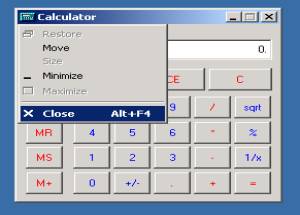
Figure 1. Displaying System Menu.
Details
In our sample Kill application we will use SendMessage function to send a message to any window in the environment provided the handle to the window is known. To know the handle we can use FindWindow function which will determine the handle associated with the window the user, wants to close.
In order to use FindWindow, you must know either the Class Name or the Caption (if any) of that window. One can get the information about the Class Name or the Caption using Microsoft Spy++ tool available in Visual Studio .Net Tools. Below Figure 2 shows the working of Spy++ tool.

Figure 2. Displaying usage of Microsoft Spy++ Tool.
So lets examine the Win32 class, which has all the Platform Invoke declarations. This class will simply group all the functions we need for our application.
public class Win32
{
public const int WM_SYSCOMMAND = 0x0112;
public const int SC_CLOSE = 0xF060;
[DllImport("user32.dll")]
public static extern int FindWindow(
string lpClassName, string lpWindowName );
[DllImport("user32.dll")]
public static extern int SendMessage(
int hWnd, uint Msg, int wParam, int lParam );
}
In C# the DllImport attribute is used to identify the name of the actual DLL that contains the exported functions. In order to apply the attribute the method must be defined as static and external.
We will be calling above class methods in button click event of Kill application. Following is the code snippet for it.
private void button1_Click(object sender, System.EventArgs e)
{
int iHandle=Win32.FindWindow(txtClsNm.Text ,txtWndNm.Text);
int j=Win32.SendMessage(iHandle, Win32.WM_SYSCOMMAND,
Win32.SC_CLOSE, 0);
}

Figure 3. Kill application sending “Close Message” to Calculator application.
For further reading on Platform Invoke


