Introduction
This project is about an application used by the Traveling Salesman, given a finite number of
'cities'(I have choosen cities from 1 to a finite number) along with the distance of travel
(distance between two cities is randomly choosen) between each pair of them, The aim is to find
the cheapest distance of visiting all the cities and returning to the starting point. Using GA we
can get an optimal solution to solve this problem.
This is only an example to look at calling COM Components and accessing SAFEARRAY in C#. I don't know
many things about genetic algorithm and please don't take take this code as demonstrating a problem to
solve using only genetic algorithms (GA). This is just one approach. The C++ code for GA I got from
the Internet.
Background (optional)
Disclaimer: I am not a GA and C# expert. I have reused C++ code to make it into a COM component
and my goal was to show some visualisation effects using new kid on the block C#. It's only an example
of GA coding.Any comments and criticism you have are most welcome.
Using the code
The main TSP component is written using COM via ATL, and the client application
using C#.
The TSP GA application will provide the following operations:
- Set number of cities.
- Set Population size for each generation.
- Set Generation Size.
- Set Cross Over Percentage.
- Set Mutation rate.
- Start TSPGA Algorithm.
- Gets best Distance for each generation.
- Gets overall best distance for all generations.
- Gets overall best path traversed.
- Gets Worst distance.
Design
COM Server
Find below the IDL file for details of methods exposed from interface:
interface ITSPGAAlgorithm : IDispatch
{
   [propput, id(1), helpstring("property SetPopulationSize")]
                    HRESULT SetPopulationSize([in] short newVal);
   [propput, id(2), helpstring("property GetPopulationSize")]
                    HRESULT GetPopulationSize([in] short* newVal);
   [propget, id(3), helpstring("property GenerationSize")]
                    HRESULT GenerationSize([out, retval] short *pVal);
   [propput, id(3), helpstring("property GenerationSize")]
                    HRESULT GenerationSize([in] short newVal);
   [propget, id(4), helpstring("property Mutate")]
                    HRESULT Mutate([out, retval] double *pVal);
   [propput, id(4), helpstring("property Mutate")]
                    HRESULT Mutate([in] double newVal);
   [propget, id(5), helpstring("property CitySize")]
                    HRESULT CitySize([out, retval] short *pVal);
   [propput, id(5), helpstring("property CitySize")]
                    HRESULT CitySize([in] short newVal);
   [id(6), helpstring("method SetCrossOverRate")]
                    HRESULT SetCrossOverRate([in] short nCrossOverPercentage);
   [id(7), helpstring("method StartGAForTSP")]
                    HRESULT StartGAForTSP();
   [id(8), helpstring("method GetAllBestDistancesByGenerations")]
                    HRESULT GetAllBestDistancesByGenerations([out,retval]
                                                             VARIANT*pAllDistances);
   [id(9), helpstring("method GetBestPathForTSP")]
                    HRESULT GetBestPathForTSP([out, retval] VARIANT* pPath);
   [propget, id(10), helpstring("property BestOverAll")]
                    HRESULT BestOverAll([out, retval] short *pVal);
   [propget, id(11), helpstring("property WorstOverAll")]
                    HRESULT WorstOverAll([out, retval] short *pVal);
};
Starting TSPGA
This is the main piece of code responsible for evolving generations, reproducing solution, mutations etc.
STDMETHODIMP CTSPGAAlgorithm::StartGAForTSP()
{
pGen = new ga(POP_SIZE,GEN_STOP,PROB_MUT,PROB_CROSS,CITY_COUNT);
pGen->evolve();
return S_OK;
}
Returning Distances to client
Use SAFEARRAY to fill the array of distances as a VARIANT pointer as below.
STDMETHODIMP CTSPGAAlgorithm::GetAllBestDistancesByGenerations(VARIANT *pAllDistances)
{
VariantInit(pAllDistances);
pAllDistances->vt = VT_ARRAY | VT_I2 ;
SAFEARRAY * psa;
SAFEARRAYBOUND bounds = {GEN_STOP,0};
psa = SafeArrayCreate(VT_I2,1,&bounds);
int * pDist = NULL;
pGen->GetDistanceByGen(&pDist);
short *pDest = (short*)CoTaskMemAlloc(sizeof(short) * GEN_STOP);
SafeArrayAccessData(psa,reinterpret_cast<void **>(&pDest));
for(int i = 0 ; i < GEN_STOP ; i++)
pDest[i] = pDist[i];
SafeArrayUnaccessData(psa);
pAllDistances->parray = psa;
return S_OK;
}
C# Client
I�m a not an expert in C# programming. It took quite a bit of time to put in all my browsing
experience to find one really good article for XY Plot graph, so here is the link
http://www.c-sharpcorner.com/Code/2002/Aug/XYPlotControl.asp.
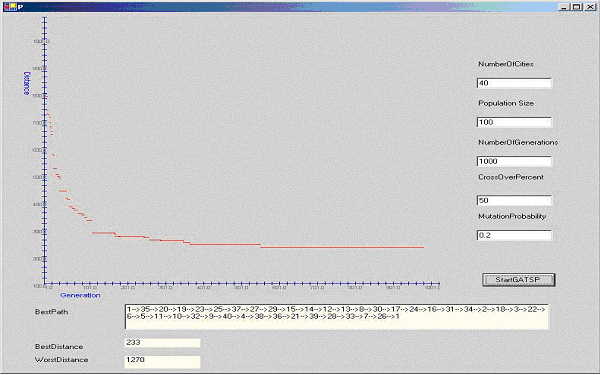
This is a nice user control to use in C# which adds nice visual effects to the travelling salesman
problem.
Register TSPGAATL.dll using regsvr32
To access this component from C#, from the VisualStudio.NET IDE click on the 'Project' menu.
Click 'Add Refernces', and a tabbed dialog should appear. Select the 'COM' tab and browse for
'TSPGAATL.dll', and add it. Now C# knows everything about our COM component.
Find below my code for accessing the COM component from C# and accessing the SAFEARRAY from
a method.
TSPGAATLLib.ITSPGAAlgorithm comTSPGA = new TSPGAATLLib.TSPGAAlgorithmClass();
comTSPGA.CitySize = System.Convert.ToInt16(this.textBox1.Text);
comTSPGA.SetPopulationSize = System.Convert.ToInt16(this.textBox2.Text);
comTSPGA.GenerationSize = System.Convert.ToInt16(this.textBox3.Text);
comTSPGA.SetCrossOverRate(System.Convert.ToInt16(this.textBox4.Text));
comTSPGA.Mutate = System.Convert.ToDouble(this.textBox5.Text);
comTSPGA.StartGAForTSP();
xyGraphControl1.Reset();
xyGraphControl1.XTickValue = 20;
xyGraphControl1.YTickValue = 20;
xyGraphControl1.XOrigin = 1;
xyGraphControl1.YOrigin = 100;
xyGraphControl1.LabelX = "Generation";
xyGraphControl1.LabelY = "Distance";
System.Array distAll =(System.Array)comTSPGA.GetAllBestDistancesByGenerations();
for(int i = 0;i < distAll.Length;i++ )
{
distFile += distAll.GetValue(i) + "\n";
xyGraphControl1.AddPoint(System.Convert.ToInt64(i),
System.Convert.ToInt64(distAll.GetValue(i)));
}
FileStream fs = new FileStream(@"c:\dist.txt" , FileMode.OpenOrCreate, FileAccess.Write);
StreamWriter m_streamWriter = new StreamWriter(fs);
m_streamWriter.BaseStream.Seek(0, SeekOrigin.End);
m_streamWriter.Write(" File Write Operation Starts : ");
m_streamWriter.Write(distFile);
m_streamWriter.Flush();
String outPut = "";
System.Array bestRoute =(System.Array) comTSPGA.GetBestPathForTSP();
for(int i = 0;i < bestRoute.Length;i++ )
{
outPut += bestRoute.GetValue(i) + "-->";
}
this.textBox6.Text = outPut + bestRoute.GetValue(0);
this.label9.Text = System.Convert.ToString(comTSPGA.BestOverAll);
this.label11.Text = System.Convert.ToString(comTSPGA.WorstOverAll);
xyGraphControl1.Invalidate();
Points of Interest
Accessing SAFEARRAY from C# took some time for me but the way C# handling any kind of
datatype is excellent. Initially I was resisting my self to move to C# from my good old Win32, MFC
and ATL controls.
C# is a good language to consider.


