 |
|
|
 |
|
 |
This article was great for its time (2002), but nowadays this functionality is built into .NET.
Check out the ShowBalloonTip() method of NotifyIcon.
|
| Sign In·View Thread·PermaLink | 1.00/5 (1 vote) |
|
|
|
 |
|
 |
How can I change the backgroud color of the notification balloon. Is it possible to show custom icon on the ballon.
thanks daanav
|
| Sign In·View Thread·PermaLink | 2.00/5 (1 vote) |
|
|
|
 |
|
 |
Thanks Joel and Josephxxy. Its a good article with some good messages. I work with vs 2003 on XP for now and this article helps me a lot. Thank you all.
|
| Sign In·View Thread·PermaLink | |
|
|
|
 |
|
 |
How to make balloon tip show until, I click on ballontip close[X]. Because I findout the min and max timeout is 10sec and 30s respectively.
So can anyone till me how to make balloon tip to show until i Close it manually.
Anil Kumar
|
| Sign In·View Thread·PermaLink | 2.00/5 (1 vote) |
|
|
|
 |
|
 |
After adding the code in the message Re: Good code, but u can safely remove ur assumptions
I wanted a Title Icon
//NotifyIcon.cs namespace NotifyBalloonDemo { // added from Balloon Tips Galore! By ramshri public enum TooltipIcon : int { None, Info, Warning, Error }
...
// replaced public void ShowBalloon(NotifyIcon ni, TooltipIcon titleIcon, string title, string text, uint timeout) { IntPtr ni_handle = GetNotifyIconHandle(ni);
if(ni_handle != IntPtr.Zero) { // show the balloon NotifyIconData data = new NotifyIconData(); data.cbSize = (System.UInt32)System.Runtime.InteropServices.Marshal.SizeOf(typeof(NotifyIconData)); data.hWnd = ni_handle; data.uID = (uint)GetNotifyIconID(ni); data.uFlags = NotifyFlags.Info; data.uTimeoutOrVersion = timeout; data.szInfo = text; data.szInfoTitle = title; data.dwInfoFlags = (uint) titleIcon; // TooltipIcon Shell_NotifyIcon(NotifyCommand.Modify, ref data);
} }
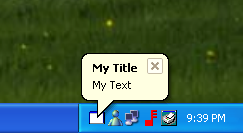
// replaced in Form1.cs private void OnShowBalloon(object sender, System.EventArgs e) { NotifyBalloonDemo.NotifyIconBalloon notifyIcon = new NotifyBalloonDemo.NotifyIconBalloon(); notifyIcon.ShowBalloon(notifyIcon1, NotifyBalloonDemo.TooltipIcon.Info, "My Title", "My Text\r\nand 2nd line", 15000); }
And it's good to read these: latest shellapi.h for the other dwInfoFlags such as NIIF_NOSOUND - Version 6.0. Do not play the associated sound. NIIF_USER - Windows XP Service Pack 2 (SP2) and later. Use the icon identified in hIcon as the notification balloon's title icon.
Tooltip Control Reference: http://msdn.microsoft.com/library/en-us/shellcc/platform/commctls/tooltip/reflist.asp
Tooltip styles, TTS_BALLOON being the one worth noting: http://msdn.microsoft.com/library/en-us/shellcc/platform/commctls/tooltip/styles.asp
Shell_NotifyIcon function reference, used to send messages to the taskbar status area, including adding of an icon together with an associated balloon styled tooltip, and modifying it to show a balloon: http://msdn.microsoft.com/library/en-us/shellcc/platform/shell/reference/functions/shell_notifyicon.asp
Data structure for the notification, including a field to set the icon of the balloon: http://msdn.microsoft.com/library/en-us/shellcc/platform/shell/reference/structures/notifyicondata.asp
these urls are subject to change
|
| Sign In·View Thread·PermaLink | |
|
|
|
 |
|
 |
How do i handle the evens of the balloon? I would like something to happen when the user click on the balloon. Thanks for your help
|
| Sign In·View Thread·PermaLink | 1.00/5 (1 vote) |
|
|
|
 |
|
 |
I was using MDI form.
When I dispose a form with notifyicon, then reload it. showmessage fail to show the balloon again.
any ideas on what's going wrong? thank you very much
|
| Sign In·View Thread·PermaLink | 2.67/5 (2 votes) |
|
|
|
 |
|
 |
I have found a very neat way to get the ID and handle of notify icon, thanx to reflection ofcourse: Here's what u can do to get these values,
public static object GetField(object o, string fieldName, Type type) { MemberInfo[] mi = type.GetMember(fieldName,BindingFlags.Instance | BindingFlags.NonPublic | BindingFlags.GetField); if(mi.Length == 0) return -1; FieldInfo fi = (FieldInfo)mi[0]; return fi.GetValue(o); } public static object GetField(object o, string fieldName) { return GetField(o,fieldName,o.GetType()); } public static int GetNotifyIconID(NotifyIcon ni) { const string ID = "id"; return (int)GetField(ni,ID); } public static IntPtr GetNotifyIconHandle(NotifyIcon ni) { const string WINDOW = "window"; const string HANDLE = "handle"; object obj = GetField(ni, WINDOW); if(obj == null) return IntPtr.Zero; return (IntPtr)GetField(obj,HANDLE,obj.GetType().BaseType); }
and its working perfectly on my system (so far ).
|
| Sign In·View Thread·PermaLink | 2.00/5 (1 vote) |
|
|
|
 |
|
 |
nice work both of you. as per other post this did not work on XP as posted. Failed to find handle in the enumproc. Tried naveedahmedsiddiqui's reflection method and it worked great. kudos to all. Sorry, CP's messaging doesnt like tabs, so everythings unindented.
sg.
using System; using System.Runtime.InteropServices; using System.Windows.Forms; using System.Reflection;
namespace NotifyBalloonDemo { public class NotifyIconBalloon { [StructLayout(LayoutKind.Sequential)] public struct NotifyIconData { public System.UInt32 cbSize; // DWORD public System.IntPtr hWnd; // HWND public System.UInt32 uID; // UINT public NotifyFlags uFlags; // UINT public System.UInt32 uCallbackMessage; // UINT public System.IntPtr hIcon; // HICON [MarshalAs(UnmanagedType.ByValTStr, SizeConst=128)] public System.String szTip; // char[128] public System.UInt32 dwState; // DWORD public System.UInt32 dwStateMask; // DWORD [MarshalAs(UnmanagedType.ByValTStr, SizeConst=256)] public System.String szInfo; // char[256] public System.UInt32 uTimeoutOrVersion; // UINT [MarshalAs(UnmanagedType.ByValTStr, SizeConst=64)] public System.String szInfoTitle; // char[64] public System.UInt32 dwInfoFlags; // DWORD //GUID guidItem; > IE 6 }
public enum NotifyCommand {Add = 0, Modify = 1, Delete = 2, SetFocus = 3, SetVersion = 4} public enum NotifyFlags {Message = 1, Icon = 2, Tip = 4, State = 8, Info = 16, Guid = 32}
[DllImport("shell32.Dll")] public static extern System.Int32 Shell_NotifyIcon(NotifyCommand cmd, ref NotifyIconData data);
[DllImport("Kernel32.Dll")] public static extern System.UInt32 GetCurrentThreadId();
public delegate System.Int32 EnumThreadWndProc(System.IntPtr hWnd, System.UInt32 lParam);
[DllImport("user32.Dll")] public static extern System.Int32 EnumThreadWindows(System.UInt32 threadId, EnumThreadWndProc callback, System.UInt32 param);
[DllImport("user32.Dll")] public static extern System.Int32 GetClassName(System.IntPtr hWnd, System.Text.StringBuilder className, System.Int32 maxCount);
public void ShowBalloon(NotifyIcon ni, uint iconId, string title, string text, uint timeout) { IntPtr ni_handle = GetNotifyIconHandle(ni);
if(ni_handle != IntPtr.Zero) { // show the balloon NotifyIconData data = new NotifyIconData(); data.cbSize = (System.UInt32)System.Runtime.InteropServices.Marshal.SizeOf(typeof(NotifyIconData)); data.hWnd = ni_handle; data.uID = iconId; data.uFlags = NotifyFlags.Info; data.uTimeoutOrVersion = 15000; data.szInfo = text; data.szInfoTitle = title; Shell_NotifyIcon(NotifyCommand.Modify, ref data); } }
public static object GetField(object o, string fieldName, Type type) { MemberInfo[] mi = type.GetMember(fieldName,BindingFlags.Instance | BindingFlags.NonPublic | BindingFlags.GetField); if(mi.Length == 0) return -1; FieldInfo fi = (FieldInfo)mi[0]; return fi.GetValue(o); } public static object GetField(object o, string fieldName) { return GetField(o,fieldName,o.GetType()); } public static int GetNotifyIconID(NotifyIcon ni) { const string ID = "id"; return (int)GetField(ni,ID); } public static IntPtr GetNotifyIconHandle(NotifyIcon ni) { const string WINDOW = "window"; const string HANDLE = "handle"; object obj = GetField(ni, WINDOW); if(obj == null) return IntPtr.Zero; return (IntPtr)GetField(obj,HANDLE,obj.GetType().BaseType); }
} }
SGarratt
|
| Sign In·View Thread·PermaLink | 5.00/5 (1 vote) |
|
|
|
 |
|
 |
public void ShowBalloon(NotifyIcon ni, uint iconId, string title, string text, uint timeout) { IntPtr ni_handle = GetNotifyIconHandle(ni);
if(ni_handle != IntPtr.Zero) { // show the balloon NotifyIconData data = new NotifyIconData(); data.cbSize = (System.UInt32)System.Runtime.InteropServices.Marshal.SizeOf(typeof(NotifyIconData)); data.hWnd = ni_handle; data.uID = (uint)GetNotifyIconID(ni); data.uFlags = NotifyFlags.Info; data.uTimeoutOrVersion = timeout; data.szInfo = text; data.szInfoTitle = title; Shell_NotifyIcon(NotifyCommand.Modify, ref data); } }
SGarratt
|
| Sign In·View Thread·PermaLink | 4.00/5 (1 vote) |
|
|
|
 |
|
 |
I extracted the .exe file and executed in my Windows XP ... and it simply didn't work ... no baloons showed in the system tray icon. Nothing happened!
What's wrong?
Rodrigo
|
| Sign In·View Thread·PermaLink | 2.50/5 (3 votes) |
|
|
|
 |
|
|
 |
|
|
 |
|
 |
private void OnShowBalloon(object sender, System.EventArgs e) { this.notifyIcon1.ShowBalloonTip(10, "My Title", "My Text", 1); }
OK?
|
| Sign In·View Thread·PermaLink | 2.00/5 (1 vote) |
|
|
|
 |
|
 |
no, but this is ok:
this.notifyIcon1.ShowBalloonTip(15000, "pwnd", "again",ToolTipIcon.Info);
@_@
|
| Sign In·View Thread·PermaLink | 4.33/5 (3 votes) |
|
|
|
 |
|
 |
The best that I have found so far is here:
http://mattgriffith.net/stories/2002/07/07/mattGriffithsnetUtilitiesClassLibrary.html
It is is under a license that makes it free to use with only copyright notifications required (for specific details, see the page, which links to the MIT license, but it seems pretty unrestricted).
Unfortunately, it does not come with a sample application.
However, I compiled the project from the supplied source for use in my application, which had already been developed using the Framework's own NotifyIcon class. I then simply created a reference to the resulting DLL (a class library assembly) from my own project, and then replaced all references to the Framework's own System.Windows.Forms.NotifyIcon class with MattGriffith.Windows.Forms.NotifyIcon.
Everything worked as before.
Then, for testing, I just set up a test button and invoked Matt's ShowBalloon() function from its Click handler, and up came the balloon text. Just what I needed.
All source code is provided at the above link. I wanted to thank the guy, but his e-mail address is nowhere listed on his site (smart).
CAVEATS:
1. I have not looked at the code carefully to see if there are any kluges. I did notice some code that finds the location and dimensions of the tray window by searching the window list for a window whose class name begins with "TrayNotifyWnd," and so I suppose this code would break if for any reason that name were changed. The good news is that only the animation of the window as it is closed or opened from the task bar seems to depend upon this code, so you could always eliminate that feature, or in the worst case perhaps your animation rectangles would appear in the wrong place, which at least would not break your app's basic functionality.
2. And, I have only tested it under XP, and then only briefly and incompletely.
Having said that, it is still the best thing I have found.
|
| Sign In·View Thread·PermaLink | 2.00/5 (1 vote) |
|
|
|
 |
|
|
 |
|
 |
I have this running in a program that is installed on a couple of my client machines. I haven't really seen this problem very much but they have regularly (I'm on win xp pro, and it seems to happen much more frequently on win2k).
Problem:
When this is running, it seems to block MS Office applications from opening. Specifically excel, and outlook.
I have created a notifyIcon variable that I show on the system tray, which is actually the balloontooltip class in this example.
Why would this be happening? Are the API calls not being cleaned up carefully enough? This is a major concern.
I've seen one example of the code using reflection, posted on another thread in this page but I'm not sure what that does or why I would want to use it.
Help is appreciated!
Thanks
|
| Sign In·View Thread·PermaLink | |
|
|
|
 |
|
|
 |
|
 |
I was able to successfully convert the code to VB.NET. My version is set up in a separate class and a shared function passing the Notify Icon as a parameter. Below is my code:
Public Class Balloon
<StructLayout(LayoutKind.Sequential)> _ Public Structure NOTIFYICONDATA Public cbSize As Int32 Public hwnd As IntPtr Public uID As Int32 Public uFlags As Int32 Public uCallbackMessage As IntPtr Public hIcon As IntPtr <MarshalAs(UnmanagedType.ByValTStr, SizeConst:=128)> _ Public szTip As String Public dwState As Int32 Public dwStateMask As Int32 <MarshalAs(UnmanagedType.ByValTStr, SizeConst:=256)> _ Public szInfo As String Public uTimeout As Int32 <MarshalAs(UnmanagedType.ByValTStr, SizeConst:=64)> _ Public szInfoTitle As String Public dwInfoFlags As Int32 End Structure
Public Const NIF_MESSAGE As Int32 = &H1 Public Const NIF_ICON As Int32 = &H2 Public Const NIF_STATE As Int32 = &H8 Public Const NIF_INFO As Int32 = &H10 Public Const NIF_TIP As Int32 = &H4 Public Const NIM_ADD As Int32 = &H0 Public Const NIM_MODIFY As Int32 = &H1 Public Const NIM_DELETE As Int32 = &H2 Public Const NIM_SETVERSION As Int32 = &H4 Public Const NOTIFYICON_VERSION As Int32 = &H5 Public Const NIIF_ERROR As Int32 = &H3 Public Const NIIF_INFO As Int32 = &H1 Public Const NIIF_NONE As Int32 = &H0 Public Const NIM_SETFOCUS As Int32 = &H3 Public Enum BalloonMessageType None = &H0 Info = &H1 [Error] = &H3 End Enum
Shared Sub NotifyBalloon(ByRef ntfyIcon As NotifyIcon, ByVal Title As String, ByVal Info As String, ByVal Type As BalloonMessageType, ByVal Timeout As Integer)
Dim t As Type = GetType(NotifyIcon) Dim window As IntPtr = (CType(t.GetField("window", System.Reflection.BindingFlags.Instance Or System.Reflection.BindingFlags.NonPublic).GetValue(ntfyIcon), NativeWindow)).Handle Dim id As Int32 = CType(t.GetField("id", System.Reflection.BindingFlags.Instance Or System.Reflection.BindingFlags.NonPublic).GetValue(ntfyIcon), Integer) Dim uNIF As NOTIFYICONDATA uNIF.cbSize = 0 uNIF.dwInfoFlags = 0 uNIF.dwState = 0 uNIF.dwStateMask = 0 uNIF.hIcon = IntPtr.Zero uNIF.szTip = "" uNIF.uCallbackMessage = New IntPtr(&H200)
uNIF.szInfoTitle = Title uNIF.uTimeout = Timeout uNIF.hwnd = window uNIF.uID = id uNIF.dwInfoFlags = CType(Type, Int32) uNIF.uTimeout = NOTIFYICON_VERSION uNIF.szInfo = Info uNIF.uFlags = NIF_INFO uNIF.cbSize = Marshal.SizeOf(uNIF) Dim result As Int32 = Shell_NotifyIconA(NIM_MODIFY, uNIF) End Sub
Private Declare Function Shell_NotifyIconA Lib "shell32" (ByVal dwMessage As Int32, ByRef pnid As NOTIFYICONDATA) As Int32 End Class
-Ryan Milligan
|
| Sign In·View Thread·PermaLink | 2.67/5 (3 votes) |
|
|
|
 |
|
|
 |
|
|
 |
|
 |
The Balloon Tip works fine without the closing button. But in the code sample the timeout was handled twice, so my Timeout was ignored. With deleting the bold codeline it now works.
(...) uNIF.uTimeout = Timeout uNIF.hwnd = window uNIF.uID = id uNIF.dwInfoFlags = CType(Type, Int32) uNIF.uTimeout = NOTIFYICON_VERSION (...)
But now I got another question: Is there any way to recognise if the Balloon Tip is still shown? I want to show an Information several times a day infinitely (each time until the user closes the tip) - but I don't want to show it again if it is still visible. (So the user doesn't have to close ten balloon tips when he returns to his PC after a lunch. )
|
| Sign In·View Thread·PermaLink | |
|
|
|
 |
|
 |
Good catch on the Timeout.
Being able to tell if the balloon timed out or was clicked by the user would require handling events created by the balloon. This is something I haven't been able to get to work yet. I will keep trying and let you know if I get it to work. If you ge it to work, please post it here, too.
I think the solution has something to do with the uCallback property and using the WndProc Override in the form with the NotifyIcon. All of my attempt have been unsuccessful, though.
-Ryan
|
| Sign In·View Thread·PermaLink | |
|
|
|
 |
