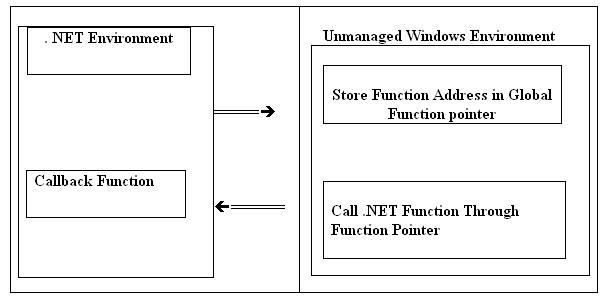
|
|
 |
Can anybody help me please?
I'm trying to implement a third party library call, but it´s not going very well.
For initializing the library i need to call the InitSmokeMeter function, but i must be doing something wrong Maybe i'm not implementing the callback function in the correct way.
this function is described in the manual like this:
PROTOTYPES
C/C++ : extern int __stdcall InitSmokeMeter(HINSTANCE hinst, char *port, WNDPROC IpWndProc, HWND *hwnd, Log *MsgCode); VB : Public Declare Function InitSmokeMeter Lib "opaclib.dll" (ByVal hinst As Long, ByVal port As String, ByVal IpWndProc As Log, hwnd As Long, msgcode As Long)As Long
PARAMETERS In hinst = handle of aplication instance port = string specifying device smokemeter is connected to (COM1) IpWndProc = pointer to stabdard WindowProc() callback function. Hwnd = pointer to the handle of the hidden window receiving messages from library MsgCode = pointer to the message code of message sent by the library Out Error code
hwnd will be set to window handle of the hidden window receiving messages from library MsgCode will be set to message code of message sent by the library (WM_OPACLIB)
EXAMPLE VB Dim lWM_OPACLIB As Long Dim rc As Long Dim hwnd As Long
rc = InitSmokeMeter(App.hInstance, "COM1", AddressOf NotifyError, hwnd, lWM_OPACLIB)
MY CODE IN C#
public delegate IntPtr Callback(IntPtr hWnd, uint msg, IntPtr wParam, IntPtr lParam);
[DllImport("OpacLib.dll", CharSet = CharSet.Auto)] static extern int InitSmokeMeter(IntPtr hInst, string port, Callback lpWndProc, ref IntPtr hwnd, ref int MsgCode);
public static IntPtr OnErrorFunc(IntPtr hwnd, uint msg, IntPtr wParam, IntPtr lParam) { return (IntPtr)1; }
private void CallInitSmokemeter() { int _Res; IntPtr _hwnd = new IntPtr(0); int _MsgCode = 0;
Type t = typeof(Application); Module m = t.Module; IntPtr _hInst = Marshal.GetHINSTANCE(m); Callback lpWndProc = new Callback(Form1.OnErrorFunc); _Res = InitSmokeMeter(_hInst, "COM1", lpWndProc, ref _hwnd, ref _MsgCode); }
Armindo
|
| Sign In·View Thread·PermaLink | |
|
|
|
 |
|
 |
First thanks for the article. It was quite helpful.
My Callback function have two parameters (IntPtr) the C++ dll will pass two void* parameters to it. The method in C# get called however the second parameter is deferent than it was in C++ code. However the first parameter get the correct value
in C#
public delegate void Method1Delegate(IntPtr pParam1, IntPtr pParam2); public static void Method1(IntPtr pParam1, IntPtr pParam2) { //Some code; }
in C++ typedef void __stdcall Method1(void* pParam1, void* pParam2); Method1 *cb_Method1 = NULL; // this is set via another method
//calling the C# method as cb_Method1(pPointerValue1, pPointerValue2);
In C# side the second parameter is different than it was in C++ code
Can u help me on this?
|
| Sign In·View Thread·PermaLink | 2.00/5 |
|
|
|
 |
|
|
 |
|
 |
Hello
I have to use a Win32 API in a C# project (VS 2K5). I want to create a API wrapper class in C++. And then use it from my C# code. I tried to use P/Invoke in C# to create a wrapper class, some of the methods didn’t work because Pointers to memory were not working..
QUESTION 1
Now how do I create a wrapper class, save it as dll and use it in C#. Please tell me whole procedure. Because when I try to create a C++ project The VS2005 gives me a list of templates to choose from like “CLR Console Application” “Windows Forms Application”, etc etc
Question 2
My project has a method that continuously reads a block of PCM data from an external radio receiver connected to the computer through USB.
Is there and way to listen to that signal through C#. IS PCM just like audio signal … if not how do I convert it into audio. ------------------------------------------------------------------------------------------------ I am writing an example of the function I have to write and tell me what type of project I have to make and what procedure I have to follow.
#include "stdafx.h" #include #include
typedef int (__stdcall *FNCOpenRadioDevice)(int iDeviceNum); typedef BOOL (__stdcall *FNCCloseRadioDevice)(int hRadio); typedef BOOL (__stdcall *FNCSetAtten)(int hRadio, BOOL fAtten); typedef BOOL (__stdcall *FNCSetPower)(int hRadio, BOOL fPower); typedef BOOL (__stdcall *FNCSetAGC)(int hRadio, int iAGC); typedef BOOL (__stdcall *FNCCodecStart)(int hRadio,void (__stdcall *CallbackFunc)(void *), void *CallbackTarget); typedef BOOL (__stdcall *FNCCodecStop)(int hRadio); typedef unsigned int (__stdcall *FNCCodecRead)(int hRadio,void *Buf,unsigned int Size);
typedef struct { int hRadio; FILE *IFFile; FNCCodecRead CodecRead; } CallbackContext;
void __stdcall CodecCallback(void *Target) { unsigned int i; char Buf[4096]; CallbackContext *Ctx=(CallbackContext *)Target;
while ((i=Ctx->CodecRead(Ctx->hRadio,Buf,sizeof(Buf)))!=0) fwrite(Buf,i,1,Ctx->IFFile); } int main(int argc, char* argv[]) { HMODULE dll=LoadLibraryA("wrg303api.dll"); if (!dll) {puts("WRG303API.DLL not found !"); return 0;}
FNCOpenRadioDevice OpenRadioDevice=(FNCOpenRadioDevice)GetProcAddress(dll,"OpenRadioDevice"); FNCCloseRadioDevice CloseRadioDevice=(FNCCloseRadioDevice)GetProcAddress(dll,"CloseRadioDevice"); FNCSetAtten SetAtten=(FNCSetAtten)GetProcAddress(dll,"SetAtten"); FNCSetPower SetPower=(FNCSetPower)GetProcAddress(dll,"SetPower"); FNCSetAGC SetAGC=(FNCSetAGC)GetProcAddress(dll,"SetAGC"); FNCCodecStart CodecStart=(FNCCodecStart)GetProcAddress(dll,"CodecStart"); FNCCodecStop CodecStop=(FNCCodecStop)GetProcAddress(dll,"CodecStop"); FNCCodecRead CodecRead=(FNCCodecRead)GetProcAddress(dll,"CodecRead");
int hRadio=OpenRadioDevice(0); if (!hRadio) {puts("No WR-G303 device could be opened !");FreeLibrary(dll); return 0;}
if (SetPower(hRadio,TRUE)) puts("The device is turned ON"); else puts("The device failed to turn ON"); if (SetAtten(hRadio,FALSE)) puts("The attenuator is OFF"); else puts("The attenuator failed to turn OFF"); if (SetAGC(hRadio,3)) puts("The AGC is FAST"); else puts("The AGC failed to switch");
FILE *f=fopen("IF2.pcm","wb");
CallbackContext Ctx;
Ctx.hRadio=hRadio; Ctx.IFFile=f; Ctx.CodecRead=CodecRead; if (!CodecStart(hRadio,CodecCallback,&Ctx)) puts("Codec streaming couldn't be started!"); else { puts("Codec streaming properly started!"); while (!ftell(f) ) { } CodecStop(hRadio); fclose(f); }
if (CloseRadioDevice(hRadio)) puts("The device is closed properly"); else puts("The device failed to close");
FreeLibrary(dll);
return 0; }
o O º(`'·.,(`'·., ☆,.·''),.·'')º O o° »·'"`»* *☆ t4ure4n ☆* *«·'"`« °o O º(,.·''(,.·'' ☆`'·.,)`'·.,)º O o°
|
| Sign In·View Thread·PermaLink | |
|
|
|
 |
|
 |
I’m using a third party ActiveX control in my .NET Application. I manage to handle the callback in unmanaged C++ like this:
class MyCallback : public ICallback { … void OnComplete() {…} }
… MyCallback *callback = new MyCallback(); someobject->SomeFunction(“just a string”, callback);
The function OnComplete is apart of the ICallback interface. In C++ the method OnComplete will be called some seconds after SomeFunction has been called.
How do I translate that into C#?
I’ve come this far:
public class MyCallbackSC : ICallback { … void OnComplete() {…} }
… MyCallbackSC callback = new MyCallbackSC(); someobject.SomeFunction(“just a string”, (object)callback);
My C# program compiles fine but when I got an exception on the codeline above that says: InvalidCastException.
_____________________________
...and justice for all
APe
|
| Sign In·View Thread·PermaLink | 2.00/5 |
|
|
|
 |
|
 |
In this dll import line CallBackDelegate should not be named "delegate" since it's a keyword.
[DllImport("MyCustomDll.dll",CallingConvention=CallingConvention.StdCall)] private static extern void SetCallBackPointer(CallBackDelegate delegate);
It should also probably add "unsafe" somewhere before "void" in this declaration
Also
myDelegate =new MyDelegate(CallbackFunction);
should be
myDelegate =new CallBackDelegate(CallbackFunction);
In C++ code you might want to do the following:
extern "C" { __declspec(dllexport) void WINAPI SetCallBackPointer(LPVOID FnAddress); }
__declspec(dllexport) void WINAPI SetCallBackPointer(LPVOID FnAddress) { pFunction = (CALL_BACK_FUNCTION)FnAddress; ... }
I think that was that. By the way I am yet to find out wheather including extern "c" permits for inclusion of callback with parameters.
In addition here is a Microsoft Article that might assist you in this endavor: http://support.microsoft.com/kb/318804/
This exercise in puting in windows hooks is similar to what is being done here.
ILYA.
There are 10 kinds of people those who can read binary and those who can not.
|
| Sign In·View Thread·PermaLink | |
|
|
|
 |
|
 |
Logicaly it appears that it would be imposible to make a callback using delegate that would allow for parameters to be passed in back and forth. Delegate is typechecked function pointer. Somehow going in, although the DLLs function pointer is 'extern "C"' it is still allowed in with the parameter. However going out the signature of a delegate with a parameter does not seam match C mangling of the DLLs callback function, at witch point it throws up. I need this,so I will work out a way to work around it and try to post it here.
ILYA.
There are 10 kinds of people those who can read binary and those who can not.
|
| Sign In·View Thread·PermaLink | |
|
|
|
 |
|
|
 |
|
 |
If I add a param(for exmaple type of int) in CALLBACK_FUNCTION and CallBackDelegate, the managed application got an error in running time?
The error is: The value of ESP was not properly saved across a function call. This is usually a result of calling a function decalared with one calling convention with a function pointer decalared with a defferent calling convention.
Why was it happened? How can i do?
Thanks a lot!
limzustc
|
| Sign In·View Thread·PermaLink | |
|
|
|
 |
|
|
 |
|
 |
The change that you need is seamply adding __stdcall to the declaration of your callback function in DLL header. So your function should look something like this:
typedef int __stdcall PERSONAL_CALLBACK(int); PERSONAL_CALLBACK * pPersonalCallback;
And your C# side will be:
public delegate int PersonalCallback(int iType); ... ... public int PersonalCallbackFunction(int iType) { string sMsg; sMsg = "The type included is " + iType.ToString() + "."; MessageBox.Show(sMsg); return 42; }
accordingly.
In addition in C# make an actual callback function non-static which will allow you to access your member variables directly.
Regards, ILYA.
There are 10 kinds of people those who can read binary and those who can not.
-- modified at 15:44 Friday 9th December, 2005
|
| Sign In·View Thread·PermaLink | 5.00/5 |
|
|
|
 |
|
|
 |
|
|
 |
|
 |
I have a COM object (Directshow filter) that I am using in a C# application. I have created an Interface that takes a function pointer. I want to use a function in my C# code.
//COM Object typdef HRESULT (*MYCALLBACK) (IMediaSample * pSample); DECLARE_INTERFACE_(IMyFilter, IUknown) { STDMETHOD(SetCallbackPointer)(LPVOID FnAddress); } MYCALLBACK m_callback; STDMETHODIMP SetCallbackPointer(LPVOID FnAddress) { m_callback = (MYCALLBACK)FnAddress; } void InvokeCallback(IMediaSample * pSample) { (m_callback)(pSample); }
//C# public delegate int CallBackDelegate(ref IMediaSample mediaSample); public class MyClass { public CallBackDelegate myDelegate; public MyClass() { myDelegate = new CallBackDelegate(CallbackFunction);
//all the stuff to create the COM object and get the interface myInterface.SetCallbackPointer(myDelegate); } public int CallbackFunction(ref IMediaSample mediaSample) { //my intention is get a copy of the mediaSample MessageBox.Show("Here"); return 0; } }
|
| Sign In·View Thread·PermaLink | |
|
|
|
 |
|
 |
It is entirely possible to call managed code functions from standard unmanaged code. It is possible because mixed c++ assemblies mush be abel to export entry points to be externally usable but those entry points can be linked to code in managed segments of the application. Doing this in c# or vb requires some IL hackery but its really not that hard to accomplish if you want to.
Whether its ever a good idea or not is an entirely different discussion, i think it would take rather exceptional circumstances to make this approach the most desirable given its drawbacks (no disposal pattern as far as i can determine) but its possible and it does work.
|
| Sign In·View Thread·PermaLink | |
|
|
|
 |
|
|
 |
|
 |
You probably want to read this[^].
I've got a sample application that shows how to do this but it appears tobe broken, i think i've messed up the regex somehow. If i get it working again i'll post it.
|
| Sign In·View Thread·PermaLink | |
|
|
|
 |
|
 |
Is there any way to call Managed .Net Function from UnManaged Windows APPLICATION instead of DLL? If so, can give any example of it? Thx.
|
| Sign In·View Thread·PermaLink | |
|
|
|
 |
|
 |
You're either very unclear about what you're doing or you don't understand what you're doing. I dont know which. As such i can't or won't help. Elaborate please.
|
| Sign In·View Thread·PermaLink | |
|
|
|
 |
|
 |
I just want to know IF there is a way of calling .net function from unmanaged window application. It may not have solution. I asked this because someone may have built his application in c++ whereas wants to use some part which is done in c#. As c++ application he has built is huge compared to c#, it will be good if can call c# function from his c++ application. The worse is to rewrite c# code to c++ code. But I just want to know why it cannot be done. That's what I want to know. Thank you.
|
| Sign In·View Thread·PermaLink | |
|
|
|
 |
|
 |
Yes it is possible. However unless you are only passing integers around as return values and parameters you're going to get major headaches trying to manually marshall things around. If you don't need parameters or retvals then its easier. You also get no disposal pattern as far as i can find, that means that things don't get gracefully disposed they are simply removed from memory as a native application would be, you have to be careful of this.
As i've said before, while its possible its really not going to be a very useful solution unless you have a seriously weird situation going on with your program. You're far better served adapting your programs to use a more flexible compatible and supported method of interoperability.
The link i posted above should give you the information you need to accomplish this though my strong suggestion will always be that you not use this method.
|
| Sign In·View Thread·PermaLink | |
|
|
|
 |
|
|
 |
|
 |
First as you are storing the address of the delegate, you need to wrap it in a GCHandle so it wont be moved around. And then theres the thread safe issue, hence u need to rely on static delegate instances.
|
| Sign In·View Thread·PermaLink | |
|
|
|
 |
|
 |
Just to add to what leppie said, the CLR will pin the delegate for the duration of a P/Invoked call, but it may be moved if you simply store it in unmanaged code.
Microsoft MVP, Visual C# My Articles
|
| Sign In·View Thread·PermaLink | |
|
|
|
 |
|
 |
Hi guys,
What would be a good method then of calling a .Net function from unmanaged code?
I have a little C# dll with two public functions, I need to allow Access and Delphi apps to reference my dll and call the functions.
Would it be better to expose my .Net dll through a COM-Callable Wrapper?
Thanks
|
| Sign In·View Thread·PermaLink | |
|
|
|
 |