Prerequisites
In order to run the samples and follow the article, you must have Visual Studio 2005 and C# installed.
Introduction
The most convenient and advanced approach in working with data is to use business objects that encapsulate business logic. Then these objects make calls to the Data Access Layer to persist information. Business objects can be created by hand or generated by the ORM tool.
Once we have the classes ready and hydrated (data is extracted from the persistence layer), we show objects in some grids and give the user the ability to edit objects in forms. So far so good. Thanks to Microsoft for the Binding class and the ability to set bindings once and leave the .NET Framework to manage data exchange between the Form's controls and business objects.
The Problem
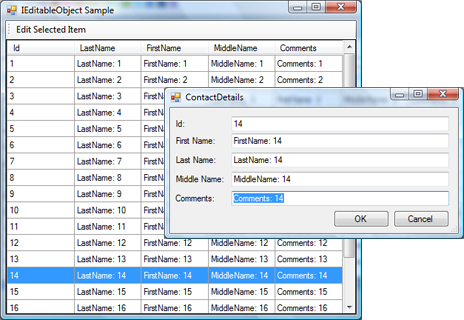
As a typical case, the user selects a single object from the grid and opens the form for editing. Modal form is shown and the business object's properties are bound to the form's controls. By using data binding, we are able to commit the changed data from controls to the object according to the DataSourceUpdateMode enumeration:
Never - Data source is never updated and values entered into the control are not parsed, validated or re-formatted. OnPropertyChanged - (default) Data source is updated whenever the value of the control property changes. OnValidation - Data source is updated when the control property is validated.
This gives us some control "when" the data source is updated. What if we want to discard changes?
Resolutions
At this point we have two solutions:
Validate() Method
The first one is not very elegant but is more obvious - we could use DataSourceUpdateMode.OnValidation mode to update the data source and to call Form.Validate() method only if the user wants to confirm data. If data has to be discarded Validate() method is not called. This introduces a consistency problem: what if some of controls are validated (and source is updated) but the rest are not? We, of course, ask the user to fix the information entered. But if at this point, the user decides to cancel object editing, we are in trouble because some fields are already updated.
IEditableObject interface
Fortunately there is a way to achieve this with .NET tools. This is the IEditableObject interface. This interface declares three public methods:
BeginEdit() - Begins an edit on an object. CancelEdit() - Discards changes since the last BeginEdit call. EndEdit() - Pushes changes since the last BeginEdit or IBindingList.AddNew call into the underlying object.
There is another good news - Microsoft controls support and works well with this interface. All we have to do is to implement this interface in our business objects. This requires some work from us but gives us enough flexibility. My personal preference is to create a base class of all business objects which implements common logic including IEditableObject methods.
Generic IEditableObject implementation
Provided here is a generic implementation which could easily be added to the base class and included in existing projects. This implementation preserves values for all public properties do not keep an eye on all fields, private properties, public properties without set ancestor
First we need some key/value pair collection which will hold the original values for us.
Store original values
This is the flag that the object is in edit mode too.
Hashtable props = null;
BeginEdit()
This method stores the current values for future restoration using reflection.
public void BeginEdit()
{
PropertyInfo[] properties = (this.GetType()).GetProperties
(BindingFlags.Public | BindingFlags.Instance);
props = new Hashtable(properties.Length - 1);
for (int i = 0; i < properties.Length; i++)
{
if (null != properties[i].GetSetMethod())
{
object value = properties[i].GetValue(this, null);
props.Add(properties[i].Name, value);
}
}
}
CancelEdit()
This method restores old values.
public void CancelEdit()
{
if (null == props) return;
PropertyInfo[] properties =(this.GetType()).GetProperties
(BindingFlags.Public | BindingFlags.Instance);
for (int i = 0; i < properties.Length; i++)
{
if (null != properties[i].GetSetMethod())
{
object value = props[properties[i].Name];
properties[i].SetValue(this, value, null);
}
}
props = null;
}
EndEdit()
This method just deletes stored values (and our flag).
public void EndEdit()
{
props = null;
}


