Introduction
This article is my own approach on how a multi-tier application could look like in C# and ADO.NET. The program has a GUI (Graphical User Interface), BO (Business Object) and DO (Data Object). Multi-tier is in my vision a program where the GUI doesn't have logic (no code that makes decisions), the DO only reads and save data to the database and all the rest is done by the BO. That's what I tried to accomplish with this code.
After having solved the multi-tier problem, I wanted to create a multi-b platform. In the code, I have added a different DO for each DataProvider or DBMS (Database Management System). That means that the BO just calls the correct version of the DO and combines these to a DataSet.
In my code, it's even possible to load data from an Access database and save the changes to a MS SQL Server database. But I don't recommend this.
Last but not least, I want to create a framework that will solve DB Concurrency errors. I think it is possible to handle all DB Concurrency errors the same way, whatever database and table is used.
Using the example
In the zip-file, there is a folder Multi-Tier which contains the solution-file. Just open it in VS.NET 2003 and run it. To test the code on an Access database, nothing extra is required. The Northwind database is also in the Muti-Tier folder.
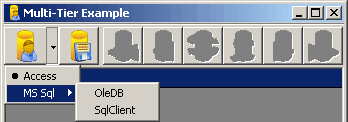
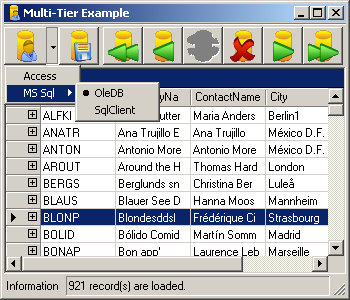
On the toolbar, there are 2 buttons enabled. The first is the load-button; the other is the save-button. The load button has a dropdown menu where a database and the connection can be selected. After selecting the source, click the load-button and the data should be loaded in the grid. Now rows can be changed, added or deleted. After all the changes have been done, press the save-button and the changes are saved to the database.
If errors have occurred during load or save, a message is set in the statusbar.
* Note when using MS SQL and SqlClient.
If SqlClient is used, then the following query must be executed in the Northwind database. This is to test the DB Concurrency.
ALTER TABLE dbo.Customers ADD Timestamp timestamp NULL.
Using the code
My example contains 4 projects. The first (MultiTier.Data) contains functions that are related to the DO, but are the same for every DO. The other 3 are example applications that use the Northwind database.
- MultiTier.Example contains the GUI.
- MultiTier.Example.Business is the BO.
- MultiTier.Example.Data has the DO code.
The GUI has 2 buttons, one loads the data from the database and the other saves the changes to the database. In the statusbar, the last action output is shown 5 seconds.
The Data class
The Data class is an abstract class that contains the basic functions and properties.
using System;
using System.Data;

namespace MultiTier.Data {

    public abstract class Data {

        private DataTable dtDataTable;
        private Exception exException;
        private long lngAffectedRecords;
        private string strConnectionString;
        private string strTableName;

        private Data() {
        }

        protected Data(string connection) {
            this.ConnectionString = connection;
            this.ConstructDataAdapter();
        }

        protected DataTier(string connection, string tableName) {
            this.ConnectionString = connection;
            this.TableName = tableName;
            this.ConstructDataAdapter();
        }

        protected DataTable Table {
            get { return dtDataTable; }
            set { dtDataTable = value; }
        }

        public string ConnectionString {
            get { return strConnectionString; }
            set { strConnectionString = value; }
        }

        public string TableName {
            get { return strTableName; }
            set { strTableName = value; }
        }

        public long AffectedRecords {
            get { return lngAffectedRecords; }
            set { lngAffectedRecords = value; }
        }

        public Exception CurrentException {
            get { return exException; }
            set { exException = value; }
        }

        protected abstract void ConstructDataAdapter();

        public abstract DataTable ReadData();

        public abstract void SaveData(DataTable dataTable);

        public abstract void InitializeConnection();
    }
}
The derived classes implement database-specific code. There is an OleDB and Sql class in my example, but others can be added. The code contains the ReadData and SaveData functions. The DataAdapter is created in a derived class from one of these classes (see Data Object Code).
public override DataTable ReadData() {
this.Table = new DataTable(this.TableName);
this.Table.Locale = CultureInfo.InvariantCulture;
try {
daDataAdapter.Fill(this.Table);
return this.Table;
}
catch (OleDbException ex) {
this.CurrentException = ex;
return this.Table;
}
}public override void SaveData(DataTable dataTable) {
this.Table = dataTable;
OleDbTransaction trTransaction = null;
try {
InitializeConnection();
cnConnection.Open();
trTransaction = cnConnection.BeginTransaction();
this.AffectedRecords = daDataAdapter.Update(this.Table);
trTransaction.Commit();
}
catch (DBConcurrencyException ex) {
this.CurrentException = ex;
trTransaction.Rollback();
}
catch (OleDbException ex) {
this.CurrentException = ex;
trTransaction.Rollback();
}
finally {
trTransaction = null;
cnConnection.Close();
cnConnection = null;
}
}
How it works
The GUI is just a form with a grid which calls ReadNorthwind in the BO and gets a DataSet in return. The BO calls a ReadData method in the DO, and gets a DataTable back from the method. The BO puts the DataTable in a DataSet, adds primary keys, relations and custom columns. The DataSet is then sent to the GUI.
When the GUI calls the SaveNorthwind, the DataSet is passed with it. The BO then calls the SaveData method from the DO. The DO then saves the DataTable.
Data Object Code (DO)
using System;
using System.Data;
using System.Data.OleDb;
namespace MultiTier.Example.Data {
public class CustomersOle : MultiTier.Data.OleDB {
public CustomersOle(string connection) : base(connection) {
}
protected override void ConstructDataAdapter() {
string strQuery = "";
OleDbCommand cmSelect;
OleDbCommand cmUpdate;
OleDbCommand cmInsert;
OleDbCommand cmDelete;
InitializeConnection();
strQuery = @"SELECT CustomerID,
CompanyName, ContactName, City, Region
FROM Customers
ORDER BY CompanyName";
cmSelect = null;
cmSelect = new OleDbCommand(strQuery, this.Connection);
cmSelect.CommandType = CommandType.Text;
strQuery = @"UPDATE Customers
SET CompanyName = @CompanyName ,
ContactName = @ContactName, City = @City, Region = @Region
WHERE CustomerID = @CustomerID";
cmUpdate = null;
cmUpdate = new OleDbCommand(strQuery, this.Connection);
cmUpdate.CommandType = CommandType.Text;
cmUpdate.Parameters.Add(new OleDbParameter("@CompanyName",
OleDbType.VarWChar, 40, "CompanyName"));
cmUpdate.Parameters.Add(new OleDbParameter("@ContactName",
OleDbType.VarWChar, 30, "ContactName"));
cmUpdate.Parameters.Add(new OleDbParameter("@City",
OleDbType.VarWChar, 15, "City"));
cmUpdate.Parameters.Add(new OleDbParameter("@Region",
OleDbType.VarWChar, 15, "Region"));
cmUpdate.Parameters.Add(new OleDbParameter("@CustomerID",
OleDbType.WChar, 5, "CustomerID"));
strQuery = @"INSERT INTO Customers (CompanyName,
ContactName, City, Region, CustomerID)
VALUES (@CompanyName, @ContactName,
@City, @Region, @CustomerID)";
cmInsert = null;
cmInsert = new OleDbCommand(strQuery, this.Connection);
cmInsert.CommandType = CommandType.Text;
cmInsert.Parameters.Add(new OleDbParameter("@CompanyName",
OleDbType.VarWChar, 40, "CompanyName"));
cmInsert.Parameters.Add(new OleDbParameter("@ContactName",
OleDbType.VarWChar, 30, "ContactName"));
cmInsert.Parameters.Add(new OleDbParameter("@City",
OleDbType.VarWChar, 15, "City"));
cmInsert.Parameters.Add(new OleDbParameter("@Region",
OleDbType.VarWChar, 15, "Region"));
cmInsert.Parameters.Add(new OleDbParameter("@CustomerID",
OleDbType.WChar, 5, "CustomerID"));
strQuery = @"DELETE FROM Customers
WHERE CustomerID = @CustomerID";
cmDelete = null;
cmDelete = new OleDbCommand(strQuery, this.Connection);
cmDelete.CommandType = CommandType.Text;
cmDelete.Parameters.Add(new OleDbParameter("@CustomerID",
OleDbType.WChar, 5, "CustomerID"));
this.DataAdapter = new OleDbDataAdapter();
this.DataAdapter.SelectCommand = cmSelect;
this.DataAdapter.UpdateCommand = cmUpdate;
this.DataAdapter.InsertCommand = cmInsert;
this.DataAdapter.DeleteCommand = cmDelete;
this.Connection = null;
}
}
}
Business Object Data (BO)
public DataSet ReadNorthwind() {
DataSet dsDataSet = new DataSet("Northwind");
DataTable dtCustomers;
DataTier doCustomers;
try {
this.Exception = null;
if (this.Provider == DataProvider.OleDB) {
doCustomers = new
MultiTier.Example.Data.CustomersOle(this.ConnectionString,
"Customers");
} else {
doCustomers = new
MultiTier.Example.Data.CustomersSql(this.ConnectionString,
"Customers");
}
dtCustomers = doCustomers.ReadData();
if (doCustomers.Exception != null) {
this.AffectedRecords = 0;
throw doCustomers.Exception;
} else {
dtCustomers.PrimaryKey = new DataColumn[]
{ dtCustomers.Columns["CustomerID"] };
dsDataSet.Tables.Add(dtCustomers);
this.AffectedRecords = doCustomers.AffectedRecords;
}
return dsDataSet;
}
catch (Exception ex) {
this.Exception = ex;
return dsDataSet;
}
finally {
dtCustomers = null;
doCustomers = null;
}
}public void SaveNorthwind(DataSet dsDataSet) {
DataTable dtCustomers;
DataTier doCustomers;
try {
this.Exception = null;
if (dsDataSet != null & dsDataSet.HasChanges()) {
dtCustomers = dsDataSet.Tables["Customers"].GetChanges();
if (dtCustomers != null) {
if (this.Provider == DataProvider.OleDB) {
doCustomers = new
MultiTier.Example.Data.CustomersOle(this.ConnectionString,
"Customers");
} else {
doCustomers = new
MultiTier.Example.Data.CustomersSql(this.ConnectionString,
"Customers");
}
doCustomers.SaveData(dtCustomers);
if (doCustomers.Exception != null) {
this.AffectedRecords = 0;
throw doCustomers.Exception;
} else {
this.AffectedRecords = doCustomers.AffectedRecords;
}
}
}
}
catch (Exception ex) {
this.Exception = ex;
}
finally {
dtCustomers = null;
doCustomers = null;
}
}
Graphical User Interface Code (GUI)
private void LoadData() {
    grdData.DataBindings.Clear();

    dsDataSet = boNorthwind.ReadNorthwind();
    grdData.DataSource = dsDataSet.Tables["Customers"];

    if (boNorthwind.Exception == null)
        SetMessage(boNorthwind.AffectedRecords + " records are loaded.");
    else
        SetMessage("While loading the record(s) a '" +
              boNorthwind.Exception.GetType().ToString() + "' occured.");
}

private void SaveData() {
    boNorthwind.SaveNorthwind(dsDataSet);

    if (boNorthwind.Exception == null)
        SetMessage(boNorthwind.AffectedRecords + " records are saved.");
    else
        SetMessage("While saving the record(s) a '" +
             boNorthwind.Exception.GetType().ToString() + "' occured.");
}
Concurrency errors
A concurrency can occur when a record in the database is read by both user A and by user B, change it and save it back to the database. The user that last updated the record will overwrite the data that was updated by the the first user. This can be caught by an exception in ADO.NET, DBConcurrency.
To create such an exception, a record must have a version-number. This can be done by SQL-server by adding a Timestamp column to the table.
I use a Timestamp column in my SqlClient example. When you open the program twice and change something in the same row in both grids and try to save the changes back to the grid, a DBConcurrency error will be generated.
UPDATE Customers
SET CompanyName = @CompanyName ,
   ContactName = @ContactName, City = @City, Region = @Region
WHERE CustomerID = @CustomerID
AND Timestamp = @Timestamp
More on Concurrency can be found by Googeling.
AutoIncrement
When working with disconnected data, we need to make sure that identity or auto-increment are unique in the DataTable (disconnected), but also in the database. If the program is used by one person only there is no real problem. Auto-increment values can be saved to the database. But when multiple users are working on the same database, concurrency errors can occur when a user tries to add a row with an ID that already exists.
To solve this problem, you can simply set two or three properties on the Column object associated with the identity column for your table:
AutoIncrement = True
This tells ADO.NET that you want it to automatically manage the value in this column as new rows are added to the local (in-memory) DataTable. Depending on the options you used when building the DataTable, this property might already be set.
AutoIncrementSeed = 0
This tells ADO.NET to begin counting the new identity values at a specific value � in this case, zero. You can start anywhere, but I recommend some value less than 1 to avoid collisions with any identity values currently in the DataTable rowset. Nope, it doesn't matter if these new numbers collide with other DataTables in other applications � they won't be saved to the database.
AutoIncrementStep = -1
This tells ADO.NET to change the automatically generated number by this amount for each new row. In this case, -1 says to make the new numbers larger (in a negative sense). Again, this prevents collision with other rows in the DataTable.
When you finally use the DataAdapter Update method, its SQL should execute INSERT statements to add the new rows�but without the locally generated identity values.
Then there are 2 ways to get the IDs the database generated in the disconnected DataTable. The first reloads the data from the database. It can cause overhead but all changes made by other users are now in the disconnected DataTable. The user is working with accurate data. The second option is to only fetch the IDs that the database generated and apply the changes to the disconnected DataTable. This can be done with @@identity and has to be done after each insert.
Known issues
The next list is things that need some more taughts:
The use of Polymorphism in ReadNorthwind and SaveNorthwind
- Try to use an
IDataAdapter
Remove the LastMessage from BO and replace it with a statuscode, that way all the text and messages are in the GUI.
- Solve DBConcurrency errors
Add a common BO class just like the DO class
- Solve errors and warnings in FxCop.
- Delete all selected rows in the grid.
- Throw own errors in DO.
The following list shows things that can be added to the sample:
Add an SQL example with Concurrency checking
Add the Orders table and a relation between customers and orders
- Add a Customer-detail form
- Use the same BO and DO in a Customer detail form
- Add a GUID to a table and show how to create an auto-increment
- Save related records (Parent/Child) in a way no errors can occur
- New Parents
- New Children
- Changed Parents
- Changed Children
- Deleted Parents
- Deleted Children
- Add events of the
DataSet or DataTable in the BO
Conclusion
In my opinion, the code can split the data-logic, business-logic and the GUI in separate classes and DLLs. In fact, it should be possible to add a Web-Form with a small amount of code. I hope (with your help) to update the functions and optimize the code.
Version history
- v0.1.100
Download source code - 540 Kb. First version
- v0.1.200
Download source code - 542 Kb
- Small layout change
- Added more code-comment
- Moved all the status-messages from BO to GUI
- v0.1.300
Download source code - 542 Kb.
- Added a
DataProvider enumerator
- Added code to connect to the SQL-version of Northwind
- Added connection strings to connect to Access, MS SQL (Ole) and MS SQL (SqlClient)
- Added an extra constructor to
MultiTier.Data that accepts the table name.
- v0.1.400
Download source code - 539 Kb
- Added a wait cursor during load and save.
- Added first, previous, next and last buttons and functions.
- Added a delete button, to delete the current row.
- Linked assembly-file in all the projects.
- v0.1.500
Download source code - 558 Kb
- Added
try & catch in the GUI (ReadData and SaveData methods)
- Added the project
MultiTier.Common
- Removed the project
MultiTier.Data
- Added a common BO class
- Added DOs to get the Orders table
- Added a relation between Customers and Orders
- Added auto-increment to Orders in BO
- Changed some comments in the code
Revision history
- 10 Mar 2004 - New version, new screenshots,
DataRelation, auto-increment.
- 04 Mar 2004 - New version, no changes to the BO or DO.
- 01 Mar 2004 - New version, extra example,
DBConcurrency, solved previous problems.
- 26 Feb 2004 - Initial revision.
Sources


