 |
|
 |
i was plagued with the issue of the black flash in my own version of fading forms in/out, then found your fix - rock on!!!
|
| Sign In·View Thread·PermaLink | |
|
|
|
 |
|
 |
I still don't know why the black flash happens. I suspect that windows uses a lightweight rendering engine when dealing with opaque forms and then transitions to the heavy weight one when rendering transparent forms. If that was in fact true it would make it very problematic for windows to double buffer the display while the new engine was starting up. If anybody can point me to a resource that will provide a definite answer for why a black flash occurs, I am still very curious. The .999 hack, while simple, has got to increase the cpu usage. (I assume transparent forms are harder to display.)
Nicholas Seward
|
| Sign In·View Thread·PermaLink | |
|
|
|
 |
|
 |
I found that flash happen because Form.Opacity set method changes form style, and Windows kernel erases background then repaints window. I found this with remote debugginng in virtual machine with breakpoints in overriden WndProc, OnPaint, OnPaintBackground - in call stack you can see what realy happen. Avoiding to set opacity to 1 solves this problem but resizing and overlaping window with other windows still repaints with flicks. This kernel behavior is completely confising for me, could anyone explain it?
|
| Sign In·View Thread·PermaLink | |
|
|
|
 |
|
 |
I dig a better workaround, just put this in your Form class:
public new double Opacity { get { return base.Opacity; } set { if(Opacity<1&&value==1) { TransparencyKey = Color.Transparent; }
if (Opacity == 1 && value < 1) { base.Opacity = value; TransparencyKey = Color.Empty; } else { base.Opacity = value; } } }
|
| Sign In·View Thread·PermaLink | |
|
|
|
 |
|
 |
I tried your prop on the demo and TransparencyKey caused some unintended side effects. When the form was suppose to be 100% opaque I can see through the input boxes.
Also, it is possible to get in an infinite loop if someone was incrementally trying to change the opacity until it reached 1. Your code will never gets the opacity to 1. (Edit: Sorry I wasn't reading your code right.) This did inspire a slicker hack. The prop below keeps the user from having to know about the opacity hack. As far as they know the opacity actually gets to 1.
public new double Opacity { get { if (base.Opacity >= .999) return 1; else return base.Opacity; } set { if (value == 1) { base.Opacity=.999; } else { base.Opacity = value; } } }
Nicholas Seward
modified on Thursday, May 14, 2009 10:58 AM
|
| Sign In·View Thread·PermaLink | |
|
|
|
 |
|
 |
Hi Nicholas,
You are awfully right about TextBox-es, i dig little bit more and found following:
When for TransparencyKey is set to Color.Transparent (which ARGB representation is (0, 255, 255, 255)) all White colors on form are transparent - yes this is extremely ugly.
My next try was for Color.FromArgb(0,0,0,0) - result was that all Black colors are transparent ... not acceptable too.
And they are transparent not only for eyes but for mouse too.
Final experiment was Color.FromArgb(0,1,1,1) and result was acceptabale - smooth fade in/out without nasty side effects.
It seems that Layered window logic skips the Alpha channel in form colors when looking for TransparencyKey, you can set Alpha blending on entire form bu not pixel per pixel.
Anyway, from my point of view this is not a perfect solution, it is not better or worst than setting Opacity to .999
The real solution is to override all methods that sets Layered form state and to add bool Layered property that overrides default logic based on Opacity and TransparencyKey values.
Regards, Atanas
|
| Sign In·View Thread·PermaLink | |
|
|
|
 |
|
 |
I agree. The Color.FromArgb(0,1,1,1) and Opacity=.999 are both not great solutions.
However, someone in the comments below had slow rendering times due to the .999 hack. I bet your hack will fix the problem. Of course you can't ever set any form element to the color (1,1,1) but who would do that anyways. But if someone did they would be hard pressed to know what is wrong so the search for the better solution continues.
Nicholas Seward
|
| Sign In·View Thread·PermaLink | |
|
|
|
 |
|
 |
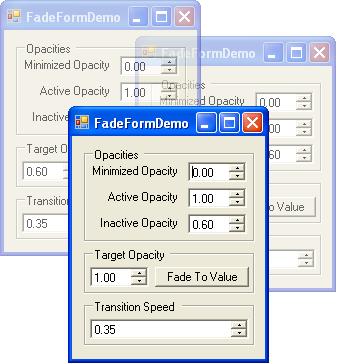
The application was good but a System error occurs in the application when the transition speed is reduced to 0.00 through arrows. There should be a limit as it is kept while increasing.
Regards, Pulkit Lall.
modified on Saturday, September 6, 2008 8:57 AM
|
| Sign In·View Thread·PermaLink | |
|
|
|
 |
|
 |
Hi there,
Thanks for the code, very useful. I did notice one problem with the form opacity being set to .999 in code. One of my forms with about 3 nested split containers would perform its layout extremely slowly on initial display and on resizing of the form. After checking my suspendlayout() and resumelayout() calls I tracked it down to this line of code setting the opacity. Removing it solved my problem and layout performed quickly again. I don't know why this is but just thought I would add a comment on this in case anyone notices a similar problem.
|
| Sign In·View Thread·PermaLink | |
|
|
|
 |
|
 |
I really like this code. I think it is pretty cool.
Comments... 1. I think you should make DisableFade a boolean property which doesn't change the other properties. 2. On all your properties you might want to include the category attribute, description attribute and refreshproperties attribute in the System.ComponentModel namespace. This way when the user is using the designer of a form derived from your class the descriptions will show in the properties grid. 3. Instead of using private void FadeForm_Load(object sender, EventArgs e) try using protected override void OnLoad(EventArgs e) { base.OnLoad(e); } 4. Look at using OnActivated and OnDeactivate. 5. FadeForm doesn't have a designer file so you can remove the "partial" from the class declaration. 6. You can remove the "using System.Drawing" namespace. 7. Running code anaysis on this file throws off some warnings but not too many.
Chris
|
| Sign In·View Thread·PermaLink | |
|
|
|
 |
|
 |
Man, I love the time that you took to review my code. I can tell that posting on the project is going to make me a much better programmer.
1) Done. At least the next version will have it. 2) Done. I always wondered how to group props so now I know. 3) Curious why you suggest the switch. It seems like just a different way to skin the cat. Let me know. 4) I have explored OnActivated and OnDeactivated but there was a problem with them early on that I didn't document and promptly forgot. I am curious to go back and check it out but my job is too hectic now to even think about it. 5) Done. Easy. 6) Done. 7) I am a Noob so how do I run an analysis. I don't want any dust bunnies.
Thanks again for you input.
Nicholas Seward
|
| Sign In·View Thread·PermaLink | |
|
|
|
 |
|
 |
I am really interested in getting your updated version.
I guess the main reason for using OnActivated and OnDeactivated is for deriving classes. If you derive a class from FadeForm (I don’t know why anyone would ever do this) you can override the OnActivated and OnDeactivated and choose to run code before and/or after the derived classes OnActivated and OnDeactivated.
Also I am noticing while resizing the window there is "black" space. This is just a minor issue.
This is my new FadeForm.cs and may give you some ideas to incorporate in your code. It may also show something wrong with my code. Please note the [RefreshProperties(RefreshProperties.All)] attribute on the MinimizedOpacity property. Because the MinimizedOpacity property changes another property you would want to refresh that other property on the property grid in the design window. I am also not sure of all the properties that could use the ArgumentOutOfRangeException to validate the value coming into the property.
Have fun...
using System; using System.ComponentModel; using System.Windows.Forms;
namespace Test { public class FadeForm : Form { #region WindowsMessageCodes private const int WMSysCommand = 0x112; private const int WMCommand = 0x111; private const int SCMinimize = 0xF020; private const int SCRestore = 0xF120; private const int SCClose = 0xF060; #endregion
#region Variables private Message _HeldMessage = new Message();
private System.Windows.Forms.Timer _Timer; #endregion
#region Properties #region ActiveOpacity private double _ActiveOpacity = 1; [Category("Custom")] [Description("The opacity that the form will transition to when the form gets focus which must be a positive number.")] [RefreshProperties(RefreshProperties.All)] public double ActiveOpacity { get { return _ActiveOpacity; } set { if (value >= 0) _ActiveOpacity = value; else throw new ArgumentOutOfRangeException("value", Properties.Resources.ErrorActiveOpacity); if (ContainsFocus) TargetOpacity = _ActiveOpacity; } } #endregion
#region FadeTime private double _FadeTime = 0.35; [Category("Custom")] [Description("The time it takes to fade from 0 to 1 or the other way around.")] public double FadeTime { get { return _FadeTime; } set { if (value > 0 && value < 1) _FadeTime = value; else throw new ArgumentOutOfRangeException("value", Properties.Resources.ErrorFadeTime); } } #endregion
#region InactiveOpacity private double _InactiveOpacity = .85; [Category("Custom")] [Description("The opacity that the form will transition to when the form doesn't have focus.")] [RefreshProperties(RefreshProperties.All)] public double InactiveOpacity { get { return _InactiveOpacity; } set { if (value >= 0) _InactiveOpacity = value; else throw new ArgumentOutOfRangeException("value", Properties.Resources.ErrorInactiveOpacity); if (!ContainsFocus && WindowState != FormWindowState.Minimized) TargetOpacity = _InactiveOpacity; } } #endregion
#region MinimizedOpacity private double _MinimizedOpacity; [Category("Custom")] [Description("The opacity that the form will transition to when the form is minimized.")] [RefreshProperties(RefreshProperties.All)] public double MinimizedOpacity { get { return _MinimizedOpacity; } set { if (value >= 0) _MinimizedOpacity = value; else throw new ArgumentOutOfRangeException("value", Properties.Resources.ErrorMinimizedOpacity); if (!ContainsFocus && WindowState != FormWindowState.Minimized) TargetOpacity = InactiveOpacity; } } #endregion
#region TargetOpacity private double _TargetOpacity; [Category("Custom")] [Description("The opacity the form is transitioning to.")] public double TargetOpacity { get { return _TargetOpacity; } set { _TargetOpacity = value; if (!_Timer.Enabled) _Timer.Start(); } } #endregion #endregion
#region Constructor [System.Diagnostics.CodeAnalysis.SuppressMessage("Microsoft.Mobility", "CA1601:DoNotUseTimersThatPreventPowerStateChanges", Scope = "member", Target = "FadeForm.FadeForm..ctor()")] public FadeForm() { this._Timer = new System.Windows.Forms.Timer(); this.SuspendLayout(); this._Timer.Interval = 25; this._Timer.Tick += new System.EventHandler(this._Timer_Tick); } #endregion
#region DisableFade public void DisableFade() { ActiveOpacity = 1; InactiveOpacity = 1; MinimizedOpacity = 1; } #endregion
#region EnableFadeDefaults public void EnableFadeDefaults() { ActiveOpacity = 1; InactiveOpacity = .85; MinimizedOpacity = 0; FadeTime = .35; } #endregion
#region WndProc [System.Security.Permissions.SecurityPermission(System.Security.Permissions.SecurityAction.LinkDemand, Flags = System.Security.Permissions.SecurityPermissionFlag.UnmanagedCode)] protected override void WndProc(ref Message m) { if (m.Msg == WMSysCommand || m.Msg == WMCommand) { if (m.WParam == (IntPtr)SCMinimize) { if (_HeldMessage.WParam != (IntPtr)SCMinimize) { _HeldMessage = m; TargetOpacity = MinimizedOpacity; } else { _HeldMessage = new Message(); TargetOpacity = ActiveOpacity; } return; }
else if (m.WParam == (IntPtr)SCRestore && this.WindowState == FormWindowState.Minimized) { base.WndProc(ref m); TargetOpacity = ActiveOpacity; return; }
else if (m.WParam == (IntPtr)SCClose) { _HeldMessage = m; TargetOpacity = MinimizedOpacity; return; } }
base.WndProc(ref m); } #endregion
#region _Timer private void _Timer_Tick(object sender, EventArgs e) { double fadeChangePerTick = _Timer.Interval * 1.0 / 1000 / FadeTime;
if (Math.Abs(TargetOpacity - this.Opacity) < fadeChangePerTick) { if (TargetOpacity == 1) this.Opacity = .999; else this.Opacity = TargetOpacity; base.WndProc(ref _HeldMessage); _HeldMessage = new Message(); _Timer.Stop(); } else if (TargetOpacity > this.Opacity) this.Opacity += fadeChangePerTick; else if (TargetOpacity < this.Opacity) this.Opacity -= fadeChangePerTick; } #endregion
#region Activated protected override void OnActivated(EventArgs e) { base.OnActivated(e);
TargetOpacity = ActiveOpacity; } #endregion
#region OnDeactivate protected override void OnDeactivate(EventArgs e) { base.OnDeactivate(e);
this.TargetOpacity = InactiveOpacity; } #endregion
#region OnLoad protected override void OnLoad(EventArgs e) { base.OnLoad(e); this.Opacity = MinimizedOpacity; TargetOpacity = ActiveOpacity; } #endregion } }
Chris
|
| Sign In·View Thread·PermaLink | |
|
|
|
 |
|
 |
chris175 wrote: Also I am noticing while resizing the window there is "black" space. This is just a minor issue.
I didn't notice that before. I did a little check and all forms with the opacity set below 1 display this behavior. I have a few ideas on how to fix this but none of them are pretty. The best idea I have is to somehow synchronize the resizing and the painting. Hold off on painting while the size is changing but once the size is stable send a refresh. It could be easy but something tells me that nothing is every easy. My guess is that it will deserve its own article.
Nicholas Seward
|
| Sign In·View Thread·PermaLink | |
|
|
|
 |
|
 |
I found out a few things.
First issue: When placing controls on a form derived from FadeForm and setting the docking control they would not dock right. To fix this I removed the "this.SuspendLayout();" in the FadeForms constructor. I really dont know why it was in there.
Second issue: I fixed the "black" space. In your code I see that you fixed it by setting the Opacity to .999. This makes sure the form will not flash black when the form looses focus.
Now for the resizing "black" space issue. In the form that is derived from FadeForm there is sometimes an Opacity property that gets placed in the .Designer.cs file which is set to .999. This property needs to be removed. How does it get there you ask? When messing with a form, the Visual Studio Designer actually executes the Constructor and OnLoad function of your form and base forms to see what needs to be in the .Designer.cs file. So in our case the FadeForm Constructor is called, then the OnLoad, then TargetOpacity gets set, then because the timer is not enabled it starts, which then calls the _Timer_Tick function and read this "this.Opacity = .999;". There is a simple fix. Right after "base.OnLoad(e);" place "if (DesignMode) return;". After the contructor is called the forms DesignMode variable is set. Then the OnLoad function is called. If DesignMode is true then the function is executing within a visual studios designer. If DesignMode is false then an application is executing the class.
Chris
|
| Sign In·View Thread·PermaLink | |
|
|
|
 |
|
 |
I understand that the opacity gets changed to .999 but I wasn't worried about that. I was keeping it from every being 1 to stop the black flashing.
The only way to get rid of the black resizing issue is to have the opacity set to 1 but when you fade from 1 you get a black flash. So, you either get black flashes or black resizing.
FYI: Windows handles the painting of layered windows(opacity<1) and normal windows (opacity=1) differently. When you switch from one type to the other the transition is not handled seamlessly in windows.
Nicholas Seward
|
| Sign In·View Thread·PermaLink | |
|
|
|
 |
|
 |
I thought the black flash was fixed but I guess not. If you remove "if (TargetOpacity == 1) this.Opacity = .999;" then the black flash goes away.
|
| Sign In·View Thread·PermaLink | |
|
|
|
 |
|
 |
Hello, I tried it in VB .Net but it crashes with WndProc : Is it possible to do it in VB ?
Protected Overrides Sub WndProc(ByRef m As Message) If ((m.Msg = &H112) OrElse (m.Msg = &H111)) Then If (m.WParam = CType(&HF020, IntPtr)) Then If (Me.m_heldMessage.WParam <> CType(&HF020, IntPtr)) Then Me.m_heldMessage = m Me.TargetOpacity = Me.MinimizedOpacity Return End If Me.m_heldMessage = New Message Me.TargetOpacity = Me.ActiveOpacity Return End If If ((m.WParam = CType(&HF120, IntPtr)) AndAlso (MyBase.WindowState = FormWindowState.Minimized)) Then MyBase.WndProc((m)) Me.TargetOpacity = Me.ActiveOpacity Return End If If (m.WParam = CType(&HF060, IntPtr)) Then Me.m_heldMessage = m Me.TargetOpacity = Me.MinimizedOpacity Return End If End If MyBase.WndProc((m)) End Sub
|
| Sign In·View Thread·PermaLink | |
|
|
|
 |
|
 |
See "Cool..." below. It has my code converted to VB.NET. There are very little non syntactical(Man, sometimes I am impressed with the words that come out of me.) differences between C# and VB.NET.
Nicholas Seward
|
| Sign In·View Thread·PermaLink | |
|
|
|
 |
|
|
 |
|
 |
I've tried to using your form, but when i try to show an MDI child form, it doesn't appear,please help me thanks
Bye
|
| Sign In·View Thread·PermaLink | |
|
|
|
 |
|
 |
I have done a few test and as far as the program is concerned the child forms are visible and where I told them to be but I can't see them. I wrote a simple program that didn't extend Fadeform and it didn't have any problems. I will continue to work on this as I get time.
Nicholas Seward
|
| Sign In·View Thread·PermaLink | |
|
|
|
 |
|
|
 |
|
 |
but instead of deriving from a Form, why not use an ExtenderProvider so it can be dropped on any type of form. I converted your code into an ExtenderProvider, but it's in VB.net because of a current project (sorry ;P). I have not completely tested the code yet, but it seems to be working properly. Let me know if there are any problems.
Imports System.ComponentModel
_ Public Class FaderExtender Implements IExtenderProvider, ISupportInitialize
Friend _Initializing As Boolean = False Private _Properties As New Dictionary(Of Control, FaderProperties)
_ _ _ _ Public Function GetFaderProperties(ByVal ctrl As Control) As FaderProperties If _Properties.ContainsKey(ctrl) Then Return _Properties(ctrl) Else _Properties.Add(ctrl, New FaderProperties(ctrl)) Return _Properties(ctrl) End If End Function
Public Sub SetFaderProperties(ByVal ctrl As Control, ByVal value As FaderProperties) Dim props As FaderProperties = Nothing
If value Is Nothing Then If _Properties.ContainsKey(ctrl) Then props = _Properties(ctrl) props.Detach() _Properties.Remove(ctrl) End If Else If _Properties.ContainsKey(ctrl) Then props = _Properties(ctrl) props.Detach() _Properties(ctrl) = value Else _Properties.Add(ctrl, value) End If If Not value._Target Is Nothing Then value.Detach() End If value._Target = ctrl value.Attach() End If End Sub
Public Function CanExtend(ByVal extendee As Object) As Boolean Implements System.ComponentModel.IExtenderProvider.CanExtend If TypeOf extendee Is Form AndAlso Not (TypeOf extendee Is FaderExtender) Then Return True End If Return False End Function
Public Sub BeginInit() Implements System.ComponentModel.ISupportInitialize.BeginInit _Initializing = True End Sub
Public Sub EndInit() Implements System.ComponentModel.ISupportInitialize.EndInit For Each fp As FaderProperties In _Properties.Values fp._Initializing = False fp.TargetOpacity = fp.TargetOpacity Next _Initializing = False End Sub
_ Public Class FaderProperties
Friend _Target As Form Private _Native As FaderWindow Friend _Initializing As Boolean = True
Private _targetOpacity As Double Private _fadeTime As Double = 0.35 Friend _activeOpacity As Double = 1.0 Private _inactiveOpacity As Double = 1.0 Friend _minimizedOpacity As Double = 0 Private _timer As System.Windows.Forms.Timer
Public Sub New(ByVal Target As Form) If Not _Target Is Nothing Then Detach() End If _Target = Target Attach() End Sub
_ _ _ Public Property TargetOpacity() As Double Get Return _targetOpacity End Get Set(ByVal value As Double) _targetOpacity = value If _Initializing Then Return If Not _timer.Enabled Then _timer.Start() End If End Set End Property
_ Public Property FadeTime() As Double Get Return _fadeTime End Get Set(ByVal value As Double) If (value > 0) Then _fadeTime = value Else _fadeTime = 0.1 End If End Set End Property
_ Public Property ActiveOpacity() As Double Get Return _activeOpacity End Get Set(ByVal value As Double) If (value >= 0) Then _activeOpacity = value Else _activeOpacity = 100.0 End If If (_Target.ContainsFocus) Then TargetOpacity = ActiveOpacity End If End Set End Property
_ Public Property InactiveOpacity() As Double Get Return _inactiveOpacity End Get Set(ByVal value As Double) If (value >= 0) Then _inactiveOpacity = value Else _inactiveOpacity = 100.0 End If If (Not _Target.ContainsFocus AndAlso _Target.WindowState <> FormWindowState.Minimized) Then TargetOpacity = InactiveOpacity End If End Set End Property
_ Public Property MinimizedOpacity() As Double Get Return _minimizedOpacity End Get Set(ByVal value As Double) If (value >= 0) Then _minimizedOpacity = value Else _minimizedOpacity = 100.0 End If If (Not _Target.ContainsFocus AndAlso _Target.WindowState <> FormWindowState.Minimized) Then TargetOpacity = InactiveOpacity End If End Set End Property
Friend Sub Attach() _Native = New FaderWindow(Me) _Native.AssignHandle(_Target.Handle)
_timer = New System.Windows.Forms.Timer() _timer.Interval = 25 AddHandler _timer.Tick, AddressOf timer_Tick AddHandler _Target.Deactivate, AddressOf FadeForm_Deactivate AddHandler _Target.Activated, AddressOf FadeForm_Activated AddHandler _Target.Load, AddressOf FadeForm_Load End Sub
Public Sub Detach() If Not _timer Is Nothing Then _timer.Stop() RemoveHandler _timer.Tick, AddressOf timer_Tick End If If Not _Native Is Nothing Then _Native.ReleaseHandle() _Native = Nothing End If If Not _Target Is Nothing Then RemoveHandler _Target.Deactivate, AddressOf FadeForm_Deactivate RemoveHandler _Target.Activated, AddressOf FadeForm_Activated RemoveHandler _Target.Load, AddressOf FadeForm_Load End If End Sub
Private Sub timer_Tick(ByVal sender As Object, ByVal e As EventArgs) Dim fadeChangePerTick As Double = _timer.Interval * 1.0 / 1000.0 / _fadeTime
'Check to see if it is time to stop the timer If (Math.Abs(TargetOpacity - _Target.Opacity) < fadeChangePerTick) Then 'There is an ugly black flash if you set the Opacity to 1.0 If (_targetOpacity = 1.0) Then _Target.Opacity = 0.999 Else _Target.Opacity = _targetOpacity End If 'Process held Windows Message. _Native.LocalWndProc(_Native.HeldMessage) _Native.HeldMessage = New Message() 'Stop the timer to save processor. _timer.Stop() ElseIf (_targetOpacity > _Target.Opacity) Then _Target.Opacity += fadeChangePerTick ElseIf (_targetOpacity < _Target.Opacity) Then _Target.Opacity -= fadeChangePerTick End If End Sub
Private Sub FadeForm_Load(ByVal sender As Object, ByVal e As EventArgs) _Target.Opacity = _minimizedOpacity TargetOpacity = _activeOpacity End Sub
Private Sub FadeForm_Deactivate(ByVal sender As Object, ByVal e As EventArgs) TargetOpacity = _inactiveOpacity End Sub
Private Sub FadeForm_Activated(ByVal sender As Object, ByVal e As EventArgs) TargetOpacity = _activeOpacity End Sub End Class
Private Class FaderWindow Inherits System.Windows.Forms.NativeWindow
Private _heldMessage As New Message() Private _Parent As FaderProperties
Private Const WM_SYSCOMMAND As Integer = &H112 Private Const WM_COMMAND As Integer = &H111 Private Const SC_MINIMIZE As Integer = &HF020 Private Const SC_RESTORE As Integer = &HF120 Private Const SC_CLOSE As Integer = &HF060
Public Property HeldMessage() As Message Get Return _heldMessage End Get Set(ByVal value As Message) _heldMessage = value End Set End Property
Public Sub New(ByVal Parent As FaderProperties) _Parent = Parent End Sub
Friend Sub LocalWndProc(ByRef m As Message) MyBase.WndProc(m) End Sub
Protected Overrides Sub WndProc(ByRef m As System.Windows.Forms.Message) If (m.Msg = WM_SYSCOMMAND OrElse m.Msg = WM_COMMAND) Then 'Fade to zero on minimze If (m.WParam.ToInt32 = SC_MINIMIZE) Then If (_heldMessage.WParam.ToInt32 <> SC_MINIMIZE) Then _heldMessage = m _Parent.TargetOpacity = _Parent._minimizedOpacity Else _heldMessage = New Message() _Parent.TargetOpacity = _Parent._activeOpacity End If Return
'Fade in if the window is restored from the taskbar ElseIf (m.WParam.ToInt32 = SC_RESTORE AndAlso _Parent._Target.WindowState = FormWindowState.Minimized) Then MyBase.WndProc(m) _Parent.TargetOpacity = _Parent._activeOpacity Return
'Fade out if the window is closed. ElseIf (m.WParam.ToInt32 = SC_CLOSE) Then _heldMessage = m _Parent.TargetOpacity = _Parent._minimizedOpacity Return End If End If
MyBase.WndProc(m) End Sub End Class End Class
|
| Sign In·View Thread·PermaLink | |
|
|
|
 |
|
 |
Your comment proves just how much of a noob I am. Using ExtenderProvider is very elegant and I never heard of it. Thanks so much for sharing your insight and don't worry about what language you write in. I only write in C# because I think it looks prettier. VB is just as good.
Nicholas Seward
|
| Sign In·View Thread·PermaLink | |
|
|
|
 |
|
|
 |
