 |
|
 |
For Windows 7 (and Vista) the code must be updated:
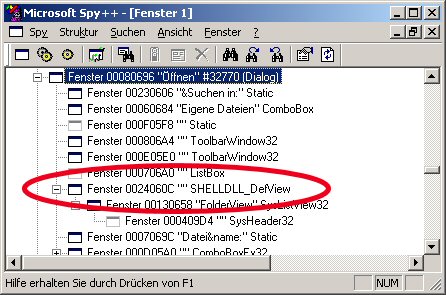
1. FindWindowEx need to substitute for EnumChildWindows+GetClassName ("SHELLDLL_DefView" window is not direct child of the Open/Save dialog window);
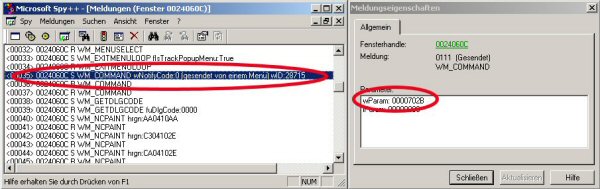
2. View IDs are different:
Details = 0x704B, Tiles = 0x704C, Extra_Large_Icons = 0x704D, Medium_Icons = 0x704E, Large_Icons = 0x704F, Small_Icons = 0x7050, List = 0x7051, Content = 0x7052
|
| Sign In·View Thread·PermaLink | |
|
|
|
 |
|
 |
Great job ! However, I would like to change the FileDlgFilter after the form dialog is shown. Indeed, in my extended dialog, the user can change an option, and that option implies to generate a different file format. But if I set the FileDlgFilter after loading, the changes are not reflected in the interface. I tried to add some _MSDialog.Filter = ... in the FileDlgFilter property, or sending events, but could find nothing that effectiveley reflects the change. Have you got a trick to do that ? Regards,
Pierre
|
| Sign In·View Thread·PermaLink | |
|
|
|
 |
|
|
 |
|
 |
I only just discovered this code, after spending a weekend cursing and swearing, trying to find some solution to this MS idiocy.
If you don't have any objections, I plan to use this is my Master's thesis coding project.
Regards Mike
|
| Sign In·View Thread·PermaLink | |
|
|
|
 |
|
|
 |
|
 |
Hi,
no the component is currently not able to do that. But this sounds like a good addition. I'll think about on how to integrate this (although it may take several days until I find some time to do so).
Robert
|
| Sign In·View Thread·PermaLink | |
|
|
|
 |
|
|
 |
|
 |
hi, great stuff. i was searching for such an article which might be useful in opening multiple files more than 200 ( i tried to find and got that cant open more than 150+. is ot correct?) at once. can u help a way to do with this FileDialogExtender article?
jee
|
| Sign In·View Thread·PermaLink | |
|
|
|
 |
|
 |
Hi, thanks for your comment. I didn't even know about this limitation thus this component doesn't handle this. If this is an issue contained within the windows dialog then I don't think this component can help you. The .Net FileDialogs or only wrappers around the ones built into windows and are (as you can see from the article) only very hard to customize. Maybe using Spy++ one could try to figure out what happens when more than 150 files are selected but I'm sorry to say that I have currently no time to do so myself. And even when doing so there is (in my opinion) only a little chance to get around this issue.
Greetings Robert
|
| Sign In·View Thread·PermaLink | |
|
|
|
 |
|
 |
using System.Threading; using System.Runtime.InteropServices;
public class DialogViewTypeSetter { public enum DialogViewTypes { LargeIcons = 0x7029, List = 0x702b, Details = 0x702c, Thumbnails= 0x7031, SmallIcons = 0x702a }
[DllImport("user32.dll",EntryPoint="SendMessageA",CallingConvention=CallingConvention.StdCall,CharSet=CharSet.Ansi)] private static extern uint SendMessage(uint Hdc, uint Msg_Const, uint wParam, uint lParam); [DllImport("user32.dll",EntryPoint="FindWindowExA",CallingConvention=CallingConvention.StdCall,CharSet=CharSet.Ansi)] private static extern uint FindWindowEx(uint hwndParent, uint hwndChildAfter, string lpszClass, string lpszWindow);
[DllImport("user32.dll",EntryPoint="GetForegroundWindow",CallingConvention=CallingConvention.StdCall,CharSet=CharSet.Ansi)] private static extern uint GetForegroundWindow();
private bool isWatching = false; private DialogViewTypes dialogViewTypes; private const int WM_COMMAND = 0x0111;
public DialogViewTypeSetter(DialogViewTypes dialogViewTypes) { this.dialogViewTypes = dialogViewTypes; }
public void StartWatching() { isWatching = true;
Thread t = new Thread(new ThreadStart(CheckActiveWindow)); t.Start(); }
public void StopWatching() { isWatching = false; }
private void CheckActiveWindow() { lock(this) { uint listviewHandle = 0;
while(listviewHandle == 0 && isWatching) { listviewHandle = FindWindowEx(GetForegroundWindow(), 0, "SHELLDLL_DefView", ""); }
if(listviewHandle != 0) { SendMessage(listviewHandle, WM_COMMAND, (uint)this.dialogViewTypes, 0); } } } }
------------------------------------------------------------ Just use StartWatching() before ShowDialog() and StopWatching() after ShowDialog() example :
... this.dialogViewTypeSetter.StartWatching(); this.openFileDialog.ShowDialog(); this.dialogViewTypeSetter.StopWatching(); // Just safety, thread will be automatically end ...
-- modified at 8:50 Thursday 27th April, 2006
|
| Sign In·View Thread·PermaLink | |
|
|
|
 |
|
 |
Thanks for sharing. Seems to work good but it is (like my solution) relatively complex to achieve such a simple thing. Microsoft should have done better on this point.
|
| Sign In·View Thread·PermaLink | |
|
|
|
 |
|
 |
//With this code you can plase the filedialog on your form and //set properties as normal and just call ShowDialog as on a // normal OpenFileDialog
using System; using System.Collections.Generic; using System.Text; using System.Threading; using System.Runtime.InteropServices; using System.Windows.Forms; using System.IO; using System.ComponentModel;
namespace OpenFileDialogEx {
public class OpenFileDialogEx : Component {
#region Dll import [DllImport("user32.dll", EntryPoint = "SendMessageA", CallingConvention = CallingConvention.StdCall, CharSet = CharSet.Ansi)] private static extern uint SendMessage(uint Hdc, uint Msg_Const, uint wParam, uint lParam);
[DllImport("user32.dll", EntryPoint = "FindWindowExA", CallingConvention = CallingConvention.StdCall, CharSet = CharSet.Ansi)] private static extern uint FindWindowEx(uint hwndParent, uint hwndChildAfter, string lpszClass, string lpszWindow);
[DllImport("user32.dll", EntryPoint = "GetForegroundWindow", CallingConvention = CallingConvention.StdCall, CharSet = CharSet.Ansi)] private static extern uint GetForegroundWindow();
#endregion
public enum DialogViewTypes { LargeIcons = 0x7029, List = 0x702b, Details = 0x702c, Thumbnails = 0x702d, // Try between 0x7031 and 0x702d SmallIcons = 0x702a }
private bool m_IsWatching = false; private DialogViewTypes m_DialogViewTypes; private const int WM_COMMAND = 0x0111; private OpenFileDialog m_OpenFileDialog; public OpenFileDialogEx() { m_IsWatching = false; m_DialogViewTypes = DialogViewTypes.Thumbnails; }
public OpenFileDialogEx(DialogViewTypes dialogViewTypes): this() { m_DialogViewTypes = dialogViewTypes; }
private OpenFileDialog OpenFileDialog { get { if (m_OpenFileDialog == null) { m_OpenFileDialog = new OpenFileDialog(); }
return m_OpenFileDialog; } }
public bool Multiselect { get { return OpenFileDialog.Multiselect; } set { OpenFileDialog.Multiselect = value; } }
public bool ReadOnlyChecked { get { return OpenFileDialog.ReadOnlyChecked; } set { OpenFileDialog.ReadOnlyChecked = value; } }
public bool ShowReadOnly { get { return OpenFileDialog.ShowReadOnly; } set { OpenFileDialog.ShowReadOnly = value; } }
public Stream OpenFile() { return OpenFileDialog.OpenFile(); }
[DefaultValue(true)] public bool AddExtension { get { return OpenFileDialog.AddExtension; } set { OpenFileDialog.AddExtension = value; } } [DefaultValue(true)] public bool CheckPathExists { get { return OpenFileDialog.CheckPathExists; } set { OpenFileDialog.CheckPathExists = value; } }
[DefaultValue("")] public string DefaultExt { get { return OpenFileDialog.DefaultExt; } set { OpenFileDialog.DefaultExt = value; } }
[DefaultValue(true)] public bool DereferenceLinks { get { return OpenFileDialog.DereferenceLinks; } set { OpenFileDialog.DereferenceLinks = value; } }
[DefaultValue("")] public string FileName { get { return OpenFileDialog.FileName; } set { OpenFileDialog.FileName = value; } }
[DesignerSerializationVisibility(0)] [Browsable(false)] public string[] FileNames { get { return OpenFileDialog.FileNames; } }
[DefaultValue("")] [Localizable(true)] public string Filter { get { return OpenFileDialog.Filter; } set { OpenFileDialog.Filter = value; } }
[DefaultValue(1)] public int FilterIndex { get { return OpenFileDialog.FilterIndex; } set { OpenFileDialog.FilterIndex = value; } }
[DefaultValue("")] public string InitialDirectory { get { return OpenFileDialog.InitialDirectory; } set { OpenFileDialog.InitialDirectory = value; } }
[DefaultValue(false)] public bool RestoreDirectory { get { return OpenFileDialog.RestoreDirectory; } set { OpenFileDialog.RestoreDirectory = value; } }
[DefaultValue(false)] public bool ShowHelp { get { return OpenFileDialog.ShowHelp; } set { OpenFileDialog.ShowHelp = value; } } [DefaultValue(false)] public bool SupportMultiDottedExtensions { get { return OpenFileDialog.SupportMultiDottedExtensions; } set { OpenFileDialog.SupportMultiDottedExtensions = value; } }
[Localizable(true)] [DefaultValue("")] public string Title { get { return OpenFileDialog.Title; } set { OpenFileDialog.Title = value; } } [DefaultValue(true)] public bool ValidateNames { get { return OpenFileDialog.ValidateNames; } set { OpenFileDialog.ValidateNames = value; } }
private void StartWatching() { m_IsWatching = true;
Thread t = new Thread(new ThreadStart(CheckActiveWindow)); t.Start(); }
public DialogResult ShowDialog() { return ShowDialog(null); }
public DialogResult ShowDialog(IWin32Window owner) { StartWatching();
DialogResult dialogResult = OpenFileDialog.ShowDialog(owner);
StopWatching();
return dialogResult; }
private void StopWatching() { m_IsWatching = false; }
private void CheckActiveWindow() { lock (this) { uint listviewHandle = 0;
while (listviewHandle == 0 && m_IsWatching) { listviewHandle = FindWindowEx(GetForegroundWindow(), 0, "SHELLDLL_DefView", ""); }
if (listviewHandle != 0) { SendMessage(listviewHandle, WM_COMMAND, (uint)this.m_DialogViewTypes, 0); } } } }
}
|
| Sign In·View Thread·PermaLink | 5.00/5 (2 votes) |
|
|
|
 |
|
 |
This is an elegant and simple solution. First-class design, implementation, and coding. I dropped in into my app and it just worked! Thanks 
|
| Sign In·View Thread·PermaLink | |
|
|
|
 |
|
|
 |
|
|
 |
|
 |
Copied it directly into my project and it works great. Thank you.
I did add some regions to the code to hide some things.
|
| Sign In·View Thread·PermaLink | |
|
|
|
 |
|
 |
This works. It would be nice if Microsoft had just made it an option for the OpenFileDialog constructor to have it come up in thumbnail mode, but since they didn't I sure am glad to have people like you around that figure out smart ways of working around their mistakes.
|
| Sign In·View Thread·PermaLink | |
|
|
|
 |
|
 |
This is great stuff - would have taken hours or days to figure this out (as it probably did). ecards
modified on Sunday, August 24, 2008 12:19 PM
|
| Sign In·View Thread·PermaLink | |
|
|
|
 |
|
 |
First of all a nice work thnx 4 ur nice article. the problem is that when i use ur class and procedure in the child form of an MDI form i doesnt work. Whats the problem . Is there any need to modify the code. Plz let me know as i m new in .Net. If some other Body knows plz help me. Thnx in Advance!
|
| Sign In·View Thread·PermaLink | |
|
|
|
 |
|
 |
Haven't tried this yet but I think you have to redirect the WndProc of the parent form instead of the child form. If I get some time I will look into it and try to resolve the issue.
|
| Sign In·View Thread·PermaLink | |
|
|
|
 |
|
 |
I just checked my theory and I was right. Best way is possibly to have a public static Extender instance somewhere which gets fed by the main form but can also accessed by your child forms in order to change the view type.
|
| Sign In·View Thread·PermaLink | 5.00/5 (1 vote) |
|
|
|
 |
|
 |
Hi,
The idea is good, I was looking for code to achieve this functionality as well... But on my Windows Server 2003 standard the sample code does not seem to work. Regardless of which view is chosen, the regular view (list) is used. This may be because of some OS version dependencies.
|
| Sign In·View Thread·PermaLink | 2.00/5 (1 vote) |
|
|
|
 |
|
 |
Hi Robert,
i do not know how to contact you, so i hope you are checking this frequently. If you read this, please contact me: bjoerneid@web.de
|
| Sign In·View Thread·PermaLink | |
|
|
|
 |
|
 |
Hey, I know that there is a way to use the FileDialog for selecting folders. I see it in MS applications. Sadly the FileDialog interface do not allow to do so. Do yoy know of a way to overcome this problem, and uses this dialog for selecting both files and folders?
Thanks, Doron.
|
| Sign In·View Thread·PermaLink | |
|
|
|
 |
|
|
 |