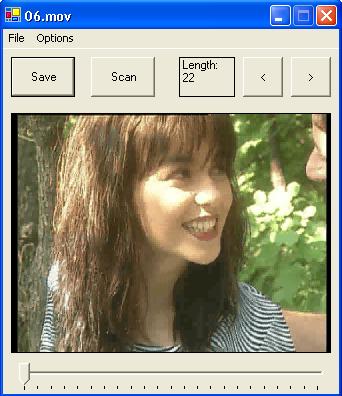
Introduction
Pressing the "Print Screen" key while playing a movie file in Windows Media Player will not allow you to save the current frame. The sample application will save frames to JPEG files. It can extract frames from most movie file formats including *.wm? (Windows Media Player), *.avi, *.mpeg, *.mov (QuickTime), and *.dat (DivX). Commercial and shareware applications that provide this functionality exist but the code that I will show will let you build your own application that fits your exact needs.
Background
Pressing the "Print Screen" key while playing a movie file in Windows Media Player will not allow you to save the current frame. So I started to look for a simple way to grab a frame from movie files playing in the most common media applications (e.g., Windows Media Player, QuickTime, or DivX Player). It turned out to be more complicated than I originally thought. Hence, I decided to write up a sample application and submit it to CodeProject since I have used their resources quite often; it was a way to thank the people behind this site.
Microsoft approach to this problem would be using DirectShow but there is no managed equivalent of it. By digging in the DirectX documentation, I discovered the MediaDet class that is used in some VB samples. It is not the ideal solution but it is good enough for many situations. By wrapping the qedit.dll from the DirectShow Developer Runtime (which is included in the Extras of the DirectX SDK) in a managed assembly, I could make calls to MediaDetClass::WriteBitmapBits method that saves a frame from a movie file to a bitmap file.
Using the code
As already mentioned, the workhorse of the application is the WriteBitmapBits method of the class MediaDetClass. In order to be able to access this method, you need to add a reference (from Visual Studio menu, Project/Add Reference if you are using Visual Studio, or use tlbimp from the .NET Framework tools) to the qedit.dll. In the code for this application, I have included the managed assembly (named interop.dexterlib.dll which was created using VS).
To declare an object of the MediaDetClass, you'll see code like:
          MediaDetClass md = new MediaDetClass();
          md.Filename = "sample.mov";
          md.CurrentStream = 0;
          string fBitmapName = "sample" + ".bmp" ;
          md.WriteBitmapBits( 0, 320, 240, fBitmapName );
After having called WriteBitmapBits, the MediaDetClass object is, as the DirectShow documentation says, in bitmap grab mode. The important thing to know about this is that you need to create a new MediaDetClass instance anytime you need to load a new movie (it is a little as if the properties of this class are "read only").
I have set the property CurrentStream to 0 and it was working with all the samples I have tried. Moreover, it seems that you can only write to a bitmap file. So in order to save disk space, I have added code to convert the bitmap file to a JPEG one. You have to remember that, even with our 100 Gig hard disks, you can chew up the gigabytes pretty quickly if you want to save a frame every 0.1 second on a 30 minutes movie.
Points of Interest
The "Save" button saves the current frame to a JPEG file in the "tmp" subdirectory. The "Scan" button loops through the whole movie and saves a frame every second (or 0.1 second).
The MediaDetClass as imported with Visual Studio is not a Windows control, its base class is System.Object, and it seems that after calling the method WriteBitmapBits, a handle to the bitmap file just created stays open. Therefore, the application, sometimes, complains that a file is already being used. I have just increased a variable counter to avoid most of these situations; an alternative solution would have been to wrap the MediaDetClass a second time in a more sophisticated implementation.
As mentioned, this is not an ideal solution. DirectShow is not going to appear in a managed version (as opposed to the rest of the DirectX API). I imagine it is for performance reasons. But as this application shows, an interop version will do the job; as they say "It Just Works!", which is fine for many situations.
I have included a file ("build.cmd" ) with the command line needed to compile the application in a shell window where the C# compiler must be found on the path.
Limitations and known issues
The application extracts a frame every second, by default. Under the Options menu, you can choose to extract a frame every one tenth of a second. This is only taken in consideration when you press the "Scan" button.
The application only saves a bitmap with the resolution 320 x 240. And they are saved in the "tmp" subdirectory (that will be created when you run the application).
The application is meant to extract pictures from movie files and is a poor application for viewing movies. The creation of new instances of the MediaDetClass type makes this restriction unavoidable.
I have created a thread to be able to keep track of the progress so far (which is displayed on a static label) when scanning a whole movie. The thread only updates the label.
The length of the movie is immediately overwritten when opening a second movie with the current position.


