Introduction
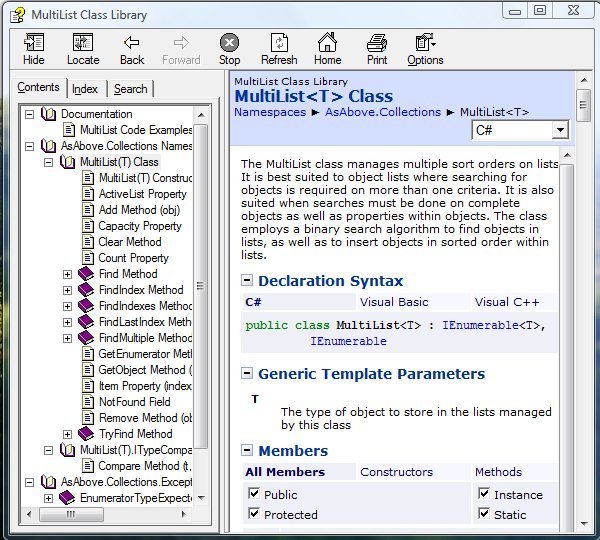
The MultiList class manages multiple sort orders on lists. It is best suited to object lists where searching for objects is required on more than one criteria. It is also suited when searches must be done on complete objects as well as properties within objects. The class employs a binary search algorithm to find objects in lists, as well as to insert objects in sorted order within lists.
This code sample demonstrates the declaration of a Person class, and the instantiation of a MultiList class to manage lists by three sort orders on the Person class. This documentation does not extensively demonstrate how to perform searches, additions, or deletions to the MultiList object; the reader should refer to the unit test code for this project for those examples. Here are some overview points about the MultiList class:
- Any property that forms the basis of a sort must be immutable, but -
- If a sort property must be modified, the client code should take care to remove the object with the
Remove method before the modification, then reinsert it with the Add method after the modification - The class employs a binary search algorithm for efficiency, both for sorting and inserting objects into lists
- Object properties that are sort criteria are not required to be unique
- If a sort criteria contains duplicates in the list, a search will return the first in the series
- No direct access to the underlying lists is allowed, but lists may be enumerated with
foreach - The
ActiveList property can be set before enumeration, to indicate which sort order to apply to subsequent enumerations - A single call to the
Add method adds an object to all managed lists - A single call to the
Remove method removes an object from all managed lists
Background
The idea for this library came about as I was working on an unrelated project that manages a list on two different sort orders. Initially I used a list that was sorted on the most important sort order, and a clumsy property and filter which allowed iteration on the second sort order. I knew it was a total kludge, but it worked. Before beginning this library, I searched for this type of functionality in publicly available code, with no luck. It seems like a fairly common problem, easily encountered in routine scenarios:
- I have an ordered list of customer names, and I would also like it sorted on city and state
- I have an ordered list of file names, and I also want to sort in on extension, size, and date
The List<T> class in the System.Collections.Generic namespace provides all of the functionality to search and sort lists, but it comes up short in some ways:
- Although it offers the ability to sort and to insert at a specified position, there is no mechanism to insert in sorted order without explicitly giving the index.
- The BinarySearch method returns the first match found when duplicates are present, but not necessarily the first in a series of duplicates.
- Although a list may be in sorted order, the methods Find, FindIndex, FindLast, and FindLastIndex perform linear searches to locate a match. On a sorted list, a binary search would be faster, followed by a linear search to the last duplicate for the
FindLast and FindLastIndex methods.
The MultiList library addresses all these issues.
Using the Code
This code example demonstrates the declaration of a Person class, and the instantiation of a MultiList class to manage lists by three sort orders on the Person class. This documentation does not extensively demonstrate how to perform searches, additions, or deletions to the MultiList object; the reader should refer to the unit test code of this project for those examples.
The Person class is defined as follows:
public class Person : System.IEquatable<Person>
{
   public enum Profession
   {
      Teacher,
      Nurse,
      Barber,
      Welder,
      Carpenter,
      Lawyer
   };

   private string _name;
   private int _age;
   private Profession _career;
   private static int _static_sequence = 0;
   private int _sequence;

   public Person (string name, int age,
      Profession career)
   {
      _name = name;
      _age = age;
      _career = career;
      lock (typeof (Person))
      {
         _sequence = ++_static_sequence;
      }
   }

   public string Name { get { return _name; } }
   public int Age { get { return _age; } }
   public Profession Career { get { return _career; } }
   public int Sequence { get { return _sequence; } }

   public bool Equals (Person p)
   {
      return Sequence == p.Sequence;
   }
}
Note the following points about the Person class:
- The class implements the IEquatable<T> interface. The purpose of this is to define a standard of equality for the class, without relying on the GetHashCode method, which is the default measure of equality. This is important because you may not want to give a direct reference to your object to a client; you may want to give the client a cloned copy, which would have a different hash code.
- The class employs a
static sequence member and a sequence member at the object level to generate a unique ID. This ID is used to determine equality.
The next step is to define an enumerator and three custom classes which are to be used as arguments to the MultiList constructor.
private enum PersonSortCriteria
{
Name,
Age,
Career
};
public class NameComparer :
MultiList<Person>.ITypeComparer<string>,
IComparer<Person>
{
public int Compare (Person p1, Person p2)
{
return p1.Name.CompareTo (p2.Name);
}
public int Compare (Person p, string name)
{
return p.Name.CompareTo (name);
}
}
public class AgeComparer :
MultiList<Person>.ITypeComparer<int>,
IComparer<Person>
{
public int Compare (Person p1, Person p2)
{
return p1.Age - p2.Age;
}
public int Compare (Person p, int age)
{
return p.Age - age;
}
}
public class CareerComparer :
MultiList<Person>.ITypeComparer<Person.Profession>,
IComparer<Person>
{
public int Compare (Person p1, Person p2)
{
return p1.Career.CompareTo (p2.Career);
}
public int Compare (Person p, Person.Profession career)
{
return p.Career.CompareTo (career);
}
}
The last step is to instantiate the three comparer objects and the MultiList class object. Note that the comparer object argument order matches the order of the PersonSortCriteria enumerator constants in the constructor.
NameComparer nameComparer = new NameComparer ();
AgeComparer ageComparer = new AgeComparer ();
CareerComparer careerComparer = new CareerComparer ();
MultiList<Person> ml =
   new MultiList<Person> (
      typeof (PersonSortCriteria), nameComparer,
      ageComparer, careerComparer);
After this, adding objects to the list is straightforward.
Person Jim = new Person ("Jim", 42,
Person.Profession.Teacher);
ml.Add (Jim);
ml.Add (new Person ("Susan", 29,
Person.Profession.Lawyer));
ml.Add (new Person ("Arthur", 22,
Person.Profession.Barber));
ml.Add (new Person ("Ellen", 29,
Person.Profession.Teacher));
A list can be searched for an index or for the actual object. It might be preferable to search for an index if you're not sure if a match will be found. If a match is not found, index searches return MultiList.NotFound. When a match is found, an index is returned that corresponds to the sort order of the search.
The following examples demonstrate the use of the index methods.
Searching for List Indexes
There are two types of searches that can be done on a MultiList object. The first type searches for an object with an existing Person object.
int index = ml.FindIndex (PersonSortCriteria.Name, Jim);
index = ml.FindIndex (PersonSortCriteria.Age, Jim);
The second type of search uses a data type that corresponds to a particular sort order.
int index = ml.FindIndex<string>
(PersonSortCriteria.Name, nameComparer, "Susan");
index = ml.FindIndex<int>
(PersonSortCriteria.Age, ageComparer, 29);
index = ml.FindIndex<Person.Profession>
(PersonSortCriteria.Career, careerComparer,
Person.Profession.Barber);
The ActiveList property may be used to specify a particular sort order, which will apply to all subsequent methods which do not specify a sort order.
ml.ActiveList = PersonSortCriteria.Age;
int index = ml.FindIndex<int>
(ageComparer, 29);
When an index is obtained, the object can be accessed in a couple of ways. In the previous code example, the ActiveList property was set to PersonSortCriteria.Age. If the Item indexer is used, it will return objects from the Age list.
if (index != MultiList.NotFound)
{
Person match = ml[index];
}
You may also access any of the lists using the GetObject method.
int index = ml.FindIndex<string>
   (PersonSortCriteria.Name, nameComparer, "Susan");
if (index != MultiList.NotFound)
{
   Person match = ml.GetObject (PersonSortCriteria.Name,
      index);
}
Searching for Actual Objects
The Find methods return a reference to the object stored in the list. When you use one of the Find methods that return an actual object, you will have to do so in a try/catch block, or else use the TryFind methods.
Person match;
try
{
match = ml.Find<string>
(PersonSortCriteria.Name, nameComparer, "Susan");
}
catch (MultiListObjectNotFoundException)
{
}
ml.ActiveList = PersonSortCriteria.Age;
if (true == TryFind<string>
(ageComparer, 29, out match))
{
}
Searching for Multiple Objects
Several methods are available that return multiple objects or indexes when duplicates exist.
IndexRange range = ml.FindIndexes<int>
(PersonSortCriteria.Age, ageComparer, 29);
if (range.Count > 0)
{
}
Person[] matches = ml.FindMultiple<int>
(PersonSortCriteria.Age, ageComparer, 29);
if (matches.Length > 0)
{
}
Points of Interest
The unit test code for this project requires NUnit 2.4.3.
History
- Enhanced - February 5, 2008: Added
IndexRange object and iteration. This object simplifies the handling of multiple indexes returned from Find methods. - Initial release - January 20, 2008


