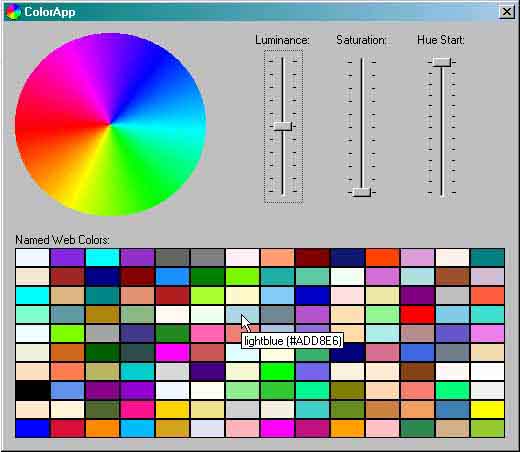
The sample application demonstrates the use of the CColor class, and uses come tricks in MFC-tooltip handling. In the upper area, the parameters for drawing the color circle could be controlled, and the lower area shows all named colors. The entire mechanism is implemented through the virtual function OnToolHitTest.
Introduction
The CColor class emerged from the need to manipulate color in the HLS model, meaning I needed the ability to directly change attributes like luminance or saturation. The HLS model makes it very easy to draw such things as color gradients between any color. Perhaps Windows 2000 will support the HLS (or the similarly HSB) color model, but I do not want to wait until the release. On the other hand, my code should also work under NT 4.0 and Win95/98. The CColor class encapsulates the long known type COLORREF and extends it with the HLS color model. A CColor object represents a color, whose RGB and HLS properties can be directly read and manipulated. It makes the use of type COLORREF and the associated macros superfluous.
Another handy feature, which I miss in the Win32 API, are named colors: frequent common colors can be used by name (instead of using a RGB value). If you use only a small number of colors, for example to emphasize portions of text, the use of named colors makes code more understandable (in my humble opinion). X11 supports named colors since I remember X11, though optimal use of the limited hardware palette was probably the original motive in those days. In the HTML documentation of Internet Explorer, I discovered again name colors and decided to integrate exactly the same into the CColor class.
CColor supports the serialization in a user friendly text format, which is specially useful for the registry or databases.
The sample application demonstrates the use of the CColor class. In the upper area, the parameters for drawing the color circle could be controlled. The lower area shows all named colors. Tool tips over the color circle and the named colors show the color name and the RGB value. The sample application also uses/demonstrates some tricks in MFC-tooltip-handling. The whole mechanism is implemented through the virtual function OnToolHitTest. Watch and admire (or shudder ;-).
Sample: Drawing of a Color Gradient with CColor
void DrawGradient(CDC& dc, int x, int y,
                 CColor c1, CColor c2, int width, int height)
{
  ASSERT(width > 0);

  float dh = (c2.GetHue() - c1.GetHue()) / width;
  float dl = (c2.GetLuminance() - c1.GetLuminance()) / width;
  float ds = (c2.GetSaturation() - c1.GetSaturation()) / width;

  for (int i = 0; i < width; ++i)
  {
    CPen pen(PS_SOLID, 1, c1);
    CPen* pOld = dc.SelectObject(&pen);
    dc.MoveTo(x + i, y);
    dc.LineTo(x + i, y + height);
    dc.SelectObject(pOld);
    c1.SetHue(c1.GetHue() + dh);
    c1.SetLuminance(c1.GetLuminance() + dl);
    c1.SetSaturation(c1.GetSaturation() + ds);
  }
}
The class CColor encapsulates the GDI color value (COLORREF) and adds some comfortable functions: direct manipulation of RGB and HSL attributes, conversion to string values for storage (registry, databases) and user-friendly color names. By userdefined constructors and conversions, is it possible to use a CColor object everywhere a COLOREF value is expected.
The attributes red, green and blue can be separately accessed. This is an improvement compared with the use of macros like RGB, GetRValue, GetBValue and GetGValue. Likewise, the attributes of the HLS color model (hue, luminance and saturation) can be separately read and manipulated. In this manner, it is very easy to draw color gradients like the title bars of Windows98 application or a "Choose Color" dialog. The MSDN Library provides an article which describes the HLS color model under the title "HLS Color Spaces".
Colors could principally be stored in the registry or in databases numerically as DWORDs, but their manipulation through regedit like tools or SQL is unnecessarily complicated in this form. But it is more clever to store colors as text in the hexadecimal format RRGGBB. This text could be, in the worst case, manipulated by hand from some experienced user or system administrator. To get and set the text representation of a color, you can use the handy GetString and SetString methods. You can construct a CColor-object from a string by using the static method FromString.
Under X11, you can use named colors since long. HTML (respectively Internet Explorer) supports them too. Constants and strings are defined for every named color supported by Internet Explorer. Using named colors makes code more readable, because the constant "chocolate" is more understandable than the expression "RGB(0xD2, 0x69, 0x1E)". The name of a color could also be determined as a string data type. It can be used as a means of communication between program and user.
Remark: The CColor class does not support palettes and has therefore the greatest use, if windows is be used with more than 256 colors (color depth greater or equal 15/16bit)
Method Overview
| CColor | Constructor for COLORREF compatibility |
| operator COLORREF | Conversion operator for COLORREF compatibility |
| RGB | |
| SetRed | Sets the red portion of the color (0 - 255) |
| SetGreen | Sets the green portion of the color (0 - 255) |
| SetBlue | Sets the blue portion of the color (0 - 255) |
| SetRGB | Sets the red, green and blue portion of the color in one step |
| GetRed | Gets the red portion of the color (0 - 255) |
| GetGreen | Gets the green portion of the color (0 - 255) |
| GetBlue | Gets the blue portion of the color (0 - 255) |
| HSL | |
| SetHue | Sets the hue (0.0 - 360.0, angle in color circle) |
| SetLuminance | Sets the luminance (0.0 - 1.0) |
| SetSaturation | Set the saturation (0.0 - 1.0) |
| SetHLS | Sets the hue, luminance and saturation in one step |
| GetHue | Gets the hue (0.0 - 360.0, angle in color circle) |
| GetLuminance | Gets the luminance (0.0 - 1.0) |
| GetSaturation | Liefert die Farbsättigung (Wertebereich: 0.0 - 1.0) |
| String | |
| SetString | Sets the color through extracting it from a string in the hexadecimal format RRGGBB |
| GetString | Gets a string which describes the color as a value in the hexadecimal format RRGGBB |
| Named Colors | |
| GetName | Gets the user friendly name of the color Farbe |
| Static | |
| GetNameFromIndex | Gets the name belonging to a value of ENamedColorIndex |
| GetColorFromIndex | Gets a CColor object, which is initialized with the color represented by a value of ENamedColorIndex |
| GetNumNames | Gets the number of named colors |
| FromString | Constructs a CColor object from a RRGGBB string (see SetString/GetString) |
Konstanten
For 140 colors, names are defined. The same names are used in html, the names and corresponding color values are copied from the Internet Explorer documentation (MSDN January 99: "Platform SDK/Internet/DHTML/Additional References/Color Table"). Because the elements of an enumeration are implicitly converted to integer and a COLOREF is only a typedef for an integer, ENamedColor values can be used everywhere a COLORREF value or a CColor object is expected. Example:
[...]
CClientDC dc(this)
dc.SetTextColor(CColor::blueviolet);

[...]
CToolTipCtrl* pToolTip = AfxGetThreadState()->m_pToolTip;
pToolTip->SetTipTextColor(CColor::gold);
The following color table is copied from Internet Explorer documentation and slightly modified ("fuchia" bug corrected and color values stripped):
| aliceblue | antiquewhite | aqua | aquamarine |
| azure | beige | bisque | black |
| blanchedalmond | blue | blueviolet | brown |
| burlywood | cadetblue | chartreuse | chocolate |
| coral | cornflower | cornsilk | crimson |
| cyan | darkblue | darkcyan | darkgoldenrod |
| darkgray | darkgreen | darkkhaki | darkmagenta |
| darkolivegreen | darkorange | darkorchid | darkred |
| darksalmon | darkseagreen | darkslateblue | darkslategray |
| darkturquoise | darkviolet | deeppink | deepskyblue |
| dimgray | dodgerblue | firebrick | floralwhite |
| forestgreen | fuchsia | gainsboro | ghostwhite |
| gold | goldenrod | gray | green |
| greenyellow | honeydew | hotpink | indianred |
| indigo | ivory | khaki | lavender |
| lavenderblush | lawngreen | lemonchiffon | lightblue |
| lightcoral | lightcyan | lightgoldenrodyellow | lightgreen |
| lightgrey | lightpink | lightsalmon | lightseagreen |
| lightskyblue | lightslategray | lightsteelblue | lightyellow |
| lime | limegreen | linen | magenta |
| maroon | mediumaquamarine | mediumblue | mediumorchid |
| mediumpurple | mediumseagreen | mediumslateblue | mediumspringgreen |
| mediumturquoise | mediumvioletred | midnightblue | mintcream |
| mistyrose | moccasin | navajowhite | navy |
| oldlace | olive | olivedrab | orange |
| orangered | orchid | palegoldenrod | palegreen |
| paleturquoise | palevioletred | papayawhip | peachpuff |
| peru | pink | plum | powderblue |
| purple | red | rosybrown | royalblue |
| saddlebrown | salmon | sandybrown | seagreen |
| seashell | sienna | silver | skyblue |
| slateblue | slategray | snow | springgreen |
| steelblue | tan | teal | thistle |
| tomato | turquoise | violet | wheat |
| white | whitesmoke | yellow | yellowgreen |
[Method overview]
Meta application it could be handy to get the name of a color by its index in the above color table. This is the cause for the existence of the enumeration ENamedColorIndex. The names are driven from ENamedColor: set the prefix "i_" before them. The index for the color "snow" is therefore "i_snow".
[Method overview]
CColor::CColor
CColor(COLORREF cr = black)
Constructs an object of the class CColor and initializes it with the passed color cr. The use of a default parameter implements in one step the default constructor and the conversion constructor from type COLORREF to type CColor. Because of this, the following code is legal, although no special assignment operator is defined:
CColor black;
CColor c1(RGB(255, 0, 0));
CColor c2(CColor::seagreen);
COLORREF r = RGB(200, 50, 200);
c1 = r;
c2 = RGB(100, 150, 200);
[Method overview]
operator COLORREF() const
Implements typeconversion from CColor to COLORREF. In this way, it is possible to use a CColor Object everywhere a COLORREF is expected. The following code is by this legal:
CColor color(CColor::yellow);
[...]
COLORREF cr = color;
Attention: Functions which expect a non constant reference to COLORREF (COLORREF&) modify the returned temporary COLORREF value, not the original CColor object!
[Method overview]
void SetRed(int red)
Sets the red portion of the color. Values must be in the range from 0 to 255.
[Method overview]
void SetGreen(int green)
Sets the green portion of the color. Values must be in the range from 0 to 255.
[Method overview]
void SetBlue(int blue)
Sets the blue portion of the color. Values must be in the range from 0 to 255.
[Method overview]
void SetRGB(int red, int green, int blue)
Combines the methods SetRed, SetGreen and SetBlue in one step.
[Method overview]
int GetRed() const
Gets the red portion of the color. The return value lies in the range from 0 to 255.
[Method overview]
int GetGreen() const
Gets the green portion of the color. The return value lies in the range from 0 to 255.
[Method overview]
int GetBlue() const
Gets the blue portion of the color. The return value lies in the range from 0 to 255.
[Method overview]
void SetHue(float hue)
Sets the hue. The parameter is interpreted as an angle in the color circle(0.0 - 360.0 Degree). Red is positioned at 0 degree, green at 120 degree and blue at 240 degree.
[Method overview]
void SetLuminance(float luminance)
Sets the luminance of the color. The parameter is normed, its value must be in the range between 0.0 (black) and 1.0 (white).
[Method overview]
void SetSaturation(float saturation)
Sets the saturation of the color. The parameter is normed, its value must be in the range between 0.0 (gray, absence of all color) and 1.0 (pure colors).
[Method overview]
void SetHLS(float hue, float luminance, float saturation)
Combines the methods SetHue, SetLuminance and SetSaturation in one step.
[Method overview]
float GetHue() const
Gets the hue. The return value is interpreted as an angle in the color circle(0.0 - 360.0 Degree). Red is positioned at 0 degree, green at 120 degree and blue at 240 degree.
[Method overview]
float GetLuminance() const
Gets the luminance of the color. The return value is normed, its value lies in the range between 0.0 (black) and 1.0 (white).
[Method overview]
float GetSaturation() const
Gets the saturation of the color. The return value is normed, its value lies in the range between 0.0 (gray, absence of all colors) and 1.0 (pure color).
[Method overview]
CString GetString() const
Gets the RGB color value as text in a hexadecimal representation int the format "RRGGBB". Example: red is returned as "FF0000", green as "00FF00" and blue as "0000FF".
[Method overview]
bool SetString(LPCTSTR pcColor)
Initializes the object with the color, whose RGB color value is scanned from the passed string pcColor. It should contain a string in the hexadecimal format RRGGBB. If no valid color could be scanned from the string, the method returns false, else true. Example: "FF0000" sets the color to red, "00FF00" to green and "0000FF" to blue.
[Method overview]
CString GetName() const
Gets the user friendly name of the color. When no name is known for the color, a string in the html format "#RRGGBB" will be returned.
[Method overview]
static int GetNumNames()
Gets the number of named colors (the number of values enumerated in ENamedColor and ENamedColorIndex).
[Method overview]
static LPCSTR GetNameFromIndex(int i)
Gets the user friendly name for the index i.
[Method overview]
static CColor GetColorFromIndex(int i)
Gets the color for the index i.
[Method overview]
static CColor FromString(LPCSTR pcColor)
Constructs a CColor object from the string pcColor. The string must be of the format RRGGBB, where RR, GG, BB are two digits hex values.


