Introduction
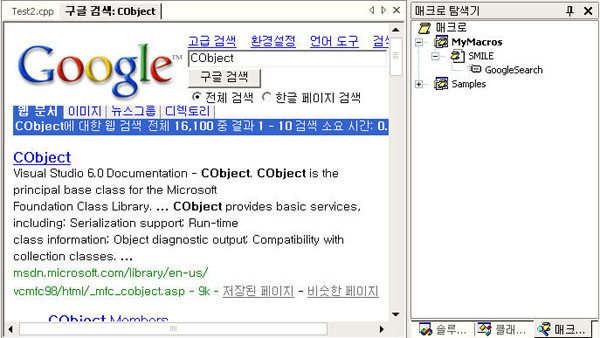
You know, in these days the most popular internet site is Google. When I programmed, I always found resource at Google. But when I wanted to find resouces, I ran Internet Explorer, typed 'www.google.com' and typed keywords. It was very boring. So I made MACRO that find resources on google and shows its results in VS.NET's Web browser.
1. Select a key word or sentence (string).
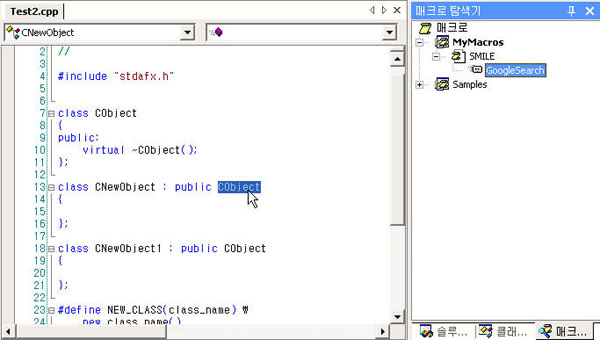
2. Execute the 'GoogleSearch' macro. You can directly execute in Macro Explorer where you can see it or register it as shortcut. If you execute the macro, the Web browser will be shown.
Using the Code
This macro is very simple. You can learn all about it from the source code. For your convenience, I have added some comments.
The following is macro's source code.
Option Strict Off
Option Explicit Off
Imports EnvDTE
Public Module SMILE
Sub GoogleSearch()
Dim strUrl As String
Dim selection As TextSelection = DTE.ActiveDocument.Selection()
If selection.Text <> "" Then
strUrl = "www.google.co.kr/search?q=" + selection.Text
DTE.ExecuteCommand("View.URL", strUrl)
Else
MsgBox("Select Text to find")
End If
End Sub
End Module
Points of Interest
As you know, VS.NET's IDE is very interesting and powerful. You can extend the VS.NET IDE however you want. If you check VS.NET's sample macro source file, you can learn from it. Try it now.
History
- 06-02-2003 - Initial upload


