Download demo project - 22 Kb
Download source files - 5 Kb
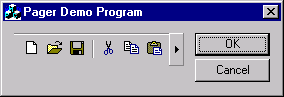
The class CCJPagerCtrl is fairly simple to use. It can be used in either a dialog or view.
For demo purposes, I implemented it in a dialog using a CToolBar, but you can use any control
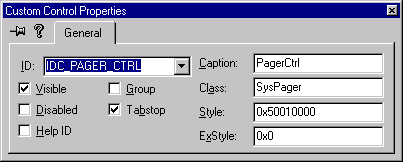
or view class as the child window. Open your dialog in your resource editor and add a custom control.
Modify the properties of the control as shown below:
In the OnInitDialog() section, add the following code:
if( !m_wndToolBar.Create(&m_Pager) ||
!m_wndToolBar.LoadToolBar(IDR_MAINFRAME))
{
TRACE0("Failed to create toolbar\n");
return -1;
}
m_wndToolBar.ModifyStyle(0, 0x0800);
m_Pager.SetChild(m_wndToolBar.m_hWnd);
m_Pager.ModifyStyle(0,PGS_HORZ);
m_Pager.SetButtonSize(15);
SIZE Size;
m_wndToolBar.SendMessage(TB_GETMAXSIZE,0,(LPARAM)&Size);
m_Pager.SetScrollArea(Size.cx+15, Size.cy+15);
NOTE:
If you are using Visual C++ 5, you will need to include the support file
comm_control.h in your
project, unless you have installed the SDK, in which case you won't need this. If you have any
questions, feel free to drop me a line.


