Introduction
Although the cryptography classes of the .NET framework have been discussed at length on CodeProject and elsewhere, I can not help but think that most examples are either over simplified or just not thorough enough. And hence I have written yet another article on the topic.
Most articles show in a few lines of code how to encrypt a string into a byte array. That's just great, but what is a developer to do with just a byte array? Often that is just not useful.
I have also never seen any good examples of how to encrypt files, small or large. Most examples read the contents of the file into a byte array, encrypt it, and write it out to a new file. That's just fabulous for 10 KB files, but what about that 700 MB movie you have on your hard drive? Should you try to cram that 700 MB into your 512 MB RAM, encrypt it, and then write it out to a file? Probably, not such a good idea.
Have you ever tried to decrypt data with an incorrect key? Did you notice that the decryption completes before you get a very descriptive 'Bad Data' error? Imagine loading your encrypted 700 MB movie into your 512 MB RAM, waiting for your poor PC to decrypt the thing only to get a 'Bad Data' error because you made a typo in your password. With an error like that, most people will think the file was corrupted and get rid of it.
With this example, I have tried to create a component that you can use for all your encryption needs with no modifications required.
With this component, you can do the following:
- Generate hash values for strings and receive the output as a byte array or Base64 string, using any of the framework classes that derive from
HashAlgorithm;
- Generate hash values for files and receive the output as a Base64 string, using any of the framework classes that derive from
HashAlgorithm;
- Encrypt/decrypt strings and receive the output as a Base64 string, using any of the framework classes that derive from
SymmetricAlgorithm;
- Encrypt/decrypt files and write the output to another file, using any of the framework classes that derive from
SymmetricAlgorithm;
- Securely overwrite a file with random data, effectively destroying it and making it unrecoverable.
Background
For background on cryptography, do a search for 'cryptography' or 'encrypting data' at MSDN.
Using the code
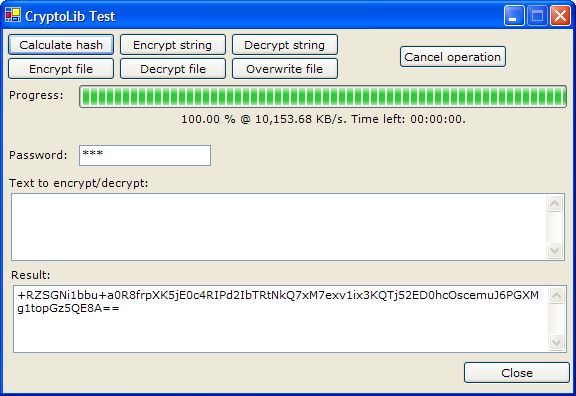
The code in the component is not rocket science at all and the sample app included in the download uses all the functionality of the component, I will therefore only discuss some points of interest below.
Points of Interest
- The file encryption, file decryption, and file hashing functions have a
bufferSize parameter. This is the amount of data the functions will work with at any given time, in KB. While conducting tests on various machines, a buffer size of 256 KB has consistently given the best performance, and hence that is the default buffer size.
- Let's take a look at the file hashing function:
Public Function HashFileToBase64String(ByVal file As String, _
         ByVal provider As HashAlgorithm, _
         ByVal bufferSize As Integer) As String
    Dim fileStream As IO.FileStream
    Dim output As String
    Dim position As Long
    Dim length As Long
    Dim storage() As Byte
    Dim retStorage() As Byte
    Dim bytesRead As Integer
    Dim cea As CryptoEventArgs

    If bufferSize = 0 Then bufferSize = 256

    If file Is Nothing OrElse file = "" Then
        Throw New ArgumentNullException("file", _
              "'file' should not be Nothing" & _
              " (null in C#) or String.Empty.")
    End If

    fileStream = New IO.FileStream(file, IO.FileMode.Open, _
                 IO.FileAccess.Read, IO.FileShare.None, _
                 bufferSize * 1024 - 1)

    If provider Is Nothing Then provider = New SHA512Managed

    ReDim storage(bufferSize * 1024 - 1)
    ReDim retStorage(bufferSize * 1024 - 1)

    cea = New CryptoEventArgs
    cea.StartTimeInternal = Now

    length = fileStream.Length
    cea.BytesTotalInternal = length

    While position < length
        bytesRead = fileStream.Read(storage, 0, _
                                storage.Length)
        position += bytesRead
        cea.BytesDoneInternal = position

        If Not position = length Then
            provider.TransformBlock(storage, 0, _
                         bytesRead, retStorage, 0)
        Else
            provider.TransformFinalBlock(storage, 0, bytesRead)
        End If

        cea.EndTimeInternal = Now
        RaiseEvent CryptoProgress(Me, cea)

        If cea.Cancel Then Exit While
    End While

    fileStream.Close()
    If Not cea.Cancel Then output = _
       Convert.ToBase64String(provider.Hash)
    provider.Clear()

    cea.EndTimeInternal = Now
    RaiseEvent CryptoCompleted(Me, cea)
    cea.Dispose()

    Return output
End Function
The function contains a private variable, retStorage, which is used in the While loop to receive bytes from the provider.TransformBlock method. The bytes written to this variable are never used anywhere in our function and are overwritten every time the loop executes. However, the variable is required as the provider.TransformBlock method expects it, and it has to have the correct dimension as well. To get the calculated hash value of the file, one has to evaluate the provider.Hash property after the provider.TransformFinalBlock method has been called.
- Overwriting files also pose a bit of a challenge. One might expect it to be a trivial task but hardware caching of data can cause a serious problem.
The problem is that if you loop through a file and write random bytes to the file, the OS uses write caching to speed things up a bit. If you immediately delete the file after writing your random bytes to it, the file gets deleted before the data in the cache is written to disk. The file never actually gets overwritten!
Luckily, the good old API can come to our rescue. Our component here contains a class called Files which contains the enumerations, constants, and function declarations that will enable us to open a file where write caching has been disabled for the file.
Friend Function OpenFileForSecureOverwrite(ByVal _
                             path As String) As FileStream
    If Not _openHandle.Equals(IntPtr.Zero) AndAlso _
               Not _openHandle.ToInt32 = _
               Me.INVALID_HANDLE_VALUE Then
        Me.CloseHandle(_openHandle)
        _openHandle = IntPtr.Zero
    End If

    _openHandle = Me.CreateFile(path, FileAccess.GENERIC_WRITE, _
                  FileShare.FILE_SHARE_READ Or FileShare.FILE_SHARE_WRITE, _
                  Nothing, CreationDisposition.OPEN_EXISTING, _
                  FlagsAndAttributes.FILE_FLAG_WRITE_THROUGH, Nothing)

    If _openHandle.ToInt32 = Me.INVALID_HANDLE_VALUE Then
        Return Nothing
    Else
        Return New FileStream(_openHandle, IO.FileAccess.ReadWrite)
    End If
End Function
We use CreateFile found in Kernel32.dll to open the file and return a handle to the open file. We then pass the handle to the constructor of FileStream to allow us to continue working with the file in .NET. The important bit in all this is the FlagsAndAttributes.FILE_FLAG_WRITE_THROUGH enumeration value that is passed to CreateFile as one of the parameters. This value disables the write caching for the open file.
The obvious drawback here is that performance takes about a 50% hit. Another thing is that some hardware do not support the ability to disable write caching.
- All files and strings that get encrypted with our component contain a 256 byte header.
The first 127 bytes contain a hash value of the password used to encrypt the data. This hash is used during decryption to determine upfront if the password is correct, thus avoiding that annoying 'Bad Data' error.
The second 127 bytes is used to store the IV used for encrypting the file. Some Microsoft documentation says, the IV does not have to be secret (look at the bottom of the section titled 'Secret-Key Encryption' of Microsoft's Cryptography Overview) and some does. Point is, without the correct IV you cannot decrypt the data properly, and therefore we save it here.
The last two bytes is used to store a value indicating which of the .NET SymmetricAlgorithm derived classes were used for encryption. The decryption functions of our component do not have a provider parameter. The provider is determined by the value saved in the header.
- Lastly, our component contains two events that expose the
CryptoEventArgs class. The events only fire for file operations and the class exposes properties relating to the progress of the operation. The only writeable property of the class is Cancel. Set this property to True if you wish to cancel the operation. The sample application included in the download uses this functionality.
History
- 2005/12/28: First release! Please rate the work and leave some comments!


