Purpose
Remember back in the good-ole' days of DOS when all file operations were done in the console?
I still remember those days. Well I got sick and tired of opening command prompts to do batch
renaming so I decided to write a shell extension which would do it for me. This shell extension
has two features to it. The first and foremost, is its batch renaming capabilities. You select
all the files you would like to rename on your desktop, right-click and select RegExp rename. The
second feature is simply swapping filenames. If you have two files selected, you can swap their
filenames. Now, how do regular expressions help us rename?
For those unfamiliar, regular expressions have been used for years in UNIX land. They are a
powerful tool used for pattern matching. You may not know however, that during a regular
expression pattern match, you can save the contents of what you match. This is how my shell
extension operates. You specify a regular expression that matches the filenames, it stores the
file name, extension, etc, and you specify an output format that it uses to rename files. Sounds
confusing? Well in a way it is, but here are some examples to help show its usefulness.
Usage
The shell extension allows batch renaming if more than 2 files are selected in Explorer. If
exactly 2 files are selected in Explorer, you can also swap their filenames.
The pattern matching is based on egrep's pattern matching. Since I am using the GNU
regular expression library, you can programmatically change how the pattern matching is done.
There are options to mimic sed, awk, grep, egrep, etc. The shell extension could be
expanded to allow the user to specify exactly which program he wanted to mimic.
Describing how regular expression pattern matching works is beyond the scope of this article.
I will just assume you know :) If you don't know, then there is plenty of documentation online
and I also suggest O'Reilly's UNIX in a Nutshell as a place to start.
Basically, the shell extension works almost like emacs regular expression search
and replace. You match your string (which in our case is filenames) and you replace with a
pattern including \[1-9] (\1, \2 etc). The \[1-9] correspond to whatever you matched. For
example, if I used (.*)\.txt as my regular expression and I wanted to replace it with
\1.txt, it would rename the file to whatever it found. There is an option to specify
if the regular expression search will be case sensitive. Here are some sample uses.
| Regular expression to match | Replacement format | Effect |
(.*)\.txt</td><td><code>prefix\1.txt | Renames *.txt to prefix*.txt |
(.*)\.txt</td><td><code>\1suffix.txt | Renames *.txt to *suffix.txt |
CSC200.*</td><td><code>CSc200\1 | Renames CSC200* to CSc200* |
I primarily use this tool when I am working with mp3's. If I download a live show and I don't
like the format that the files are named, I can rename them all at once. I also use it to convert
cases when I'm working with files. Another use is converting a group of .c files into .cpp files.
The possibilities are endless!
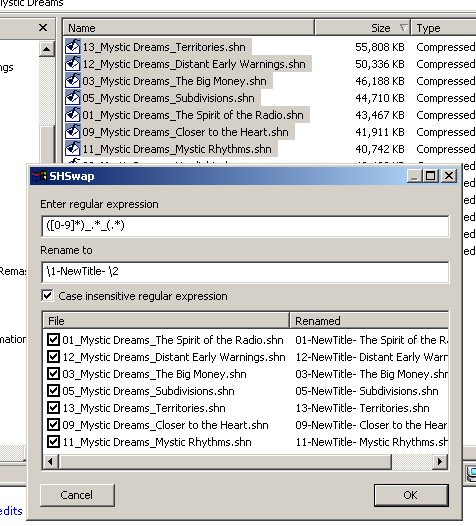
To use the utility, first register the extension using regsvr32. Then from within Explorer,
select the files you want to rename. Right-click, choose RegExp rename or Swap Filenames. When using RegExp
rename, a dialog box will appear where you can fill in the regular expression pattern and the replacement format.
When you change these fields, the results of your changes will be shown. That way you can see how the files will
be renamed before actually renaming them. Each file can be checked or unchecked. An unchecked file will not be
renamed. Hit OK to rename all the files. Once you have hit OK, you will see the status of each file's renaming.
A column will be added to the listview which shows the result - either success or the failure reason. A new button
will appear - Undo. If you don't like the changes, or some of the results failed, you can Undo. Click OK a second
time to exit.
Code
The project is an ATL project that exposes one class,
CISHRename. This class derives
from
IShellExtInit and
IContextMenu. The earlier code used STL to store
the filenames in a
vector, but I have changed that to a simple C++ array.
The code for
QueryContextMenu just creates and populates this array with the filenames.
It separates the files by name and by directory. It needs to know which directory the file is in,
because the regular expression matching works on only the filename, not the complete path. (For instance,
d.*\.txt would match document.txt, but not c:\documents\document.txt)
HRESULT CISHRename::Initialize(LPCITEMIDLIST pidlFolder,
LPDATAOBJECT pDO,HKEY progID)
{
HRESULT retVal=S_OK;
char fileName[MAX_PATH];
UINT iCount;
UINT i;
LPTSTR pEndingSlash;
if (pDO == NULL)
return E_INVALIDARG;
STGMEDIUM med;
FORMATETC fe={CF_HDROP,NULL,DVASPECT_CONTENT,-1,TYMED_HGLOBAL};
if (SUCCEEDED(pDO->GetData(&fe,&med)))
{
iCount=DragQueryFile((HDROP)med.hGlobal,0xFFFFFFFF,NULL,0);
if (iCount < 2)
return E_INVALIDARG;
m_files = new RENAME[iCount];
if (m_files)
{
m_count = iCount;
for (i=0;i<iCount;++i)
{
if (DragQueryFile((HDROP)med.hGlobal,i,fileName,MAX_PATH) != 0)
{
pEndingSlash = _tcsrchr(fileName,'\\');
if (!pEndingSlash)
{
m_files[i].dir[0] = 0;
lstrcpy(m_files[i].file,fileName);
}
else
{
*pEndingSlash = 0;
lstrcpy(m_files[i].dir,fileName);
lstrcpy(m_files[i].file,pEndingSlash+1);
}
m_files[i].bRename = true;
m_files[i].renamedFile[0] = 0;
}
}
}
else
{
m_count = 0;
retVal = E_OUTOFMEMORY;
}
ReleaseStgMedium(&med);
}
return retVal;
}
Since it works with renaming, it stores separately the filename and the directory of each file.
At first I was using GetFileTitle to pull out the file name, but after a careful rereading of the
documentation, this will not work if the user hides file extensions for registered filetypes. So
I reverted back to manual parsing.
In QueryContextMenu we add the menu items. If the count of files is 2, we also must add the Swap Filenames item.
HRESULT CISHRename::QueryContextMenu(HMENU hmenu, UINT indexMenu,
UINT idCmdFirst, UINT idCmdLast,
UINT uFlags)
{
UINT idFirst=idCmdFirst;
UINT iCount;
if (uFlags & CMF_DEFAULTONLY )
{
return MAKE_HRESULT ( SEVERITY_SUCCESS, FACILITY_NULL, 0 );
}
else
{
iCount=1;
if (m_count == 2)
{
InsertMenu(hmenu,indexMenu++,MF_STRING | MF_BYPOSITION,
idFirst+1,(LPCTSTR)_T("Swap filenames"));
++iCount;
}
InsertMenu(hmenu,indexMenu,MF_STRING | MF_BYPOSITION,
idFirst,(LPCTSTR)_T("RegExp rename"));
return MAKE_HRESULT(SEVERITY_SUCCESS,FACILITY_NULL,iCount);
}
return E_FAIL;
}
The code for the renaming is actually quite simple because the regular expression matching is
done by the GNU library. The dialog box procedure takes care of all the details. When the user
changes the text, the dialog box updates all the variables associated with each file (such as the
new destination name). Then when the user hits OK, it performs the MoveFile's that
are necessary to do the renaming. Here is the code which handles when the user types.
static void ChangeListView(HWND hWnd,LPDDATA pData)
{
char regExp[MAX_PATH];
char rename[MAX_PATH];
LVITEM item;
regex_t regt;
regmatch_t regMatch[10];
UINT i;
unsigned int regFlags;
HWND hList = GetDlgItem(hWnd,IDC_LIST);
for (i=0;i<pData->count;++i)
{
pData->pRename[i].bRename = false;
pData->pRename[i].renamedFile[0] = 0;
}
if (GetDlgItemText(hWnd,IDC_EDITREGEXP,regExp,MAX_PATH) != 0 &&
GetDlgItemText(hWnd,IDC_EDITRENAME,rename,MAX_PATH) != 0)
{
re_syntax_options = RE_SYNTAX_EGREP;
regFlags = REG_EXTENDED;
if (pData->bCaseInsensitive)
regFlags |= REG_ICASE;
if (regcomp(®t,regExp,regFlags) == 0)
{
for (i=0;i<pData->count;++i)
{
memset(regMatch,-1,sizeof(regMatch));
if (regexec(®t,pData->pRename[i].file,10,regMatch,0) == 0)
{
if (RegMoveFile(regMatch,pData->pRename[i].file,rename,
pData->pRename[i].renamedFile,MAX_PATH))
pData->pRename[i].bRename = true;
else
pData->pRename[i].renamedFile[0] = 0;
}
}
regfree(®t);
}
}
for (i=0;i<pData->count;++i)
{
item.mask = LVIF_TEXT;
item.iItem = i;
item.iSubItem = 1;
item.pszText = pData->pRename[i].bRename ?
pData->pRename[i].renamedFile : "<error>";
SendMessage(hList,LVM_SETITEMTEXT,i,(LPARAM)&item);
}
}
The RegMoveFile function does the most work. It uses a DFA to create the
formatted string. It expands all the \1's, \2's etc.
bool RegMoveFile(regmatch_t *pMatch,const char *fileName,
const char *outputFormat,char *output, int maxLength)
{
#define APPENDCHAR(c) if ((--maxLength) > 0) *(s++) = c; else goto exit;
char *s=output;
char c;
int index;
int length;
enum STATE {S_START,S_SLASH,S_END};
STATE state=S_START;
while (state != S_END)
{
c=*(outputFormat++);
switch (state)
{
case S_START:
if (c == '\0') state=S_END;
else if (c == '\\') state=S_SLASH;
else APPENDCHAR(c);
break;
case S_SLASH:
if (c == '\0')
{
APPENDCHAR('\\');
state=S_END;
}
else if (isdigit(c))
{
index=c-'0';
if (pMatch[index].rm_so < 0 || pMatch[index].rm_eo < 0)
return false;
length=pMatch[index].rm_eo - pMatch[index].rm_so;
if (length < maxLength)
{
strncpy(s,fileName+pMatch[index].rm_so,length);
s += length;
maxLength -= length;
}
else
goto exit;
state=S_START;
}
else
{
APPENDCHAR(c);
state=S_START;
}
break;
case S_END:
break;
}
}
exit:
*s=0;
return true;
}
Final thoughts
The code compiles and runs under Win9x and Windows 2000. I havn't tested NT 4.0 but it should
work. It runs as ANSI because the regex library requires ANSI strings.
Within the source code, I've included compiled copies of the GNU regex library as static
libraries. Also the regex.h header file is included. For those interested in downloading the source, it can
be found at ftp.gnu.org. Much thanks goes out to the GNU folk.
Revision History
30 Jun 2002 - Moved image to below downloads
27 Jul 2002 - Updated article after my rewrite
7 Aug 2002 - Updated article to fix a few things I missed


