Click here to Skip to main content
6,292,811 members and growing! (10,169 online)
Email Password   helpLost your password?
Languages » VB6 Interop » General     Intermediate License: The Code Project Open License (CPOL)

Edit Flex Grid with Combo Box in VB 6

By Mostafa Kaisoun

Using new ActiveX to edit Microsoft Flex grid with Combo box in VB 6
VB 6Win2K, WinXP, Win2003, Vista, WinForms
Version:4 (See All)
Posted:15 Nov 2007
Updated:29 Jan 2009
Views:47,669
Bookmarked:22 times
Announcements
Loading...
 
Search    
Advanced Search
printPrint   Broken Article?Report       add Share
  Discuss Discuss   Recommend Article Email
10 votes for this article.
Popularity: 4.00 Rating: 4.00 out of 5

1
1 vote, 10.0%
2
1 vote, 10.0%
3
1 vote, 10.0%
4
7 votes, 70.0%
5
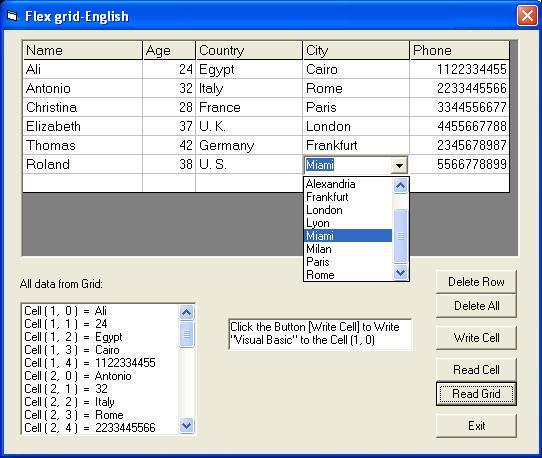
Screenshot - Imag5.jpg
Form1: Main form

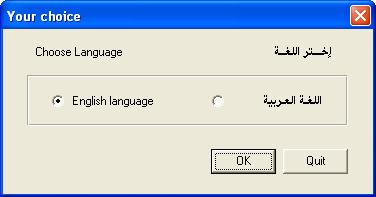
Screenshot - Imag6.jpg

Form2: English language

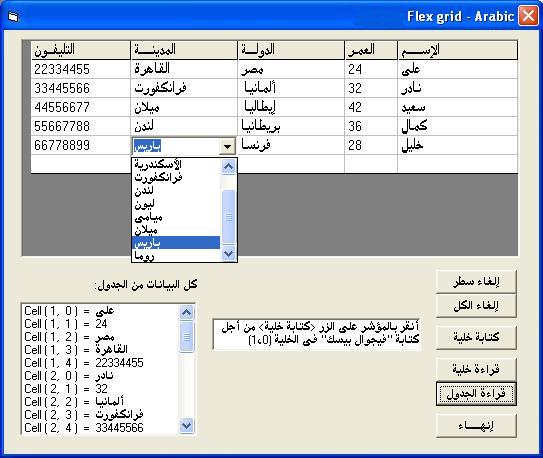
Screenshot - Imag7.jpg

Form3: Arabic language

Introduction

With beautiful VB6, I have some trials to edit something like invoice, I found Data grid not familiar to edit tables, also Flex grid has no method to edit. Now I create my ActiveX control using (MSFlexGrid) control, a hidden text box and a hidden combo box. I give the name (VB6Flexgrid) to my ActiveX. I create a project (prjFlexGrid) to test my control. I write the code under Visual Basic 6. With my ActiveX control, you can:

  • Edit any cell in flex grid
  • Delete any row
  • Delete all rows and begin with one row
  • Add combo box to any column and use more than one
  • Write data to any cell
  • Read data from any cell
  • Read all data from the grid

Background

When using my ActiveX control (VB6Flexgrid), the flex grid begins with one row as Data grid control, then increases rows one by one after editing the previous row. My ActiveX control has some methods and some properties:

Method/Property

Definition

Example

ColWidth(anyCol) Set column width in (Twip) VB6Flexgrid1.ColWidth(1) = 1500
TextMatrix(anyRow, anyCol) Get or set string for the cell (row, col) VB6Flexgrid1.TextMatrix(3, 2) = “VB6”
CellType anyCol, B Let Column include combo box if B = True VB6Flexgrid1.CellType 3, True
ComboClear anyCol Clear combo box VB6Flexgrid1.ComboClear 3
ComboAddItem anyCol, anyString Add item to combo box VB6Flexgrid1.ComboAddItem 3, “Visual Studio”
DelRow Delete current row VB6Flexgrid1.DelRow
DelAll Clear the grid VB6Flexgrid1.DelAll

To use my ActiveX (VB6Flexgrid), you must add the file VB6Flexgrid.ocx and MicrosoftFlexGrid control to ‘ToolBox’ as follows:

  • Click ‘ToolBox’, then choose Components.
  • From Components dialog, choose Microsoft FlexGrid Control 6.0.
  • Click ‘Browse’ then choose ‘VB6FlexGrid.ocx’ ActiveX control from where you had saved, then click ‘OK’.

Using the Code

About columns:

' Set number of columns:
VB6Flexgrid1.FixedCols = 0 ' if you do not need fixed columns 
VB6Flexgrid1.Cols = 5 ' number of columns
' Set width of column:
VB6Flexgrid1.ColWidth(1) = 1500 ' width in Twip
' Set alignment of column (You can change many using loop)
VB6Flexgrid1.ColAlignmentHeader(1) = flexAlignCenterCenter 
				' alignment of fixed row, column #1 (to Center)
VB6Flexgrid1.ColAlignment(1) = flexAlignLeftCenter ' alignment column #1 (to Left)

About combo box:

' Set combo box at any column:
VB6Flexgrid1.CellType 3, True  ' combo box at column #3
VB6Flexgrid1.ComboClear 3 ' clear this combo
VB6Flexgrid1.ComboAddItem 3, „Visual Studio“ ' add item to this combo

About cell:

' Send data to any cell:
VB6Flexgrid1.TextMatrix(2, 3) = „VB6“
' Read any cell:
Dim strCell As String
strCell = VB6Flexgrid1. TextMatrix(3, 2)

You can go back to source files of the project (prjFlexGrid) to read more than the previous examples.

Remarks

When extracting the file VBFlexGrid.zip, you can find the file: ..\VBFlexGrid\ActiveXcontrol\VB6Flexgrid.ocx, find the project to test the ActiveX control in the folder: ..\ VBFlexGrid.

This project has three forms:

  • Form1: To choose language
  • Form2: For English language
  • Form3: For Arabic language

Form2 and Form3 have the same controls:

  • The ActiveX control (VB6Flexgrid1) adds the file VB6Flexgrid.ocx
  • The button control (btnDelOne) to delete one row
  • The button control (btnDelAll) to clear the grid
  • The button control (btnWriteCell) writes data to the first cell
  • The button control (btnReadOne) to read the current cell
  • The button control (btnReadAll) to copy all data from grid to list box
  • The button control (btnExit) closes the form
  • The list box control (lstAllData) holds data from grid

Last Words

I hope this article is useful and helps you to create your applications. If you have any ideas or if you find any problems, please tell me. Thanks to CodeProject and thanks to all.

-- Mostafa Kaisoun

License

This article, along with any associated source code and files, is licensed under The Code Project Open License (CPOL)

About the Author

Mostafa Kaisoun


Member

Location: Egypt Egypt

Other popular VB6 Interop articles:

Article Top
You must Sign In to use this message board.
FAQ FAQ 
 
Noise Tolerance  Layout  Per page   
 Msgs 1 to 22 of 22 (Total in Forum: 22) (Refresh)FirstPrevNext
GeneralCan we use VB6Flexgrid.ocx in .NET Pinmemberaarujana21:37 24 Jun '09  
GeneralRe: Can we use VB6Flexgrid.ocx in .NET PinmemberMostafa Kaisoun10:05 25 Jun '09  
GeneralPls post source code of activex control PinmemberAvinash Sureka23:36 7 Jun '09  
QuestionThanks for your ActiveX (VB6Flexgrid) Pinmembermigooo7:54 3 Jun '09  
AnswerRe: Thanks for your ActiveX (VB6Flexgrid) PinmemberMostafa Kaisoun14:47 3 Jun '09  
GeneralHow to have a Column as Read Only in this FlexGrid PinmemberVani Agrawal20:57 24 Nov '08  
GeneralRe: How to have a Column as Read Only in this FlexGrid PinmemberMostafa Kaisoun13:01 26 Nov '08  
GeneralRe: How to have a Column as Read Only in this FlexGrid Pinmemberamarnath grandhi1:19 28 Nov '08  
GeneralRe: How to have a Column as Read Only in this FlexGrid PinmemberMostafa Kaisoun8:55 29 Nov '08  
GeneralEditable Flex Grid Pinmembercuteshree1:35 31 Oct '08  
GeneralAuto add new line PinmemberMostafa Kaisoun23:03 31 May '08  
GeneralPrevent adding new row automatically PinmemberMonjur Ahmed20:38 31 May '08  
GeneralTo hide my name and email [modified] PinmemberMostafa Kaisoun14:09 31 May '08  
GeneralRe: To hide my name and email PinmemberKishore.P20:30 28 Jan '09  
GeneralRe: To hide my name and email PinmemberMostafa Kaisoun14:56 29 Jan '09  
GeneralReturn ColWidth not available PinmemberMostafa Kaisoun22:12 1 May '08  
QuestionColWidth produces error Pinmemberkelli36:52 29 Apr '08  
QuestionVB6 FlexGrid require to work with VBA PinmemberIlyas Kazi19:25 6 Mar '08  
GeneralWhere I can download it?? Pinmemberale5007:09 6 Dec '07  
GeneralWorkaround needed PinmemberVidya Amar3:26 23 Nov '07  
GeneralRe: Workaround needed PinmemberMostafa Kaisoun0:51 24 Nov '07  
GeneralRe: Workaround needed PinmemberVidya Amar5:34 24 Nov '07  

General General    News News    Question Question    Answer Answer    Joke Joke    Rant Rant    Admin Admin   

PermaLink | Privacy | Terms of Use
Last Updated: 29 Jan 2009
Editor: Deeksha Shenoy
Copyright 2007 by Mostafa Kaisoun
Everything else Copyright © CodeProject, 1999-2009
Web13 | Advertise on the Code Project