Introduction
Its quite important to have project help documentation while working in a team environment. C# has integrated Web Comments generator which makes this task quite easy. As for VB.NET developers, this is not the case. But the GotDotNet PowerToys community has developed a tool called VBCommenter, which is an add-in in the VS.NET IDE. This tool allows us to create C# like comments in our VB.NET code and convert them into an XML file during project builds. This output XML file can be used along with NDoc to create quick and easy help files for your projects.
Background
Integrating Help into Visual Studio.NET and C# Documenting and Commenting are very good articles on how one can create and use help files in C# projects. This article is conceptually similar, except it is applicable in VB.NET environment.
Before we start
Following are required to start this process:
- VS.NET 2003 (I have read that VBCommenter also works with VS.NET 2002, but haven't tried it)
- NDoc: download
- VBCommenter v1.1.1: download
Using VBCommenter
Step1 : After installing VBCommenter in an appropriate directory, it is shown as an add-in in the VS.NET IDE.
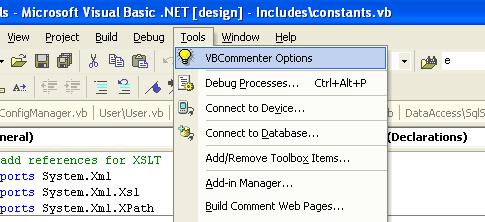
Step2 : VBCommenter Settings dialog opens where you can set the whether you want comments file to be generated at every build, whether XML comments are required in the source file and what type of prefix is required for creating these comments. I usually select the ''' prefix so that i can distinguish between single line comments in the code from the VbCommenter comments at the top of classes and functions.

Step3 : Commenting your code with VbCommenter is easy. You type the prefix (''') right on top of any method, hit Return and the comment block appears. Add your comments and save.
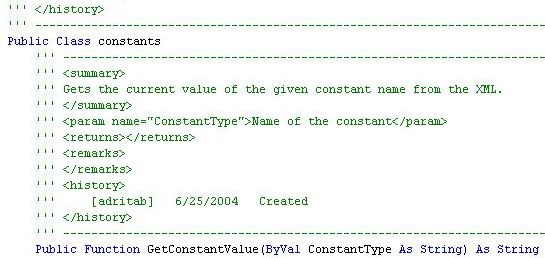
Step4 : Build your project. You will see an XML file in the bin directory with the same name as your project.
Using NDoc
Step1 : NDoc asks you to provide an input DLL name and an Input XML file. You also have to enter the type of documentation required. For example, MSDN is selected in the diagram below. Specify a location for the output HTML files in the "OutputDirectory" parameter.
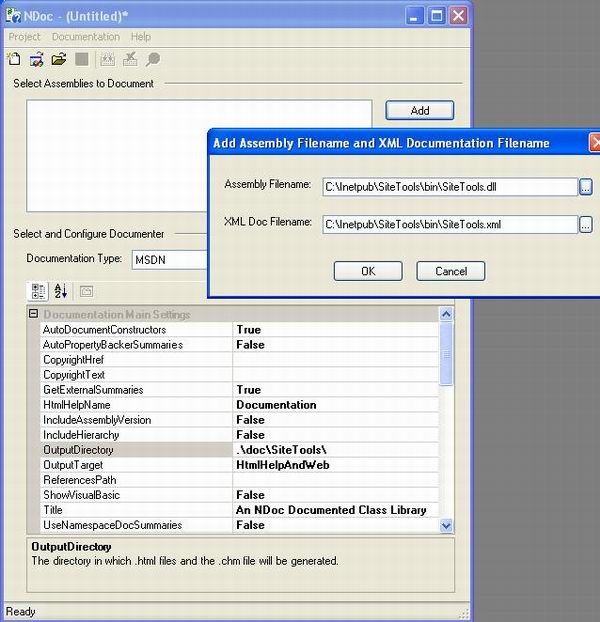
Step2 : Generate the help files using Ctrl+Shift+B.
Sample Help File Web Pages
Thats it! With very little effort, you have MSDN quality Help files for easy accessibility over the intranet. You also have the option of integrating this help in VS.NET IDE. See Integrating Help into Visual Studio.NET

Points of Interest
While working with VbCommenter and NDoc I came accross a few hurdles.
- If VB.NET projects do not have a namespace (neither as a root namespace in the Project Properties nor in the code), NDoc creates help files with (global) namepsace. Comments in the summary blocks, remarks blocks etc. are not shown. So, you have to have namespaces defined for your projects.
- If the comment description in any tag contains special characters like "&" and "<" then NDoc creates faulty documents, even though VBCommenter makes an accurate XML. Avoid using special characters, instead write it out (for e.g. less than instead of <).
- For a current bug list tracker, visit the VbCommenter website.


