Introduction
Security has always been a top issue for all kinds of applications, especially Web applications. Web apps are accessible to almost the entire universe, and are open to attack. Most of the web applications provide the file download feature, the real time challenge is not in providing such a feature, but in securing such operations. Recently, I dealt with an application which demands for secure file upload and download, during which I did wide research, so I thought of sharing it with the world to make it worth.
You may find several articles on the internet talking about secure downloads, but this article is a bit different from all those, because it distinguishes between upload and download by providing two different entry points for them.
The following article depicts how secured file download can be achieved using IIS basic authentication.
Background
Before we start, let's refresh our memory and learn some basics.
An ASP.NET application has two separate authentication layers. That is because ASP.NET is not a standalone product. Rather, it is a layer on top of IIS. All requests flow through IIS before they are handed to ASP.NET. As a result, IIS can decide to deny access without the ASP.NET process even knowing that someone requested a particular page. Here is an overview of the steps in the joint IIS and ASP.NET authentication process:
- IIS first checks to make sure the incoming request comes from an IP address that is allowed access to the domain. If not, it denies the request.
- Next, IIS performs its own user authentication if it is configured to do so. By default, IIS allows anonymous access, so requests are automatically authenticated, but you can change this default on a per � application basis within IIS.
- If the request is passed to ASP.NET with an authenticated user, ASP.NET checks to see whether impersonation is enabled. If impersonation is enabled, ASP.NET acts as though it were the authenticated user. If not, ASP.NET acts with its own configured account.
- Finally, the identity from step 3 is used to request resources from the operating system. If ASP.NET authentication can obtain all the necessary resources, it grants the user's request, otherwise it is denied. Resources can include much more than just the ASP.NET page itself. You can also use .NET�s code access security features to extend this authorization step to disk files, Registry keys, and other resources.
How it works
In general, any web application contains a single virtual directory and a single Uploads folder, to/from which end users upload/download files. Here, I'm playing a little trick: though upload and download happens to/from the same folder, I'm keeping two different entry points for them. I.e., I create two different virtual directories which point to the same physical folder.
- Create a virtual directory by name Security (your web application) in which the ASP.NET application resides.
- Inside this folder, create a folder by name Uploads (your application subfolder, to which you upload the files). The ASP.NET application will upload files to this folder using general file upload practices.
- Create one more virtual directory by name Downloads, and map it to the Uploads (your application subfolder, to which you upload the files) folder which is residing in the Security (your web application) folder. This virtual directory is simply meant for file downloads, and it has nothing to do with the ASP.NET application or the file upload process.
Keeping the uploads folder as it is, we are creating two entry points for the files, one is through http://localhost/security/uploads, and the other through http://localhost/downloads. Though both the virtual directories are pointing to the same folder, based on their settings, they will behave differently.
Configuration
- Unzip the attached source code on to disk.
- Start IIS.
- Create a new virtual directory by name Security, and map it to the source code.
- In IIS, select the Security virtual directory (created above). You will find an Uploads folder inside it. Right click on the Uploads folder and select Properties. Remove the Read access from the Uploads folder, and provide only Write access to it.

- Create a new virtual directory named Downloads, and map the Uploads folder (present in the Security folder) to it.
- Open the downloads virtual directory property window, and grant only Read permissions to it, as shown below:

Using the code
Modify the following parameters in the web.config files as per your application needs:
//Application uploads folder virtual path
<add key="UploadPath" value="/Security/Uploads" />

//Entry point for downloads folder, a virtual path
<add key="DownloadURL" value="http://localhost/downloads" />

//Windows user name
<add key="BasicAuthenticationUser" value="administrator" />

//Windows user password
<add key="BasicAuthenticationPWD" value="admin$123" />
Now, let's start learning...................
What is Basic Authentication - when an unauthenticated request comes into the web server, the web server returns an HTTP 401 response, prompting the client for its credentials. The client re-requests the same resource, passing the username and password in a base-64 encoded HTTP header. (The base-64 encoding does not encrypt or protect the credentials; it merely ensures that the characters sent over the wire are in a format that won't conflict with any reserved characters.) Since the credentials are sent over the wire in plain-text, Basic Authentication should only be used when using SSL, since this ensures that the entire contents of the HTTP request are encrypted. However, in our case, we are passing the credentials to the same server through localhost, so passing credentials as clear text would not be a problem.
The .NET Framework provides the WebClient class, which is designed to simplify the HTTP request process. It contains common methods for sending data to and receiving data from a resource identified by a URI. The HttpWebRequest class is used to generate the request, and HttpWebResponse is used to retrieve the response from the server. Typically, HttpWebRequest and HttpWebResponse serve all the purposes, but in the case of Basic Authentication, an extra class comes into picture, i.e., CredentialCache.
Both the WebClient and HttpWebRequest classes make it easy to include authentication information in the request through their Credentials properties. The Credentials property accepts an object that implements ICredentials. The CredentialCache class provides a store for credentials. The intent of the CredentialCache class is to store a set of credentials for the user. When a request is made to a resource, the CredentialCache class can be interrogated and the appropriate credentials can be extracted based on the resource being requested.
The simplest use of this class involves just a few lines of code. The steps we need to perform include:
- Creating an instance of the class.
- Calling the
DownloadData method, passing in the URL (which returns an array of Bytes).
- Writing the downloaded data's
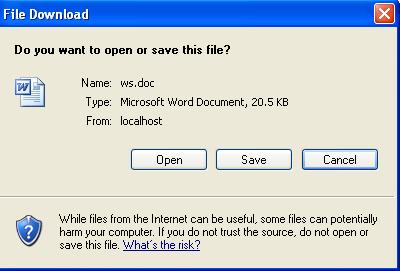
Byte using Response.BinaryWrite, which in turn prompts the user to download the file.
The following code shows how to use the CredentialCache class and the WebClient's Credentials property to make a request to a URL that is protected via Basic Authentication:
using System;
using System.Collections;
using System.ComponentModel;
using System.Data;
using System.Drawing;
using System.Web;
using System.Web.SessionState;
using System.Web.UI;
using System.Web.UI.WebControls;
using System.Web.UI.HtmlControls;
using System.Net;
using System.IO;
namespace security
{
public class SecureFile
{
public SecureFile()
{
}
public bool UploadFile(HtmlInputFile inputfile)
{
try
{
string fileName = "";
string DirPath = "";
if(( inputfile.PostedFile != null ) &&
( inputfile.PostedFile.ContentLength > 0 ))
{
DirPath=HttpContext.Current.Server.MapPath(
System.Configuration.ConfigurationSettings.AppSettings[
"UploadPath"]);
fileName = System.IO.Path.GetFileName(
inputfile.PostedFile.FileName );
inputfile.PostedFile.SaveAs( DirPath + "\\" + fileName );
}
return true;
}
catch
{
return false;
}
}
public bool DownloadFile(string strFile)
{
try
{
string strDownloadURL=
System.Configuration.ConfigurationSettings.AppSettings[
"DownloadURL"];
string strUser=
System.Configuration.ConfigurationSettings.AppSettings[
"BasicAuthenticationUser"];
string strPWD=
System.Configuration.ConfigurationSettings.AppSettings[
"BasicAuthenticationPWD"];
string strURL=strDownloadURL + "\\" + strFile;
//Creating an instance of a WebClient
WebClient req=new WebClient();
//Creating an instance of a credential cache,
//and passing the username and password to it
CredentialCache mycache=new CredentialCache();
mycache.Add(new Uri(strURL),"Basic",
new NetworkCredential(strUser,strPWD));
req.Credentials=mycache;
//Creating an instance of a Response object
HttpResponse response = HttpContext.Current.Response;
response.Clear();
response.ClearContent();
response.ClearHeaders();
response.Buffer= true;
//Keep the current page as it is, and writes
//the content to an new instance,
//which prompts the user to download the file
response.AddHeader("Content-Disposition",
"attachment;filename=\"" + strFile + "\"");
byte[] data=req.DownloadData(strURL);
response.BinaryWrite(data);
response.End();
return true;
}
catch(Exception ex)
{
if(ex.Message=="The remote server " +
"returned an error: (404) Not Found.")
throw new Exception("File not found");
else if(ex.Message=="The remote server" +
" returned an error: (401) Unauthorized.")
throw new Exception("Unauthorized access");
return false;
}
}
}
}
Enjoy!!! Any feedback would be appreciated.
Using the code
For quick implementation and demonstration purposes, I have used the administrator user, but I strongly recommend you to create a new user which has only Write permissions to the Uploads folder and no other permissions on the server/system.


