
A Few Numbers for the Beginning
What It Replaces
It replaces a combination of two separate dropdowns (one for month, another for year).
Typical Usage
On reporting pages for listing values/summaries for a given time period.
How It Saves Your Time
- It generates the month list automatically.
- It generates the year list automatically from the
YearStart and YearEnd properties. - It automatically uses the language of current culture.
- You can use it directly to fill parameters of SqlDataSource (the selected month is accessible as both
StartDate and EndDate properties). - It automatically preselects the current month.
- Compatible with UpdatePanel.
Sample 1: Switching the Language
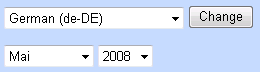
You have two options for choosing the language:
- Change the
Culture in your Page declaration:
<%@ Page Language="C#" … Culture="en-US" %>
- Set the
Culture property of MonthPicker control:
MonthPicker1.Culture = "en-US";
Sample 2: SqlDataSource and GridView Integration
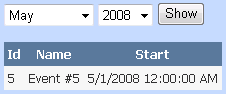
DayPilot MonthPicker can be used directly in SqlDataSource declaration:
<asp:SqlDataSource ID="SqlDataSource1" runat="server"
ConnectionString="<%$ ConnectionStrings:MonthPicker %>"
SelectCommand="SELECT [Id], [Name], [Start] FROM [events] _
		WHERE ([Start] >= @Start) AND ([Start] < @End)">
    <SelectParameters>
        <asp:ControlParameter
    ControlID="MonthPicker1" PropertyName="StartDate"
            Name="Start" Type="DateTime" />
        <asp:ControlParameter
        ControlID="MonthPicker1" PropertyName="EndDate"
            Name="End" Type="DateTime" />
    </SelectParameters>
</asp:SqlDataSource>
Links
History
- 15th May, 2008: Initial post


