|
|
|
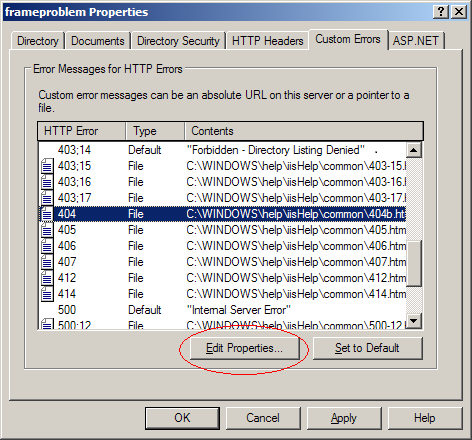
Ok, so setting the Custom Error for the 404 error using the "Website Properties:Custom Errors" dialog works well if you have access to the IIS Manager. Is there a way to set this if you are using a shared host and don't have access to the IIS Manager. Perhaps somehow in the web.config file?
|
| Sign In·View Thread·PermaLink | |
|
|
|
 |
|
|
Carl,
Unfortunately the root of this whole issue is that "bad requests" get routed through IIS before ever hitting ASP.NET. This is why Http Modules can't even handle when a request goes to something like www.yoursite.com/fakedirectory/, where /fakedirectory/ does not exist.
As such, it must be set on the IIS directly to route bad requests back to your site.
I hope this answers your question.
|
| Sign In·View Thread·PermaLink | |
|
|
|
 |
|
|
It is too bad that not all requests are propagated to HttpModules. In Java for example, you can get the whole http request, so you don’t have to do silly workarounds like this one.
I played with it on the train home, and ended up with a small request handler instead of an http module.
Basically I just forward all 404’s to Myrequesthandler.ashx. Not much work at all.
I am going to try this in a production server soon. I really hope that it works the same way in IIS6.
Thank you!
Rickard
|
| Sign In·View Thread·PermaLink | 1.00/5 (1 vote) |
|
|
|
 |
|
|
Hi Richard,
The word Java took my attention. Isn't this an IIS 6 problem? It is not an ASP.NET problem AFAIK! So, if the same JSP application is used with IIS 6 it will be the same problem, right/wrong?
Kind regards, Adam Tibi
Make it simple, as simple as possible, but not simpler.
|
| Sign In·View Thread·PermaLink | 1.00/5 (1 vote) |
|
|
|
 |
|
|
 |
|
|
 |
|
|
I've been doing this for a long time but never thought to write an article about it. However, I have started also doing a wildcard mapping of (*.*) in IIS to the aspnet_isapi.dll module to make IIS work more similarly to the development server which already maps everything to asp.net natively. I can't really comment on the performance considerations however...
|
| Sign In·View Thread·PermaLink | 1.00/5 (2 votes) |
|
|
|
 |
|
|
I have tried to use wildcard mapping (*.*) and found that it made it so I could no longer update my website using Front Page extensions (VS 2005 Publishing). Even so, if a requested file doesn't exist, a 404 error will be generated. This way of handling fake directory requests is brilliant in its simplicity. I wanted to do this for a blog engine that I wrote (does that make it sound like a worked a year and a half on it?), but I could never figure out any way to handle archives in what appeared to be a directory structure (e.g. myblog.com/2007/04/18/NewUrlRewriting.aspx).
|
| Sign In·View Thread·PermaLink | 1.00/5 (1 vote) |
|
|
|
 |
|
|
The solution is elegant and fairly simple which makes it atrractive but it has a drawback which is considered significant in a modern Web 2.0 world: it is search engine unfriendly. Why you would ask? Because the first thing that happens is a 404 which means the URL does not exist on the site. 404 response will make almost any SE exclude this URL from its index no matter how this request follows up further on. Basically if someone considers such URLs to be searchable the solution won't work for this matter.
Is there any other approach? I suppose so. For example, if you want to have custom URLs without a .aspx extension but yet being ASP.NET pages this can be done through intercepting and parsing URLs for every request by a custom-written HTTP module. The only thing you need to do in order to make it work properly is to add an aspnet_isapi.dll to a wildcard application maps list using a "Configuration" button on the "Home directory" tab of the web site properties window. This setting makes IIS to send every request coming to the web site to the ASP.NET regardless of the URL pattern.
Alexander Turlov Software development consultant, MCSD.NET
|
| Sign In·View Thread·PermaLink | 1.00/5 (2 votes) |
|
|
|
 |
|
|
You are completely incorrect.
To verify, use what I wrote and then try the following: System.Net.HttpWebRequest myReq = (System.Net.HttpWebRequest)System.Net.HttpWebRequest.Create("http://yoursite/fakedirectory/"); System.Net.HttpWebResponse myRes = (System.Net.HttpWebResponse)myReq.GetResponse();
Then, have a look at the myRes.StatusCode. You will see an "OK", not a 404. This is because when IIS throws a 404 it first looks at the CustomError. Usually the CustomError page has a 404 header and returns as such, but now we've caught it in the HttpModule pipe and re-routed it to a page that does exist. As such, the client never receives a 404.
Please test it before making such claims.
|
| Sign In·View Thread·PermaLink | |
|
|
|
 |
|
|
The only other solution I have seen for IIS involves writing an ISAPI filter, which parses the url first and then sends it onto the website. In a previous project this is exactly what I had to do - painful if you don't know C!!!
Thanks,
Mark www.markagrant.com
Mark Grant is Technical Director for Cambridge Convergence Limited. He has a Masters Degree from Cambridge University in Engineering. His interests include XML, XSLT, and Object Orientated Programming.
|
| Sign In·View Thread·PermaLink | |
|
|
|
 |
|
|
what is amazing about this ,is that it's so simple that no one ever noticed.
I did not try it yet, but I think it will work.
but there is something I dont get, this article describes how to capture the requst for a fake URL. but there is some more work to do
1- mapping the fake url to the real url, (Can be done by making a custom section in web config inclusing Regular Expression (fully explained in the MSDN URL Rewriting Sample - I dont remeber the link but search for it u'll find it easly)
2- completing the rest of the normal life cycle for the new URL( the obtained after mapping in step 1)i.e to load the coressponding page to handle the request.
would u please extend your article to implement these two steps?
p.s. your code also should handle the post back calls , as when u use fake URL for each page there must be two rules (1- for the first time requesting the page 2- for the postback on that page)
Example :
there is a physical page http://www.mywebsite.com/pages/user/profile.aspx?username=aromr
the fake url will be (http://www.mywebsite.com/pages/aromr/profile ) your code will cover the case that there is arequest for the url (http://www.mywebsite.com/pages/aromr/profile )
but
when there is a post back on this page the requet url will be like this http://www.mywebsite.com/pages/aromr/profile.aspx?username=aromr
so u will have to handle this
thanks alot , I've been looking around for that since while.
|
| Sign In·View Thread·PermaLink | |
|
|
|
 |
|
|
Thanks for the feedback, it is extremely simple but that's the amazing part about it. I'm really confused as to why nobody has posted this kind of thing anywhere, as the other post says all the current "popular" solutions involve using ISAPI filters, which is a no-no when you want to stick with .NET and C#.
As for your request for me to extend my article to implement URL masking, I specifically am not doing this because there is a lot of articles on the internet on this subject and I don't think I need to re-iterate it. Just to give you a start: http://www.aspnetworld.com/articles/2004011901.aspx
For your question about post backs, these are most easily handled by a URL re-writer by the method Microsoft explains: http://msdn2.microsoft.com/en-us/library/ms972974.aspx
My specific code above does not need to handle this situation as it simple parses 404 errors for bad directory requests when URL rewriting is used.
|
| Sign In·View Thread·PermaLink | |
|
|
|
 |
|
|
after u captured the request for the fake directory and u resolved the correct url , u need to make the requst to complete it's life cycle.
sure u wont do redirection to the resolved url , unless u want to loose what u already acheived.
(sure u know that redirecting will expose the real url to the client browser)
what I need to know is how would u load the corresponding page to the resolved url
thanks
In The Name OF All The Most Merciful
And Bless His Messenger Mohmed The Greatest Human Ever.....
|
| Sign In·View Thread·PermaLink | |
|
|
|
 |
|
|
The code in this article shows how to parse out the original request. Once you have the original request you can just feed it back into your URL rewriter to produce the correct re-write. This is how I do it at least.
|
| Sign In·View Thread·PermaLink | |
|
|
|
 |
|
|
 |
|
|
HttpModule Rewrite works on fake directies under Windows XP and under VS2005 tiny development webserver.
I've tried your solution under Windows 2003 Server but I'm having trouble rewriting form POSTS.
|
| Sign In·View Thread·PermaLink | |
|
|
|
 |
|
|
Yes, you are right that it works under the dev webserver included with VS2005, but that's of no use because nobody deploys on it: we deploy on IIS.
As for your question, form posts with URL re-writing gets a little tricky. The easiest way to fix it is to refer to the Microsoft article discussing it here: http://msdn2.microsoft.com/en-us/library/ms972974.aspx
|
| Sign In·View Thread·PermaLink | 2.00/5 (1 vote) |
|
|
|
 |