Introduction
"Mobilis Immobile" is a Virtual Earth slide show Gadget for Windows Vista. So with "Mobilis Immobile" ("Mobim" for short), you can travel all over the world to your favorite places without moving from the front of your screen! By the way, "travel without moving" is exactly what "Mobilis Immobile" sentence means in Latin.
Installing and using the Gadget
To install the Mobim Gadget just drag it from the gadget gallery on the sidebar or on the desktop.
Docked or undocked
Mobim can be displayed in three different views:
- Docked: The docked view is when the gadget is in the sidebar.
- Undocked: The undocked view is when the gadget is on the desktop. The view is larger than the docked view and allow you to view the full description of the current slide.
- Flyout: The flyout view combines docked and undocked. With this view you have both the docked and undocked view side by side. The flyout view appears when you click on the docked view.
Here is a screen capture of each view:
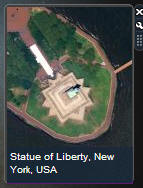 |  |
| Docked view | Undocked view |
|
| Flyout view |
Settings
Mobim gadget has an enhanced settings windows. See below:
Here is what each option means:
- URL: URL is the web address of the feed or collection currently displayed.
- Paste: The Paste button just pastes the content of the Windows clipboard in the URL field.
- Display during: Choose the elapsed time between each slide.
- Default view: Default map style (aerial, road, hybrid or bird's eye) used when no value is set in the slide description.
- Default zoom: Default zoom used when no value is set in the slide description.
- Shuffle: Shuffle slides when checked or displays in the order of the feed or collection when unchecked.
- Display marker: Display a pushpin for each item when checked.
- Display description: Displays title of each slide (or both title and description on larger view) when checked.
Choose your feed
Mobim gadget can display two types of slides:
- Live Collection: Live collections could be created using Microsoft's Live web site or could be chosen on Collections.live.com. To display a collection, either for personal collections of for shared collections, just paste the full address of the collection in the URL field of the settings window. URL address must be something like "http://maps.live.com/...&cid=..." or "http://local.live.com/...&cid=...".
- GeoRSS feed: GeoRSS is an extension of the standard XML RSS format. In fact, GeoRSS just adds two XML elements to a standard RSS item: <geo:lat> and <geo:long>. Of course, <geo:lat> is used for the latitudinal coordinate and <geo:long> is used for the longitudinal coordinate. See below an example of a GeoRSS feed. To use GeoRSS in Mobim, just paste the address or the web site where your GeoRSS feed is hosted. It could be a local or a distant web site, or it could be a link to a static XML or a dynamically generated XML.
="1.0"="utf-8"
<rss version="2.0" xmlns:geo="http://www.w3.org/2003/01/geo/wgs84_pos#"
xmlns:georss="http://www.georss.org/georss" xmlns:gml=
"http://www.opengis.net/gml">
<channel>
<title>Perpignan</title>
<link />
<description>Famous place in Perpignan, France</description>
<item>
<title>Castillet</title>
<description>[mode@o][zoom@1][sceneid@10995771]Castillet Castle built
in 1368.</description>
<geo:lat>42.70069438573455</geo:lat>
<geo:long>2.893863466593684</geo:long>
</item>
<item>
<title>Dames de France</title>
<description>[mode@o][zoom@1][sceneid@10995756]</description>
<geo:lat>42.6985786771285</geo:lat>
<geo:long>2.888311216990704</geo:long>
</item>
</channel>
</rss>
Playing slide show
The slide show begins as soon as you drag Mobim on the sidebar/desktop or as soon as you exit from the settings windows, committing your choice.
A control bar allows you to control the slide show more precisely. The control bar appears automatically when you move the mouse cursor over the gadget. Using the pause button, you can suspend/resume the slide show; using the next or previous button you can move to the next or previous slide.
Note that the control bar is also usable in the flyout view. In this case, the control bar of the smaller view controls both the smaller and the larger views.
Customize view
Mobim allows you to customize the slide show using general settings or using a setting for each slide. To do that, you need to encode settings in the description field of your collection or your feed with a special pattern.
Three parameters could be used:
- [mode@X] : Set the view for this slide. Allowed values for X are: a for aerial, r for road, h for hybrid and o for bird's eye.
- [zoom@N] : Set the zoom level for this slide. Allowed values are 1 to 19.
- [sceneid@X] : Set the sceneID for the slide. This value is used internally by Virtual Earth to identify the photography of the scene. This value makes sense only in bird's eye view.
Note that parameter values do not appear in the description field in the detailed view.
How it works
Of course, Mobim relies on features of Virtual Earth. Virtual Earth can load and use as pushpins, a GeoRSS, or a live collection. Unfortunately, Virtual Earth handles all items as a layer and you can't control the way the layer is displayed the first time. Moreover, you don't have access to the full characteristics of items. So for Mobim, I rewrote the loading of GeoRSS feed and live collection from scratch. Here how:
Load slides
The heart of Mobim is to build a collection where each item is a slide and its characteristics. This process is done at startup with an AJAX call in the function named
loadItems. Find below an excerpt of this function:
function loadItems(callback)
{
    ...
    collection = new Array();
    ...

    afterLoad = callback;
    httpreq = new ActiveXObject("Microsoft.XMLHTTP");
    httpreq.open("GET", urltocall, true);
    httpreq.onreadystatechange = processRequest;
    httpreq.send(null);
}
When the request is done, Mobim must process the response to fill the collection array. The process depends on the type of collection: GeoRSS or Live Collection. Which is exactly what the function processRequest does. See here:
function processRequest()
{
if (httpreq.readyState == 4)
{
if (httpreq.status == 200)
{
if (islive)
processLiveCollection();
else
processGeoRSS();
if (collection.length > 0)
{
if (shuffle)
shuffleCollection();
afterLoad();
}
else
System.Debug.outputString("no feed available\n");
}
else
{
System.Debug.outputString("error reading feed\n");
}
}
}
Today, to find if a URL is a Live collection or a GeoRSS feed we just have to do a test on the prefix of the URL (Live Collections start by "http://maps.live.com/" or "http://local.live.com/".
Process a GeoRSS feed
Processing GeoRSS is pretty simple, it's just an XML text and Mobim parse it node by node.
function processGeoRSS()
{
    var items = httpreq.responseXML.getElementsByTagName("item");
    var title_string;
    var description_string;
    var link_string;
    var point;

    for (var i = 0; i < items.length; i++)
    {
        title_string = getElementText("title", items[i]);
        description_string = getElementText("description", items[i]);
        link_string = getElementText("link", items[i]);
        point = findPoint(items[i]);
        if (point != null)
            collection.push(new MobimRSSItem(title_string,
                description_string, link_string, point));
    }
}
Process Live collections
Bad news: there is no API today to get a Live Collection. So I need to use a hack to find how to retrieve and parse it. Using
IE HTTP Analyzer, I found that to retrieve a Live Collection layer, Virtual Earth internally uses this HTTP call:
http://maps.live.com/UserCollections.aspx?action=RetrieveAllAnnotations&cid=
    XXXX&mkt==en&mapguid=1111111111111&contextid=2222222222222
Where
XXXX is the collection ID in the initial URL and where
1111111111111 and
2222222222222 are contextual numbers whi are irrelevant here. In response to this call, the Live Server return a JSON response like this:
VEMap._GetMapFromGUID('1111111111111')._lm.RetrieveAllAnnotationsCallback(
    [
     new VE_Annotation('D4783333CD255A28!116','Statue of Liberty, New York,
          USA','http://www.nps.gov/stli/','','01/01/0001 00:00:00',
          'Located on a 12 acre island, the Statue of Liberty ...[zoom@16]',
          '40.6892944466626','-74.0444612503052','0','0','',
          '01/01/0001 00:00:00',[]),
     new VE_Annotation('D4783333CD255A28!117','Key West, Florida, USA',
          'http://en.wikipedia.org/wiki/Key_West,_Florida','',
          '01/01/0001 00:00:00','Key West is a city and an island...',
          '24.5553986767496','-81.7980194091797','0','1','',
          '01/01/0001 00:00:00',[]),
     ...
    ],'2222222222222');
Each item of the embedded array is exactly what I need: characteristics of all items in the Live Collection. After a few substitutions and a call to eval, it's now easy to retrieve an array:
function processLiveCollection()
{
var response = httpreq.responseText;
var start = response.indexOf("([new VE_Annotation(");
if (start == -1)
return;
var end = response.indexOf(")],'2222222222222');", start);
if (end == -1)
return;
var strarray = response.substring(start+1, end+2);
strarray = strarray.replace(/VE_Annotation/g, "MobimLiveMarker");
collection = eval(strarray);
}
Create your own slide show
Feel free to create your own Live collection or GeoRSS feed and view it with Mobim. A good start to find nice places all over the world is the Bird's Eye Tourist web site. Also do a follow up to the Virtual Earth blog Team where a lot of Virtual Earth tips and tricks are listed. Here some of my favorites collections (drag & drop URL in URL field and use recommended settings):
Do not hesitate to contact me for bugs, questions, or comments.


