Introduction
Word 2007 is becoming quite widespread even before becoming a production release. There have been over 3 million downloads of Beta 2 already as at July 2007. This article demonstartes a system for creating simple Word 2007 documents based solely on the packaging and XML formats. This can run on the desktop or a server and requires no installation of Word.
Background
It is quite common to see articles talking about using Word on a server to create or manipulate Microsoft Word documents. Often these applications are only tested on a developers machine, as they will fail in a production environment, as this usually requires running multiple threads. Only one instance of Word can run at a time, so the app must maintain a queue, and process as Word becomes free. This is especially problematic in a web server environment.
Add to this the fact that many System Administrators will either not install Word on a server, or require an in depth business case to be provided, it is often not as simple as it could be.
Using the code
A Word 2007 document usually has the extension .docx There are exceptions for macro enabled documents, templates etc. For this article we will only look at .docx files. This is actually a group of files and folders zipped up. By opening the file file with a zipping application you will see a structure like this:

This is a very simple word document, and the structure can get a lot more complex. The text content of the word document is found in the word\document.xml file.
The code will create the package, but takes a very simple approach, creating the word\document.xml file, and adding a standard set of files for all the auxilliary files.
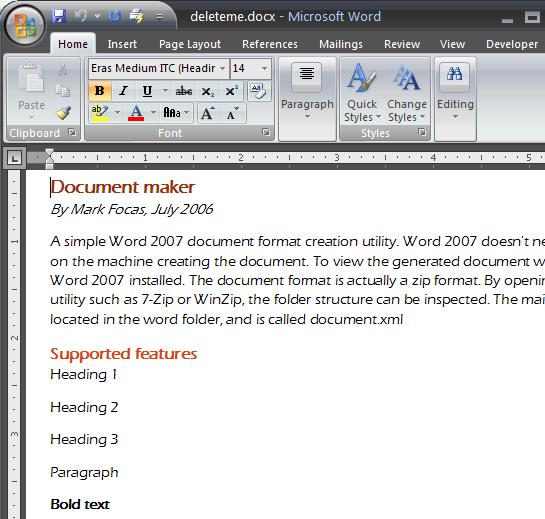
DocumentMaker supports a very limited subset of the Word object model, The only styles supported in this limited version are:
- Heading 1
- Heading 2
- Heading 3
- Paragraphs
- Bold, italic and underlined text
We begin by creating a Document object. This is quite similar to the Document Object model that you might use in a standard Word application.
Document doc = new Document();
Now we can add objects that derive from Paragraph to the Paragraphs collection.
doc.Paragraphs.Add(new Heading1("Document maker"));
A paragraph contains only plain text. If formatted text is required, then a Run object is required, or alternatively, an overloaded version of the Paragraph constructor allows for a formatting style to be specified. A Run represents a contiguous piece of text with one style applied to it. If the text requires mixed styling, i.e. some text with a bold word in the middle of it, then separate Runs can be added to the Paragraph object.
doc.Paragraphs.Add(new Paragraph("By Mark Focas, July 2006",
TextFormats.Format.Italic));
Paragraph p=new Paragraph();
p.Runs.Add(new Run("Text can have multiple format styles, they can be "));
p.Runs.Add(new Run("bold and italic",
        TextFormats.Format.Bold | TextFormats.Format.Italic));
doc.Paragraphs.Add(p);
Note how the Run objects can be or ed together to create combinations
p.Runs.Add(new Run("bold and italic",
TextFormats.Format.Bold | TextFormats.Format.Italic));
Once the document has been created, it needs to be packaged to be of any use. For maximum flexibility, DocumentMaker returns a Stream object
DocumentPackager dp = new DocumentPackager();
Stream s= dp.Package(doc);
There are not many objects in the solution, most of them have been described above.
Points of Interest
The Microsoft XML model for Word appears complex, but in some ways is quite simple. Every object is a paragraph, all headings, list items etc. This makes it extremely simple to generate word documents, but extremely complex to process using XSLT. The approach I took with the Run object is based on the approach the Word XML format takes.
I remain completely neutral about, and do not wish to enter in any debate on whether Word XML is better that Open Document Language or vice versa. This article should not be viewed as claiming Microsoft Word is any better or worse than Open Office. It could easily be adapted to output Open Office format if you require that.
Having said that, I am rather disappointed that Microsoft are intending to charge for downloads of Office 2007 beta 2 from August.
History
30 July 2006 - Version 1.0.0


