Introduction
This article presents a class, handling sending of input (mouse and keyboard) to any running Windows Control by its handle.
Background
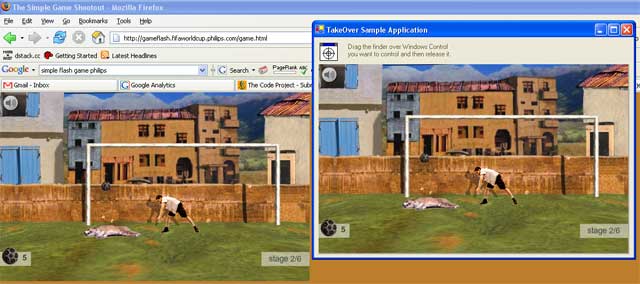
Some time ago, I was making a program which would win a penalty shootout soccer flash game for me. My task in the application was repeatedly to do these things:
- Grab flash window content
- Do some image processing and find out what to do
- Finally, take some action (send mouse input)
I found some great articles concerning taking of screenshot like this one.
This library helped me with image processing a lot.
On the other hand, I spent a lot of time trying to find out how to send mouse input to flash window correctly... and when I got how to do it, I decided to make this library.
Get the Handle
In order to use the TakeOver class, you need to obtain the handle (int number) of the window you want to control. It's possible to use spy++ tool from Visual Studio and convert HEX value to DEC using Windows calculator. The other possibility is to implement your own Window Picker (like in the demo project). Further details about this problem are out of scope for this article.
Using the Code
The first thing you need to do to take control over the window is to create a TakeOver class instance.
Remo.TakeOver tO = new Remo.TakeOver(targetWindowHandle);
Sending of input messages to a window is quite self-explanatory. The class provides these methods for sending messages:
public void SendLeftButtonDown(int x,int y);
public void SendLeftButtonUp(int x,int y);
public void SendLeftButtonDblClick(int x,int y);
public void SendRightButtonDown(int x,int y);
public void SendRightButtonUp(int x,int y);
public void SendRightButtonDblClick(int x,int y);
public void SendMouseMove(int x,int y);
public void SendKeyDown(int key);
public void SendKeyUp(int key);
public void SendChar(char c);
public void SendString(string s);
Sending input usually requires a target window to be focused to work properly, however it's not always so. The demo application can be tested here. Normally, you will have the application running in the background with controlled window focused, so there should be no problem with sending input messages. Since keyboard messages are not very reliable (I do not know how to encode lParam of SendMessage correctly, any hints?), it is recommended for keyboard input to use the SendKeys class once the window is focused via the SetFocus() method. Sendkeys is part of the standard System.Windows.Forms namespace. To focus target window TakeOver class provides a method:
public void SetFocus();
History
- 4th July, 2006: Initial post


