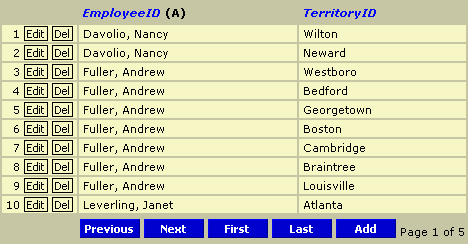
Introduction
A grid control for editing databases on the web. It is written for ASP with
JavaScript, but should be fully usable from VBScript as well. With just a few
lines of code, you will, with this control, be able to edit your data.
Features
- Write protect fields you don't want the user to edit.
- ID fields can look up values in other recordsets.
- Sort by any column that supports sorting.
- Paging with custom page size.
- Automatically detects primary key, but can also be manually overridden.
- Get default values for new records with custom select statement.
Usage
To use the grid you create it by calling new BGrid(rs) from
JavaScript, or you can alternately create it by calling CreateGrid(rs)
which also works from VBScript. The parameter in both methods is the recordset
you want the grid to display. This recordset should allow moving both back and
forward, so I usually set CursorLocation to adUseClient
on my connection.
I'm too lazy to manually declare all those ad-constants, so at the top of
config.asa I add the following. This means that all ADO constants are available,
and is required for the demo to work without a lot of work.
<!--
A simple example
Using the grid requires only a few lines of code:
<%@Language="JavaScript%">
<!--#include file=misc.asp-->
<!--#include file=b.dropdown.asp-->
<!--#include file=b.grid.asp-->

<form method=post>
<%
var Conn = CreateConnection(); // CreateConnection is defined in misc.asp
var rs = Server.CreateObject("ADODB.Recordset");
rs.Open("EmployeeTerritories",Conn,adOpenStatic,adLockOptimistic,adCmdTable);

var Grid = new BGrid(rs);
Grid.Process(); // Process must be called to handle saving and such stuff
Grid.Display(); // Display does just that
Grid = null;

rs.Close();
rs = null;
Conn.Close();
Conn = null;
%>
</form>
Since the EmployeeTerritories table has a field called TerritoryID which is
a foreign key to the Territories table, we can tell the grid to look for a
value to display from this table instead of displaying an ID that means
nothing:
var rsTerritories = Conn.Execute("Territories");
Grid.SetLookup("TerritoryID",rsTerritories,"TerritoryID","TerritoryDescription");
When a record is being edited it will look similar to this picture:

Functions
CreateGrid(recordset)
Grid.Process()
Grid.Display()
Grid.SetDefault(field,sql)
Grid.ProtectFields(fieldlist)
Grid.SetLookup(fkfield,recordset,pkfield,displayfield)
Grid.SetOption(option,value)
Some of these are explained above, but there are a few I haven't mentioned yet:
Grid.SetOption(option,value)
option can be one of the following: "debug", "pagesize", "pk", "truncate".
value varies depending on the option. "debug" requires a boolean, "pagesize"
requires a number, "pk" is a comma separated list of fields which is the manually overridden
primary key, and "truncate" needs a number to know how many characters that should be
displayed of every field in the grid. Some examples:
Grid.SetOption("debug",true);
Grid.SetOption("pagesize",20);
Grid.SetOption("pk","field1,field2");
Grid.SetOption("truncate",30);
Grid.SetDefault(field,sql)
field is the name of the field in the recordset, and sql
is the sql-statement used to find the default value for new records in this grid.
Grid.SetDefault("UserID","select max(UserID)+1 from TheTable");
Grid.SetDefault("HireDate","select getdate()");
Grid.SetDefault("MinAge","select 18");
Grid.ProtectFields(fieldlist)
Protects the fields in the fieldlist from editing. Example:
Grid.ProtectFields("UserID,HireDate");
This member has not yet provided a Biography. Assume it's interesting and varied, and probably something to do with programming.



 General
  News
News  Suggestion
  Question
  Bug
Bug  Answer
  Joke
Joke  Praise
  Rant
Rant  Admin
Admin 


 Submit an article or tip


 !!!
!!!