Introduction
The Windows service code that ships with the .NET framework and Visual Studio works just fine usually. However, sometimes it's just annoying to have to create an installer project just for a simple service you're writing. Furthermore, Microsoft tends to hide away the Win32 service infrastructure from us. I'm not saying that's a bad thing, but sometimes you just need something a little better. There're some advanced issues with services that make working with the API difficult and so wouldn't it be nice to have something that encapsulates all the functionality, but exposes it to those who need it? The code provides a base class and an attribute for you to use to define your own service.
Background
A thorough discussion of the intricacies of Win32 services is another subject. This code focuses on bringing it all together and then exposing it via an easy to use class and custom attribute.
Using the code
Using the code is as simple as deriving from the base class:
using System;
using HoytSoft.ServiceProcess.Attributes;

namespace MyServices {
    public class TestService : HoytSoft.ServiceProcess.ServiceBase {

        protected override bool Initialize(string[] Arguments) {
            this.Log("Test service initialized correctly, starting up...");
            return true;
        }
    }
}
And then defining an attribute:
using System;
using HoytSoft.ServiceProcess.Attributes;

namespace MyServices {
    [Service(
    "HoytSoft_TestService",
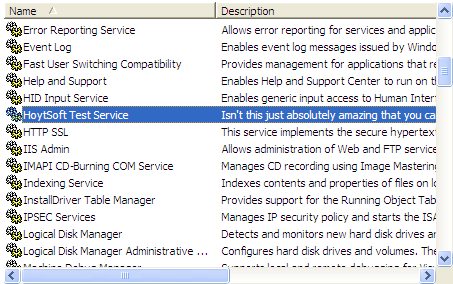
    DisplayName         = "HoytSoft Test Service",
    Description         = "Isn't this just absolutely amazing?",
    ServiceType         = ServiceType.Default,
    ServiceAccessType   = ServiceAccessType.AllAccess,
    ServiceStartType    = ServiceStartType.AutoStart,
    ServiceErrorControl = ServiceErrorControl.Normal,
    ServiceControls     = ServiceControls.Default
    )]
    public class TestService : HoytSoft.ServiceProcess.ServiceBase {

        protected override bool Initialize(string[] Arguments) {
            this.Log("Test service initialized correctly, starting up...");
            return true;
        }
    }
}

All the attributes correspond to their equivalent Win32 service descriptions. A lot of the code has been commented, so a glance at the intellisense should give you an idea of what each option is and how it modifies your Windows service.
It is important that you give a name to your service. It is a required parameter for the Service attribute. The attribute values specified here are used in the ServiceBase's Main() method. I suppose I should also note that your service should not define its own Main() method since ServiceBase uses its own that reads in Service attributes and then creates objects automatically for you. If the service has not been installed, it will auto-install it for you. To uninstall a service, simply pass in "u" or "uninstall" to the program. To manually do this, go to a DOS prompt and type in: sc delete "MyServiceName".
An interesting feature that hasn't been tested at all is the ability to use multiple services in a single application. To do this, be sure to set the ServiceType to ServiceType.ShareProcess or ServiceType.InteractiveProcessShare.
Now of most importance to you is probably developing, testing, and debugging your service. There is a property on the Service attribute named "Debug". Set this to true and the base class will automatically treat your program like a normal console program so you can develop the rest of the program. When you're ready to test it out as an actual service running on the machine, just switch this to false or take it out and it will work like a service. The program will install the service whether or not you're in debug mode when it's first run. If you try to run the program when it was compiled in Debug mode, you will get an error saying the process couldn't be started. This is by design since to gain all of the debug mode capabilities in Visual Studio, you can't have it start up as a real service. Simply switch the Debug mode, recompile, and it will run as normal.
You can write to the system event log by making a call to this.Log("My message here."):
The main meat of your code should be the overridden methods:
All of these should be fairly straightforward. Any questions?
Updates
- 10/4/05: After the default timeout of 30 seconds (this is a Windows-imposed standard), if the service is not being run by the service control manager (SCM), the program runs like a normal console/Windows program. This is done in the
ServiceBase's main method which will detect when it's not being run as a service and executes the proper methods on the service.
You just continue to use the service like you normally would through the Initialize() and Start() methods. If you want to test other methods, you can optionally use the following methods from inside Start():
TestPause()
TestContinue()
TestStop()
TestShutdown()
TestInterrogate()
TestInstall()
TestUninstall()
ServiceBase will take care of calling your methods while attempting to simulate a real situation or user by calling your overridden methods asynchronously.
- 10/12/05: A message was added to the CodeProject article informing me of missing copyright notices in the source code, so I've added them here along with some more updates. This version has a major fix involving running it from a referenced, external DLL. If you put the code inside another DLL and then try to use it, you may notice you can start, but can't pause or stop your service. The fix, actually, was just adding a strong name key (HoytSoft.snk) to the external assembly. After I did this, I was able to run the service normally.
As a result, I have divided the solution into two projects - one containing the service code and the other is just a simple example console service app.
Important! The namespace has changed! It was HoytSoft.Service, but it is now HoytSoft.ServiceProcess to more accurately reflect its replacement of the System.ServiceProcess namespace. Please keep in mind that to install/run the service you must have the proper permissions!
- 10/21/05: There were some more problems with referencing the
ServiceBase class from a class library. I think the main problem was a delegate that was going out of scope that rendered a callback useless. Lots of people got errors when trying to pause, stop, or do anything on the service when using it as a class library. I was able to reproduce the problem and after making the aforementioned fixes, it worked just fine.
Also of note is the ability to explicitly and only install the service without having to run the rest of the service. To do this, just start the service and pass in "i" or "install" and it will quickly install and exit. If you start the app normally and it hasn't been installed yet, the app will work like before and install it before proceeding. You should still be able to run it as a console or service app.
Points of Interest
- The service installs itself and can uninstall itself through a command line argument ("u" or "uninstall").
- You can run, test, and debug your service from within Visual Studio without having to create a separate installer project or use the
ServiceController classes.
History
- Took out "
Debug" property from the ServiceAttribute attribute since the code now auto-detects this. (See "Points of Interest" above).
I'm a recent graduate of Brigham Young University in Provo, UT and now working for Lawrence Livermore National Laboratories (LLNL). I've been programming since I was 14 and did the amazing Hoyt family website with an animated gif of a spinning globe. I've come a long way since then and now actually use pictures of people.
I've been interested in website development and Windows programming since and I haven't stopped except for two years spent in El Salvador as a religious representative for my church.
I've done lots of work with C#/C/C++/Java/Python/JavaScript/Scheme/T-SQL/PL-SQL/Visual Basic/etc., web services, windows apps, services, and web apps. It's been a lot of fun!



 General
  News
News  Suggestion
  Question
  Bug
Bug  Answer
  Joke
Joke  Praise
  Rant
Rant  Admin
Admin 


 Submit an article or tip


![Rose | [Rose]](https://codeproject.freetls.fastly.net/script/Forums/Images/rose.gif)
