|
|
Comments and Discussions
|
|
 |

|
I know this is a rather old article but it just saved me from several days of torture.
Thanks very much....
|
|
|
|

|
I am glad the article helped you out.
Ben
|
|
|
|

|
Your article is great and I have been able to successfully build reports
However I have 2 glitches.
1. Whitespace is translated to spaces. How do I preserve whitespace in using this process?
2. Ho do I spawn WinWord to print the document and then close. Like right clicking on a Doc file and selecting print on pop up menu
thank you for your help
|
|
|
|

|
You know I don't know how to keep the white space from getting translated to spaces.
If you want winword to print your doc like when your right click a doc file, you have to figure out the paramters to winword. I don't remember exactly what they are, but I am sure a quick google search will lead to do the correct answer. It is something like
winword /print docname
I don't remember for sure.
Ben
|
|
|
|

|
This is a great trick especially for those of us just starting out with automation! Thanks very much for this article.
|
|
|
|

|
Glad you liked the article. Before I figured this out I was trying to search everywhere to try and figure out how to do stuff. It is much easier to just have the macro write the code for you.
Ben
|
|
|
|

|
Yes, I had been banging my head a couple days trying to figure out how to do something programmatically. Using your method I was able to sort it out in 10 minutes!
|
|
|
|

|
That is great! I am glad to hear it.
Ben
|
|
|
|

|
Hi
who I Can Open OfficeWord By C# and start to record a macro and save It??
|
|
|
|

|
You know I haven't actually tried to save a macro, usually I just try to use the macro to see what the code would look like in C#. Then I put the macro code into C# and it does what I want in word. I am not sure how that would work anyway, since starting to record a macro takes user input like mouse clicks and keystrokes. So then your C# app would have to do all of that while you are recording a macro.
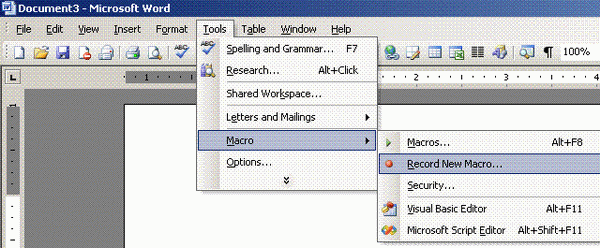
Now by chance you are asking how do you start and record a macro in word.
In office 2003 or later you go to tools -> macros -> record macro
In office 2007 click on the view tab then macros then record macro.
Sorry I can't me more help.
Ben
|
|
|
|

|
tanks
I know that =>> any work can run in word by C# that is (Macroable) and change VB Macro To C# for example " Selection.TypeText Text:="Hello" -OR- ShowVisualBasicEditor = True " To
{word.Selection.TypeText("Hello"); -AND- word.ShowVisualBasicEditor = true; } In C#. But the question is ( what is function Of Record macro In VB to translate in C# )
very thanks AND BYE
|
|
|
|

|
I am still not totally sure I understand your question. I think you want to start recording a word macro in C#. I have never done that and I don't know if it can be done. If you include a refrence to the office ddl in your project the intellsense should work on the word object. So you can search through the different methods exposed in the word object and see if a start macro method exists.
Sorry I can't help more.
Ben
|
|
|
|

|
i want to built macro application for all general activities by visual studio in vb.net if any one have some material please share with me.
|
|
|
|

|
i have created the table in the word, now i want to add the picture below the table.But with my code the picture is added in one of the column of table.Now i want that how to end the table.
|
|
|
|

|
I would guess that you need to add a return key so that word knows you are on the next line not in the table. That is my guess.
Ben
|
|
|
|

|
How can we create a word document with footer on each page and the text in footer is like pages X of Y.
|
|
|
|

|
Well, if you follow what my article talked about. First you turn on the record for the word macro. Then you turn on the page N of N in word. Then you look at the macro to see what the macro code looks like. Then you look at the word automation object in .net and the code should be pretty close to what you see in the macro.
Hope that helps.
Ben
|
|
|
|

|
Thanks a lot i have got the solution...
sunil rajak
|
|
|
|

|
I am glad you figured it out. Nice job!
Ben
|
|
|
|

|
HI,
In my scenario i need to add a field in the a table cell that is placed in the header Section of page.
Field that i am trying to insert is Page X of Y ( X is the current page number and Y is the total number of pages in document)
The code you have written replaces the whole header. Can you any body tell me how to add field in the header section table.
thanks,
Qasim
|
|
|
|

|
I suggest that you create a macro while you are doing they above code and then look at the macro code. That should give you a pretty good idea how to do it.
Hope that helps.
Ben
|
|
|
|

|
Hi
we are trying to automate office @ server side with specific user account(dcom service configured to run under specific user account who is a local administrator) and this is recommended by microsoft for automating office. Now the problem is since we are not running under interactive account I am worried how will it handle the normal popups of office while converting to HTML
Please reply me if you have answer for this.
|
|
|
|

|
Pop ups are a problem. In my experience if you are not allowing the automation to be visible you will have less issues with pop ups. That is if you use this code:
wordApp.Visible = false;
You still can have some trouble, but in most cases you should be able to get around it by calling the methods correctly, so there is no need to prompt. If you need the wordapp to be visible, then I am not sure what you can do about the pop ups.
Sorry I couldn't be more helpful.
Ben
|
|
|
|

|
Hi,
We are trying to convert word and excel to html format, we are using late binding to support different version of office. We have already taken care of setting dcom security to interactive user and also we have given [B]'launch and active'[/B] and [B]'Access permissions'[/B] for aspnet(Network service in case of 2003) user.
The problem is it works absolutely fine in some systems, but it will not work in some systems and throws error as Unauthorizedaccess for CreateObject call.
The only difference i could see in working and non working system is, in working system dcom services of excel and word are running with name like "Microsoft Excel Application", but in nonworking system these servies are runnig with GUID like "00020812-0000-0000-C000-000000000046", and this is just a difference i saw I am really not sure whether problem is because of this only or not.
PS: We are noy supposed to impersonate aspnet user, so in our web confgi we set impersonation to false.
This is kiiling my time i dont have any clue on how to go abt this,
System.Type WordType = Type.GetTypeFromProgID("Word.Application");
WordApp = Activator.CreateInstance(WordType,true);
string Version = Convert.ToString(WordApp.GetType().InvokeMember("Version",System.Reflection.BindingFlags.GetProperty,null,WordApp,null));
...
...
...
if (Version.StartsWith("9.") || Version.StartsWith("10."))
{
...
...
WordDocs = WordType.InvokeMember("Documents",System.Reflection.BindingFlags.GetProperty | System.Reflection.BindingFlags.Public ,null,WordApp,null);
wrdDoc = WordDocs.GetType().InvokeMember("Open",System.Reflection.BindingFlags.InvokeMethod | System.Reflection.BindingFlags.Public,null,WordDocs,oParamDocPath);
wrdDoc.GetType().InvokeMember("SaveAs",System.Reflection.BindingFlags.InvokeMethod | System.Reflection.BindingFlags.Public,null,wrdDoc,oParamHtmlPath);
WordApp.GetType().InvokeMember("Quit",System.Reflection.BindingFlags.InvokeMethod | System.Reflection.BindingFlags.Public,null,WordApp,null);
}
|
|
|
|

|
Hello,
So it seems to me that on some level the office automation is running on the client's PC. If this is true, I have seen some weird errors that are caused by not having the .net hooks installed. What this means is that the installation of office probably happened before the .net framework was loaded on the client machine. Or if the .net framework did exist for some reason the .net hooks into office were not installed. If you run the office install for Word or excel, you can choose an update or add extra feature. (I can't remember the exact wording) Anyway, if you check all the things that you can add or turn off in an office install one of them is the .net programming or something like that. My guess is that the computers that don't work don't have this installed.
That is my best guess for know. I hope that helps.
Ben
|
|
|
|
|

|
Do you know how can we save a loaded Word Document as HTML? I can't find/set the FileFormat property of the SaveAs method, the formatname wdFormatFilteredHTML (I got from the Macro editor) doesn't work.
Any idea?
Thanks.
|
|
|
|

|
Sorry it has taken so long to get back to you on this. We got like a foot of snow yesterday, so I was busy with that. Anyway, here is what you need to do:
object vk_range = missing;
object vk_to = missing;
object vk_from = missing;
Microsoft.Office.Interop.Word.ApplicationClass vk_word_app = new Microsoft.Office.Interop.Word.ApplicationClass();
// Open the document that was chosen by the dialog
Microsoft.Office.Interop.Word.Document aDoc = null;
aDoc = vk_word_app.Documents.Open(
ref fileName, ref missing, ref vk_read_only,
ref missing, ref missing,
ref missing, ref missing, ref missing, ref missing,
ref missing, ref missing, ref vk_visible, ref missing, ref missing, ref missing, ref missing );
object vk_saveformat = Microsoft.Office.Interop.Word.WdSaveFormat.wdFormatHTML;
aDoc.SaveAs(ref fileSaveName, ref vk_saveformat ,ref missing,ref missing,ref missing, ref missing,
ref missing,ref missing, ref missing, ref missing, ref missing, ref missing,ref missing,
ref missing, ref missing, ref missing);
Note: you need to include Microsoft.office.core dll for the saveas constants.
Let me know if you have any problems.
Ben
|
|
|
|
|

|
I am not sure what your situation was. Perhaps you were trying to do a certain edit or somthing like that with a macro. Anyway, at least with my experience I haven't had any issues. There are some good links on the microsoft site that describe the methods, properties etc. The biggest issue is usually knowing which ones you should use. Just pick a known method and do a search on the Microsoft site you will find the documentation there.
Thanks,
Ben
|
|
|
|
|

|
If you want some details for the methods and properties go to
http://msdn.microsoft.com/library/default.asp?url=/library/en-us/vbawd11/html/woproSaveFormat1_HV05213090.asp
This will take you to the microsoft site to the saveas format stuff. Anyway you can navigate through using the left hand side menu to all of the methods and properties in Office 2003. If you check through the menu you will see that office 97 and office 2000 is also there.
Still it helps to know which method you should probably be looking at first, using macros, then you can search the micro soft site to get the details on that method and sometimes they have examples that can be helpful as well.
Thanks,
Ben
|
|
|
|

|
I agree with Urs that using the macros does not always provide the correct code for running in VB.Net, especially with MS Project, however it does provide a good starting point. One other thing to note is that if you are creating a significant amount of new COM objects, then grabage collection becomes an issue, best to minimise the amount of new objects created and reuse where possible.
|
|
|
|

|
Thanks for you comment. I agree with you. I wouldn't expect the macro code to plop right into your vb.net or C# and work. Still it will most likely point you to the right object and method to be looking at. You have a very good point about being concerned with memory links. In debuging automation apps I have often shut the debugger down in the middle of running. This leaves a version of word running behind the scenes. After you do this enough your app won't run any more.
Thanks,
Ben
|
|
|
|

|
I also didn't know that trick. Thank you very much, it will certainly help me a lot.
|
|
|
|

|
Glad you have found it useful. I was hoping that someone would benefit from this article.
Thanks,
Ben
|
|
|
|

|
It helped me too. Thanks.
|
|
|
|

|
Thanks for the tip man, I've always wondered if there's any trouble between different versions of Word, I mean, if you code your program for Word 2003, and you run the code on a computer with a different version of word, like Word 2003 in spanish, or Word XP, will you have some trouble?
____________________________
José Manuel Menéndez Poo
IT Manager
www.techniks.com.mx
|
|
|
|

|
Jose,
There are differences between versions. If you want the most compatibility you will have to do the macro in the oldest version of office you plan on supporting. They are always adding new features that don't exist in over versions. You are correct this example was done in office 2003. In the end it should all depend on what you are trying to do. If you are not using some new XML feature that doesn't exist in an older version. Most of my applications for automation have been more internal to the company I wrote them for. So I kind of knew what people were using and thus what would work.
Thanks,
Ben
|
|
|
|

|
Great tip! I guess it will save me a bunch of testing hours.
Thanks for sharing
|
|
|
|

|
Glad you found the article helpful. It is always good to save on testing time.
Ben
|
|
|
|

|
Nicely detailed article, but as for a little known trick. All the books and articles I've read on the subject of Office Automation have all recommended this technique.
Michael
CP Blog [^] Development Blog [^]
|
|
|
|

|
Honestly, I haven't seen it in a book, but I don't doubt that it is there. I was just trying to get a title that would grab people's attention. I would guess that many people like me have not read the books you have and thus may benefit from this technique.
Thanks for your comment.
Ben
|
|
|
|
 |
|
|
General News Suggestion Question Bug Answer Joke Rant Admin
|
This article exposes a trick to help in creating apps with MS Office automation.
| Type | Article |
| Licence | CPOL |
| First Posted | 2 Dec 2005 |
| Views | 112,451 |
| Bookmarked | 50 times |
|
|