Click here to Skip to main content
Licence 
First Posted 11 Jan 2006
Views 81,856
Downloads 1,835
Bookmarked 46 times

An LPR client in C#

By rob tillaart | 27 Dec 2006
An article on printing with LPR in C#.
1 vote, 7.1%
1
1 vote, 7.1%
2

3
4 votes, 28.6%
4
8 votes, 57.1%
5
4.21/5 - 14 votes
1 removed
μ 3.82, σa 2.19 [?]

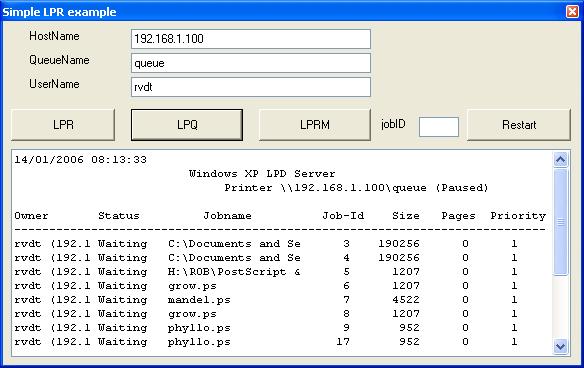
screenshot of the demo application

Introduction

This article presents a printer class that supports the LPR print protocol in C#. With this class, it is possible to send a print file in ASCII, PostScript, PCL, et cetera, directly to a network printer or print server that communicates by means of the LPR (LPD) protocol. The printer class also implements the LPQ, the LPRM, and the Restart request.

Background

The LPR/LPD protocol is a 15 year old print protocol from the TCP/IP suite that is still important in the area of network printers and print servers. It is described in detail in RFC 1179. Augmented variations of the protocol exist, like LPRNG also known as LPR Next Generation.

In an application, I needed to send PostScript files to an LPD enabled printer. It was possible to use the command line lpr.exe which is included in Windows but I didn't want to be dependant on lpr.exe, so I searched for a free C# implementation of LPR. As I could not find one, it was time to build such a class myself.

How to use the code

The printer class is straightforward. The constructor is called with three parameters, the hostname, the queue name, and the username. As these parameters are reused again and again with every LPR and LPQ request, I decided to place them in the constructor. Just a choice.

To print a file, one only needs to call LPR with the filename as argument, and to get the content of the spool queue, just call LPQ. The boolean parameter of LPQ indicates a long or small listing. The output format of LPQ depends on the implementation of the LPD daemon in the printer so there might be no difference.

So the core code to print a postscript file could look like:

if (openFileDialog1.ShowDialog() == DialogResult.OK)
{
    LPD.Printer printer1 = 
         new LPD.Printer("saturnus","queue","rob");
    string fname = openFileDialog1.FileName;
    if (fname.EndsWith(".ps"))
    {
        printer1.LPR(fname);
        textBox1.Text = printer1.LPQ(false);
    }
    else
    {
        // display appropiate error message
        // ...
    }
}

Points of interest

To use the printer class, one should have a network printer with an LPD daemon, or start the TCP/IP Print Service on a computer (print server). Then, you can send files to any Windows printer defined on the computer. Use the PC name as hostname and the name of the printer as queue name. Be aware that the name of the printers may not contain spaces as the LPR/LPD protocol uses spaces as separators.

LPR does not wait until the file is printed, it starts a thread in the background for every file. LPQ and LPRM do not use a background thread.

The Restart method seems not to be supported in the Windows LPD daemon as I get no acknowledge. Nevertheless, I kept it in the code (use at own risk :).

Some things to improve the class include: (no deadline)

  • improve error handling
  • implement status and some other properties
  • fix some todo's in the code
  • overload LPR to print from a stream
  • call back when file prints (e.g. for progress indicator)
  • refactor ad fundum

History

  • 2006/12/24 - Version 1.06 - Added some comments, a status string, InternalQueueSize, and filesSend.
  • 2006/12/24 - Version 1.03 - Added delete flag (thanks to Dion Slijp).
  • 2006/11/09 - Version 1.02 - Patched code with remarks of Karl Fleischmann.
  • 2006/01/14 - Version 1.01 - Added host, queue + user name to demo
  • 2006/01/02 - Version 1.00 - published on CodeProject.
  • 2006/01/02 - Version 0.96 - added Restart, fixed minor bugs, updated CP page.
  • 2005/12/31 - Version 0.92 - added WriteLog, added LPRM.
  • 2005/12/30 - Version 0.90 - refactoring protocode, writing initial CP page.
  • 2005/??/?? - started with the Printer class.

Usage rights

Everybody is granted to use this code as long as you refer to the original work, and I would appreciate that enhancements are published at CodeProject too.

License

This article has no explicit license attached to it but may contain usage terms in the article text or the download files themselves. If in doubt please contact the author via the discussion board below.

A list of licenses authors might use can be found here

About the Author

rob tillaart

Web Developer

Netherlands Netherlands

Member


Sign Up to vote   Poor Excellent
Add a reason or comment to your vote: x
Votes of 3 or less require a comment

Comments and Discussions

 
You must Sign In to use this message board. (secure sign-in)
 
Search this forum  
 FAQ
    Noise  Layout  Per page   
  Refresh
QuestionIs it possible to specify the tray in PostScript? Pinmemberzhangzq710:03 7 Feb '12  
AnswerRe: Is it possible to specify the tray in PostScript? Pinmemberrob tillaart9:31 8 Feb '12  
GeneralRe: Is it possible to specify the tray in PostScript? Pinmemberzhangzq7116:51 8 Feb '12  
GeneralRe: Is it possible to specify the tray in PostScript? Pinmemberrob tillaart10:51 9 Feb '12  
GeneralRe: Is it possible to specify the tray in PostScript? Pinmemberzhangzq7116:36 9 Feb '12  
QuestionWindows 7 64-bit Pinmemberbobrocks7910:27 20 Jul '11  
AnswerRe: Windows 7 64-bit [modified] Pinmemberrob tillaart1:14 21 Jul '11  
QuestionNeed Help To Develop IPHONE Printing PinmemberMurugan.mcse8:03 22 Jun '11  
AnswerRe: Need Help To Develop IPHONE Printing Pinmemberrob tillaart23:16 22 Jun '11  
GeneralRe: Need Help To Develop IPHONE Printing PinmemberMurugan.mcse6:23 23 Jun '11  
GeneralRe: Need Help To Develop IPHONE Printing Pinmemberrob tillaart8:11 23 Jun '11  
Generalsupport for lpr binary mode (lpr -o l) added Pinmemberjustin.killen6:50 29 Apr '10  
GeneralRe: support for lpr binary mode (lpr -o l) added Pinmemberrob tillaart8:46 3 May '10  
GeneralUsing PCL to print Pinmembervanhungit21:52 6 Apr '10  
GeneralRe: Using PCL to print Pinmemberrob tillaart23:04 6 Apr '10  
GeneralPerformance tweaks PinmemberRowland Shaw5:15 14 Dec '09  
GeneralRe: Performance tweaks Pinmemberrob tillaart23:05 6 Apr '10  
GeneralLess naive implementation of GetJobId() PinmemberRowland Shaw5:06 14 Dec '09  
GeneralLPR failed after 10 jobs [modified] Pinmemberbalu123459:46 10 Oct '09  
GeneralRe: LPR failed after 10 jobs Pinmemberrob tillaart8:02 11 Oct '09  
GeneralRe: LPR failed after 10 jobs Pinmemberbalu123458:53 11 Oct '09  
GeneralRe: LPR failed after 10 jobs Pinmemberrob tillaart7:48 13 Oct '09  
GeneralRe: LPR failed after 10 jobs Pinmemberbalu123458:36 23 Oct '09  
GeneralRe: LPR failed after 10 jobs Pinmemberrob tillaart22:42 23 Oct '09  
Hi,
 
"Remote diagnostics is a wonderful game".
 
My conclusion so far is that there is a restriction in the printserver as told earlier. It is not simple to ask if physical pages are printed, you need a printer that supports e.g. SNMP and the printerMIB. But than again you need to know how many pages the jobs have to make an ideal solution.
 
An easier although a bit unreliable is to use an LPQ call and see if a particular job is still in the queue at the server. If theserver says that the job is not in the queue you may assume it is sent to the printer. That does not mean it is printed but probably it is busy printing.
 
The solution above is called "active polling" and is resource intensive (CPU, network, client & server) but it will not generate a large load if you put a sleep() in it.
 
You can implement this in several ways. Straightforward:
1. Send a job,
2. sleep some time and lpq the server until queue is empty
3. goto 1.
 
A more intelligent solution uses some system knowledge. Just send jobs and do an lpq to see #jobs in the queue at the server. If this is 10 (make that configurable) sleep for one second (also configurable). When the queuesize is less than 10 start sending jobs again. IN short use the fact that the server can buffer X jobs. The sleep time should be configurable as you only need to check after a page is printed, this minimizes the polling overhead. If the printer is 10PPM you only need to check every 6 seconds in theory. In practice I would check once a second.
 
Please note the above solutions are not foolproof, especially if there are multiple clients the straightforward solution can create starvation in theory. If this happens you need at least a faster printer Smile | :)
 
Hopes this helps enough to solve your problem
 
Regards, Rob
GeneralRe: LPR failed after 10 jobs Pinmemberbalu123454:02 4 Nov '09  

General General    News News    Suggestion Suggestion    Question Question    Bug Bug    Answer Answer    Joke Joke    Rant Rant    Admin Admin   

Use Ctrl+Left/Right to switch messages, Ctrl+Up/Down to switch threads, Ctrl+Shift+Left/Right to switch pages.

Permalink | Advertise | Privacy | Mobile
Web04 | 2.5.120210.1 | Last Updated 27 Dec 2006
Article Copyright 2006 by rob tillaart
Everything else Copyright © CodeProject, 1999-2012
Terms of Use
Layout: fixed | fluid
