Click here to Skip to main content

JavaScript SOAP Client

By , 24 Jan 2006
 

Introduction

A lot of talking about AJAX is taking place here and there; AJAX is the acronym of "Asynchronous JavaScript and XML", a technology based on XMLHttpRequest, which is now supported by all main browsers. The basic idea is quite simple - and not actually a breakthrough - but it allows updating a page following a server request, without reloading the entire set of data. Some examples can be found on GMail or Google Suggest. For additional information about AJAX, you can see Wikipedia.

In this article, we propose a solution based on AJAX that has a great advantage with respect to those commonly found in Internet: calls are made to the Web Services.

This permits:

  1. On the server side, we only have to expose a Web Service with the required methods (instead of generating dynamic pages incorporating data that are based on a custom syntax or on a generic XML).
  2. On the client side, we use the WSDL (Web Service Description Language) to automatically generate a JavaScript proxy class so as to allow using the Web Service return types - that is similar to what Visual Studio does when a Web Reference is added to the solution.

The following diagram shows the SOAP Client workflow for asynchronous calls:
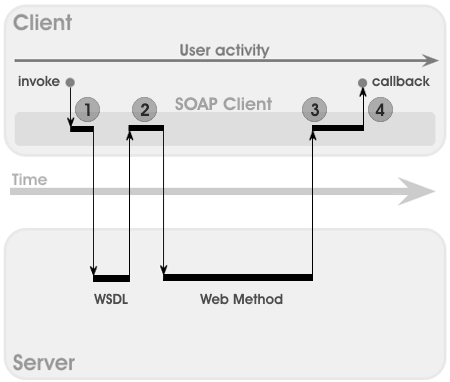
The Client invokes the "SOAPClient.invoke" method using a JavaScript function and specifies the following:

  • Web Service URL (please note that many browsers do not allow cross-domain calls for security reasons).
  • Web method name.
  • Web method parameter values.
  • Call mode (async = true, sync = false).
  • Callback method invoked upon response reception (optional for sync calls).

The "SOAPClient.invoke" method executes the following operations (numbers refer to the previous diagram):

  1. It gets the WSDL and caches the description for future requests.
  2. It prepares and sends a SOAP (v. 1.1) request to the server (invoking method and parameter values).
  3. It processes the server reply using the WSDL so as to build the corresponding JavaScript objects to be returned.
  4. If the call mode is async, the callback method is invoked, otherwise it returns the corresponding object.

Using the code

After having exposed our idea about consuming a Web Service via JavaScript, we only have to analyze the code.

Let's start with the class for the definition of the parameters to be passed to the Web method: "SOAPClientParameters":

function SOAPClientParameters()
{
    var _pl = new Array();
    this.add = function(name, value) 
    {
        _pl[name] = value; 
        return this; 
    }
    this.toXml = function()
    {
        var xml = "";
        for(var p in _pl)
        {
            if(typeof(_pl[p]) != "function")
                xml += "<" + p + ">" + 
                       _pl[p].toString().replace(/&/g, 
                         "&").replace(/</g, 
                         "<").replace(/>/g, 
                         ">

The code simply consists of an internal dictionary (associative array) with the parameter name (key) and the related value; the "add" method allows appending new parameters, while the "toXml" method provides XML serialization for SOAP requests (see "SOAPClient._sendSoapRequest").

Let's define the "SOAPClient" class, which can only contain static methods in order to allow async calls, and the only "public" method within this class: "SOAPClient.invoke".

Note: since JavaScript does not foresee access modifiers - such as "public", "private", "protected", etc. - we'll use the "_" prefix to indicate private methods.

function SOAPClient() {}
SOAPClient.invoke = function(url, method, 
                      parameters, async, callback)
{
    if(async)
        SOAPClient._loadWsdl(url, method, 
                    parameters, async, callback);
    else
        return SOAPClient._loadWsdl(url, method, 
                   parameters, async, callback);
}

The "SOAPClient.invoke" method interface is described above; our implementation checks whether the call is async (call result will be passed to the callback method) or sync (call result will be directly returned). The call to the Web Service begins by invoking the "SOAPClient._loadWsdl" method:

SOAPClient._loadWsdl = function(url, method, parameters, async, callback)
{
    // load from cache?
    var wsdl = SOAPClient_cacheWsdl[url];
    if(wsdl + "" != "" && wsdl + "" != "undefined")
        return SOAPClient._sendSoapRequest(url, method, 
                    parameters, async, callback, wsdl);
    // get wsdl
    var xmlHttp = SOAPClient._getXmlHttp();
    xmlHttp.open("GET", url + "?wsdl", async);
    if(async) 
    {
        xmlHttp.onreadystatechange = function() 
        {
            if(xmlHttp.readyState == 4)
                SOAPClient._onLoadWsdl(url, method, 
                     parameters, async, callback, xmlHttp);
        }
    }
    xmlHttp.send(null);
    if (!async)
        return SOAPClient._onLoadWsdl(url, method, parameters, 
                                    async, callback, xmlHttp);
}

The method searches the cache for the same WSDL in order to avoid repetitive calls:

SOAPClient_cacheWsdl = new Array();

If the WSDL is not found in the cache (it's the first call in the current context), it is requested from the server using an XMLHttpRequest, according to the required mode (sync or not). Once an answer is obtained from the server, the "SOAPClient._onLoadWsdl" method is invoked:

SOAPClient._onLoadWsdl = function(url, method, 
             parameters, async, callback, req)
{
    var wsdl = req.responseXML;
    SOAPClient_cacheWsdl[url] = wsdl;
    return SOAPClient._sendSoapRequest(url, method, 
                       parameters, async, callback, wsdl);
}

A WSDL copy is stored into the cache and then the "SOAPClient._sendSoapRequest" method is executed:

SOAPClient._sendSoapRequest = function(url, method, 
                 parameters, async, callback, wsdl)
{
    var ns = (wsdl.documentElement.attributes["targetNamespace"] + 
              "" == "undefined") ? 
              wsdl.documentElement.attributes.getNamedItem(
              "targetNamespace").nodeValue : 
              wsdl.documentElement.attributes["targetNamespace"].value;
    var sr = 
        "<?xml version=\"1.0\" encoding=\"utf-8\"?>" +
        "<soap:Envelope " +
        "xmlns:xsi=\"http://www.w3.org/2001/XMLSchema-instance\" " +
        "xmlns:xsd=\"http://www.w3.org/2001/XMLSchema\" " +
        "xmlns:soap=\"http://schemas.xmlsoap.org/soap/envelope/\">" +
        "<soap:Body>" +
        "<" + method + " xmlns=\"" + ns + "\">" +
        parameters.toXml() +
        "</" + method + "></soap:Body></soap:Envelope>";
    var xmlHttp = SOAPClient._getXmlHttp();
    xmlHttp.open("POST", url, async);
    var soapaction = 
      ((ns.lastIndexOf("/") != ns.length - 1) ? ns + "/" : ns) + method;
    xmlHttp.setRequestHeader("SOAPAction", soapaction);
    xmlHttp.setRequestHeader("Content-Type", "text/xml; charset=utf-8");
    if(async) 
    {
        xmlHttp.onreadystatechange = function() 
        {
            if(xmlHttp.readyState == 4)
                SOAPClient._onSendSoapRequest(method, 
                     async, callback, wsdl, xmlHttp);
        }
    }
    xmlHttp.send(sr);
    if (!async)
        return SOAPClient._onSendSoapRequest(method, 
                    async, callback, wsdl, xmlHttp);
}

The service namespace is taken out of the WSDL (using different XPath queries for Internet Explorer and Mozilla / FireFox), then a SOAP v. 1.1 request is created and submitted. The "SOAPClient._onSendSoapRequest" method will be invoked upon receiving the server response:

SOAPClient._onSendSoapRequest = function(method, 
                     async, callback, wsdl, req)
{
    var o = null;
    var nd = SOAPClient._getElementsByTagName(
             req.responseXML, method + "Result");
    if(nd.length == 0)
    {
        if(req.responseXML.getElementsByTagName(
                     "faultcode").length > 0)
            throw new Error(500, 
              req.responseXML.getElementsByTagName(
              "faultstring")[0].childNodes[0].nodeValue);
    }
    else
        o = SOAPClient._soapresult2object(nd[0], wsdl);
    if(callback)
        callback(o, req.responseXML);
    if(!async)
        return o;        
}

The server response is processed looking for faults: if found, an error is raised. Instead, if a correct result is obtained, a recursive function will generate the return type by using the service description:

SOAPClient._soapresult2object = function(node, wsdl)
{
    return SOAPClient._node2object(node, wsdl);
}

SOAPClient._node2object = function(node, wsdl)
{
    // null node
    if(node == null)
        return null;
    // text node
    if(node.nodeType == 3 || node.nodeType == 4)
        return SOAPClient._extractValue(node, wsdl);
    // leaf node
    if (node.childNodes.length == 1 && 
       (node.childNodes[0].nodeType == 3 || 
        node.childNodes[0].nodeType == 4))
          return SOAPClient._node2object(node.childNodes[0], wsdl);
    var isarray = SOAPClient._getTypeFromWsdl(node.nodeName, 
                  wsdl).toLowerCase().indexOf("arrayof") != -1;
    // object node
    if(!isarray)
    {
        var obj = null;
        if(node.hasChildNodes())
            obj = new Object();
        for(var i = 0; i < node.childNodes.length; i++)
        {
            var p = SOAPClient._node2object(node.childNodes[i], wsdl);
            obj[node.childNodes[i].nodeName] = p;
        }
        return obj;
    }
    // list node
    else
    {
        // create node ref
        var l = new Array();
        for(var i = 0; i < node.childNodes.length; i++)
            l[l.length] = 
              SOAPClient._node2object(node.childNodes[i], wsdl);
        return l;
    }
    return null;
}

SOAPClient._extractValue = function(node, wsdl)
{
    var value = node.nodeValue;
    switch(SOAPClient._getTypeFromWsdl(
           node.parentNode.nodeName, wsdl).toLowerCase())
    {
        default:
        case "s:string":            
            return (value != null) ? value + "" : "";
        case "s:boolean":
            return value+"" == "true";
        case "s:int":
        case "s:long":
            return (value != null) ? parseInt(value + "", 10) : 0;
        case "s:double":
            return (value != null) ? parseFloat(value + "") : 0;
        case "s:datetime":
            if(value == null)
                return null;
            else
            {
                value = value + "";
                value = value.substring(0, value.lastIndexOf("."));
                value = value.replace(/T/gi," ");
                value = value.replace(/-/gi,"/");
                var d = new Date();
                d.setTime(Date.parse(value));                                        
                return d;                
            }
    }
}
SOAPClient._getTypeFromWsdl = function(elementname, wsdl)
{
    var ell = wsdl.getElementsByTagName("s:element");    // IE
    if(ell.length == 0)
        ell = wsdl.getElementsByTagName("element");    // MOZ
    for(var i = 0; i < ell.length; i++)
    {
        if(ell[i].attributes["name"] + "" == "undefined")    // IE
        {
            if(ell[i].attributes.getNamedItem("name") != null && 
               ell[i].attributes.getNamedItem("name").nodeValue == 
               elementname && ell[i].attributes.getNamedItem("type") != null) 
                return ell[i].attributes.getNamedItem("type").nodeValue;
        }    
        else // MOZ
        {
            if(ell[i].attributes["name"] != null && 
               ell[i].attributes["name"].value == 
               elementname && ell[i].attributes["type"] != null)
                return ell[i].attributes["type"].value;
        }
    }
    return "";
}

The "SOAPClient._getElementsByTagName" method optimizes XPath queries according to the available XML parser:

SOAPClient._getElementsByTagName = function(document, tagName)
{
    try
    {
        return document.selectNodes(".//*[local-name()=\""+ 
                                           tagName +"\"]");
    }
    catch (ex) {}
    return document.getElementsByTagName(tagName);
}

A factory function returns the XMLHttpRequest according to the browser type:

SOAPClient._getXmlHttp = function() 
{
    try
    {
        if(window.XMLHttpRequest) 
        {
            var req = new XMLHttpRequest();
            if(req.readyState == null) 
            {
                req.readyState = 1;
                req.addEventListener("load", 
                    function() 
                    {
                        req.readyState = 4;
                        if(typeof req.onreadystatechange == "function")
                            req.onreadystatechange();
                    },
                    false);
            }
            return req;
        }
        if(window.ActiveXObject) 
            return new ActiveXObject(SOAPClient._getXmlHttpProgID());
    }
    catch (ex) {}
    throw new Error("Your browser does not support XmlHttp objects");
}

SOAPClient._getXmlHttpProgID = function()
{
    if(SOAPClient._getXmlHttpProgID.progid)
        return SOAPClient._getXmlHttpProgID.progid;
    var progids = ["Msxml2.XMLHTTP.5.0", 
                   "Msxml2.XMLHTTP.4.0", 
                   "MSXML2.XMLHTTP.3.0", 
                   "MSXML2.XMLHTTP", 
                   "Microsoft.XMLHTTP"];
    var o;
    for(var i = 0; i < progids.length; i++)
    {
        try
        {
            o = new ActiveXObject(progids[i]);
            return SOAPClient._getXmlHttpProgID.progid = progids[i];
        }
        catch (ex) {};
    }
    throw new Error("Could not find an installed XML parser");
}

Points of Interest

By using a single little (less than 10 KB) JavaScript library and, on the server side, simply exposing a Web Service with remote methods, you can use AJAX to create dynamic Web applications with no need for reloading the entire page.

See the on-line demo for an example of usage.

License

This article has no explicit license attached to it but may contain usage terms in the article text or the download files themselves. If in doubt please contact the author via the discussion board below.

A list of licenses authors might use can be found here

About the Author

Matteo Casati
United States United States
Member
No Biography provided

Sign Up to vote   Poor Excellent
Add a reason or comment to your vote: x
Votes of 3 or less require a comment

Comments and Discussions

 
You must Sign In to use this message board.
Search this forum  
    Spacing  Noise  Layout  Per page   
QuestionFantastic....!!!!memberRichard Vera8 Mar '13 - 7:47 
Thanks....!!!!!!!!!1
QuestionThe message with Action '[namespace]/[method]' cannot be processedmemberArtZeg12 Dec '12 - 23:18 
the class works fine with the first GET call to establish targetNameSpace.
 
but using the POST I'm receiving this message.
 
The message with Action '[namespace]/[method]' cannot be processed at the receiver, due to a ContractFilter mismatch at the EndpointDispatcher. This may be because of either a contract mismatch (mismatched Actions between sender and receiver) or a binding/security mismatch between the sender and the receiver. Check that sender and receiver have the same contract and the same binding (including security requirements, e.g. Message, Transport, None)
 
How do I establish such contract cq. implement the config.file to be used with the class..?
QuestionSupport for attribute data members in WebService Message for output...memberBRUNO S M27 Sep '12 - 7:05 
The code doesn't decode webservices that specify data as attribute. Is there a new version with support for that?
 
For instance in the XML below the SOAPClient doesn't support the attribute @versionNum of the element GetServiceVersionResponse:
 
action=GetServiceVersion
 

<?xml version="1.0" encoding="utf-8"?>
<soap:Envelope xmlns:xsi="http://www.w3.org/2001/XMLSchema-instance" xmlns:xsd="http://www.w3.org/2001/XMLSchema" xmlns:soap="http://schemas.xmlsoap.org/soap/envelope/">
  <soap:Body>
    <GetServiceVersionResponse xmlns="urn:bcpcorp.net/ws/WSAVIM" versionNum="0.23">
      <Status>OK</Status>
    </GetServiceVersionResponse>
  </soap:Body>
</soap:Envelope>

QuestionAccess-Control-Allow-Originmemberbertyhell26 Jun '12 - 22:17 
I get this error when I make the first request:
XMLHttpRequest cannot load http://localhost:8080/datacheckService?wsdl. Origin http://localhost:2469 is not allowed by Access-Control-Allow-Origin.
 
I think its something to do with cross browser scripting.
Can i fix this serverside? i tried adding the correct headers to outgoing soap messages, but it doesn't seem to help.
 
any ideas how to fix this error?
AnswerRe: Access-Control-Allow-Originmemberkastathome30 Aug '12 - 22:42 
Did you hear somthing about CORS ? You have to modify the header of your WebService Provider and add something like "Access-Control-Allow-Headers", "Content-Type, X-Requested-With".
I don't know your WS AppServer, but you can modify the header in any way.
Try http://enable-cors.org/ as a starting point for solving your problem Wink | ;)
GeneralRe: Access-Control-Allow-Originmemberbertyhell31 Aug '12 - 4:59 
Yes, I tried that, but apparently Glassfish (my webservice) doesn't support this
so I rewrote my service in c# for IIS
and now its working
thx for the help Big Grin | :-D
Questionvariable not used?memberbertyhell25 Jun '12 - 22:04 
i was wondering why you declaire the variable "o" here:
 
<pre lang="Javascript">SOAPClient._getXmlHttpProgID = function()
{
     if(SOAPClient._getXmlHttpProgID.progid)
          return SOAPClient._getXmlHttpProgID.progid;
     var progids = ["Msxml2.XMLHTTP.5.0", "Msxml2.XMLHTTP.4.0", "MSXML2.XMLHTTP.3.0", "MSXML2.XMLHTTP", "Microsoft.XMLHTTP"];
     var o;
     for(var i = 0; i < progids.length; i++)
     {
          try
          {
               o = new ActiveXObject(progids[i]);
               return SOAPClient._getXmlHttpProgID.progid = progids[i];
          }
          catch (ex) {};
     }
     throw new Error("Could not find an installed XML parser");
}</pre>
 
you create that object because the constructor can throw an exception?
or can we just remove the whole line?
 
thx for the great article btw Cool | :cool:
Questionhaving trouble with soapclient.jsmemberfran_jo7 Mar '12 - 7:48 
I'm having trouble in this line
SOAPClient._sendSoapRequest = function(url, method, parameters, async, callback, wsdl)
{
    // get namespace
    var ns = (wsdl.documentElement.attributes["targetNamespace"] + "" == "undefined") ? wsdl.documentElement.attributes.getNamedItem("targetNamespace").nodeValue : wsdl.documentElement.attributes["targetNamespace"].value;
 
I call a web method like this
var url_wsPQEvent=
        "http://server/axis2/services/WS_PQM_PROCESS_PQEvent/"
function initEvents()
        {
            var repositorio= <server directory>
            var param = new SOAPClientParameters();
            param.add("nomDir", repositorio);
            SOAPClient.invoke(url_wsPQEvent, "cargar", param, true, pr_loadedEvents);
        }
function pr_loadedEvents()
        {
            document.getElementById("loading").innerHTML= "PQ Events Loaded!";
        }

Questionfirefox can't load wsdl from the server, but IE do.memberlxwei14 Feb '12 - 15:05 
Hi, Matteo Casati,
My js client can get wsdl from the server through IE8 successfully,but firefox can't.
It always warns that the wsdl is null.However the gsoap server does recieve the
request and send out the wsdl.
Please help!
QuestionGreat tool, but having trouble with it for existing appmemberMember 853975610 Jan '12 - 3:52 
I'm trying to use this tool with an existing SOAP application and having some issues with it. May be from my lack of expertise with javascript. I'm using the ver 2.4 code.
 
When I put the URL for my app's SOAP API call into the invoke() call, I get a
"NetworkError: 400 Bad Request" error but the call trace in Firebug seems to be the right path, with the final r and wsdl objects being null.
 
When I use the WSDL file for the url parameter, I can see the stack trace in Firebug, no network error, and the r object always comes back null, but the wsdl object is filled in.
 
Your code seems to be assuming the WSDL and the API call are in the same place. Or is it able to figure out which URL to make the request based on the WSDL? Because if I'm sending in the wsdl as the url, that would have to be happening and I don't see that.
 
The req parameter in _onSendSoapRequest() is the WSL file rather than the request I was expecting.
 
Any help you can offer?
GeneralFantastic.memberMikeGledhill28 Nov '11 - 2:14 
This script is a lifesaver. It makes calling WebServices from Javascript so easy...
 
No comments, no suggestions, just a big pat on the back.
Excellent work!
GeneralMy vote of 5memberprince_rumeel10 Nov '11 - 19:30 
this is very help full for me.if i have any question how can i ask about this topic?
Questionerror: 405 - HTTP verb used to access this page is not allowedmemberpgn4web8 Sep '11 - 23:54 
I'm trying to use soapclient.js 2.4 to make calls to a remote server from an extension of Google Chrome (I'm mentioning this because allthough the resulting XMLHTTPRequest is cross-domain, Google Chrome extensions are allowed cross-domain XMLHTTPRequests).
 
I always get this error messages:
 
Failed to load resource: the server responded with a status of 405 (Method Not Allowed)
 
405 - HTTP verb used to access this page is not allowed.
The page you are looking for cannot be displayed because an invalid method (HTTP verb) was used to attempt access.
 
Any suggestions how to make this work client side?
The web service is run by a third party, I don't have the ability to change it.
 
This is the code I'm using:
 
var url = "http://www.lokasoft.nl/tbweb/tbapi.wsdl";
 
function probeFen(fenString)
{
    var pl = new SOAPClientParameters();
    pl.add("fen", fenString);
    SOAPClient.invoke(url, "ProbePosition", pl, true, probeFen_callBack);
}
function probeFen_callBack(r)
{
    document.getElementById("out").innerHTML = r;
}
 
probeFen("8/8/8/8/1p2P3/1k1KP3/8/8 w - - 0 1");
 
Info about the web service: http://www.lokasoft.nl/tbapi.aspx
 
Thanks.
AnswerRe: error: 405 - HTTP verb used to access this page is not allowedmemberpgn4web9 Sep '11 - 1:01 
did more testing and confirmed that a chrome extension can use soapclient.js for cross domain requests; for instance the following code works:
 
var url = "http://www.guru4.net/articoli/javascript-soap-client/demo/webservicedemo.asmx";
 
function HelloWorld()
{
    var pl = new SOAPClientParameters();
    SOAPClient.invoke(url, "HelloWorld", pl, true, HelloWorld_callBack);
}
function HelloWorld_callBack(r)
{
    alert(r);
}
 
HelloWorld();

GeneralRe: error: 405 - HTTP verb used to access this page is not allowedmemberpgn4web11 Sep '11 - 10:48 
Some more testing... the lokasoft web service seems fine, there's something broken either in the way I use the soapclient.js library or in the library itself.
 
The following code works by manually constructing the SOAP query and manually parsing the reply.
 
No 405 error in this case.
 
<script>
 
function probeFen(fenString) {
   probeTablebaseXMLHTTPRequest = new XMLHttpRequest();
   probeTablebaseXMLHTTPRequest.open("POST", "http://www.lokasoft.nl/tbweb/tbapi.asp", true);
   probeTablebaseXMLHTTPRequest.setRequestHeader("Content-Type", "text/xml; charset=utf-8");
   probeTablebaseXMLHTTPRequest.setRequestHeader("SOAPAction", "http://lokasoft.org/action/TB2ComObj.ProbePosition");
   probeTablebaseXMLHTTPRequest.onreadystatechange = function() {
      if (probeTablebaseXMLHTTPRequest.readyState == 4) {
         if (probeTablebaseXMLHTTPRequest.status == 200) {
            if (matches = probeTablebaseXMLHTTPRequest.responseText.match(/<SOAP-ENV:Body><m:ProbePositionResponse xmlns:m="http:\/\/lokasoft.org\/message\/"><Result>([0-9M-]*)<\/Result><\/m:ProbePositionResponse>/)) {
               alert(matches[1]);
            }
         }
      }
   };
   request = '<SOAP-ENV:Envelope xmlns:ns3="http://www.w3.org/2001/XMLSchema" xmlns:SOAP-ENC="http://schemas.xmlsoap.org/soap/encoding/" xmlns:ns0="http://schemas.xmlsoap.org/soap/encoding/" xmlns:ns1="http://lokasoft.org/message/" xmlns:ns2="http://schemas.xmlsoap.org/soap/envelope/" xmlns:xsi="http://www.w3.org/2001/XMLSchema-instance" xmlns:SOAP-ENV="http://schemas.xmlsoap.org/soap/envelope/" SOAP-ENV:encodingStyle="http://schemas.xmlsoap.org/soap/encoding/"><SOAP-ENV:Header/><ns2:Body><ns1:ProbePosition><fen xsi:type="ns3:string">' + fenString + '</fen></ns1:ProbePosition></ns2:Body></SOAP-ENV:Envelope>';
   probeTablebaseXMLHTTPRequest.send(request);
}
 
probeFen("8/8/8/8/1p2P3/1k1KP3/8/8 w - - 0 1");
 
</script>

QuestionMessage that doesn't require responsememberKeprotto22 Jul '11 - 2:51 
Hi!
 
I have a problem. I want to execute a method in a web service that doesn't send a response message (like a set method), so I haven't a callback function because there is no return.
How can I do that?
 
Simply call SOAPClient.invoke(url, method, pl, true)? it works?
 
Thanks
QuestionCan you describe one example with a XSL transform? [modified]memberpchaves24 Jun '11 - 3:06 
First, congratulations on the article, it is excellent.
 
In the end you said that we can change the result also XSL. You exemplify?
 
I'm living a situation that I'm not getting the return address of the xml (soap) by XSL.
 
I posted more details about that here[^].
 
Thanks Laugh | :laugh:

modified on Friday, June 24, 2011 9:26 AM

Questionusing SOAP Client on node.jsmemberagrohe2110 May '11 - 7:09 
has anyone considered porting this over to node.js? Given the reliance on XMLHTTPRequest, a few things would have to change, but could be done.
General"Access is Denied" error!!!membermanish.kungwani9 May '11 - 21:29 
Hi,
I have added a .asmx file to my project and am deploying the ASP.NET website with the .asmx file to:
 
http://xx.xxx.xx.xxx:8888/WebTest/

 
Now when on a page in the website, (in the same project), I try to access the webservice, I get the error: "Access is Denied" from the line of code in SoapClient.js which retreives the WSDL file
 
http://xx.xxx.xx.xxx:8888/WebTest/SampleWebService.asmx?wsdl

 
Now from what i read and understand, it could be due to XSS, but I added my "localhost" (for testing) as well as the web location to my Trusted Sites in IE.
 
Also, in my SoapWebservice the namespace is set to http://xx.xxx.xx.xxx:8888/.
 
Please help me as to how can I resolve the error??
 
Also, when I hit the following URL in my browser, I can see the WSDL of my service!!
http://xx.xxx.xx.xxx:8888/WebTest/SampleWebService.asmx?wsdl
GeneralhelpmemberDavid "Tha JnR"1 Apr '11 - 4:05 
I need to know how can I call methods from a webservice using ajax,Please anyone help
GeneralPlease HelpmemberDavid "Tha JnR"1 Apr '11 - 4:03 
I need to know how can I call method from a webservice
GeneralTIP: Request method namemembermoymmm4 Feb '11 - 10:06 
Other WSDL services that i have used returns the word Response instead Result , so
In the method SOAPClient._onSendSoapRequest , i changed the line:
var nd = SOAPClient._getElementsByTagName(req.responseXML, method + "Result");
by
var nd = SOAPClient._getElementsByTagName(req.responseXML, method + "Response");

GeneralClass Correctionmembermoymmm4 Feb '11 - 9:22 
In the Class SOAPClientParameters, i've changed:
var _p1 = new Array() 
by
this._p1 = new Object();
and all references of _p1 by this._p1
 
My script did not send params and this change made the correction
Generalusing a proxymemberpackets17 Dec '10 - 15:25 
creator/contributers
 
I am having issues with a php proxy. I fully understand that this code is not cross domain supportive, however, i wanted to be sure that this isn't a fault of the script.
 
My php proxy works with GET. It will invoke my webservice however upon the response is returned as the HTML descriptor page and not xml.
 
Here is an example of my php proxy using cURL.
 
 
error_reporting(0);
$url = ($_POST['url']) ? $_POST['url'] : $_GET['url'];
$headers = ($_POST['headers']) ? $_POST['headers'] : $_GET['headers'];
//$mimeType =($_POST['mimeType']) ? $_POST['mimeType'] : $_GET['mimeType'];
$mimeType = "xml";
 

$browser = "Mozilla/5.0 (X11; U; Linux i686; en-US; rv:1.8.1.2) Gecko/20070319 Firefox/2.0.0.3";
 
//Start the Curl session
$session = curl_init($url);
 
// If it's a POST, put the POST data in the body
if ($_POST['url']) {
$postvars = '';
while ($element = current($_POST)) {
$postvars .= key($_POST).'='.$element.'&';
next($_POST);
}
curl_setopt ($session, CURLOPT_POST, true);
curl_setopt ($session, CURLOPT_POSTFIELDS, $postvars);
 
}
curl_setopt($session, CURLOPT_HEADER, ($headers == "true") ? true : false);
curl_setopt($session, CURLOPT_FOLLOWLOCATION, true);
curl_setopt($session, CURLOPT_RETURNTRANSFER, true);
curl_setopt($session, CURLOPT_USERAGENT, $browser);
$response = curl_exec($session);
if ($mimeType != "")
{
// The web service returns XML. Set the Content-Type appropriately
header("Content-Type: ".$mimeType);
}
echo $response;
curl_close($session);
?>

 
If anyway can help Smile | :)
Generalsoapclient.js access is deniedmemberKayoWang29 Nov '10 - 3:36 
Hello,everyone. I'm new to programming Javascript , hope you guys can help me a lot :P
 
After I download the demo project , and run it on my PC .
It appears "soapclient.js:   access is denied" after I push the button by demo 1.
 
I don't know how to fix this , while the following url works well...
 
http://www.guru4.net/articoli/javascript-soap-client/demo/en.aspx
 
can anybody tell me why? thx

General General    News News    Suggestion Suggestion    Question Question    Bug Bug    Answer Answer    Joke Joke    Rant Rant    Admin Admin   

Permalink | Advertise | Privacy | Mobile
Web01 | 2.6.130516.1 | Last Updated 24 Jan 2006
Article Copyright 2006 by Matteo Casati
Everything else Copyright © CodeProject, 1999-2013
Terms of Use
Layout: fixed | fluid
