Click here to Skip to main content

Five XHTML Elements You Didn't Know But Were Afraid to Ask

By , 15 May 2006
 

Introduction

With experience, working with ASP.NET, I noticed some important XHTML tags that are rarely used by web developers, even the experienced ones, so I thought of writing this article to promote them.

Most of the mentioned elements are HTML compatible, but all of them are XHTML compatible. I've tested these elements on Internet Explorer 6 and Firefox 1.5. Also, I've validated the demo project against XHTML 1.1 and XHTML 1.0 Transitional on the W3C Validator.

The elements are optgroup, label, fieldset/legend, col/colgroup and acronym. In this article, I point out the differences in displaying each of these elements between IE and Firefox, moreover, I show their relation with ASP.NET. What follows is a quick introduction for each element:

1. optgroup
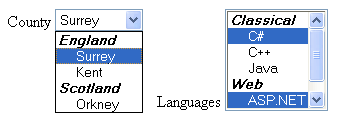
optgroup sample

<label for="county">County</label>
<select id="county">
    <optgroup label="England">
        <option>Surrey</option>
        <option>Kent</option>
    </optgroup>
    <optgroup label="Scotland">
        <option>Orkney</option>
    </optgroup>
</select>

<label for="languages">Languages</label>
<select size="6" multiple="multiple" id="languages">
    <optgroup label="Classical">
        <option>C#</option>
        <option>C++</option>
        <option>Java</option>
    </optgroup>
    <optgroup label="Web">
        <option>ASP.NET</option>
        <option>PHP</option>
    </optgroup>
</select>

The optgroup, which stands for Option Group, is an element that groups a set of option elements, inside a select element, and labels them. It is perfect for showing states and cities, countries and states, and other similar categorized items.

Unfortunately, this element is not generated by any ASP.NET server controls, however, I believe you can easily inherit from the DropDownList, ListBox, or the Item controls and make the necessary modifications to generate it.

2. label

label sample

<label for="FirstName">Full&nbsp;Name</label>
<input id="FirstName" type="text" />
Gender:&nbsp;
<label for="male">Male</label>
<input id="male" type="radio" name="gender" />
<label for="female">Female</label>
<input id="female" type="radio" name="gender" />

The label element provides a caption for a form element. Its main attribute is the "for" attribute which will point to the element that you want to provide a caption for.

In addition to providing a caption for the element, label will make selecting the associated element easier; so by clicking on the caption, you will be setting focus to the associated element, as if it is making the caption text a part of the associated element. In the provided demo, try clicking on the word "Full Name" and the text box next to it will be selected; also, when you click on the word "Male", the radio button will be selected.

ASP.NET generates this element for the Text property of the RadioButton and CheckBox server controls (and other controls as well). This explains the secret of setting focus to the control whenever clicking the text next to it. In ASP.NET 2.0, the Label server control has a new attribute AssociatedControlID that will render the control as an HTML label associated to the specified element versus rendering it as a span element.

3. fieldset/legend

fieldset sample

<fieldset>
    CP is a good place to publish XHTML related articles. 
</fieldset>

<fieldset>
    <legend>Personal Information</legend>
    <label for="FirstName">Full&nbsp;Name</label>
    <input id="FirstName" type="text" />
    Gender:&nbsp;
    <label for="male">Male</label>
    <input id="male" type="radio" name="gender" />
    <label for="female">Female</label>
    <input id="female" type="radio" name="gender" />
</fieldset>

The fieldset is an element that creates a frame, and legend is an optional element that creates a title for this frame.

In ASP.NET 2.0, there is a new attribute GroupingText for the Panel web control that will render it a legend and fieldset. However, ASP.NET 1.1 doesn't have any standard web control that could generate this element.

4. col/colgroup

optgroup sample

<table border="1">
    <colgroup>
        <col width="150px" />
        <col width="10px"  />
        <col width="220p" />
    </colgroup>
    <tr>
        <td valign="top">1</td>
        <td>&nbsp;</td>
        <td>2</td>
    </tr>
    <tr>
        <td>3</td>
        <td>&nbsp;</td>
        <td>4</td>
    </tr>
</table>

The colgroup element is a table element. Its only child element is the col element. Each col element affects a column in the table. You can specify attributes that apply to all the columns in the colgroup element, and specific attributes for individual columns in the col element. You can also omit the colgroup element and keep the col elements.

The advantage of using the col element is that you only need to specify an attribute once rather than adding the same attribute across every td element in the column, and the result is less attributes and easier to manage code.

For cross-browser issues, use the width attribute only with the colgroup and col elements because I noticed that Firefox doesn't support all the attributes of the colgroup and col.

Sadly, the ASP.NET's Table and GridView server controls do not generate these elements.

5. acronym

acronym sample

<acronym title="Code Project">CP</acronym> is a good place to publish 
<acronym title="Extensible HyperText Markup Language">XHTML</acronym>
related articles.

The acronym element provides a definition for a term via the title attribute. By using this element, you are helping readers who are not familiar with the term, better optimizing your page for search engines and supporting accessibility.

By default, IE 6 doesn't show any sign on the text surrounded by this element; however, Firefox displays a dashed line under it. Both browsers display a tool tip of the full meaning whenever you stop your cursor over it.

If you like this element, have a look at the abbr (abbreviation) element which has a similar role.

Conclusion

I have spotted some elements that I thought need to have extra light on; however, there are more hidden elements to spot like th, tf, base, address, bdo, blockquote, code, dl, dt, dd, and dfn elements.

This article served as a quick reference for each element; for a full list of the attributes and usage, try the W3 Schools, htmldog.com, and you can always go back to the official documentations at the World Wide Web Consortium.

If you found the contents of this article useful, then please remember to vote.

History

  • 25 April 2006 - First version.
  • 10 May 2006 - Second version.
  • 13 May 2006 - Third version.

License

This article, along with any associated source code and files, is licensed under The Microsoft Public License (Ms-PL)

About the Author

Adam Tibi
Team Leader
United Kingdom United Kingdom
Member
Software Consultant, Lives in Guildford/Surrey, UK.
 
www.AdamTibi.net

Sign Up to vote   Poor Excellent
Add a reason or comment to your vote: x
Votes of 3 or less require a comment

Comments and Discussions

 
Hint: For improved responsiveness ensure Javascript is enabled and choose 'Normal' from the Layout dropdown and hit 'Update'.
You must Sign In to use this message board.
Search this forum  
    Spacing  Noise  Layout  Per page   
GeneralNice Articlemembersmsayami16 Jul '07 - 11:27 
Thanks for reminding useful stuffs
GeneralGood One!memberCharuT29 Oct '06 - 14:01 
It was a very useful artcile Mr.Adam Tibi. Please keep up the good work and Thank You!   Sincerely, Charu.   Charu.
GeneralClarification re: labelmemberVBScab18 Sep '06 - 21:22 
Some good stuff here. However, on reading, I thought that the reason LABEL is useful hasn't been made crystal-clear, so let me try to do that.   With elements like radio buttons and check boxes, a user has to click on the actual element itself. A good number of users, however, are used to...
GeneralRe: Clarification re: labelmemberAdam Tibi19 Sep '06 - 8:34 
I totally agree. Not to mention the great benefit for screen readers, hence, accessibility.   Thank you for the comment, cheers, Adam Tibi   Make it simple, as simple as possible, but not simpler.
GeneralYou missed CaptionadminChris Maunder23 May '06 - 15:52 
Kinda handy.   cheers, Chris Maunder CodeProject.com : C++ MVP
GeneralGreat Things But.....memberSameers (theAngrycodeR )21 May '06 - 13:07 
Some of the things you mentioned I already know but some are really new and nice too. Thanks for sharing.... But, is there any browser wide compatibility issue in all of these? Do you think this all will run exactly same on firefox and other browsers as it will run on IE?   Cheers,...
GeneralRe: Great Things But.....memberAdam Tibi21 May '06 - 22:57 
Thank you!   I don't think, I have tested the code on IE and FireFox and it is working correctly! However, IE adds its own theme to them like adding a round edges and stuff. So, they are XHTML, IE and FF compliant.   I didn't test this on Netscape because Netscape is now using IE...
GeneralRe: Great Things But.....memberxxrono7 May '07 - 10:10 
hi thanks for tha article   any reason why on my mozzila it doesn't work?i'm talking about the fieldset/legend   in mozzila i don't get rounded corners,looks not good.. something in my css?   thanks
GeneralRe: Great Things But.....memberAdam Tibi7 May '07 - 22:44 
Hi,   The round corners is an IE only behaviour, there is no W3C specifications that says so. You can have your own CSS to control its look.   Regards, Adam Tibi   Make it simple, as simple as possible, but not simpler.
Generalfieldset rounded cornersmemberwebber12345613 May '06 - 8:02 
I'm not able to get rounded corners for fieldset with either Firefox or IE 6.   is there a specific DTD required ?
GeneralRe: fieldset rounded cornersmemberAdam Tibi13 May '06 - 8:24 
I think the rounded corners only shows on Win XP + IE 6, but I am not sure, do you have Win XP?   Firefox doesn't show rounded corners.   Regards, Adam Tibi   Make it simple, as simple as possible, but not simpler.
GeneralRe: fieldset rounded cornersmemberwebber12345613 May '06 - 9:40 
yep, win xp sp2 and IE 6   -- modified at 16:11 Saturday 13th May, 2006   I can get firefox to work with   fieldset { -moz-border-radius: 8px; _position: relative; background-color: #c0e0ff; border-radius: px; width: ...
GeneralRe: fieldset rounded cornersmemberJon Rista16 Jun '06 - 19:26 
IE6 will apply the skinned "groupbox" style to fieldsets in the browser, unless you explicitly take steps to render all web page controls using the default html styling (which is possible with IE6). If you are using a non-standard skin for WindowsXP (i.e., StyleXP, WindowBlinds, etc.), your...
GeneralRe: fieldset rounded cornersmemberxxrono8 May '07 - 1:25 
COol Post   Cheers   ninja coding
GeneralClarification acronym vs. abbrmemberl0b010 May '06 - 22:38 
Nice article; thanks!   However, the use of acronym vs. abbr should be clarified a bit: An acronym is an abbreviation which can be pronounced as a word. E.g., "HTML" is an abbreviation, but not an acronym - It's pronounced "Age tee emm ell". "WYSIWYG" is an acronym. So both your "acronym"...
GeneralRe: Clarification acronym vs. abbrmemberAgeKay12 May '06 - 11:06 
LOL, I don't know which school you went to but here is the definition of acronym: "A word formed from the initial letters of a series of words. (eg, IEEE is an acronym for Institute of Electrical and Electronics Engineers).".   Definition of abbreviation: "The shortened form of a written...
GeneralRe: Clarification acronym vs. abbrmemberl0b012 May '06 - 23:54 
The definition is half right, but the example is wrong - I've never heard anyone pronounce "IEEE" as "Ayeeeee".   Wikipedia explains this well - see the first paragraph.   In my dead-tree Webster's, "Eniac", "Unesco", "radar" and "sonar" are the only examples provided for acronyms,...
GeneralRe: Clarification acronym vs. abbrmemberAgeKay13 May '06 - 0:19 
Wikipedia says exactly the same thing I said: "Acronyms and initialisms are abbreviations, such as NATO, laser, and LED, written as the initial letter or letters of words". I did not say that IEEE is pronounced "Ayeeee". It's pronounced "I", "E", "E", "E". But you don't pronounce each letter...
GeneralRe: Clarification acronym vs. abbrmemberl0b013 May '06 - 1:07 
The difference: "[...]restricting acronym to pronounceable words formed from the initial letter or letters of each of the constituent words[...]", i.e., none of "IEEE", "WWW", "HTTP", and "URI". These are initialisms ("[...]restricting initialism to abbreviations pronounced as the names of the...
GeneralRe: Clarification acronym vs. abbrmemberJon Rista16 Jun '06 - 19:19 
Let’s not take things out of context by dropping pieces of a quote to bias the result. The actual description on Wikipedia is as follows (taken from the link on the word "difference" in your post, btw, l0b0):   "Acronyms and initialisms are abbreviations, such as NATO, laser, and LED,...
JokeRe: Clarification acronym vs. abbrmemberGeert Verbakel15 May '06 - 19:34 
IEEE is pronounced as: "I" triple "E"
GeneralRe: Clarification acronym vs. abbrmemberRichardGrimmer22 Jun '06 - 5:43 
Actually - to be a COMPLETE tosser, it's actually pronounced I treble E.....triple is a verb!   "Now I guess I'll sit back and watch people misinterpret what I just said......" Christian Graus At The Soapbox
GeneralRe: Clarification acronym vs. abbrmemberlaughingandliving2 Sep '06 - 19:36 
Hey now, I'm sure tossing is not allowed on CP!   However, while we're tossing, let me toss out your toss, or something like that.   Both 'treble' and 'triple' are verbs as well as nouns, so I triple E is perfectly valid (so saith I).   Ref:...
GeneralRe: Clarification acronym vs. abbrmemberAdam Tibi12 May '06 - 23:49 
Thank you for the note   I didn't really take much care deferentiating abbr and acronym because abbr didn't work on all browsers the same way acronym did, so I never used abbr for compatibility issues. I always recommand using acronym for both issues.   Regards, Adam Tibi ...
GeneralNice, but still a question about OptGroupmemberKrIstOfK10 May '06 - 21:13 
First of all: learned some things already today from you.   But i've got a question: can you add these optgroup items dynamically with an asp.net control from your codebehind?

General General    News News    Suggestion Suggestion    Question Question    Bug Bug    Answer Answer    Joke Joke    Rant Rant    Admin Admin   

Permalink | Advertise | Privacy | Mobile
Web04 | 2.6.130516.1 | Last Updated 15 May 2006
Article Copyright 2006 by Adam Tibi
Everything else Copyright © CodeProject, 1999-2013
Terms of Use
Layout: fixed | fluid