Important Notice:
This article is based in a deprecated version of the library. Its adaptation to the new 7.0.1 version is on going. Thanks.
Introduction
This article explains how the Kerosene ORM library has been extended to provide support for WCF services and connections, the main concepts used, and its usage scenarios. It can also be used to understand how the to develop your own 'link' class to accommodate to your own scenarios if you need it.
If you have not done it already, you really want to read the Kerosene ORM Introductory Article, because otherwise you will feel lost. Make sure you also take a look at the accompanying "Dynamic Records" and "Entity Maps" articles, as their concepts will be used to some extend in what follows. Note that this article comes with no specific download: it assumes you are using the one provided by that introductory article, where you can find all the samples and library packages.
A bit of motivation
Suppose for a minute, just as an example, that the business problem you are dealing with requires, for whatever reasons, that you to develop a client application, maybe a heavy client one, that must have access to database services. Nothing new, we've done this many times, right?
Let's now suppose that this application is going to be distributed in the wild, and hence your security guy is showing symptoms of being suffering a heart attack. Hey, you appreciate that guy, and also you appreciate very much not being fired because bypassing the nice security regulations of your company.
To top it let's also assume that you will have to use some corporate POCO classes that you cannot modify. Yes, you are not going to be allowed to modify them with even any ORM or database-related attributes. But also that, at the same time, specifications smell so that you are afraid you are going to use very convoluted logic, involving queries that may need to use a lot of stuff with columns and members that don't appear in that classes.
But... you show the diagram below to the security committee, and you tell them: what happen if our client application is able to use a database alike service without being connected to the database itself, so it remains hidden and protected behind our corporate curtain? What if that service is even able to filter what clients are connecting to it, and so it is able to provide an adapted vision of the database to each concrete client? Suddenly a shy smile appear on that guy's face (these guys are paid to never laugh, anyhow), so you are now on your go.
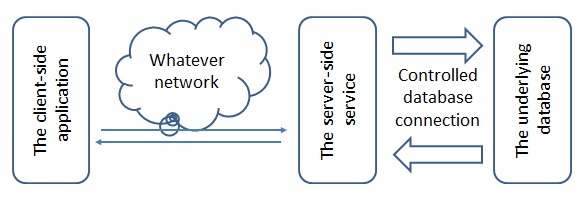
Ok, you've got your green flag and so you start to analyze your choices. Let's also assume that, for your concrete scenario at hand, an HTML-based client is not enough, Let's also assume that for whatever reasons using REST or OData are not valid options: you really need to use database-alike services in your application.
Finally your remembered that Kerosene ORM provides you with a WCF adapted version while providing you a whole deal of flexibility and power. You read the introductory article to refresh your already-deep knowledge of it, and then you landed in this article to understand how it can help you to address this scenario.
The Basics
So what we want to do is to develop a client application that will be able to connect to a database-alike service, and to use it as if it were a full-fledged regular database for all practical purposes. Of course we won't be able to evade from all the nitty-gritty details of WCF, but the Kerosene ORM's "WCF Links" solutions presented in this article is agnostic to what concrete WCF configuration you are using, so you can configure it in any way you want... or need to please that security people.
Having said that, what Kerosene ORM does is to <emp>split the data context object your application will use into a dual client-side and server-side personalities. The client-side one will still implement the base 'IKLink' interface so your application can use it as it could have used any other 'IKLink' derived objects, for instance using its "Dynamic Records" or "Entity Maps" operational modes without any restrictions.
The server-side one will be an object of a class that inherits from the abstract 'KServerWCF' one. This class is the one in charge of attending your client's requests, and to make them progress to any underlying database the server wants to connect to on its behalf. When connecting, the server will accept a 'Connection Package' from the client that can carry any arbitrary information the client wants to send in order to tell the server what database may it want to connect to, if such information is available, what login and password to use, and any other of information you can imagine. When attending the requests the server can even filter them, modify them, deny them, or log them... among almost any other interesting things you can implement if you wish.
The Server
Creating and Starting the Server
So, as mentioned, out first tasks is to create a class that inherits from the base abstract one. I'm going to be original and name it 'MyProxy' in the following example:
public class MyProxy : KServerWCF
{
   ...
}
Before looking at how to customize our custom proxy server, I need to mention that the library is architected so that an instance of our class will be created per each client connecting to the service. This way, each will enjoy its own private 'server proxy service' without interfering with any other clients that might be connected simultaneously to the same physical server. The following code shows an example of the start-up code of your server-side service:
void Main(string[] args)
{
   ...
   KEngineFactory.Register(new KEngineSqlServer2008());
   KengineFactory.Register(new KNEgineSqlServer2012());
   ...
   KTypesWCF.Initialize():
   KTypesWCF.RegisterType(typeof(CalendarDate));
   KTypesWCF.RegisterType(typeof(ClockTime));
   ...
   ServiceHost host = new ServiceHost(typeof(MyProxy));
   host.Open();
   ...
   Console.ReadLine();
   host.Close(new TimeSpan(0, 0, 5));
}
The first block just registers with Kerosene ORM the possible database engines we want our proxy class to be able to locate and use. If we just want to use the default 'engine' adapters that come with the core library we don't even have to write these lines. But, in this example, we are registering the custom engine adapters that are provided in an additional library (included in the download) for MS SQL Server databases, versions 2008 and 2012.
The second block just tells WCF what types are going be serialized and deserialized among the server and its clients. The first line automatically registers the core Kerosene ORM classes with WCF. The second and third lines registers an example of custom classes of your application that, just as an example, are provided to, well, show precisely this capability.
The third block registers our custom proxy class with WCF and fires up the service. There are many interesting ways of doing this in a WCF context, but this is probably among the simplest ones.
Finally, the fourth block just waits till the [Enter] key is pressed, and the we shut-down the service. We have used an override that waits for five seconds before proceeding, but feel free to use your own as needed.
From the services' infrastructure point of view this is all that we need to do. What remains is to see how to finalize the definition of our custom proxy class, and how to customize its behavior if such is needed.
Customizing the server
The only real thing required is that we implement the abstract 'CreateLink()' method of the base class. This method is called each time a client is initiating a connection, and its job is to create and return the server-side data context, or 'link' our proxy will use to attend the future requests from that client. For instance:
protected override IKLink CreateLink()
{
   Console.WriteLine("\n> Proxy Id: {0}, Package: {1}",
      ProxyId.ToString(),
      Package == null ? "-" : Package.ToString());

   var link = KLinkDirectFactory.Create();
   link.AddTransformer<CalendarDate>(x => x.ToDateTime());
   link.AddTransformer<ClockTime>(x => x.ToString());
   ...;

   return link;
}
The first consideration is that the client may have sent an optional "Connection Package" to the server as part of the connection request. This object is maintained in the proxy's 'Package' property, and it may be null if the client has sent no connection package. If it is not null then it is an instance of the multi-level dynamic 'DeepObject' class, able to maintain any arbitrary number of dynamic members, each possible having their own dynamic members as well.
We can use this package to customize the 'link' our proxy will create to attend that client. For instance, it may contain the name of the database it wants to connect to, or the engine type and version the client will assume the server to use, of the login and password provided by the client... in general, any information our server may require to get from that client.
If this method returns 'null' then an exception if thrown back to the client and the connection is aborted.
In the example we have just used it for informational purposes instead of have used it to create the link to return, which is precisely the job the next lines are doing. In our case we have opted for creating a direct connection against an underlying database, as specified in the configuration files of our server ('KLinkDirectFactory.Create()'). We have also registered into it, in the next two lines, the transformers of our custom classes the solution will use to represent command arguments. You definitely may want to take a look at the introductory article and to the accompaying ones for more details.
And, in the general case, that's it!
To finalize this section just let me mention that the base proxy class implements the 'IKProxyWCF' interface, which basically is the WCF services contract both parts will use. Almost all methods defined in 'KServerWCF' are virtual ones and can be overridden by your custom proxy for any need you may have.
Nonetheless the most interesting ones are the 'OnEnumeratorCreate(text, pars)' one, and the 'OnExecutorCreate(text, pars)'. The first one is invoked when the client wants to enumerate a command, while the second one is invoked when the client wants to just execute a command.
Both take two parameters. The first one is just the raw text of the SQL command the client wants to execute or enumerate. You can intercept this call and modify this text, validate that its contents agree with your security policies, log it, or whatever you want to do. The second one is just the list of arguments of that command, and you can do use it any way it pleases you.
There are many others available and you are encourage to take a look at the source code to see them and figure out if you will need to override them or not for your own needs.
The Client
Let's now move on and take a look at the client-side. As mentioned before, the client 'link' implements the 'IKLink' interface so, for any practical purposes, you can use all the capabilities you have seen in the accompanying articles, as the "Dynamic Records" operational mode, or the "Entity Maps" one, for instance. You can create any sort of database-related command they support, or you can define your own client-side maps as you wish.
Creating the Client-side Link
Let's take a look at the start-up code of your client-side application. The first thing we need to do, as we did with the server, is to lay down the basic infrastructure:
void Main(string[] args)
{
   ...
   KEngineFactory.Register(new KEngineSqlServer2008());
   KengineFactory.Register(new KNEgineSqlServer2012());
   ...
   KTypesWCF.Initialize():
   KTypesWCF.RegisterType(typeof(CalendarDate));
   KTypesWCF.RegisterType(typeof(ClockTime));
   ...
}
As happened before, we need to register the custom engine adapters we want our client to be able to locate and use, and we have to register with WCF the types that are going to be sent through the wire.
When being at the client remember we have no visibility and no information on what will be the real hidden database the server will use to attend our requests. So our first taks is to get an instance of one out of our registered engines adapters so that, at the client, we play as if it were the type of the database the server uses. We can use the static 'KEngineFactory' class for this purpose:
...
var provider = "SqlClient";
var version = "11";
var engine = KEngineFactory.Locate(provider, version);
...
In this example we are obtaining a customized engine for a MS SQL Server database, version 2012, that has been registered before. You can use any engine you may wish, your own custom ones, or any of the generic ones that are provided along with the core library package.
Our second task is create the "Connection Package" that our client will send to the server. If we need no connection package we can just send 'null' and we are done.
There are infinite ways you can use it. As a first example let's suppose that at the client side you are informed that the server can use one out of several connection string entry names, and that it expects your client to select one among them. Fine, let's just do so:
...
dynamic package = new DeepObject();
package.ConnectionStringEntry = "MyappDB";
...
Another scenario would be the one in which the server expects, in this case, your client to specify what kind of engine to use, its version, and the login and password to impersonate the connection at the server side. Fine let's do so as well:
...
p.Engine = "SqlClient";
p.Version = "11";
p.DB.Login = "Login_name";
p.DB.Password = "Password";
...
Just as an example note how we have specified the aforementioned login and password: as dynamic members of our root connection package. Of course this is a convention your server and client must agree on in advance, but it opens big flexibility and organization to the way you can send any kind of information you need.
Ok, fine, just a couple of things remain. The first one is, well, to actually create our client-side link instance, and to connect it to the server. We can do both things in one shot by using the following link constructor:
...
var endpoint = "My_Service_EndPoint";
var link = new KLinkWCF(engine, endpoint, package);
...
You could have also used the 'new KLinkWCF(engine)' version, but in this case what you have created as a disconnected instance. You can connect it to the server using the 'Connect(endpoint, package)' method, and when you are done you can explicitly disconnect from the server by using the link's 'Disconnect()' one.
Just for completeness don't forget to register the transformers for the custom types you are using as parameters of you command:
...
link.AddTransformer<CalendarDate>(x => x.ToDateTime());
link.AddTransformer<ClockTime>(x => x.ToString());
...
Usage considerations
This section is almost redundant: we have said that the client link behaves as if it were a regular one, so what else do we have to say about it?
Transactions
The first thing to bear in mind is how Kerosene ORM handles transactions in this WCF scenario. As you may remember, each 'link' object carries a 'Transaction' object that provides a nestable and agnostic transactional capability. Our WCF client link does so, but in this case that property carries an instance of an object adapted to this scenario.
It works basically as we have seen in the introductory and accompanying articles, except for the fact that the only mode allowed is the 'Database' one. The reason is that we do not want at the server to have global scope transactions that, if any of them fail, would affect all other clients connected to the server. Actually, this is really just background information because, remember, we at the client do not even know what database the server is using, if any, or maybe it is just faking the database services for us.
What's more, even if the client-link instance provides the same 'Open()' and 'Close()' methods as any other regular link, the server can decide to honor those requests or to do whatever it wants, depending upon their own needs and design. So the best approach when using transactions is just to use that property, and rely on the service to take the appropriate actions on our behalf.
Commands, Records and Maps
Have I mentioned already that you can use your client-link instance as if it were a regular one? Yes, it also applies to all objects this link can use, including dynamic records, schemas, and maps.
Records are serializable so, if you enumerate a command and expect to obtain that records back, so will be pleased. They work as you expect. The only caveat, and this is really a very rare border case, is that if your record would carry any value whose type is not known to WCF, you need to register this type in advance as we have seen before.
Schemas are also serializable and they are handled automatically by Kerosene ORM. The only caveat to bear in mind is that it might be possible that some metadata obtained from the database might not belong to any serializable type. In this case, these metadata entries are just ignored and not sent through the wire to avoid hard-to-debug exceptions.
Some Internals
Maintaining connection state at the server
There are some elements maintained at the server, per client, that collectively represent the state of a given connection. All these elements are managed by the custom proxy instance created to attend that client.
The important thing to mention is that these elements are kept into the server memory until the client is disposed or disconnected, or until, at the client side, they are disposed. For instance, the server creates and keeps the 'enumerator' created for a given command until that object, at the server side, is disposed. When using any of the extension methods provided by the commands, disposing is done automatically for us. But the morale is that, when you are enumerating your commands at the client side try not to leave them open, but rather, if you have the chance of doing so, either enumerate them till there are no more records available, or dispose them if you need them not any longer.
What else?
I encourage you to take a deep look at both the "Dynamic Records" and "Entity Maps" articles whose links appear in the introductory one because the WCF facilities we have described here are just, from the Kerosene ORM perspective, a well behaved citizen in its ecosystem. So they can take full advantage of their capabilities.
mbarbac has worked in start-ups, multinational tech companies, and consulting ones, serving as CIO, CTO, SW Development Director, and Consulting Director, among many other roles.
Solving complex puzzles and getting out of them business value has ever been among his main interests - and that's why he has spent his latest 25 years trying to combine his degree in Theoretical Physics with his MBA... and he is still trying to figure out how all these things can fit together.
Even if flying a lot across many countries, along with the long working days that are customary in IT management and Consultancy, he can say that, after all, he lives in Spain (at least the weekends).



 General
  News
News  Suggestion
  Question
  Bug
Bug  Answer
  Joke
Joke  Praise
  Rant
Rant  Admin
Admin 


 Submit an article or tip


