Introduction
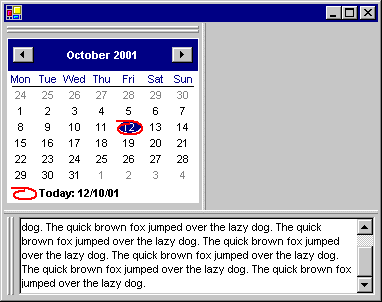
One of the first features of C# that piqued my interest was the ability to Dock a Control onto the edge of a Form. Now I could attach a Control (or more likely a composite control by deriving from UserControl) onto a Form edge and quickly construct a useful looking application. But there is one crucial factor missing from this scenario. The user has no discretion over the size or positioning of this docked control. I want the user to be able to drag the control to a different edge and be able to resize the control so that they can customise the application area to suit their own preferences.
Composite Control for Docking
To solve this problem, we need to create a new composite control DockingControl that is able to take a caller supplied control and manage its position and sizing. Our composite control will need a resizing bar; a grab handle area that can be used to move its docking position and a place for the caller supplied control to be displayed.
class DockingControl : UserControl
{
private Form _form;
private DockingResize _resize;
private DockingHandle _handle;
private BorderControl _wrapper;
public DockingControl(Form form, DockStyle ds, Control userControl)
{
_form = form;
_resize = new DockingResize(ds);
_handle = new DockingHandle(this, ds);
_wrapper = new BorderControl(userControl);
_wrapper.Dock = DockStyle.Fill;
this.Dock = ds;
Controls.AddRange(new Control[]{_wrapper, _handle, _resize});
}
public Form HostForm { get { return _form; } }
The final line of code in the instance constructor adds the three child controls _wrapper, _handle and _resize. The order of the controls in the initializer list is absolutely crucial because when the DockingControl (or any other Control) has its Dock style changed, this ordering determines the position and size of the child controls. Calculations are made starting with the last control added (which equates to the last entry in the initializer list) back towards the first, which is the exact opposite of what I would have expected.
The _resize bar is first to be positioned (and so last in initializer list) as it should always be shown spanning the entire length of the docking control. Next is the _handle as it should be positioned under the sizing bar and finally the _wrapper control, this is last because it always has a Dock style of Fill and we want it to take up whatever space is leftover when all the other controls have finished being laid out.
Change of Docking Position
When the docking position of our composite control is changed, we need to ensure that our child controls are also correctly positioned for the new docking style. So we override the inherited Dock property and recalculate the correct size and positions as appropriate.
public override DockStyle Dock
{
get { return base.Dock; }
set
{
Size size = this.ClientSize;
DockStyle dsOldResize = _resize.Dock;
_handle.SizeToOrientation(value);
_resize.Dock = DockingControl.ResizeStyleFromControlStyle(value);
_handle.Dock = DockingControl.HandleStyleFromControlStyle(value);
base.Dock = value;
if (dsOldResize != _resize.Dock)
{
if ((this.Dock == DockStyle.Top) ||
(this.Dock == DockStyle.Bottom))
size.Height = size.Width;
else
size.Width = size.Height;
this.ClientSize = size;
}
_handle.Invalidate();
_resize.Invalidate();
}
}
Two static functions (ResizeStyleFromControlStyle and HandleStyleFromControlStyle) are used to find the correct docking style for the _resize and _handle controls dependant on the new Dock style. Of special note is the code that checks for a change in docking orientation and then changes the Width or Height of the control. Remember that when our control is docked to the top or bottom of the form, then the Width of the control is calculated for us by the form and the Height determines how far inwards the docking control extends. When the orientation moves to be left or right, then we need to update the Width of the control to reflect how far from the edge we want the control to extend. So the new Width should be the old Height, otherwise the Width will remain the same as the entire width of the form and so it would fill the entire client area.
The rest of the DockingControl class follows and consists of static properties for recovering GDI+ objects (to be used by the child controls for drawing) and the previously mentioned static methods used for calculating the new docking position of each child control based on the new position of the DockingControl.
private static Pen _lightPen =
new Pen(Color.FromKnownColor(KnownColor.ControlLightLight));
private static Pen _darkPen =
new Pen(Color.FromKnownColor(KnownColor.ControlDark));
private static Brush _plainBrush = Brushes.LightGray;
public static Pen LightPen { get { return _lightPen; } }
public static Pen DarkPen { get { return _darkPen; } }
public static Brush PlainBrush { get { return _plainBrush; } }
public static DockStyle ResizeStyleFromControlStyle(DockStyle ds)
{
switch(ds)
{
case DockStyle.Left:
return DockStyle.Right;
case DockStyle.Top:
return DockStyle.Bottom;
case DockStyle.Right:
return DockStyle.Left;
case DockStyle.Bottom:
return DockStyle.Top;
default:
throw new ApplicationException("Invalid DockStyle argument");
}
}
public static DockStyle HandleStyleFromControlStyle(DockStyle ds)
{
switch(ds)
{
case DockStyle.Left:
return DockStyle.Top;
case DockStyle.Top:
return DockStyle.Left;
case DockStyle.Right:
return DockStyle.Top;
case DockStyle.Bottom:
return DockStyle.Left;
default:
throw new ApplicationException("Invalid DockStyle argument");
}
}
}
Resizing
Our first child control is called DockingResize and provides an area of the docking control that the user can drag for resizing. Notice that when the mouse is clicked, the OnMouseDown remembers the current size of the parent DockingControl and the screen position of the mouse. This is necessary so that when the OnMouseMove is received, it can calculate how far the mouse has been moved since it was pressed and so the new size of DockingControl. Also notice that it will set the cursor to indicate a resizing operation is allowed.
class DockingResize : UserControl
{
private const int _fixedLength = 4;
private Point _pointStart;
private Point _pointLast;
private Size _size;
public DockingResize(DockStyle ds)
{
this.Dock = DockingControl.ResizeStyleFromControlStyle(ds);
this.Size = new Size(_fixedLength, _fixedLength);
}
protected override void OnMouseDown(MouseEventArgs e)
{
_pointStart = _pointLast = PointToScreen(new Point(e.X, e.Y));
_size = Parent.ClientSize;
base.OnMouseDown(e);
}
protected override void OnMouseMove(MouseEventArgs e)
{
if ((this.Dock == DockStyle.Top) ||
(this.Dock == DockStyle.Bottom))
this.Cursor = Cursors.HSplit;
else
this.Cursor = Cursors.VSplit;
if (this.Capture)
{
Point point = PointToScreen(new Point(e.X, e.Y));
if (point != _pointLast)
{
_pointLast = point;
int xDelta = _pointLast.X - _pointStart.X;
int yDelta = _pointLast.Y - _pointStart.Y;
if ((this.Dock == DockStyle.Top) ||
(this.Dock == DockStyle.Left))
{
xDelta = -xDelta;
yDelta = -yDelta;
}
if ((this.Dock == DockStyle.Top) ||
(this.Dock == DockStyle.Bottom))
Parent.ClientSize = new Size(_size.Width,
_size.Height + yDelta);
else
Parent.ClientSize = new Size(_size.Width + xDelta,
_size.Height);
Parent.Refresh();
}
}
base.OnMouseMove(e);
}
The only other work needed in this class is the override of OnPaint that is used to draw the 3D appearance of the resizing bar itself. It uses static methods from the DockingControl to recover the correct GDI+ objects to use.
protected override void OnPaint(PaintEventArgs pe)
{
Point[] ptLight = new Point[2];
Point[] ptDark = new Point[2];
Rectangle rectMiddle = new Rectangle();
Size sizeClient = this.ClientSize;
if ((this.Dock == DockStyle.Top) ||
(this.Dock == DockStyle.Bottom))
{
ptDark[1].Y = ptDark[0].Y = sizeClient.Height - 1;
ptLight[1].X = ptDark[1].X = sizeClient.Width;
rectMiddle.Width = sizeClient.Width;
rectMiddle.Height = sizeClient.Height - 2;
rectMiddle.X = 0;
rectMiddle.Y = 1;
}
else if ((this.Dock == DockStyle.Left) ||
(this.Dock == DockStyle.Right))
{
ptDark[1].X = ptDark[0].X = sizeClient.Width - 1;
ptLight[1].Y = ptDark[1].Y = sizeClient.Height;
rectMiddle.Width = sizeClient.Width - 2;
rectMiddle.Height = sizeClient.Height;
rectMiddle.X = 1;
rectMiddle.Y = 0;
}
pe.Graphics.DrawLine(DockingControl.LightPen, ptLight[0], ptLight[1]);
pe.Graphics.DrawLine(DockingControl.DarkPen, ptDark[0], ptDark[1]);
pe.Graphics.FillRectangle(DockingControl.PlainBrush, rectMiddle);
base.OnPaint(pe);
}
}
Dragging
Our next child control DockingHandle has three tasks to perform. It must first of all ensure that it is sized correctly to reflect the current orientation of the parent DockingControl. One of our dimensions will always be calculated determined for us as we are docked to one of the parent control edges. However, the other dimension should always be fixed to reflect the space needed for drawing and allowing the user to grab it. The routine SizeToOrientation performs this decision.
class DockingHandle : UserControl
{
private const int _fixedLength = 12;
private const int _hotLength = 20;
private const int _offset = 3;
private const int _inset = 3;
private DockingControl _dockingControl = null;
public DockingHandle(DockingControl dockingControl, DockStyle ds)
{
_dockingControl = dockingControl;
this.Dock = DockingControl.HandleStyleFromControlStyle(ds);
SizeToOrientation(ds);
}
public void SizeToOrientation(DockStyle ds)
{
if ((ds == DockStyle.Top) || (ds == DockStyle.Bottom))
this.ClientSize = new Size(_fixedLength, 0);
else
this.ClientSize = new Size(0, _fixedLength);
}
The second task and the most interesting is performed inside OnMouseMove. Here, we need to convert the mouse position from our own client position to the client position in the host form. By testing how near the cursor is to each edge of the form, we can decide which edge should become the new docking position of the parent DockingControl. At the moment, the code uses a constant value of _hotLength to decide if the mouse is close enough to an edge for the docking edge to be changed. Actually causing the docking to change is trivial, just change the Dock property on the DockingControl.
protected override void OnMouseMove(MouseEventArgs e)
{
if (this.Capture)
{
if (null != _dockingControl)
{
this.Cursor = Cursors.Hand;
Point screenPoint = PointToScreen(new Point(e.X, e.Y));
Point parentPoint =
_dockingControl.HostForm.PointToClient(screenPoint);
Size parentSize = _dockingControl.HostForm.ClientSize;
DockStyle ds = _dockingControl.Dock;
if (parentPoint.X < _hotLength)
{
ds = DockStyle.Left;
}
else if (parentPoint.Y < _hotLength)
{
ds = DockStyle.Top;
}
else if (parentPoint.X >= (parentSize.Width - _hotLength))
{
ds = DockStyle.Right;
}
else if (parentPoint.Y >= (parentSize.Height - _hotLength))
{
ds = DockStyle.Bottom;
}
if (_dockingControl.Dock != ds)
_dockingControl.Dock = ds;
}
}
else
this.Cursor = Cursors.Default;
base.OnMouseMove(e);
}
Lastly, the control needs to draw the two lines that decorate the control area.
protected override void OnPaint(PaintEventArgs pe)
{
Size sizeClient = this.ClientSize;
Point[] ptLight = new Point[4];
Point[] ptDark = new Point[4];
if ((_dockingControl.Dock == DockStyle.Top) ||
(_dockingControl.Dock == DockStyle.Bottom))
{
int iBottom = sizeClient.Height - _inset - 1;
int iRight = _offset + 2;
ptLight[3].X = ptLight[2].X = ptLight[0].X = _offset;
ptLight[2].Y = ptLight[1].Y = ptLight[0].Y = _inset;
ptLight[1].X = _offset + 1;
ptLight[3].Y = iBottom;
ptDark[2].X = ptDark[1].X = ptDark[0].X = iRight;
ptDark[3].Y = ptDark[2].Y = ptDark[1].Y = iBottom;
ptDark[0].Y = _inset;
ptDark[3].X = iRight - 1;
}
else
{
int iBottom = _offset + 2;
int iRight = sizeClient.Width - _inset - 1;
ptLight[3].X = ptLight[2].X = ptLight[0].X = _inset;
ptLight[1].Y = ptLight[2].Y = ptLight[0].Y = _offset;
ptLight[1].X = iRight;
ptLight[3].Y = _offset + 1;
ptDark[2].X = ptDark[1].X = ptDark[0].X = iRight;
ptDark[3].Y = ptDark[2].Y = ptDark[1].Y = iBottom;
ptDark[0].Y = _offset;
ptDark[3].X = _inset;
}
Pen lightPen = DockingControl.LightPen;
Pen darkPen = DockingControl.DarkPen;
pe.Graphics.DrawLine(lightPen, ptLight[0], ptLight[1]);
pe.Graphics.DrawLine(lightPen, ptLight[2], ptLight[3]);
pe.Graphics.DrawLine(darkPen, ptDark[0], ptDark[1]);
pe.Graphics.DrawLine(darkPen, ptDark[2], ptDark[3]);
if ((_dockingControl.Dock == DockStyle.Top) ||
(_dockingControl.Dock == DockStyle.Bottom))
{
for(int i=0; i<4; i++)
{
ptLight[i].X += 4;
ptDark[i].X += 4;
}
}
else
{
for(int i=0; i<4; i++)
{
ptLight[i].Y += 4;
ptDark[i].Y += 4;
}
}
pe.Graphics.DrawLine(lightPen, ptLight[0], ptLight[1]);
pe.Graphics.DrawLine(lightPen, ptLight[2], ptLight[3]);
pe.Graphics.DrawLine(darkPen, ptDark[0], ptDark[1]);
pe.Graphics.DrawLine(darkPen, ptDark[2], ptDark[3]);
base.OnPaint(pe);
}
}
Shrink the User Supplied Control
When developing this code, I noticed that placing the user supplied control for the DockingControl into the control would push that control right up against the edges of the resize bar and grab area. Although there is nothing wrong with this, it didn't look very tidy, so instead I use this small helper class that places a border around the provided control. The DockingControl creates an instance of this BorderControl passing in the user supplied control. Then this BorderControl is used to fill the DockingControl rather than the user supplied one.
class BorderControl : UserControl
{
private int _borderWidth = 3;
private int _borderDoubleWidth = 6;
private Control _userControl = null;
public BorderControl(Control userControl)
{
_userControl = userControl;
Controls.Add(_userControl);
}
protected override void OnResize(EventArgs e)
{
if (null != _userControl)
{
Size sizeClient = this.Size;
_userControl.Location = new Point(_borderWidth, _borderWidth);
_userControl.Size = new Size(sizeClient.Width - _borderDoubleWidth,
sizeClient.Height - _borderDoubleWidth);
}
base.OnResize(e);
}
}
Conclusion
This code was developed using a text editor and then calling the C# compiler on a command line. Therefore, the look is modelled on the appearance of the VC6 environment (which I have) and not the newer look and feel of docking controls/windows from VC7 (which I don't have). I think it would be very easy to build on this code to allow floating controls and multiple docking controls in a docking bar. If you have any ideas or make any changes to the code, then feel free to contact me as I would be very interested.
License
This article has no explicit license attached to it, but may contain usage terms in the article text or the download files themselves. If in doubt, please contact the author via the discussion board below.
A list of licenses authors might use can be found here.
I am a big fan of .NET and have been working on developing a free user interface library to enhance the very basic controls that come out-of-the-box. Download the free source code project from http://www.dotnetmagic.com. I often carry out bespoke development work for companies, so feel free to email me for a quote on your .NET needs!



 General
  News
News  Suggestion
  Question
  Bug
Bug  Answer
  Joke
Joke  Praise
  Rant
Rant  Admin
Admin 


 Submit an article or tip


