Introduction
This is the second part of the two part series of "Say Hello to Behavior Driven Development".
The first part of this series is Say Hello To Behavior Driven Development (BDD)- Part 1.
In this article, I shall try to show you how to follow BDD in real life while starting development of any module or project. Please note that this article will only concentrate on showing the path of using BDD methodology in real life project rather than 100% full fledged project developed using BDD.
I have attached a skeleton of .NET project (as UI component here, I have used WPF) that has been developed with steps as described below.
Background
At the end of the day, by implementing BDD you need to write some Unit test code and you need some tool that supports Unit Testing like NUnit, MSTest (integrated with Visual studio) or any other flavor you like. For this example, I shall use MBUnit. But you are free to use any such tool you like.
For converting Gherkin to Unit Test code, I shall use SpecFlow. I like Specflow because it the Coolest BDD tool I have ever seen for .NET.
For IDE, I shall use Visual Studio 2010. I am lucky to have license of ReSharper and in this example I shall take some help from ReSharper as it gives some integrated test output result. If you don’t have ReSharper, don’t worry as I only used that tool to ease some step. You can, of course, proceed without Resharper.
Let the show begin!
Please Fasten Your Seat Belt, We Are Taking Off!
Since we shall develop something following Behavior Driven Development, at first, we should have some requirement in Gherkin. So here is one simple requirement.
Given that we have a search form that searches over Name, Address and Profession table
When The user enters non empty text
And the length of the text is more than 3 alphanumeric character long
Then The user will get the search result
And if the search result is empty he will get an message box asking him
to do the search again.
STEP 1
So let's open Visual Studio 2010 and create two class library projects like below:
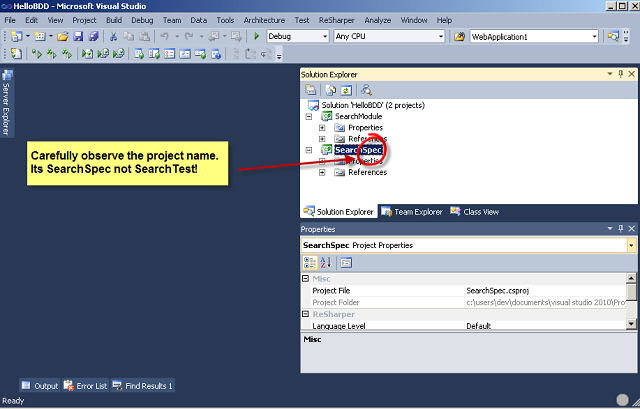
Since we are creating everything from scratch, we have created two projects. SearchSpec will basically contain Gherkin to CS specification code. Carefully note that the project name is SearchSpec not SearchTest, since we shall write down the behavior or specification not test.
We have another class library project called SearchModule that will hold all the necessary code that would meet our specification.
STEP 2
We would add one configuration file in SearchModule project like below:

After that, we will paste the following configuration in the App.Config file:
="1.0"
<configuration>
<configSections>
<section name="specFlow"
type="TechTalk.SpecFlow.Configuration.ConfigurationSectionHandler, TechTalk.SpecFlow"/>
</configSections>
<specFlow>
<unitTestProvider name="MbUnit"/>
</specFlow>
<startup>
<supportedRuntime version="v4.0" sku=".NETFramework,Version=v4.0"/>
</startup>
</configuration>
After pasting this, the App.config file will look like this. The first config section is related with the Specflow and the second one is related with the Unit Test tool that we will be using. As the picture says, you can use any Unit Testing tool you like.
The reason we are using this configuration file is because when the Gherkin is trans coded to CS code, it is written as per the Unit Test Tool mentioned in the configuration file.
STEP 3
Now we shall add one Feature file. Since it is assumed that SpecFlow has already been installed so in Visual Studio we will get 3 extra templates installed for SpecFlow. Among the 3, we shall choose Feature file like below. We will name it Search.feature and will press OK.
Visual Studio will create two files for us. One feature file containing the feature of specification in Gherkin and one code behind associated with feature file which contains generated C# code related with feature, that is C# representation of Gherkin as shown below. Please note that whenever Visual Studio creates any feature file, it gives a dummy feature related with some mathematics.
Needless to say here, you need to add necessary reference of Spec Flow, Gallio and MBUnit in your project like below that can be found in their respective installation folder.
STEP 4
Now we would change the content of feature file with our simple specification. We will just paste our specification there and will save the feature file. After saving the feature file corresponding CS code will be generated in code behind. Pretty cool, isn't it? The feature file and code behind will be looking like below:
STEP 5
We have got our feature coded in CS. Now we need another level abstraction so that for each of the steps as described in our feature (and off-course in feature.cs) file can be defined. (Look I haven't used the word “test”. I could have written “so that each of the step can be tested.” Since we are using BDD, we will develop our feature by defining steps not by defining TEST! )
Fortunately Specflow gave us a template for creating step definition. So we shall add one step definition file named SearchStepDefination.cs like below:
But once the step definition file is generated, you will again see some preloaded code related with mathematics which is not at all related with our feature. Like below, it is trivial that we need to remove these dummy code. But the question is how can I write step definition since I don't know how to write step definition. (A blocking state!!!)
Don't worry!!! We have an easy solution and again this code will be written by SpecFlow engine, but not in a very usual way! Let me show you how we can generate Step Definition based on our feature in step by step (yes! these are some sub steps).
- At first, remove all the code inside
SearchStepDefinition class so that it looks like:
[Binding]
public class SearchStepDefinition
{
}
- Then Run Unit Test in Search.Feature.cs file. If you have re-sharper, you will get a context menu besides
SearchingInDataBaseTables method. Otherwise, if you are using VS 2010 Ultimate, you can run the Unit Test by clicking Test->Run->Test in Current Context. If you have neither of the above, just follow the way you used to do to run unit test in your IDE. Once you have run the unit test, just look into the test result output window, which will be something similar like below:
I know right at this moment you are smiling. As you have rightly noticed, the output window is telling what functions are needed to be implemented in Step Definition file with proper signature!
- This is the last sub step. All you need to do is to copy the functions from output window to our step definition file. After that, our step definition file will look like below:
STEP 6
Our foundation has been created and now we can start development by following pure BDD. We will now write the body of the each step definition method and while writing this, we will actually write code related with the original development.
Let's concentrate on the first method.
[Given(@"that we have a search form that searches over Name, Address and Profession table")]
public void GivenThatWeHaveASearchFormThatSearchesOverNameAddressAndProfessionTable()
{
    ScenarioContext.Current.Pending();
}
In order to write the body of this method, we need to create a form that will take input from user. So we need to have some place holder that will contain the input text. So we will create a class for this under SearchModule project. The class will be looking like below:
namespace SearchModule
{
 public class UserInput
 {
   public string Input { get; set; }
 }
}
We also need to create a form. For this, we can create another project under the same solution. I am going to choose a WPF project like this, so that we will have a WPF window having a text box and a search button and it will look something like below:
Now we will need to have a class that will be able to search over Name, Address and Profession table. So our next steps will be:
- For searching in Database tables, we need to write some SQL or Linq 2 SQL or some Stored Procedure.
- We need to write some data access layer code to handle this searching.
- The search will return a list of a object that will hold name, address and profession information. So we need to create a class that will hold these properties.
I am not going to show you how to do the above 3 steps as these are the most trivial things you do in your day to day life.
Conclusion
As you can see, we are now trying to create classes and variables just to meet step definition functions and step by step we are actually creating our module in such a way that meets the behavior aka specification of the project and thereby we have started developing a module following Behavior Driven Development methodology.
I could have written a few hundred lines more to make a complete module using BDD but my target is to show you the path that will ultimately lead you to implement BDD in your own project.
I hope you got the basic idea and tips/tricks to start Behavior Driven Development right from your next project. I wish you all the best!!
I am truly versatile and 360 degree Engineer having wide range of development experience in .NET and Java Platform. I am also proficient in system level programming in C++. To me technology is not at all a problem, it’s the client requirement that matters! That is I am ready and comfortable to use any technology to make the business of my client a success.
In my five years of experience I have the opportunities to work for fortune 500 companies of US and many renowned clients from Europe.
My Linkedin Profile: http://bd.linkedin.com/in/mahmudazad



 General
  News
News  Suggestion
  Question
  Bug
Bug  Answer
  Joke
Joke  Praise
  Rant
Rant  Admin
Admin 


 Submit an article or tip


 I have removed the emotions!