Here we look at: the what and why of JSON, features of this implementation, some of the JSON alternatives that I have personally used, using the code, and performance tests.
Preface
The code is now on :
I will do my best to keep this article and the repositories in sync.
Security Warning
It has come to my attention from the HP Enterprise Security Group that using the $type extension has the potential to be unsafe, so use it with common sense and known json sources and not public facing ones to be safe.
Introduction
This is the smallest and fastest polymorphic JSON serializer, smallest because it's only 25kb when compiled, fastest because most of the time it is (see performance test section) and polymorphic because it can serialize and deserialize the following situation correctly at run-time with what ever object you throw at it:
class animal { public string Name { get; set;} }
class cat: animal { public int legs { get; set;} }
class dog : animal { public bool tail { get; set;} }
class zoo { public List<animal> animals { get; set;} }

var zoo1 = new zoo();

zoo1.animals = new List<animal>();
zoo1.animals.Add(new cat());
zoo1.animals.Add(new dog());
This is a very important point because it simplifies your coding immensely and is a cornerstone of object orientated programming, strangely few serializers handle this situation, even the XmlSerializer in .NET doesn't do this and you have to jump through hoops to get it to work. Also this is a must if you want to replace the BinaryFormatter serializer which what most transport protocols use in applications and can handle any .NET object structure (see my WCF Killer article).
The What and Why of JSON
JSON (Java Script Object Notation) is a text or human readable format invented by Douglas Crockford around 1999 primarily as a data exchange format for web applications (see www.JSON.org). The benefits of which are ( in regards to XML which was used before):
- Structured data format like XML
- High signal to noise ratio in other words it does away with extra characters which are not conclusive to the data ( angle brackets and slashes in XML)
- Compact data format
- Simple parsing rules which makes the processing of data easy and fast
So its good for the following scenarios:
- Data exchange between same or different platforms like Java, .NET services over the wire.
- Data storage: MongoDB (www.mongodb.org) uses JSON as an internal storage format.
Features of this implementation
- Just 3 classes + 2 helpers : 1158 lines of code
- JSON standard compliant with the following additions
- "
$type" is used to denote object type information [ Json.NET does this as well ]. - "
$schema" is used to denote the dataset schema information - "
$map" is used for post processing runtime types when assigned to the object type. - "
$types" is used for global type definition where the instances reference this dictionary of types via a number ( reduces JSON size for large number of embedded types)
- Works on .NET 2.0+ : some implementations in the list of alternatives below require at least .NET 3.5
- Extremely small size : 25kb when compiled
- Blazingly fast (see the performance tests section)
- Can dynamically create types
- Handles
Guid, Dataset, Dictionary, Hashtable and Generic lists - Handles
Nullable types - Handles byte arrays as base64 strings
- Handles polymorphic collections of objects
- Thread safe
- Handles value type arrays (e.g.
int[] char[] etc.) - Handles value type generic lists (e.g.
List<int> etc.) - Handles special case
List<object[]> (useful for bulk data transfer) - Handles Embedded Classes (e.g.
Sales.Customer) - Handles polymorphic
object type deserialized to original type (e.g object ReturnEntity = Guid, DataSet, valuetype, new object[] { object1, object2 } ) [needed for wire communications]. - Ability to disable extensions when serializing for the JSON purists (e.g. no
$type, $map in the output). - Ability to deserialize standard JSON into a type you give to the deserializer, no polymorphism is guaranteed.
- Special case optimized output for
Dictionary<string,string>. - Override
null value outputs. - Handles
XmlIgnore attributes on properties. Datatable support.- Indented JSON output via
IndentOutput property. - Support for SilverLight 4.0+.
RegisterCustomType() for user defined and non-standard types that are not built into fastJSON (like TimeSpan, Point, etc.).
- This feature must be enabled via the
CUSTOMTYPE compiler directive as there is about a 1% performance hit. - You supply the serializer and deserializer routines as delegates.
- Added support for public Fields.
- Added
ShowReadOnlyProperties to control the output of readonly properties (default is false = won't be outputted). - Automatic UTC
datetime conversion if the date ends in "Z" (JSON standard compliant now). - Added
UseUTCDateTime property to control the output of UTC datetimes. Dictionary<string, > are now stored optimally not in K V format.- Support for
Anonymous Types in the serializer (deserializer is not possible at the moment) - Support for
dynamic types - Support for
circular referneces in object structures - Support for multi dimensional arrays i.e.
int[][]
Limitations
Currently can't deserialize value type array properties (e.g. int[] char[] etc.) Currently can't handle multi dimensional arrays.- Silverlight 4.0+ support lacks
HashTable, DataSet, DataTable as it is not part of the runtime.
What's out there
In this section I will discuss some of the JSON alternatives that I have personally used. Although I can't say it is a comprehensive list, it does however showcase the best of what is out there.
XML
If you are using XML, then don't. It's too slow and bloated, it does deserve an honorable mention as being the first thing everyone uses, but seriously don't. It's about 50 times slower than the slowest JSON in this list. The upside is that you can convert to and from JSON easily.
BinaryFormatter
Probably the most robust format for computer to computer data transfer. It has a pretty good performance although some implementation here beat it.
| Pros | Cons |
- Can handle anything with a Serializable attribute on it
- Pretty compact output
|
- Version unfriendly : must be deserialized into the exact class that was serialized
- Not good for storing of data because of the versioning problem
- Not human readable
- Not for communication outside of the same platform (e.g. both sides must be .NET)
|
Json.NET
The most referenced JSON serializer for the .NET framework is Json.NET from (http://JSON.codeplex.com/) and the blog site (http://james.newtonking.com/pages/JSON-net.aspx). It was the first JSON implementation I used in my own applications.
| Pros | Cons |
- Robust output which can handle datasets
- First implementation I saw which could handle polymorphic object collections
|
- Large dll size ~320kb
- Slow in comparison to the rest in the list
- Source code is hard to follow as it is large
|
LitJSON
I had to look around a lot to find this gem (http://litjson.sourceforge.NET/), which is still at version 0.5 since 2007. This was what I was using before my own implementation and it replaced the previous JSON serializer which was Json.NET. Admittedly I had to change the original to fit the requirements stated above.
| Pros | Cons |
- Can do all that Json.NET does (after my changes).
- Small dll size ~57kb
- Relatively fast
|
- Didn't handle datasets in the original source code ( I wrote it my self afterwards in my own application)
- The lexer class is difficult to follow
- Requires .NET 3.5 ( Got around this limitation by implementing a Linqbridge class which works with .NET 2.0)
|
ServiceStack Serializer
An amazingly fast JSON serializer from Demis Bellot found at (http://www.servicestack.NET/mythz_blog/?p=344). The serializer speed is astonishing, although it does not support what is needed from the serializer. I have included it here as a measure of performance.
| Pros | Cons |
- Amazingly fast serializer
- Pretty small dll size ~91kb
|
- Can't handle polymorphic object collections
- Requires at least .NET 3.5
- Fails on Nullable types
- Fails on Datasets
- Fails on other "exotic" types like dictionaries, hash tables etc.
|
Microsoft Json Serializer (v1.7 update)
By popular demand and my previous ignorance about the Microsoft JSON implementation and thanks to everyone who pointed this out to me, I have added this here.
| Pros | Cons |
- Included in the framework
- Can serialize basic polymorphic objects
|
- Can't deserialize polymorphic objects
- Fails on Datasets
- Fails on other "exotic" types like dictionaries, hash tables etc.
- 4x slower that fastJSON in serialization
|
Using the code
To use the code do the following:
string jsonText = fastJSON.JSON.Instance.ToJSON(c);
var newobj = fastJSON.JSON.Instance.ToObject(jsonText);
The main class is JSON which is implemented as a singleton so it can cache type and property information for speed.
Additions in v1.7.5
JSON.Instance.UseOptimizedDatasetSchema = true;
JSON.Instance.UseFastGuid = true;
JSON.Instance.UseSerializerExtension = true;
public string ToJSON(object obj, bool enableSerializerExtensions)
public string ToJSON(object obj, bool enableSerializerExtensions, bool enableFastGuid)
public string ToJSON(object obj, bool enableSerializerExtensions, bool enableFastGuid, bool enableOptimizedDatasetSchema)
public object Parse(string json)
public T ToObject<T>(string json)
public object ToObject(string json, Type type)
Additions v1.7.6
JSON.Instance.SerializeNullValues = true;
public string ToJSON(object obj, bool enableSerializerExtensions, bool enableFastGuid, bool enableOptimizedDatasetSchema, bool serializeNulls)
Additions v1.8
For all those who requested why there is no support for type "X", I have implemented a open closed principal extension to fastJSON which allows you to implement your own routines for types not supported without going through the code.
To allow this extension you must compile with CUSTOMTYPE compiler directive as there is a performance hit associated with it.
public void main()
{
fastJSON.JSON.Instance.RegisterCustomType(typeof(TimeSpan), tsser, tsdes);
}
private static string tsser(object data)
{
return ((TimeSpan)data).Ticks.ToString();
}
private static object tsdes(string data)
{
return new TimeSpan(long.Parse(data))
}
Performance Tests
All test were run on the following computer:
- AMD K625 1.5Ghz Processor
- 4Gb Ram DDR2
- Windows 7 Home Premium 64bit
- Windows Rating of 3.9
The tests were conducted under three different .NET compilation versions
- .NET 3.5
- .NET 4 with processor type set to auto
- .NET 4 with processor type set to x86
The Excel screen shots below are the results of these test with the following descriptions:
- The numbers are elapsed time in milliseconds.
- The more red the background the slower the times
- The more green the background the faster the times.
- 5 tests were conducted for each serializer.
- The "AVG" column is the average for the last 4 tests excluding the first test which is basically the serializer setting up its internal caching structures, and the times are off.
- The "min" row is the minimum numbers in the respective columns below.
- The Json.NET serializer was tested with two version of 3.5r6 and 4.0r1 which is the current one.
- "bin" is the BinaryFormatter tests which for reference.
- The test structure is the code below which is a 5 time loop with an inner processing of 1000 objects.
- Some data types were removed from the test data structure so all serializers could work.
The test code template
The following is the basic test code template, as you can see it is a loop of 5 tests of what we want to test each done count time (1000 times). The elapsed time is written out to the console with tab formatting so you can pipe it to a file for easier viewing in an Excel spreadsheet.
int count = 1000;
private static void fastjson_serialize()
{
    Console.WriteLine();
    Console.Write("fastjson serialize");
    for (int tests = 0; tests < 5; tests++)
    {
        DateTime st = DateTime.Now;
        colclass c;
        string jsonText = null;
        c = CreateObject();
        for (int i = 0; i < count; i++)
        {
            jsonText = fastJSON.JSON.Instance.ToJSON(c);
        }
        Console.Write("\t" + DateTime.Now.Subtract(st).TotalMilliseconds + "\t");
    }
}
The test data structure
The test data are the following classes which show the polymorphic nature we want to test. The "colclass" is a collection of these data structures. In the attached source files more exotic data structures like Hashtables, Dictionaries, Datasets etc. are included.
[Serializable()]
public class baseclass
{
public string Name { get; set; }
public string Code { get; set; }
}
[Serializable()]
public class class1 : baseclass
{
public Guid guid { get; set; }
}
[Serializable()]
public class class2 : baseclass
{
public string description { get; set; }
}
[Serializable()]
public class colclass
{
public colclass()
{
items = new
List<baseclass>();
date = DateTime.Now;
multilineString = @"
AJKLjaskljLA
ahjksjkAHJKS
AJKHSKJhaksjhAHSJKa
AJKSHajkhsjkHKSJKash
ASJKhasjkKASJKahsjk
";
gggg = Guid.NewGuid();
isNew = true;
done= true;
}
public bool done { get; set; }
public DateTime date {get; set;}
public string multilineString { get; set; }
public List<baseclass> items { get; set; }
public Guid gggg {get; set;}
public decimal? dec {get; set;}
public bool isNew { get; set; }
}
.NET 3.5 Serialize
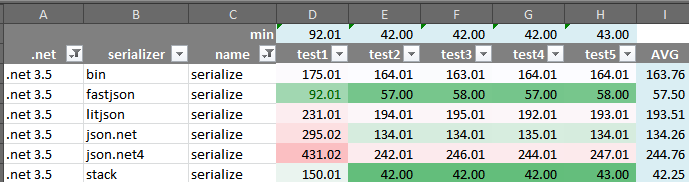
- fastJSON is second place in this test by a margin of nearly 35% slower than Stacks.
- fastJSON is nearly 2.9x faster than binary formatter.
- Json.NET is nearly 1.9x slower in the new version 4.0r1 against its previous version of 3.5r6
- Json.NET v3.5r6 is nearly 20% faster than binary formatter.
.NET 3.5 Deserialize
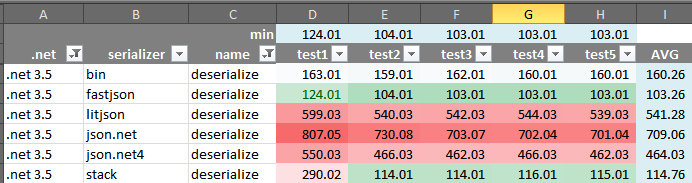
- fastJSON is first place in this test to Stacks by a margin of 10%.
- fastJSON is nearly 4x faster than nearest other JSON.
- Json.NET is nearly 1.5x faster in version 4.0r1 than its previous version of 3.5r6
.NET 4 Auto Serialize
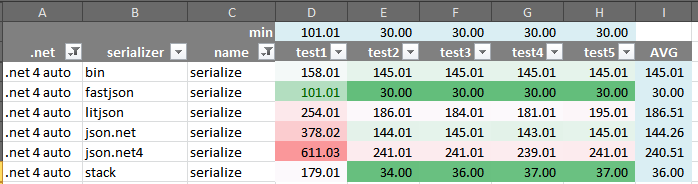
- fastJSON is first place in this test by a margin of nearly 20% against Stacks.
- fastJSON is nearly 4.9x faster than binary formatter.
- Json.NET v3.5r6 is on par with binary formatter.
.NET 4 Auto Deserialize
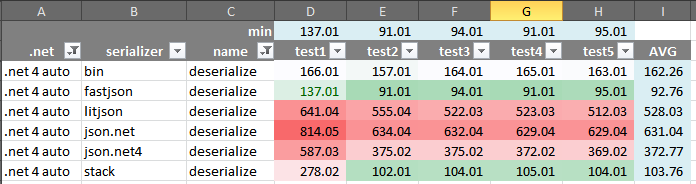
- fastJSON is first place by a margin of 11%.
- fastJSON is 1.7x faster than binary formatter.
- Json.NET v4 1.5x faster than its previous version.
.NET 4 x86 Serialize
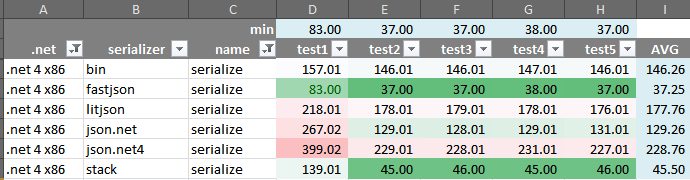
- fastJSON is first place in this test by a margin of nearly 21% against Stacks.
- fastJSON is 4x faster than binary formatter.
- Json.NET v3.5r6 1.7x faster than the previuos version.
.NET 4 x86 Deserialize
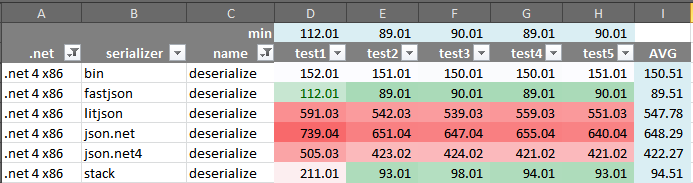
- fastJSON is first place by a margin of 5% against Stacks.
- fastJSON is 1.7x faster than binary formatter which is third.
Exotic data type tests
In this section we will see the performance results for exotic data types like datasets, hash tables, dictionaries, etc.. The comparison is between fastJSON and the BinaryFormatter as most of the other serializers can't handle these data types. These include the following:
- Datasets
- Nullable types
- Hashtables
- Dictionaries
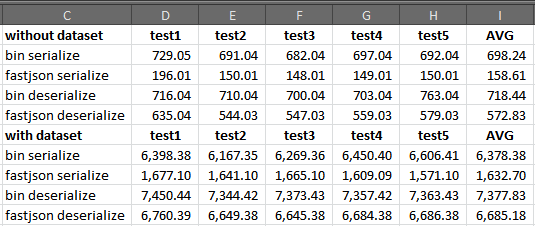
- fastJSON is 5x faster than BinaryFormatter in serialization
- fastJSON is 20% faster than BinaryFormatter in deserialization
- Datasets are performance killers by a factor of 10
Performance Conclusions
- fastJSON is faster in all test except the when running the serializer under .NET 3.5 for which Stacks is faster by only 35% (note must be made that Stacks is not polymorphic and can't handle all types so it is not outputting data correctly within the tests).
- .NET 4 is faster than .NET 3.5 by around 15% in these test except for the fastJSON serializer which is 90% faster..
- You can replace BinaryFormatter with fastJSON with a huge performance boost ( this lean way lends it self to compression techniques on the text output also).
- Start up costs for fastJSON is on average 2x faster than Stacks and consistently faster than everyone else.
Performance Conclusions v1.4
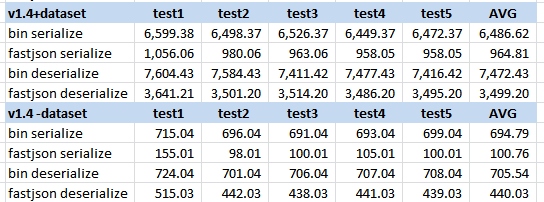
As you can see from the above picture v1.4 is noticably faster. The speed boost make fastJSON faster than SerializerStack in all tests even on .net v3.5.
- fastJSON serializer is 6.7x faster than binary with a dataset.
- fastJSON deserializer is 2.1x faster than binary with a dataset.
- fastJSON serializer is 6.9x faster than binary without a dataset.
- fastJSON deserializer is 1.6x faster than binary without a dataset.
Performance Conclusions v1.5
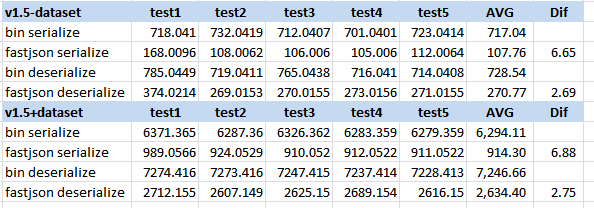
- The numbers speak for themselves fastJSON serializer 6.65x faster without dataset and 6.88x faster than binary, the deserializer is 2.7x faster than binary.
- The difference in numbers in v1.5 which is slower than v1.4 is because of extra properties in the test for Enums etc.
Performance Conclusions v1.6
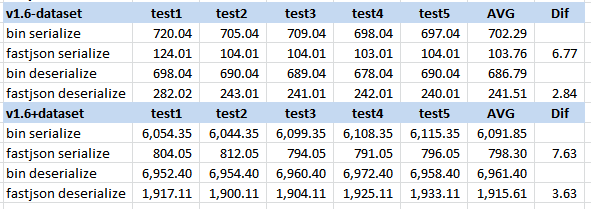
Guid are 2x faster now with base64 encoding you can revert back to old style with the UseFastGuid = false on the JSON.InstanceDatasets are ~40% smaller and ~35% faster.- fastJSON serializer is now ~2.3x faster than deserializer and the limit seems to be 2x.
Performance Conclusions v1.7
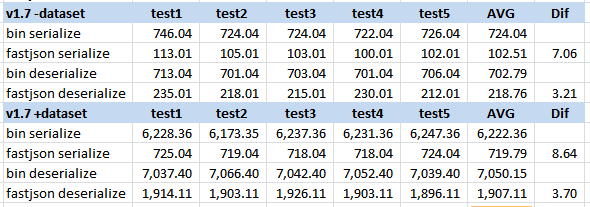
int, long parse are 4x faster.- unicode string optimizations, reading and writing non english strings are faster.
ChangeType method optimizedDictionary optimized using TryGetValue
Points of Interest
I did a lot of performance tuning with a profiler and here are my results:
- Always use a StringBuilder and never strings concats.
- Never do the following stringbuilder.append("string1 + "string2") because it kills performance, replace it with two stringbuilder appends. This point blew my mind and was 50% faster in my tests with the profiler.
- Never give the stringbuilder a capacity value to start with e.g. var stringbuilder = new StringBuilder(4096); . Strange but it is faster without it.
- I tried replacing the StringBuiler with a MemoryStream but it was too slow (100% slower).
- The simplest and the most direct way is probably the fastest as well, case in point reading values as opposed to lexer parser implementations.
- Always use cached reflection properties on objects.
Appendix v1.9.8
Some reformatting was done to make the use of fastJSON easier in this release which will break some code but is ultimately better in the long run. To use the serializer in this version you can do the following :
string str = fastJSON.JSON.Instance.ToJSON(obj,
new fastJSON.JSONParamters { EnableAnonymousTypes = true });
fastJSON.JSON.Instance.Parameters.UseExtensions = false;
This removes a lot of the ToJSON overloads and gives you more readable code.
Also in this release support for anonymous types has been added, this will give you a JSON string for the type, but deserialization is not possible at the moment since anonymous types are compiler generated.
DeepCopy has been added which allows you to create an exact copy of your objects which is useful for business application rollback/cancel semantics.
Appendix v2.0.0
Finally got round to adding Unit Tests to the project (mostly because of some embarrassing bugs that showed up in the changes), hopefully the tests cover the majority of use cases, and I will add more in the future.
Also by popular demand you can now deseialize root level basic value types, Lists and Dictionaries. So you can use the following style code :
var o = fastJSON.JSON.Instance.ToObject<List<Retclass>>(s);
var o = fastJSON.JSON.Instance.ToObject<Dictionary<Retstruct, Retclass>>(s);
A breaking change in this version is the Parse() method now returns number formats as long and decimal not string values, this was necessary for array returns and compliance with the json format (keep the type information in the original json, and not loose it to strings). So the following code is now working :
List<int> ls = new List<int>();
ls.AddRange(new int[] { 1, 2, 3, 4, 5, 10 });
var s = fastJSON.JSON.Instance.ToJSON(ls);
var o = fastJSON.JSON.Instance.ToObject(s);
Be aware that if you do not supply the type information the return will be longs not ints. To get what you expect use the following style code:
var o = fastJSON.JSON.Instance.ToObject<List<int>>(s);
Check the unit test project for sample code regarding the above cases.
Appendix v2.0.3 - Silverlight Support
Microsoft in their infinate wisdom has removed some functionality which was in Silverlight4 from Silverlight5. So fastJSON will not build or work on Silverlight5.
Appendix v2.0.10 - MonoDroid Support
In this release I have added a MonoDroid project file and fastJSON now compiles and works on Android devices running the excellent work done by Miguel de Icaza and his team at Xamarin. This is what Silverlight should have been and I am really excited about this as it will open a lot of opportunities one of which is the new RaptorDB.
Appendix v2.0.11 - Unicode Changes
My apologies to everyone regarding my misreading of the JSON standard regarding Unicode, my interpretation was that the output should be in ASCII format and hence all non ASCII characters should be in the \uxxxx format.
In this version you can control the output format with the UseEscapedUnicode parameter and all the strings will be in Unicode format (no \uxxxx), the default is true for backward compatibility.
Appendix - fastJSON vs Json.net rematch
After being contacted by James Newton King for a retest with his new version of Json.net which is v5r2, I redid the tests and here is the results (times are in milliseconds):
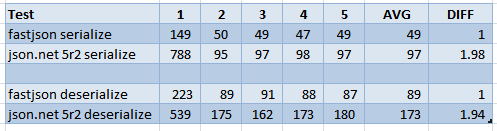
As you can see there are 5 test and the AVG column is the average of the last 4 tests so to exclude the startup of each library, the DIFF column is the difference between the two libraries and fastJSON being the base of the test.
Things to note :
fastJSON is about 2x faster than Json.net in both serialize and deserialize.Json.net is about 1.5-2x faster that it's previous versions which is a great job of optimizatons done and congratualtions in order.
Appendix v2.0.17 - dynamic objects
By popular demand the support for dynamic objects has been added so you can do the following with fastJSON:
string s = "{\"Name\":\"aaaaaa\",\"Age\":10,\"dob\":\"2000-01-01 00:00:00Z\",\"inner\":{\"prop\":30}}";
dynamic d = fastJSON.JSON.Instance.ToDynamic(s);
var ss = d.Name;
var oo = d.Age;
var dob = d.dob;
var inp = d.inner.prop;
Appendix v2.0.28.1 - Parametric Constructors
As of this version fastJSON can now handle deserializing parametric constructor classes without a default constructors, like:
public class pctor
{
public pctor(int a)
{
}
}
Now to do this fastJSON is using the FormatterServices.GetUninitializedObject(type) in the framework which essentially just allocates a memory region for your type and gives it to you as an obeject by passing all initializations including the constructor. While this is really fast, it has the unfortunate side effect of ignoring all class initialization like default values for properties etc. so you should be aware of this if you are restoring partial data to an object (if all the data is in json and matches the class structure then you are fine).
To control this you can set the ParametricConstructorOverride to true in the JSONParameters.
Appendix v2.1.0 - Circular References & Breaking Changes
As of this version I fixed a design flaw since the start which was bugging me, namely the removal of the JSON.Instance singleton. This means you type less to use the library which is always a good thing, the bad thing is that you need to do a find replace in your code and the nuget package will not be drop in and you have to build with the new version.
Also I found a really simple and fast way to support circular reference object structures. So a complex structure like the following will serialize and deserialize properly ( the unit test is CircularReferences()):
var o = new o1 { o1int = 1, child = new o3 { o3int = 3 }, o2obj = new o2 { o2int = 2 } };
o.o2obj.parent = o;
o.child.child = o.o2obj;
To do this fastJSON replaces the circular reference with :
{"$i" : number }
also a $circular : true is added to the top of the json for the deserializer to know, so the above structure yields the following json :
{
   "$circular" : true,
   "$types" : {
      "UnitTests.Tests+o1, UnitTests, Version=1.0.0.0, Culture=neutral, PublicKeyToken=null" : "1",
      "UnitTests.Tests+o2, UnitTests, Version=1.0.0.0, Culture=neutral, PublicKeyToken=null" : "2",
      "UnitTests.Tests+o3, UnitTests, Version=1.0.0.0, Culture=neutral, PublicKeyToken=null" : "3"
   },
   "$type" : "1",
   "o1int" : 1,
   "o2obj" : {
      "$type" : "2",
      "o2int" : 2,
      "parent" : {
         "$i" : 1
      }
   },
   "child" : {
      "$type" : "3",
      "o3int" : 3,
      "child" : {
         "$i" : 2
      }
   }
}
After much request I have added the support for millisecond resolution to the DateTime serialization, while the JSON standard does not explicitly state the format but there seems to be general concensus about it. So if you enable the JSONParameters.DateTimeMilliseconds flag then you will get :
"2014-09-15 09:40:16.006Z"
Important Note : when deserializing the above the resulting DateTime will not equal the original value since the DateTime object also has a Tick value which is not serialized and will be 0 so an object comparison will be false.
On a different note, I recently got a Raspberry Pi, installed mono on it and copied fastJSON on it, the results are below:
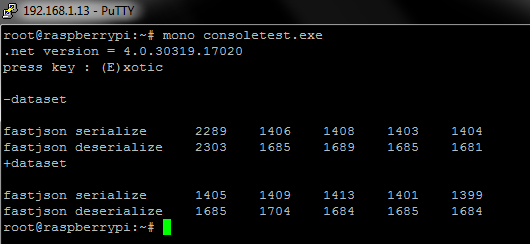
This is quite incedible and says a lot for the mono team when by just coping my DLL files from a Windows system it works.
As a comparison I have added the results for my new dev notebook which has an i7 4702MQ and 8gb of ram below:
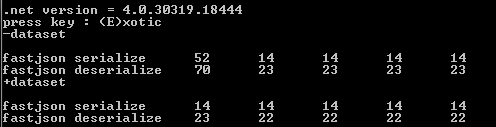
as you can see the Raspberry is ~100x slower, but still works.
Appendix v2.3.5 - Parser optimizations
In this version the parser has been optimized to skip properties not in the object but available in the json, for those times your data is from some where else and you only care about some of the properties. Previously fastJSON parsed all the properties from the json string and then populated the object you wanted, now the parser is smarter and will skip unwanted properties.
This feature works with the ToObect<T>() or ToObject(string, Type) generic interface where you supply the reuslting type, it will also work with general no typed case if the json string has $types defined in it.
For maximum compatibilty this feature will be disabled on edge cases involving Dictionay<,> properties in other classes.
Some results on a 29Mb json file supplied by Marcos Kirchner for testing, the "full" suffix is to denote Deserialize<object>() or equivalent for each library which ensures reading all the properties:
on dotnet 4 full framework:

          Newtonsoft    629 ms
      NewtonsoftFull  3,437 ms

                 Jil    343 ms
             JilFull  2,767 ms

                utf8    367 ms
            utf8Full  1,581 ms

            FastJson    194 ms
       FastJsonParse  1,154 ms
on dotnet core 3.1:

          Newtonsoft :    652 ms
      NewtonsoftFull :  3,455 ms

      SystemTextJson :    412 ms
  SystemTextJsonFull :    811 ms

                 Jil :    364 ms
             JilFull :  2,988 ms

            FastJson :    283 ms
       FastJsonParse :  1,185 ms
The Microsoft json serializer is really good on .net core. fastJSON performs better on full framework for some reason.
You can check out previous versions of fastJSON here.
History
- Initial Release : 2011/02/20
- Update v1.1 : 26% performance boost on dataset deserialization, corrected ServiceStack name
- Update v1.2 : System.DBNull serialized to null, CultureInfo fix for numbers, Readonly properties handled correctly
- Update v1.3 : Removed unused code (lines now at 780), Property comma fix
- Update v1.4 : Heavy optimizations (serializer 3% faster, deserializer 50% faster, dataset serializer 46% faster, dataset deserializer 26% faster) [ now officially faster than the serializer ServiceStack in all test even on .net 3.5]
- Update v1.5 : Heavy optimizations (deserializer ~50% faster than v1.4), Enum fix, Max Depth property for serializer. Special thanks and credits to Simon Hewitt for optimizations in this version.
- Update v1.6 :
- value type arrays handled
- guid 2x faster
- datasets ~40% smaller
- serializer ~2% to 11% faster
- deserializer ~6% to 38% faster
- Update v1.7 :
- added microsoft json evaluation
- added consoletest project to downloads for testing newer exotic types
- bug fix dictionary deserialize
- special case handles List<object[]>
- int and long parse 4x faster
- unicode string optimize
- changetype optimize
- dictionary optimize
- deserialize embeded class e.g. Sales.Customer
- safedictionary check before add
- handles object ReturnEntity = new object[] { object1, object2 }
- handles object ReturnEntity = Guid, Dataset, valuetype
- Update v1.7.5 :
- ability to serialize without extensions
- overloaded methods for serialize and deserialize
- the deserializer will do its best to deserialize the input with or without extensions with no gaurantee on polymorphism
- Update v1.7.6 :
- XmlIgnore handled : thanks to Patrik Oscarsson for the idea
- special case optimized output for dictionary of string,string
- bug fix year 1 date output as 0000 string
- override serialize nulls to output : thanks again to Patrik
- Update v1.7.7 :
- Indented output
- Datatable support
- bug fix
- Update v1.7.7 Silverlight4 : 4th June 2011
- A new project added for silverlight4, currently in testing phase will add to main zip when all ok.
- Silverlight lacks arraylist, dataset, datatable, hashtable support
- #if statements in source files for silverlight4 support.
- Update v1.8 : 9th June 2011
- Silverlight code merged into the project
- Seperate Silverlight project
- RegisterCustomType extension for user defined serialization routines
- CUSTOMTYPE compiler directive
- Update v1.9 : 28th June 2011
- added support for public fields
- Update v1.9.1 : 30th June 2011
- fixed a shameful bug when SerializeNullValues = false, special thanks to Grant Birchmeier for testing
- Update v1.9.2 : 10th July 2011
- fixed to fullname instead of name when searching for types in property cache (namespace1.myclass , namespace2.myclass are now different) thanks to alex211b
- Update v1.9.3 : 31st July 2011
- UTC datetime handling via UseUTCDateTime = true property thanks to mrkappa
- added support for enum as key in dictionary thanks to Grant Birchmeier
- Update v1.9.4 : 23rd September 2011
- ShowReadOnlyProperties added for exporting readonly properties (default = false)
- if datetime value ends in "Z" then automatic UTC time calculated
- if using UTC datetime the output end in a "Z" (standards compliant)
- Update v1.9.6 : 26th November 2011
- bug fix datatable schema serialize & deserialize
- added a $types extension for global type definitions which reduce the size of the output json thanks to Marc Bayé for the idea
- added UsingGlobalTypes config for controling the above (default = true)
- bug fix datatable commas between arrays and table definitions (less lint complaining)
- string key dictionaries are serialized optimally now (not K V format)
- Update v1.9.7 : 10th May 2012
- bug fix SilverLight version to support GlobalTypes
- removed indent logic from serializer
- added Beautify(json) method to JSON credits to Mark http://stackoverflow.com/users/65387/mark
- added locks on SafeDictionary
- added FillObject(obj,json) for filling an existing object
- Update v1.9.8 : 17th May 2012
- added DeepCopy(obj) and DeepCopy<T>(obj)
- refactored code to JSONParameters and removed the JSON overloads
- added support to serialize anonymous types (deserialize is not possible at the moment)
- bug fix $types output with non object root
- Update v1.9.9 : 24th July 2012
- spelling mistake on JSONParameters
- bug fix Parameter initialization
- bug fix char and string ToString
- refactored reflection code into Reflection class
- added support for top level struct object serialize/deserialize
- Update v2.0.0 : 4th August 2012
- bug fix reflection code
- added unit tests
- deserialize root level arrays (int[] etc.)
- deserialize root level value types (int,long,decimal,string)
- deserialize ToObject< Dictionary<T,V> >
- deserialize ToObject< List<T> >
- * breaking change in Parse , numbers are returned as decimals and longs not strings
- Update v2.0.1 : 10th August 2012
- bug fix preserve internal objects when FillObject called
- changed ArrayList to List<object> and consolidated silverlight code
- added more tests
- speed increase when using global types ($types)
- Update v2.0.2 : 16th August 2012
- bug fix $types and arrays
- Update v2.0.3 : 27th August 2012
- readonly property checking on deserialize (thanks to Slava Pocheptsov)
- bug fix deserialize nested types with unit test (thanks to Slava Pocheptsov)
- fix the silverlight4 project build (silverlight5 is not supported)
- Update v2.0.4 : 7th September 2012
- fixed null objects -> returns "null"
- added sealed keyword to classes
- bug fix SerializeNullValues=false and an extra comma at the end
- UseExtensions=false will disable global types also (thanks to qio94, donat.hutter, softwarejaeger)
- fixed parameters setting for Parse()
- Update v2.0.5 : 17th September 2012
- fixed number parsing for invariant format
- added a test for German locale number testing (,. problems)
- Update v2.0.6 : 19th September 2012
- singleton uses [ThreadStatic] for concurrency (thanks to Philip Jander)
- bug fix extra comma in the output when only 1 property in the object (thanks to Philip Jander)
- Update v2.0.7 : 5th October 2012
- bug fix missing comma with single property and extensions enabled
- Update v2.0.8 : 13th October 2012
- bug fix big number conversions (thanks to Alex .µZ Hg.)
- * breaking change Parse will return longs and doubles instead of longs and decimal
- ToObject on value types will auto convert the data (e.g ToObject<decimal>() )
- Update v2.0.9 : 24th October 2012
- added support for root level DataSet and DataTable deserialize (you have to do ToObject<DataSet>(...) )
- added dataset tests
- Update v2.0.10 : 15th November 2012
- Update v2.0.11 : 7th December 2012
- bug fix single char number json
- added UseEscapedUnicode parameter for controlling string output in \uxxxx for unicode/utf8 format
- bug fix null and generic ToObject<>()
- bug fix List<> of custom types
- Update v2.0.12 : 3rd January 2013
- bug fix nested generic types (thanks to Zambiorix)
- bug fix comma edge cases with nulls
- Update v2.0.13 : 9th January 2013
- bug fix comma edge cases with nulls
- unified DynamicMethod calls with SilverLight4 code
- test cases for silverlight
- Article Update : 12th April 2013
- rematch between fastJSON and Json.net v5r2
- Update v2.0.14 : 19th April 2013
- Optimizations done by Sean Cooper
- using Stopwatch instead of DateTime for timings
- myPropInfo using enum instead of boolean
- using switch instead of linked if statements
- parsing DateTime optimized
- StringBuilder using single char output instead of strings for \" chars etc
- Update v2.0.15 : 24th May 2013
- removed CUSTOMTYPE directives from code
- fix for writing enumerable object
- Update v2.0.16 : 22nd June 2013
- bug fix formatter
- added test for formatter
- Update v2.0.17 : 22nd July 2013
- added serialization of static fields and properties
- added dynamic object support and test
- reformatted article
- Update v2.0.18 : 19th August 2013
- edge case empty array deserialize "[]" -> T[]
- code cleanup
- fixed serialize readonly properties
- Update v2.0.19 : 27th August 2013
- fix dynamic objects and lists (Thanks to M.Killer)
- fix deserialize
Dictionary<T, List<V>> and Dictionary<T, V[]> (Thanks to Pelle Penna) - added tests for dictionary with lists
- Update v2.0.20 : 11th September 2013
- fixed hastable deserialize
- added test for hashtable
- added abstract class test
- changed list of getters to array ~3% performance gain
- removed unused code
- Update v2.0.21 : 18th September 2013
- fixed edge case tailing '\' in formatter
- code cleanup formatter
- Update v2.0.22 : 1st October 2013
- added .net 3.5 project
- now compiling to 'output' directory
- added signed assembly
- version numbers will stay at 2.0.0.0 for drop in compatibility
- file version will reflect the build number
- bug fix deserializing to dictionaries instead of dataset when type is not defined
- Update v2.0.23 : 28th October 2013
JSONParameters.IgnoreCaseOnDeserialize now works- added ignore case test
- Update v2.0.24 : 2nd November 2013
- access inner property in arrays in dynamic types e.g. d.arr[1].a (Thanks to Greg Ryjikh)
- add
JSONParameters.KVStyleStringDictionary to control string key dictionary output
- Update v2.0.25 : 16th November 2013
- bug fix dynamic json and root arrays e.g. [1,2,3,4]
- Update v2.0.26 : 23rd November 2013
- bug fix objects in array dynamic types e.g. [1,2,{"prop":90}]
- added support for special collections :
StringDictionary, NameValueCollection
- Update v2.0.27 : 8th January 2014
- added
UseValuesOfEnums parameter to control enum output - fixed working with const properties and fields (i.e ignored)
- Update v2.0.28 : 22nd March 2014
- removed ToCharArray in the parser for less memory usage (Thanks to Simon Hewitt)
- fixed create enum from value and string
- replaced safedictionary with dictionary for some of the internals so no locks on read
- added custom ignore attributes (Thanks to Jared Thirsk)
- using IsDefined instead of GetCustomAttributes (Thanks to Andrew Rissing)
- moved all the reflection code out of JSON.cs
- now you can deserialize non default constructor classes (Thanks to Anton Afanasyev)
- Update v2.0.28.1 : 29th March 2014
- added
ParametricConstructorOverride parameter to control non default constructors - fixed failing StructTest when run with others
- added create object performance test
- Update v2.1.0 : 7th April 2014
- *breaking change* : removed the JSON.Instance singleton
- moved all the state from JSON to the Reflection singleton
- all of the JSON interface is now static
- added JSONParameters overloads for ToObject()
- support for circular referenced object structures
- added circular test
- fixed the .net35 project file to compile correctly
- Update v2.1.1 : 27th April 2014
- bug fix
obj.List<List<object>> and obj.List<object[]> - added code intellisense help for methods
- added
ClearReflectionCache() to reset all internal structures
- Update v2.1.2 : 16th August 2014
- bug fix circular references (thanks to SonicThg)
- Update v2.1.3 : 15th September 2014
- added support for DateTime milliseconds
- added
TestMilliseconds() test
- Update v2.1.4 : 6th October 2014
- bug fix deserializing a struct property in a class
- Update v2.1.5 : 23rd October 2014
- added direct nullable convert
ToObject<x?> i.e. int? long? etc. (thanks to goroth) - bug fix deserialize private set and no set properties
- added
ReadonlyTest() test for the above
- Update v2.1.6 : 20th November 2014
- fix for release build in net4 (thanks to Craig Minihan)
- support for
ExpandoObject serialize in net4 (thanks to Craig Minihan) - added
JSONParameters.SerializerMaxDepth to control the max depth to go down to - added
JSONParameters.InlineCircularReferences to disable the $i feature and inline already seen objects JSONParameters.UseExtensions = false disables circular references also
- Update v2.1.7 : 29th November 2014
- strict ISO date format compliance with a T in the output (IE, firefox javascript engines complained)
- added
JSONParameters.SerializeToLowerCaseNames for javascript interop JSONParameters.IgnoreCaseOnDeserialize is depricated and not needed anymore- added tests for lowercase output
- internal code cleanup
- Update v2.1.8 : 8th January 2015
- bug fix serializing
static fields and properties - skip indexer properties on objects (thanks to scymen)
JSONParameters.SerializeToLowerCaseNames also handles Dictionary and NameValueCollection
- Update v2.1.9 : 16th January 2015
JSONParameters.SerializeNullValues = false handles Dictionary and NameValueCollection correctly
- Update v2.1.10 : 24th February 2015
- bug fix
byte[] keys with Dictionary (thanks to Stanislav Lukeš)
- Update v2.1.11 : 6th March 2015
- bug fix
public static properties
- Update v2.1.12 : 27th April 2015
- support for multidimensional arrays (thanks to wmjordan)
- Update v2.1.13 : 17th May 2015
- code speedups (thanks to wmjordan)
- Update v2.1.14 : 31st May 2015
dynamic object processing enhancements (thanks to Justin Dearing)
- Update v2.1.15 : 15th March 2016
- usings cleanup
- bug fix : edge case
CreateArray() bt is null -> default to typeof(object)
- Update v2.1.16 : 19th June 2016
- bug fix
ToObject<Dictionary<string, List<X>>>() (thanks to sleiN13) - bug fix
CreateStringKeyDictionary() (thanks to John Earnshaw) - type access optimizations
- test restructuring
- Update v2.1.17 : 15th July 2016
- added support for skipping line comments in json string on read (e.g. //comment)
- fixed broken custom type handler (sorry to all)
- added test for custom types
- auto convert
string to int or long if the receiving type expects one - auto convert
byte[] if needed (thanks to Enrico Padovani) - bug fix
DateTime in anonymous type InvalidProgramException (thanks to skottmckay) ExpandoObject work correctlyJSON.ToObject<T[]>() works correctly- support for
double.NaN float.NaN with test - property/field/key names with quotes etc. handled correctly
- fixed
byte[] in Dictionary values with test - added twitter data test
- support for
DateTimeOffset
- Update v2.1.18 : 23rd July 2016
- bug fix read only properties to output
- added test for readonly properties
- sync
reflection.cs with fastBinaryJSON - added
NonSerialized to the list of ignore default attributes
- Update v2.1.19 : 3rd September 2016
- added
ToNiceJSON(obj) with default parameters - added support for interface object properties (thanks to DrDeadCrash)
- Update v2.1.20 : 12th September 2016
- bug fix nested dictionary
D<,D<,>>
- Update v2.1.21 : 21st October 2016
- bug fix enumerating dynamic objects
- Update v2.1.22 : 29th December 2016
- bug fix
ToObject<Dictionary<string,List<T>>() with extensions off (thanks to chunlizh) - added Howto.md (work in progress)
- renamed solution file
- Update v2.1.23 : 15th February 2017
- added support for
TimeSpan (equates to a long) - added auto convert string numbers "42" -> 42
- added more to Howto.md
- Update v2.1.24 : 1st June 2017
- Support ISO8601 formatted
DateTimeOffset (thanks to Scott McKay) - security warning for $type usage
- Update v2.1.25 : 24th July 2017
- support for
DataMember[Name] attribute - handling \0 in strings as \u0000 even without extensions
- Update v2.1.26 : 12th August 2017
- bug fix support for
byte[] in DataTable columns (thanks to HKatura) - added
JSONParameters.FormatterIndentSpaces - bug fix edge cases for
float/decimal/double/long/ulong/int/uint
MinValue, MaxValue, NegativeInfinity, PositiveInfinity, Epsilon, NaN (thanks to qaqz111)
- Update v2.1.27 : 15th September 2017
- bug fix case in
DataMember attributes (thanks to Elvis Lam) - added
ToObject(string json, Type type, JSONParameters par) - bug fix .net v2.0+ build with conditional compilation
- Update v2.1.28 : 16th January 2018
- bug fix deserializing array of objects with type information
- test for above
- support for .net core and netstandard2.0 via separate project
- Update v2.1.29 : May 4th 2018
- added
JSONParameters.AllowNonQuotedKeys for non standard javascript like json - signed .net core and standard assembly
- Update v2.1.31 : May 9th 2018
- auto convert to string on deserialize if the object property is string and the json value is not
- fixed side effect of changing
JSONParameters.UsingGlobalTypes inside classes and affecting the original value - fixed deserialize nested
Dictionary without extensions with generic ToObject<>
- Update v2.1.32 : 26th May 2018
- Non public setter / readonly property support (thanks to rbeurskens)
- unify reflection.cs with
fastBinaryJSON
- Update v2.1.33 : 18th June 2018
- case insensitive
enum (thanks to AgentFire) - auto covert to
boolean (number >0 , string : 1, true, yes, on) - fixed .net 3.5 project output framework version
- Update v2.1.34 : 28th June 2018
- ability to create internal/private objects (removed the public access restriction on classes)
- Update v2.1.36 : 8th August 2018
- optimization tweaks ~30% boost on deserialize
- changed internal
tolower to tolowerinvariant - internal json parser fixed char pointer
- internal reflection
struct to class
- Update v2.2.0 : 23rd August 2018
- fixed json parser to create a decimal number if the string does not have an exponent
- fixed fast creating lists without capacity constructor
- unified Reflection.cs
- * breaking runtime change if using RegisterCustomType() *
- Update v2.2.2 : 17th March 2019
- thread safe json formatter (thanks to Ondrej Medek)
- added
JSONParameters.AutoConvertStringToNumbers to control the auto conversion, if false you will get an exception - fixed file names in nuget package on linux
- Update v2.2.3 : 4th May 2019
- bug fix deserialize
Dictionary<int,List<X>> without extensions (thanks to Ondrej Medek) - bug fix deserialize
Dictionary<int,X[]> without extensions
- Update v2.2.4 : 8th June 2019
- optimized
CreateLong() and CreateInteger() (thanks to djmarcus) - made
JSONParameters.MakeCopy() public
- Update v2.3.0 : 26th October 2019
- bug fix reading a negative number in
int[] - bug fix object equality hash code checking with
JSONParameters.OverrideObjectHashCodeChecking (thanks to MTantos1) - added
JSONParameters.BlackListTypeChecking default true for friday 13th json attack checking
- Update v2.3.3 : 29th September 2020
- removed racist term from code
- added
fastSJON.DataMember attribute for .net v2+
- Update v2.3.5 : 20th October 2020
- optimized the parser for skipping when type provided and $types not in json
- Update v2.3.5.1 : 21st October 2020
- added nuget package for nunit to the test project
- code cleanup
- Update v2.3.5.2 : 30th October 2020
- bug fix endless loop parsing recursive object structures
- Update v2.3.5.3 : 10th November 2020
- Update v2.4.0.2 : 23rd January 2021
- dotnet 5.0 build
- debug and release configs working
json5 support
(nan, infinity, leading/trailing decimal, trailing comma, string escapes, single/double quotes
positive/negative prefix, comments, hex numbers, multi line string breaks)- bug fix json5 line break
- support for json5 +NaN -NaN
- numbers > 32 chars treated as double
Mehdi first started programming when he was 8 on BBC+128k machine in 6512 processor language, after various hardware and software changes he eventually came across .net and c# which he has been using since v1.0.
He is formally educated as a system analyst Industrial engineer, but his programming passion continues.
* Mehdi is the 5th person to get 6 out of 7 Platinum's on Code-Project (13th Jan'12)
* Mehdi is the 3rd person to get 7 out of 7 Platinum's on Code-Project (26th Aug'16)



 General
  News
News  Suggestion
  Question
  Bug
Bug  Answer
  Joke
Joke  Praise
  Rant
Rant  Admin
Admin 


 Submit an article or tip


