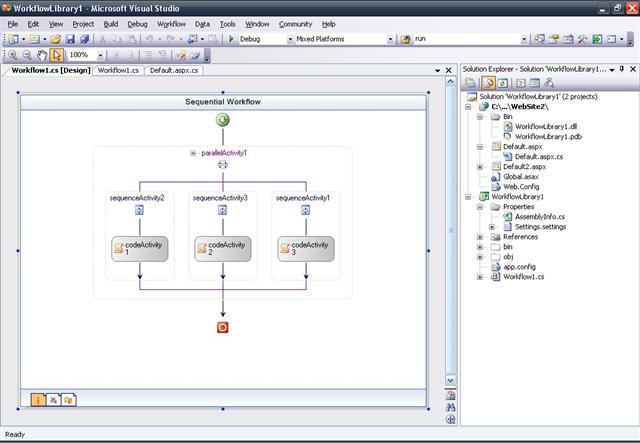
Introduction
Simple Web Site ASP.NET using Microsoft Worflow Fundation. Parameters - Web Page - WorfFlow.
Using the code
Definicion Runtime in Global.asax
void Application_Start(object sender, EventArgs e)
{
System.Workflow.Runtime.WorkflowRuntime workflowRuntime = new System.Workflow.Runtime.WorkflowRuntime();
System.Workflow.Runtime.Hosting.ManualWorkflowSchedulerService manualService = new System.Workflow.Runtime.Hosting.ManualWorkflowSchedulerService();
workflowRuntime.AddService(manualService);
workflowRuntime.StartRuntime();
Application["WorkflowRuntime"] = workflowRuntime;
}
void Application_End(object sender, EventArgs e)
{
System.Workflow.Runtime.WorkflowRuntime workflowRuntime = Application["WorkflowRuntime"] as System.Workflow.Runtime.WorkflowRuntime;
workflowRuntime.StopRuntime();
}
Parameters
wr = Application["WorkflowRuntime"] as WorkflowRuntime;
manualScheduler = wr.GetService(typeof(ManualWorkflowSchedulerService)) as ManualWorkflowSchedulerService;
Dictionary<string, object> parameters = new Dictionary<string, object>();
parameters.Add("Valor", Int32.Parse(this.valor.Text));
wr.WorkflowCompleted += new EventHandler<WorkflowCompletedEventArgs>(wr_WorkflowCompleted);
wr.WorkflowTerminated += new EventHandler<WorkflowTerminatedEventArgs>(wr_WorkflowTerminated);
Type type = typeof(WorkflowLibrary1.Workflow1);
WorkflowInstance wi = wr.CreateWorkflow(type, parameters);
wi.Start();
manualScheduler.RunWorkflow(wi.InstanceId);
WorkFlow
namespace WorkflowLibrary1
{
    public sealed partial class Workflow1: SequentialWorkflowActivity
    {
        public Workflow1()
        {
            InitializeComponent();
        }

      private string m_Resultado="Rechazado";
      private int m_Valor;
      private DateTime m_FechaHora = DateTime.Now;

       public string Resultado
       {
           get { return m_Resultado; }
       }

       public int Valor
       {
           get { return m_Valor; }
           set { m_Valor = value; }
       }

       public DateTime FechaHora
       {
           get { return m_FechaHora; }
       }


        private void ExecuteCodeActivity1(object sender, EventArgs e)
        {
            if (m_Valor > 100)
            {
                m_Resultado = "Aceptado";
            }
        }


    }

}
WorkFlow
Simple use worflow in ASP.net. Using Parameters
History
This member has not yet provided a Biography. Assume it's interesting and varied, and probably something to do with programming.



 General
  News
News  Suggestion
  Question
  Bug
Bug  Answer
  Joke
Joke  Praise
  Rant
Rant  Admin
Admin 


 Submit an article or tip

