Click here to Skip to main content

Introduction to VML

By , 16 Jan 2002
 

Introduction

When I first started playing around with HTML, I couldn't understand why there was no functionality to draw shapes and non-horizontal lines. It was only a couple of years later that I discovered VML (soon to be replaced by SVG). Don't get me wrong, HTML is an incredibly powerful GUI tool, but with the advent of vector graphics for the web, its power grows exponentially.

Overview

VML (vector markup language) is the technology that allows developers to draw directly onto an HTML page as if it were a GDI canvas. The syntax is made up of 2 parts: markup and code. These are mutually exclusive. Unfortunately, possibly due to a very slow adoption rate, the VML object model is poorly documented and rarely used in samples (here too). In order to use VML, you need to ensure that the IE5.0 install included the VML plugin. Here's a really basic VML shape.
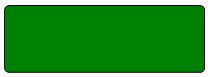
Want to get a complete sample going on your machine? Firstly, you'll need to "import" the namespace into you HTML page:

<html xmlns:v="urn:schemas-microsoft-com:vml">

Next, you'll need to add a new behaviour to the page:

<style>
	v\:* { behavior: url(#default#VML); }
</style>

That's it. It won't do anything, but it makes your page VML-aware. This base code will be presumed for the rest of examples. Try adding this anywhere within the <body> tag:

<v:roundrect style="width:150pt;height:50pt"/>

Note that valid XML syntax applies. If you don't adhere to this axiom, then the page could display unpredictably and make debugging very tedious. The actual VML markup is pretty self-explanatory and human-readable (a general goal of the XML standard). Note the v: tag-prefix, this specifies to the IE rendering engine that the roundrect tag in this case is to be handled differently to other tags.

Detailed view:

So, what's the point? One of the advantages of VML is its minute size when compared to images. Depending on the type of webplications you design, this could be reason enough. Also:

  • ability to alter styles(colors, etc...) at after-load time.
  • ability to engage dynamic scripts. (explained later)

So, hopefully, you can see that VML is more than just a distorted 1x1 pixel image. Here's the code for the famous diagonal line that I wanted to do in HTML for so long:

<v:line from="10,10" to="100,100"/>

The code is really neat and simple (albiet for simple shapes). For this type of shape, a from(x,y) to(x,y) co-ord syntax is used. The above samples are probably enough for most simple web graphics, but let's dive into some more.

Try this:

<v:oval style="position:absolute;top:100;left:100; width:150pt;height:50pt" fillcolor="green"/>

Same concept, just a different shape. Note the all too familiar style tag attributes.

Here's a sample that uses a bunch of different shapes.

<v:line strokecolor="red"
   strokeweight="2pt"  from="100pt,100pt" to="200pt,150pt">
   <v:stroke endarrow="diamond"/>
</v:line>
 
<v:line strokecolor="yellow"
   strokeweight="2pt"   from="100pt,100pt" to="50pt,100pt" >
   <v:stroke endarrow="classic"/>
</v:line>
 
<v:line strokecolor="blue"
   strokeweight="2pt" from="100pt,100pt" to="120pt,120pt" >
   <v:stroke endarrow="block"/>
</v:line>

<v:line strokecolor="black"
   strokeweight="2pt"  from="100pt,100pt" to="150pt,200pt">
   <v:stroke endarrow="none"/>
</v:line>

<v:line strokecolor="green"
   strokeweight="2pt"  from="100pt,100pt" to="200pt,85pt">
   <v:stroke endarrow="oval"/>
</v:line>

<v:line strokecolor="green"
   strokeweight="2pt"  from="100pt,100pt" to="200pt,100pt">
   <v:stroke endarrow="open"/>
</v:line>

<v:oval style="width:100pt; height: 50pt" fillcolor="pink" />

<v:curve from="10pt,10pt" to="100pt,10pt" control1="40pt,30pt" control2="70pt,30pt"></v:curve>

<v:rect id=myrect fillcolor="red" 
   style="position:relative;top:100;left:100;width:20;height:20;rotation:10">
</v:rect>

As foreign as it seems (to most), using comments in HTML might be a really good plan here.

One of the awesome things about VML as a graphics tool is that ALL paint events are handled for you. Try minimising the browser or "un-maximise" it and move a part of it off the edge of your screen and out again. It repaints on it's own - and with no noticable performance penalty! This is a massive bonus for those graphics guys out there.

What about a real world use? Here's the output from a graphing engine I supposedly work on during bouts of insomnia.
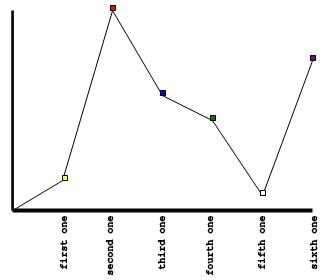
A huge bonus that this approach has over the standard "let-the-server-make-a-gif" idea, is that the client (browser) can alter the shapes at the client's will. I achieve this by giving each applicable shape an id and use inline event-handlers to setup how mousedown, mousemove and mouseup events are handled. After that it's just a matter of implementing a bit of drag-and-drop code. So, put another way, VML shapes are still objects as far as JScript/VBScript is concerned.

The other technique that you can use to draw shapes is co-ordinate pairs. This can be a lot trickier to code by hand, but does gives you (virtually) unlimited power over your web presentation.

Here's an example:

<v:polyline points="5pt,10pt 15pt,20pt 100pt,50pt 50pt,100pt 5pt,10pt"/>

Conclusion & Call to action

Currently, the SVG specification is set to overtake VML and will eventually be supported natively by the main browsers. But in the meantime, VML is easy to use and can offer a new avenue of expression for lowly web developers.


License

This article has no explicit license attached to it but may contain usage terms in the article text or the download files themselves. If in doubt please contact the author via the discussion board below.

A list of licenses authors might use can be found here

About the Author

SimonS
Web Developer
South Africa South Africa
Member
* Visual C# MVP 2004, 2005 - South Africa
* SADeveloper.NET User Group co-founder and lead 2003, 2004, 2005
 
MSN : simon_stewart AT hotmail.com
Email : simon AT brokenkeyboards.com
Skype: brokenkeyboards
CEO of Broken Keyboards Software


Founder of these startups:


Browse This For Me


Monitor My URL


My full CV can be download here in PDF format.

Sign Up to vote   Poor Excellent
Add a reason or comment to your vote: x
Votes of 3 or less require a comment

Comments and Discussions

 
You must Sign In to use this message board.
Search this forum  
    Spacing  Noise  Layout  Per page   
GeneralRe: VML and 3DmemberSimonS4 Dec '02 - 0:28 
I see where you're going.
Have you looked through the SVG spec?
 
I think there is a lot more chance of SVG branching into 3D when compared to VML (which even Microsoft has removed their homepage for).
 
Cheers,
Simon
 
"From now on, if rogue states want to buy weapons of mass destruction, they're going to have to go on eBay," Mr. Bezos said.

GeneralRe: VML and 3DsussAnonymous6 Dec '02 - 2:37 
Food for thought... Smile | :)
GeneralRe: VML and 3Dsussmissnightrider4 Jun '03 - 18:21 
http://www.p-richards.demon.co.uk/vml/vml_main.htm
 

sroll to the end of that link
quote "Just to prove it can be done, here is a 3D graphics display done with VML!"
 
that paper plane looks quite well to me so if u want to u can get a few tips from the webmaster
 
i believe there is nothing wrong with creativity
just because vml wasnt created for some stuff dosent mean people shouldnt try.
 
i create free weblayouts with nothing but pure vml and i dont think it was meant for that Roll eyes | :rolleyes:
GeneralRe: VML and 3DmemberSimonS4 Jun '03 - 22:35 
That's a great demo.
 
My comment that VML wasn't meant for 3D wasn't to say that it can't or shouldn't be done.
I suppose the only issue with making a technology do something it wasn't initially designed for is speed and complexity of implementations.
 
Cheers,
Simon
 
"I ask candidates to create an object model of a chicken.", Bruce Eckel on interviewing programmers.
animation mechanics in SVG       (my first abstract photo

QuestionWhat about SVGmemberJim Crafton20 Jan '02 - 13:00 
Why use VML over SVG ? Isn't SVG a lot more flexible and powerful ?
AnswerRe: What about SVGmembersimons20 Jan '02 - 20:35 
Agreed and thanks for the feedback, Jim.
 
I initially used VML as I don't think the SVG spec was finalized at that stage. VML itself is extremely powerful and I'm baffled why MS / other does not promote it more.
 
The VML graphic tool I wrote is going to be ported to SVG as soon as SVG becomes more common place (will be a long weekend).
 
If you have some practical examples of SVG, I'd be really keen to see them.

 
Cheers,
Simon Stewart
GeneralRe: What about SVGmemberPhilippe Lhoste21 Jan '02 - 4:46 
simons wrote:
I initially used VML as I don't think the SVG spec was finalized at that stage. VML itself is extremely powerful and I'm baffled why MS / other does not promote it more.
 
That's probably because VML, AFAIK, is MS specific, ie. a proprietary format/language.
SVG has been created by a comitee (with MS inside, among others), so it has a better chance to be adopted as a standard.
 
The bad side of SVG is its complexity. The good side, beyond its status of standard, is its power for complex drawings.
 
You can find many SVG images on the Internet.
Adobe has an interesting page: http://www.adobe.com/svg/demos/main.html
See also: http://www.adobe.com/svg/tools/3party.html
Gnome page has some images too: http://www.levien.com/svg/
 
Etc.
 
--=#=--=#=--=#=--=#=--=#=--=#=--=#=--=#=--=#=--
Philippe Lhoste (Paris -- France)
Professional programmer and amateur artist
http://jove.prohosting.com/~philho/
--=#=--=#=--=#=--=#=--=#=--=#=--=#=--=#=--=#=--
GeneralRe: What about SVGmembersimons21 Jan '02 - 20:31 

Actually VML is a W3C standard. Check out the spec with contributions by MS, Visio (now MS), HP.
 
My concern is that if IE6.0 doesn't natively have a SVG plugin, then when will SVG be an install standard? Confused | :confused:
 
FYI: thanks for the links, I'm busy downloading the SVG plugin for my new machine.

 
Cheers,
Simon
 
If we fail to anticipate the unforeseen or expect the unexpected in the universe of infinite possibilities, then we may find ourselves at the mercy of anyone or anything that can not be programmed, categorized or easily referenced.
GeneralRe: What about SVGmemberPaul Wolfensberger22 Jan '02 - 8:32 
Actually, when I last looked (about 6 months ago) VML was not a W3C standard....there was a "VML Note" on the W3C site, but not a published standard. Included with the note were several examples, some of which were incorrect.
 
I wrote a set of VML classes for producing bar charts, pie charts, and line charts about 18 months ago. It produces very nice graphics with tiny foot prints. The bad thing is that outside of the W3C site and a few MS pages which are no longer accessible on the MS website, there was very little publish information.
 
Paul
GeneralXHTML and NetscapememberAndrew Peace17 Jan '02 - 8:22 
Just to point out, tags set out as <img src"..."/> won't work in Netscape.   The problem is the shortcut '/>', which saves you having to type <img scr"..."></img>, whilst remaining fully compliant with XHTML specs.   The solution to this problem (i.e. to make XHTML pages Netscape compatible and stay compliant) is to insert a space before the closing of the tag, i.e. <img src="..."   />.
 
--
Andrew.

General General    News News    Suggestion Suggestion    Question Question    Bug Bug    Answer Answer    Joke Joke    Rant Rant    Admin Admin   

Permalink | Advertise | Privacy | Mobile
Web01 | 2.6.130523.1 | Last Updated 17 Jan 2002
Article Copyright 2002 by SimonS
Everything else Copyright © CodeProject, 1999-2013
Terms of Use
Layout: fixed | fluid