Introduction
Processing a list of XML elements using XSLT is fairly simple if you want to process each element. But what if you want to group the XML elements, to show a summary? Consider the following XML:
="1.0"
<Employees>
<Employee>
<TeamID>1</TeamID>
<TeamName>Sales</TeamName>
<TaskID>1</TaskID>
<Hours>5</Hours>
<EmployeeID>1</EmployeeID>
<Name>Bob</Name>
<Surname>Shibob</Surname>
</Employee>
<Employee>
<TeamID>1</TeamID>
<TeamName>Sales</TeamName>
<TaskID>2</TaskID>
<Hours>4</Hours>
<EmployeeID>1</EmployeeID>
<Name>Bob</Name>
<Surname>Shibob</Surname>
</Employee>
<Employee>
<TeamID>1</TeamID>
<TeamName>Sales</TeamName>
<TaskID>4</TaskID>
<Hours>7</Hours>
<EmployeeID>2</EmployeeID>
<Name>Sara</Name>
<Surname>Lee</Surname>
</Employee>
<Employee>
<TeamID>2</TeamID>
<TeamName>Finance</TeamName>
<TaskID>5</TaskID>
<Hours>2</Hours>
<EmployeeID>3</EmployeeID>
<Name>John</Name>
<Surname>Smith</Surname>
</Employee>
<Employee>
<TeamID>2</TeamID>
<TeamName>Finance</TeamName>
<TaskID>3</TaskID>
<Hours>4</Hours>
<EmployeeID>4</EmployeeID>
<Name>Penny</Name>
<Surname>Wise</Surname>
</Employee>
<Employee>
<TeamID>2</TeamID>
<TeamName>Finance</TeamName>
<TaskID>5</TaskID>
<Hours>3</Hours>
<EmployeeID>4</EmployeeID>
<Name>Penny</Name>
<Surname>Wise</Surname>
</Employee>
</Employees>
Suppose you need to show a summary of Employee hours, grouped by Team. Something like this:
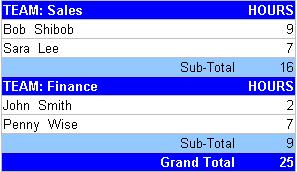
The Unwieldy Approach
One way to do this is to loop through the list of <Employee> elements, and only show a row whenever the EmployeeID changes. While this would work, this approach is unwieldy and inefficient, because for each <Employee> being processed, you would be required to keep track of the IDs of the previous <Employee> element. This is not a pretty sight.
The Efficient Approach
A cleaner, more efficient way to do this is to build a list of unique keys, then use these keys to group the results. (This is called the Muenchian Method.)
First, you must define the keys required to group the <Employee> elements. You will need one for the TeamID, and one for the EmployeeID.
<xsl:key name="keyTeamID" match="Employee" use="TeamID" />
<xsl:key name="keyEmployeeID" match="Employee" use="EmployeeID" />
Select the first element of each group of elements for each unique TeamID.
<xsl:for-each select="//Employee[generate-id(.) = generate-id(key('keyTeamID', TeamID)[1])]">
Get all the <Employee> elements that belong to that Team, into a variable.
<xsl:variable name="lngTeamID"><xsl:value-of select="TeamID" /></xsl:variable>
<xsl:variable name="lstEmployee" select="//Employee[TeamID=$lngTeamID]" />
The <Employee> elements in this list must now be grouped by EmployeeID. This is similar to grouping by TeamID, except that in this case you only need to select elements in the list contained in the variable; you do not need to select elements from the entire result set.
<xsl:for-each select="$lstEmployee[generate-id(.) =
generate-id(key('keyEmployeeID', EmployeeID)[1])]">
It is now fairly simple to show the total Hours for each Employee.
<xsl:value-of select="sum($lstEmployee[EmployeeID=$lngEmployeeID]/Hours)" />
The full source
This is the entire XSLT used to render the table in the image:
="1.0"
<xsl:stylesheet version="1.0"
xmlns:xsl="http://www.w3.org/1999/XSL/Transform">
<xsl:key name="keyTeamID" match="Employee" use="TeamID" />
<xsl:key name="keyEmployeeID" match="Employee" use="EmployeeID" />
<xsl:template match="/">
<html>
<head>
<title>Employee Hours By Team</title>
<link type="text/css" rel="stylesheet" href="groupxml.css" />
</head>
<body>
<h3>Employee Hours By Team</h3>
<table>
<xsl:for-each select="//Employee[generate-id(.) = generate-id(key('keyTeamID', TeamID)[1])]">
<xsl:variable name="lngTeamID"><xsl:value-of select="TeamID" /></xsl:variable>
<xsl:variable name="lstEmployee" select="//Employee[TeamID=$lngTeamID]" />
<xsl:call-template name="ShowEmployeesInTeam">
<xsl:with-param name="lstEmployee" select="$lstEmployee" />
</xsl:call-template>
</xsl:for-each>
<tr>
<td colspan="4" class="RightJustified DarkBack">Grand Total</td>
<td colspan="1" class="RightJustified DarkBack">
<xsl:value-of select="sum(//Employee/Hours)" />
</td>
</tr>
</table>
</body>
</html>
</xsl:template>
<xsl:template name="ShowEmployeesInTeam">
<xsl:param name="lstEmployee" />
<tr>
<td colspan="4" class="DarkBack">TEAM:
<xsl:value-of select="<code>$lstEmployee[1]/TeamName</code>" /></td>
<td colspan="1" class="DarkBack RightJustified">HOURS</td>
</tr>
<xsl:for-each select="$lstEmployee
[generate-id(.) = generate-id(key('keyEmployeeID', EmployeeID)[1])]">
<xsl:variable name="lngEmployeeID" select="EmployeeID" />
<tr>
<td colspan="4">
<xsl:value-of select="$lstEmployee[EmployeeID=$lngEmployeeID]/Name" />
<xsl:value-of select="$lstEmployee[EmployeeID=$lngEmployeeID]/Surname" />
</td>
<td colspan="1" class="RightJustified">
<xsl:value-of select="sum($lstEmployee[EmployeeID=$lngEmployeeID]/Hours)" />
</td>
</tr>
</xsl:for-each>
<tr>
<td colspan="4" class="LightBack RightJustified">Sub-Total</td>
<td colspan="1" class="LightBack RightJustified">
<xsl:value-of select="sum($lstEmployee/Hours)" />
</td>
</tr>
</xsl:template>
</xsl:stylesheet>
The CSS used to render the table in the image:
table
{  border-collapse: collapse;
   width: 30%;
   table-layout: fixed;
   border-style: solid;
}
table, td
{  border-width: 1px;
}
td
{  color: black;
   font-family: Arial;
   font-size: x-small;
   border-right-style: none;
   border-left-style: none;
   border-top-style: solid;
   border-bottom-style: solid;
}
.DarkBack
{  background-color: #0066FF;
   background-color: blue;
   color: white;
   font-weight: bold;
}
.LightBack
{  background-color: #99CCFF;
   color: black;
}
.RightJustified
{  text-align: right;
}
License
This article has no explicit license attached to it, but may contain usage terms in the article text or the download files themselves. If in doubt, please contact the author via the discussion board below.
A list of licenses authors might use can be found here.
I live in the Northern Suburbs of Cape Town (South Africa).



 General
  News
News  Suggestion
  Question
  Bug
Bug  Answer
  Joke
Joke  Praise
  Rant
Rant  Admin
Admin 


 Submit an article or tip


